AI Agents for Business – AI Agent Development & Deployment
An AI agent that doesn't just answer but gets work done: it updates your CRM, drafts proposals and handles email and documents — with permission controls and human approval.
›The agent completes whole tasks, not single steps
›Secure system access through MCP and tool calling with least-privilege permissions
›Human-in-the-loop for sensitive decisions: payments, contracts or messages to key accounts wait for one-click human approval.
Price: from €3,000
SERVICE DETAILS
An AI agent is a system built on a language model that plans and executes multi-step tasks on its own, using your tools — CRM, ERP, email, calendar, databases and documents. Unlike a chatbot it doesn't stop at an answer: it checks data, makes decisions within agreed limits and takes action, asking a human to approve anything sensitive. I design and deploy AI agents for business on proven patterns: tool calling and MCP (Model Context Protocol) for secure system access, LangGraph or n8n for orchestration, memory and RAG over company knowledge, plus evaluations, a full action log and scoped permissions. Typical use cases: drafting proposals and replies to inquiries, inbox and document handling, lead qualification with CRM updates, data analysis and reporting, and market research.
› INVESTMENT:
from €3,000
constmodule = newExecutionProtocol();
// Initializing ai-agents-for-business... › Loading dependencies... OK › Establishing connection... OK › Ready for deployment... AWAITING_COMMAND
Paweł Wiszniewski · my approach
What I do differently
I build AI agents for production, not just slide decks: GiftFinder is an autonomous agentic system that generated over 11,000 landing pages on a hybrid model architecture, and the AI Operations Agent demo shows an agent resolving tickets from text, images and voice. These projects gave me my rule: an agent gets only the tools and permissions it needs, every action is logged, and irreversible decisions are approved by a human. I increase autonomy gradually, once the data shows the agent gets things right.
In my view the biggest risk with AI agents isn't that they're dumb but that they get too many permissions. An unrestricted agent is an intern with the keys to the server room.
From the market
In July 2025 a Replit AI agent, during the SaaStr founder's experiment, deleted a production database with records of over a thousand companies, despite being told not to make changes without approval. Anthropic, summarizing lessons from dozens of deployments, advises starting with the simplest solution and adding autonomy only when needed. Hence my rules: minimal permissions, human approval and separated environments.
Companies with repetitive processes that require looking into several systems at once.
Sales teams preparing proposals from enquiries, price lists and customer history.
Teams handling inboxes, documents and requests that need reading and classifying.
Companies that tried ChatGPT and want AI to do the work, not just suggest it.
What you get
A process map with decision points and where a human approves actions.
An agent with tools (APIs, MCP) and scoped permissions.
Orchestration in LangGraph or n8n with memory and access to company knowledge.
An action log, quality evaluations and prompt injection resilience tests.
A gradual rollout: suggestion mode first, then growing autonomy.
How results are measured
Share of tasks the agent completes without corrections.
Process time before and after launch.
Escalations to a human and their reasons.
Model cost per task.
Key Benefits
The agent completes whole tasks, not single steps — from reading a customer inquiry and checking CRM and ERP data to preparing a ready proposal for approval.
Secure system access through MCP and tool calling with least-privilege permissions — the agent only sees and changes what you allow.
Human-in-the-loop for sensitive decisions: payments, contracts or messages to key accounts wait for one-click human approval.
A full action log and quality evaluations — every agent decision is recorded and quality is measured on a test set before and after launch.
Runs on OpenAI, Anthropic, Google or open-weight models — I match the model to the task and budget, with no single-vendor lock-in.
The Process
1
Pick the process and define success
We choose the highest-ROI process, map it step by step and agree a measurable goal: handling time, share of tasks done without a human and error rate.
2
Agent and permission architecture
I design the tools the agent can use (APIs, MCP), decision boundaries, human approval points and fallback scenarios.
3
Build, integrate and test
I build the agent, connect your systems in a staging environment and test it on dozens of real cases, including edge cases and prompt injection attempts.
4
Launch, monitor and improve
I roll the agent out gradually — suggestion mode first, then growing autonomy — with a dashboard for quality, cost and the action log.
AI agent vs AI chatbot vs classic automation
Criterion
AI agent
AI chatbot
Classic automation (RPA, Zapier)
What it does
Plans and executes multi-step tasks
Answers questions in a conversation
Runs a fixed, pre-programmed scenario
Input
Unstructured: emails, PDFs, notes
User questions
Structured fields and forms
System access
Tools, APIs and MCP with permission control
Usually a knowledge base only
Integrations defined step by step
Handling exceptions
Reasons or escalates to a human
Hands the chat to an agent
Stops with an error
Oversight
Action log, evals, human approval
Chat history
Execution logs
Best for
Complex processes across multiple systems
24/7 customer questions
Simple, fully predictable flows
Common mistakes
✕Giving an agent full system access “to move faster”.
✕No action log, so after a mistake nobody knows what the agent did or why.
✕Launching straight into full autonomy instead of suggestion mode.
✕Building an agent where a simple workflow with one AI step would do.
When this service is not worth it
—The process can be fully described by rules — classic automation is enough.
—An agent mistake would be very costly and human approval isn't possible.
—The systems the agent would use have no API or other safe access.
/// GUIDE
AI agent development for business – how I design, secure and test an agent step by step
An AI agent in a business isn't just a model; it's several layers: tools, permissions, state, approval points, an action log and tests. Below I show what a production agent is made of, walk through a proposal-drafting example, explain how I design tools and MCP, how I assess risk, how I test an agent before launch and what I build it on. When an agent makes sense at all, and when a workflow is enough, is covered in the AI automation guide.
What an AI agent for business is made of – the anatomy of a production deployment
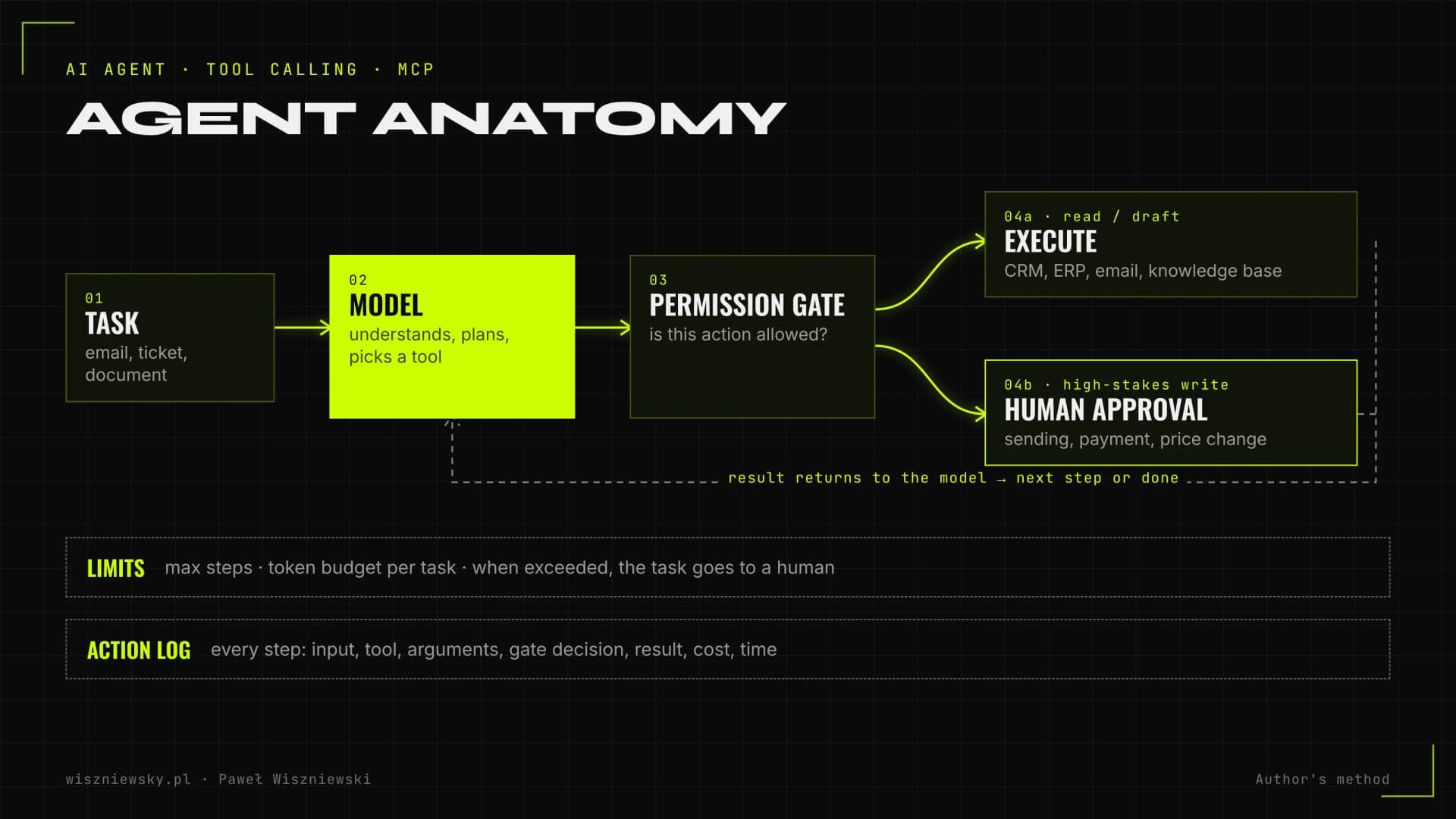
A production AI agent is a model-and-tools loop wrapped in control layers: a permission gate, human approval points, limits and an action log. The model does the reasoning, but whether the agent is safe and predictable depends mostly on what surrounds it.
Every agent action passes the permission gate; high-stakes writes wait for a human to approve them.
Layer
What it does
How I implement it
Model (or several)
Understands the task, plans, picks tools
A stronger model for decisions, a cheaper one for simple steps; the provider can change without rewriting the agent
Instructions
Goal, boundaries, tone, escalation rules
A versioned system prompt describing the process, with examples of hard cases
Tools
Read and write in company systems
Functions (tool calling) or MCP servers with narrow scope and argument validation
Permission gate
Checks whether an action is allowed
A dedicated agent account, an allowlist of actions, thresholds on amounts and recipients
State and memory
What the agent has already done on a case
State saved after each step so a case can resume after approval or a failure
Knowledge
Price lists, procedures, customer history
RAG or database queries using the user's permissions
Human approval
Signs off high-stakes actions
One click in Slack, Teams or email, with full context
Limits
Protect against loops and runaway cost
A maximum step count, a token budget per task, daily caps
Log and tracing
Let you reconstruct every decision
Input, tool calls, arguments, results, cost and time recorded
This table doubles as a list of questions for any vendor. If a proposal has no permission gate, no limits and no log, you're getting a prototype, not an agent ready to work on company data. How the agent loop itself works is explained in plain language in the post AI agents – what they are and how they work.
Example: a proposal-drafting agent, step by step
A proposal agent is a good example because it combines everything hard: an unstructured customer email, several systems, pricing decisions and external communication. Below is the typical flow I design, marking where the agent only reads, where it writes and where a human decides.
Read the enquiry (read only). The agent reads the email and attachments and extracts products, quantities, deadline and company details into a structured format. It treats the email as data, not as instructions.
Identify the customer (CRM read). It checks whether the company is in the CRM, its order history, payment terms and assigned sales rep.
Availability and pricing (ERP and price list read). It checks stock, delivery dates and the price including customer-specific discounts.
Clarifying questions (draft). If data is missing, such as a dimension or quantity, it drafts a question to the customer instead of guessing.
Draft proposal (draft write). It creates the proposal in the CRM as a draft, with a rationale for each line and the source of each price.
Approval (human). The sales rep gets a notification with a summary, differences from the standard price list and risk flags such as a discount above the threshold or an unusual deadline.
Sending (after approval). Only an approved proposal is sent, and the agent logs the activity and a follow-up date in the CRM.
The agent has no right to email the customer on its own or change a price in the price list. Those limits aren't about distrusting the model; they're simple arithmetic: one wrong proposal sent to a customer costs more than one click from a sales rep. Integrations with the systems involved are covered in the posts on AI in CRM and AI in customer service.
Designing an agent's tools – tool calling and MCP in practice
An agent's quality depends heavily on its tools: how many there are, their names, their descriptions and what they return. In its post on writing tools for agents (September 2025), Anthropic advises against wrapping every API endpoint as a tool and recommends fewer tools built around real tasks, because more tools don't always lead to better outcomes.
Rules I apply to every tool
Separate read and write tools. "Get customer" and "create proposal draft" are two tools with different permissions, not one generic "operate on CRM".
Write as a draft, not a final result. Where the system allows it, the agent creates a draft and publishing or sending is done by a human or by a separate, controlled step.
Schema-validated arguments. Every call goes through JSON Schema and business rules: allowed values, amount ranges, tax ID format, an existing customer ID.
Idempotency. Write actions carry an idempotency key, so a retry after a network error doesn't create two invoices.
Readable errors. Instead of a 500, the tool returns a message saying what went wrong and what the agent can do. Anthropic recommends this because models recover better from it.
Lean results. A tool returns the fields needed for the decision, with pagination and filters, not the whole API response eating up context.
Unambiguous names and descriptions. `customer_id` rather than `user`, and a tool description written as if explaining it to a new hire.
MCP (Model Context Protocol) is an open standard for connecting models to tools and data. In December 2025 Anthropic donated it to the Agentic AI Foundation under the Linux Foundation and reported more than 10,000 active public MCP servers. For a business it means one MCP server built for your CRM can serve both an agent and the assistants your staff use.
Situation
What I choose
One agent, a few narrow operations in one system
Direct functions (tool calling) in the agent's code
The same system must be available to several agents and assistants
A custom MCP server with permission control
A ready-made MCP server from the system's vendor
Used after a review: which tools it exposes, which permission scopes, who maintains it
An MCP server from an unknown source or a public directory
Not connected to production data without a code review and isolation
The MCP specification's security best practices forbid token passthrough (forwarding tokens that weren't issued to that server) and recommend a minimal initial permission scope that is only widened when needed. They also describe the risk of local servers running with the user's privileges. In practice I implement this with a dedicated technical account for the agent, scopes limited to the operations it needs, and servers run in an isolated environment. More on the protocol itself is in the post on MCP.
An AI agent threat model – the lethal trifecta and the Rule of Two
An agent is most exposed when it reads untrusted content, has access to sensitive data and can take actions or communicate externally, all at once. Before building any agent I check which of these three properties it has, and design it so that a single session never has all three without human oversight.
The approach has two well-known sources. In June 2025 Simon Willison called the combination of access to private data, exposure to untrusted content and the ability to communicate externally the "lethal trifecta". In October 2025 Meta described the "Agents Rule of Two": within one session an agent should have no more than two of three properties: processing untrustworthy inputs, access to sensitive systems or private data, and the ability to change state or communicate externally. If all three are needed, a human has to supervise.
Agent
Untrusted input
Sensitive data
External actions
How I handle it
Proposal agent reading customer emails
Yes (email)
Yes (CRM, prices)
Yes (sending)
Sending only after human approval; the agent creates a draft
Reporting agent on internal data
No
Yes
No (report for the team only)
Full automation is acceptable, with a log and limits
Web research agent
Yes (web pages)
No
No
No access to company systems; output goes to a human
Inbox agent allowed to reply
Yes
Yes
Yes
Automatic replies only from approved templates, everything else to approval
In December 2025 OWASP published a separate threat list for agentic applications (Top 10 for Agentic Applications for 2026), alongside the familiar list for LLM applications that I cover in the AI automation guide. The agentic list includes agent goal hijack, tool misuse, identity and privilege abuse, and memory and context poisoning. I test for each of them before launch. Practical isolation and permission techniques are in the post on AI agent security.
One agent or a multi-agent system – how I choose
By default I build a single agent with well-chosen tools, and a multi-agent system only when the task splits into independent, parallel parts. More agents mean more tokens, more places for errors and harder debugging.
Anthropic's June 2025 write-up of its research system shows this well. The multi-agent setup (a lead model plus subagents) outperformed a single agent by 90.2% on an internal research eval, but agents used about 4 times more tokens than a chat interaction and multi-agent systems about 15 times more. The authors note the architecture pays off for tasks valuable enough to justify the cost and that can be parallelised.
Criterion
Single agent
Multi-agent system
Task structure
Steps depend on each other, one case at a time
Independent subtasks that can run in parallel
Example
Proposal, inbox handling, CRM updates
Broad research across many sources, analysing many documents at once
Model cost
Lower
Several times higher
Debugging
One decision trace
Many traces plus inter-agent communication
My default
Yes
Only when the gain from parallelism is clear
When splitting work across several agents makes sense, and how to design it, is covered in the post on multi-agent systems, with a research agent example in AI deep research.
How I test an agent before launch – outcome, trajectory and consistency
I test an agent on a set of real cases and assess three things: whether the outcome is correct, whether the path to it was right (tools, arguments, order) and whether the agent behaves the same way on repeated runs. A correct outcome alone isn't enough, because the agent may have reached it through an action it shouldn't have taken.
Why consistency is a separate metric
The authors of the τ-bench benchmark (Sierra, 2024) proposed the pass^k metric: the share of tasks an agent solves correctly in all k attempts. In their tests, agents built on the leading models of the time solved under 50% of tasks, and pass^8 in the retail domain was below 25%. Models have improved since, but the lesson stands: an agent that solves a task "sometimes" isn't fit to work unsupervised. So I run every case in the test set several times.
What the test set contains
Typical cases from the company's history, with the correct outcome described by the person who handles them today.
Edge cases – missing data, conflicting information, unusual requests, cases at the edge of the agent's permissions.
Cases where the agent should refuse or escalate – to check that it knows when to stop.
Attack attempts – instructions hidden in emails, attachments and documents, attempts to extract another customer's data.
Metric
What it measures
How I assess it
Outcome correctness
Whether the draft, decision or write is right
Comparison with a reference; manual review and LLM-as-a-judge with a human-checked sample
Trajectory correctness
Whether the agent used the right tools with the right arguments
Analysis of the call trace; forbidden actions counted separately
Consistency (pass^k)
Whether the result is stable across attempts
Each case run several times
Escalation accuracy
Whether the agent asks a human when it should
Cases labelled "must escalate" and "must not"
Prompt injection resilience
Whether hidden instructions change behaviour
Share of attempts that led to a forbidden action (target: zero)
Cost and time per case
Whether the agent stays within budget
Tokens, step count and time from the log
These results decide which autonomy level the agent starts at and when it can move up. Autonomy levels and approval rules are described in the AI automation guide, and the evaluation method in the post on LLM evaluation.
n8n, LangGraph or a model provider's SDK – what I build agents on
I choose the technology based on how complex a case's state is and how important it is to resume after a pause. A simple agent with a few tools works well in n8n, while an agent running multi-step cases with human approval mid-process fits LangGraph or custom code better.
When a provider-specific feature or full control is needed
Whatever the choice, I keep business logic (permissions, validation, limits) out of the prompt, in ordinary code or configuration. That way switching the model or framework doesn't change the security rules. If a system has no API, interface automation (computer use) sometimes helps, but I treat it as a last resort, as explained in the post on computer use. Building an agent in LangGraph is covered in a separate tutorial.
Action log, tracing and cost per task – what runs after launch
I record every agent step so that a week later you can reconstruct what it saw, what it decided, which tool it used and what it cost. Without that you can neither explain a complaint nor safely increase autonomy.
What a log entry contains
The case ID and the agent version (prompt, model, tools).
Input: what the agent received and through which channel.
Every tool call with arguments, result and the permission gate's decision.
Human decisions: who approved, corrected or rejected, and why.
Tokens, cost, step count and time.
Personal data masked wherever it isn't needed for analysis.
For tracing I follow the OpenTelemetry semantic conventions for generative AI, which define standard attributes for model and tool calls. That way agent data lands in the same monitoring tools your IT team already uses, rather than in a separate closed dashboard.
How I keep cost under control
I calculate the agent's cost per case, not per month: average steps times tokens per step times the model price. I set a hard step limit and a token budget per case; once exceeded, the agent stops and hands the case to a human. That protects against loops where the agent calls the same tool over and over. Further levers such as prompt caching and a cheaper model for simple steps are in the post on AI API cost optimization, and monitoring in monitoring AI in production.
What to prepare before an agent rollout and what you get at the end
On the company side you need three things: someone who knows the process and can judge the agent's output, access to the systems through an API or another secure channel, and a few dozen historical cases for the test set. An agent for one process starts from €3,000.
Pre-launch checklist
A process owner with time for the workshop and a weekly review of results in the first month.
Written process rules, including the informal ones: discount thresholds, exceptions, customers handled differently.
Test access to the systems (CRM, ERP, email) and the ability to create a dedicated technical account for the agent.
Historical cases with correct outcomes, including the hard ones.
A decision on where data is processed: a cloud model under a data processing agreement or a locally hosted model. The post on AI data security helps with that.
What I hand over after launch
Item
Contents
Agent card
Goal, scope, tools, permissions, limits, escalation rules, model version
Process map
Steps, decision points and where a human approves
Test set and results
Test cases, pre-launch metrics, attack attempts and their outcome
Operating manual
How to approve, how to pause the agent, what to do on an error, who to notify
Log and dashboard access
Quality, escalations, cost per case, handling time
Agents often draw on company knowledge, so in many projects I pair them with a RAG implementation. If the process can be described by rules, n8n process automation will be cheaper, and for customer service it's worth starting with an AI chatbot. An example of an agentic system in production is the GiftFinder case study.
A chatbot holds a conversation and answers questions. An AI agent also acts: it uses tools and APIs, checks data in your systems, completes multi-step tasks and saves the results — for example, drafting a proposal in your CRM or booking a document after verification.
Is an AI agent safe for company data?
Yes, when it's designed properly. I apply least-privilege access, sandboxing, human approval for irreversible actions, PII filtering and a full action log. For sensitive data I recommend cloud models under a data processing agreement or self-hosted models.
Which processes suit AI agents best?
Repetitive, multi-step work on data from several systems: handling quote requests, inboxes and documents, lead qualification, reporting, research and comparisons. Rare, high-stakes decisions without clear rules are the worst fit.
How much does an AI agent cost?
Deploying an AI agent for a single process starts from €3,000. Running costs are mainly model fees (typically tens to a few hundred euros a month) plus optional support. I quote after a short process-mapping workshop.
How long does it take to deploy an AI agent?
A first agent for one process usually takes 4–6 weeks: one week for mapping and design, 2–3 weeks to build and test, and 1–2 weeks in suggestion mode before full launch.
Can an AI agent work in my systems without an API?
Sometimes — through browser automation (computer use) or file import and export. It's less stable than an API, so I use it only where there's no other way, with extra safeguards.
Which models do you build agents on?
OpenAI, Anthropic, Google or open-weight models. I match the model to the task: complex reasoning needs a different model than simple, frequent steps. The architecture lets you switch models without rewriting the agent.
Who is responsible for agent mistakes?
I design agents so mistakes are detectable and reversible: scoped permissions, human approval for important decisions and a full action log. Responsibility and oversight are agreed in the contract and procedures before launch.