BACK TO Technical SEO

SEO Migration

Safe domain, CMS, or URL restructure migration without losing organic traffic. Full 301 mapping, Search Console validation, and 90-day ranking monitoring included.

Author: Paweł Wiszniewski · Updated:

Key takeaways

Safe domain, CMS, or URL restructure migration without losing organic traffic. Full 301 mapping, Search Console validation, and 90-day ranking monitoring included.

  • ›Complete old→new URL mapping for every page on the site
  • ›50+ point pre-launch checklist: redirects, canonicals, hreflang, XML sitemap, robots.txt, Search Console property
  • ›90-day post-launch monitoring

Price: from €1,200

SERVICE DETAILS

Changing domain, migrating from WordPress to Next.js, or restructuring your URL architecture? I conduct a complete SEO migration with URL-by-URL redirect mapping, 301 implementation, sitemap updates, and 90-day post-launch monitoring. My migrations don't lose the domain authority your site has built over years.

› INVESTMENT:

from €1,200
const module = new ExecutionProtocol();

// Initializing seo-migration...
› Loading dependencies... OK
› Establishing connection... OK
› Ready for deployment... AWAITING_COMMAND

Paweł Wiszniewski · my approach

What I do differently

A migration is the easiest moment to lose years of SEO work, and it's usually run by a web agency for which SEO is “for later”. I run migrations from the SEO and code side at the same time: the redirect map is built from traffic and backlink data, not from a list of CMS pages. One example is a store moved from WooCommerce to PrestaShop with no visibility drop, described in the case study. I also show which pages are worth merging or removing, because a migration is the best moment to clean up.

Case study: Beauty E-Commerce SEO/GEO

My take and a real-world example

My take

In my view the biggest migration mistake is treating redirects as temporary. It's a common scenario: months later someone “cleans up” the server config and removes the old rules, along with links built up over years.

From the market

Google's John Mueller explicitly recommends keeping 301 redirects for at least a year, because Google's systems need to see a redirect several times before moving signals to the new URL. Backlinks to old URLs, however, live far longer than a year — which is why redirects stay in place permanently in my migrations.

Sources: Search Engine Journal: Google — keep 301 redirects for at least a year

Who this is for

  • Companies changing domain, CMS or store platform.
  • Sites restructuring URLs or merging several sites into one.
  • Brands adding language versions or moving them to new addresses.
  • Businesses that already lost traffic after a migration and want it back.

What you get

  • An inventory of every URL with traffic, links and rankings.
  • A 301 redirect map from old to new for every valuable page.
  • A pre-launch checklist: canonicals, hreflang, sitemap, robots.txt, structured data.
  • Launch-day coordination and change notification in Search Console.
  • Monitoring of rankings, traffic and errors in the following weeks.

How results are measured

  • Organic traffic and impressions versus the pre-migration period.
  • 404 errors and redirect chains.
  • How quickly new URLs are reindexed.
  • Rankings for the most important keywords.

Key Benefits

Complete old→new URL mapping for every page on the site — no valuable URL disappears without a 301 redirect preserving its link juice.

50+ point pre-launch checklist: redirects, canonicals, hreflang, XML sitemap, robots.txt, Search Console property — everything verified before the new version goes live.

90-day post-launch monitoring — I track rankings for your 50 most important keywords, alert on new 404 errors, and provide weekly indexing health reports.

Google Search Console domain change notification and sitemap resubmission for maximum re-indexing speed after the switch.

Internal link preservation — I update all internal links in the CMS to the new URLs, eliminating redirect chains and 404 errors from within your own site.

The Process

1

Pre-Migration Audit

I crawl the current site, export all URLs with their data (traffic, inbound links, rankings), and identify the highest-SEO-value pages requiring special attention in the migration.

2

Redirect Map Creation

I build a complete old→new URL redirect map accounting for directory structure changes and slug changes, with particular attention to pages with external backlinks.

3

Implementation & Pre-Launch Validation

I implement redirects in server config or Next.js, validate every redirect on staging, and run a full Screaming Frog audit before going live.

4

Launch & 90-Day Monitoring

I coordinate the launch, immediately check Google Search Console for crawl errors, and monitor rankings for 50 key queries for 90 days post-migration.

Common mistakes

  • Redirecting all old URLs to the homepage instead of their equivalents.
  • Missing URLs that have backlinks but aren't in the menu or sitemap.
  • Changing content, structure and domain at once, so nobody knows what caused a drop.
  • Switching off the old version without keeping redirects in place permanently.

When this service is not worth it

  • You're only changing the design while URLs, content and structure stay the same.
  • The site is new and has no organic traffic or backlinks yet.
  • The migration happened over a year ago and traffic has stabilized — a regular audit is a better fit.
/// GUIDE

SEO migration – how I plan, ship and monitor a site move

This is a migration from the inside: how I assess the risk of each type of change, where I get the list of URLs to redirect, the rules I use to build the 301 map, what I test on staging, what launch day looks like and which Search Console signals I treat as alarms. The rules are based on Google Search Central's documentation on site moves and redirects, with sources listed at the end.

Types of site migration and their SEO risk

„Migration” covers very different changes, from moving to a new server to merging two sites under a new domain, and each needs a different scope of work. Risk grows with the number of URLs that change and with the number of things changed at the same time.

Migration typeWhat changesRiskWhat I watch most closely
Hosting or CDN changeServer only, URLs stay the sameLowFirewalls blocking Googlebot, new server performance, leftover robots.txt and noindex from the test version
HTTPS or www / non-www switchProtocol or host within the domainLow to mediumComplete redirects, canonicals and sitemaps on the new URLs; the Change of Address tool does not apply
URL structure rebuildPaths within the same domainMedium to highA redirect for every URL with value, internal links, hreflang
CMS or store platform changeTemplates, rendering, often URLs tooHighParity of content, meta tags and structured data, rendering, filters and variants
Domain change (rebrand)Every URLHighChange of Address tool, every variant of the old domain, external links and brand profiles
Merging several sitesURLs and content across domainsVery highContent consolidation, cannibalisation, moving sites one at a time

Google's documentation on site moves with URL changes recommends changing one thing at a time, for example the domain first and the layout later. The Change of Address help page adds that combining a move with a redesign of content or URL structure can cause traffic loss, and that several sites should not be consolidated in one step but moved one by one, waiting for traffic to settle in between. If the business needs everything changed at once, I plan longer monitoring and agree up front how we will tell which change caused a drop.

SEO migration timeline – what I do at each stage

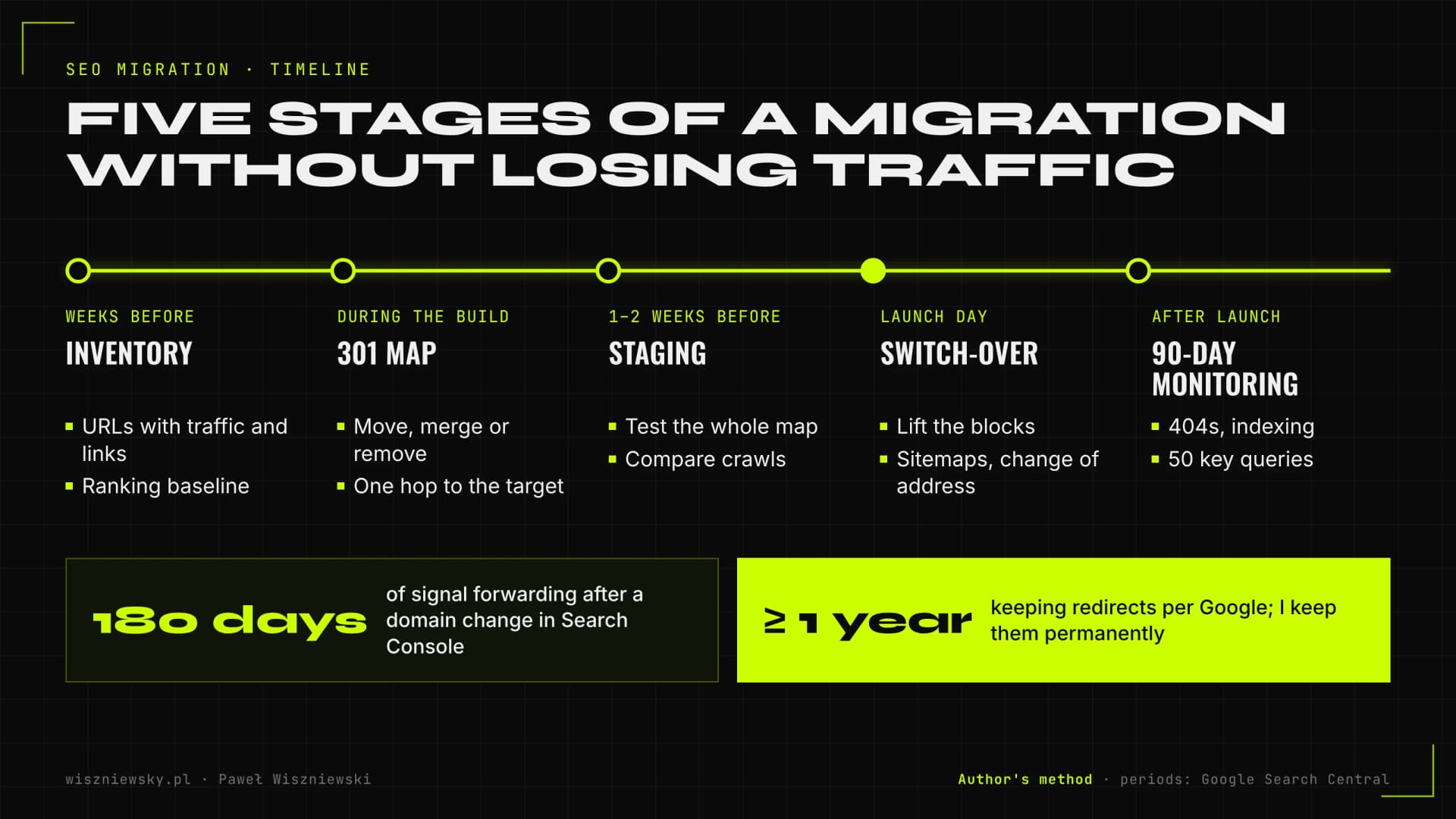
Most of the work in a good migration happens before launch, not on switch-over day. On a typical project I start several weeks ahead, and monitoring runs for 90 days, while the redirects and their upkeep stay in place much longer.

SEO migration timeline in five stages: URL inventory, redirect map, staging tests, launch day and 90-day monitoring, followed by redirects kept for at least a year according to Google.
Author's method. Redirect and domain retention periods from Google Search Central documentation.
StageWhenKey tasks
Inventory and baselineSeveral weeks before launchList of every URL with traffic, links and rankings; ranking and Search Console snapshots as a baseline
Redirect map and content decisionsIn parallel with the new buildAssign every URL to its counterpart; decide to move, merge or remove
Staging testsLast 1–2 weeksAutomated map test, crawl comparison of old and new versions, checks of meta tags, canonicals, hreflang, structured data
Launch daySwitch-over dayDeploy, lift blocks, test redirects in production, sitemaps, Change of Address for a domain move
Monitoring90 days after launch404s, indexing of new URLs, key query rankings, traffic, server logs, quick fixes

The best time to bring me in is while the new structure is being designed, before anyone fixes the URLs. At that point you can still keep old URLs wherever there is no reason to change them, and every URL that stays the same is one less redirect to maintain.

URL inventory – where I get the full list of URLs

A redirect map is only as good as the URL list it was built from, and the list of pages in your CMS is usually just part of it. The most valuable URLs often appear in neither the menu nor the sitemap: old articles with external links, past campaigns, PDF files, parameter URLs from old ads.

Google's site move documentation lists sitemaps, server logs, analytics, the Search Console Links report and the CMS itself as sources, and reminds you to include images, videos, JavaScript and CSS files. I merge these sources into one table:

  • A crawl of the current site with JavaScript rendering, including images and files.
  • Every sitemap, including old ones nobody remembers and files submitted to Search Console years ago.
  • Search Console: URLs with impressions and clicks over the longest period the report offers, the Links report, the Page indexing report.
  • GA4: landing pages with traffic from all channels, not only search, because newsletters and ads have their own URLs too.
  • A backlink tool (Ahrefs): URLs with external links, including those that already return 404.
  • Server logs on large sites: URLs Googlebot still requests.
  • A CMS or product database export: the full list of products, categories, posts and their IDs, which makes automatic matching easier.

After merging and de-duplicating, each URL gets its data: organic traffic, referring domains, rankings and conversions. Then I split URLs into tiers. For the tier with traffic or links I check every row of the map by hand; for the long tail, such as thousands of products, I match URLs automatically by ID or SKU and spot-check samples.

The 301 redirect map – the rules I use to assign URLs

Every old URL with value should reach the closest content equivalent through a single permanent redirect, and URLs you deliberately do not move should return 404 or 410. Google's documentation also notes that redirects do not lose PageRank, so the problem is never the redirect itself, only a bad destination.

SituationWhat I do
The page exists in the new version under a different URLOne-to-one 301 or 308 redirect
Several old pages are merged into oneAll redirect to the new combined page, which genuinely contains their content
The page is removed and has no equivalent404 or 410; if it has external links, I look for the closest topical page or create a new one
Product permanently discontinuedRedirect to a successor or category if it genuinely replaces the product; otherwise 404 or 410
Parameter, filter or print-version URLsRedirect to the canonical version, or leave out of the map if it was never indexed
Images and PDFs with image search traffic or linksRedirects for files too, not only for pages
Redirects left over from earlier migrationsFlatten them so the oldest URL goes straight to the final destination, with no chain

Google advises against sending many old URLs to one unrelated page, such as the homepage. For chains it recommends as few hops as possible: ideally none, and if that cannot be avoided, about three hops and fewer than five, while Googlebot follows up to ten. Every row in my map has a „decision type” column and a short reason, so months later anyone can see why a URL ended up where it did.

Redirect types and how Google treats them

TypeHow Google treats itWhen I use it
Server-side 301 and 308Permanent; the target becomes canonicalAlways in a migration
302, 303 and 307Temporary; the old URL usually stays in resultsShort outages and tests, never as a migration redirect
Meta refresh with zero delayPermanentOnly when there is no access to server config
Delayed meta refreshTemporaryNot in migrations
JavaScript redirectPermanent, but only works if Google renders the pageLast resort when nothing else is available

The table follows Google's redirects documentation (updated April 2026). In practice, the most common bug I find is 302 redirects set by default by a plugin or framework and never switched to permanent.

How I implement redirects and test the map

I implement redirects where they run fastest and most reliably: on the server, at the CDN or in the application router, not in client-side JavaScript. Where exactly depends on the number of rules and on who will maintain them.

  • Pattern rules (for example the whole /blog/2019/... directory to /blog/...) go into server or framework config as expressions, because one rule covers thousands of URLs.
  • One-to-one maps with many URLs live in a file or database and are looked up in the routing layer, instead of thousands of separate rules that slow down every request.
  • In Next.js, short lists go into the redirects config, and large maps are handled in middleware with a dictionary-style lookup. More on this in the Next.js migration service.
  • URL normalisation: letter case, trailing slashes, old .html and .php extensions, encoding of non-ASCII characters. I handle these variants with general rules before the detailed map.

I test the map automatically. A script requests every old URL in the map, checks the status code, number of hops, the destination and the destination's own status, and compares the result with what was expected. The test passes only when every row ends in a single 301 or 308 to a page returning 200, and removed URLs return 404 or 410. I run the same test on staging, in production on launch day and then on a schedule throughout monitoring.

Staging tests – what I compare between the old and new site

On staging I compare old and new versions template by template, because post-migration drops rarely come from redirects alone and more often from the new site quietly losing content, links or signals. I run two crawls and match them URL to URL using the map.

Pre-launch checklist

AreaWhat I check
ContentThe new URL has the same or better content: H1–H3 headings, product and category descriptions, text below listings
Meta tagsTitles and descriptions carried over or deliberately improved, no mass duplicates generated by the new template
CanonicalEvery page self-references its new URL, with no references to staging or the old domain
IndexingNo noindex or robots.txt blocks from the test version after launch, a correct production robots.txt
Internal linksMenu, footer, breadcrumbs and in-content links point straight to new URLs, not through redirects
HreflangUpdated URLs in every language version and reciprocal references
Structured dataSame types and fields as before (Product, Offer, Breadcrumb, Article, Organization), consistent with content
RenderingContent and links in the server HTML, not only after JavaScript, especially when the technology changes
PerformanceCore Web Vitals of key templates no worse than in the old version
Analytics and verificationGA4 code, Search Console verification tag, conversion events

I protect staging with a password rather than only a noindex tag, because a password will not accidentally ship to production with the template. Google's documentation on hosting moves without URL changes reminds you to remove temporary robots.txt blocks and noindex tags left over from the build before switching. Forgetting this is one of the most common reasons a site disappears from results after launch. I cover rendering problems in detail in the article on JavaScript SEO.

Migration launch day – my run sheet

Launch day should be boring: everything that can be tested earlier already has been, and on the day I only check that production behaves like staging. I schedule the launch for a lower-traffic period, which Google also recommends for sites with seasonal traffic.

  1. Content freeze in the old CMS during the switch, so no URLs appear that are not in the map.
  2. Deploy the new version and the redirects; remove the password, noindex and robots.txt blocks.
  3. Run the automated test of the whole redirect map in production and check the most important URLs by hand with URL Inspection.
  4. Submit the new sitemap in Search Console. I keep the old sitemap with the previous URLs for monitoring, as Google suggests, and redirect warnings in it are expected at that point.
  5. For a domain change: the Change of Address tool for the old domain and every verified variant.
  6. Set crawl rate to let Googlebot decide on both properties, and make sure the new server can handle the heavier crawling Google warns about after a move.
  7. Full crawl of the new version and comparison with the staging crawl.
  8. Update URLs in ad campaigns, business profiles, newsletters and with partners who link to your most-used pages.

For a hosting change with no URL changes, Google advises lowering DNS TTL to a few hours at least a week before the move and keeping the old server running until its logs show no more traffic. I treat that case as a migration too, because a new server's firewall blocking Googlebot can do as much damage as missing redirects.

Post-migration monitoring – what I measure and when I act

After launch, what matters most is catching an error within days, not a month later in a traffic report. Google warns that rankings may fluctuate temporarily during a move, and that a medium-sized site takes a few weeks to move and a large one longer. So I separate normal fluctuation from signs that something is broken.

What I measureSourceAlarm signal
Status codes of old URLsScheduled map test, server logsAny mapped URL returns 404, 5xx or lands in a chain
New 404sPage indexing report, logs, GA4404s on URLs with external links or traffic; they go straight into the map
Indexing of new URLsSitemaps report and Page indexing reportIndexed new URLs stall while old ones do not decline
Googlebot activityCrawl stats, server logsFewer requests, more server errors or slower response times
Key query rankingsRank trackingOne group of pages dropping rather than the whole site, pointing to a problem in one template
Traffic and conversionsGA4, Search ConsoleTraffic to the old domain does not fall, or traffic to the new one does not rise

Google says a move is complete only when Googlebot has visited every old and new URL at least once, and that there is no fixed frequency for those visits. That is why rarely crawled long-tail URLs can take weeks to move. During the 90-day monitoring period I track rankings for the 50 most important queries and report weekly on indexing health, and every new 404 with value goes into the map immediately.

Domain change and rebranding – what the Change of Address tool requires

The Change of Address tool in Search Console only works when moving a domain or subdomain to another domain, and it has conditions you must meet before launch. It is not for switching to HTTPS, moving between www and non-www, or changing paths within the same domain.

  • You must own both the old and new properties in Search Console, under the same Google account.
  • The old domain's homepage must 301-redirect to the new homepage.
  • The request covers every variant of the old domain (www and non-www, subdomains), each of which must be verified even if unused.
  • According to Search Console Help, the move notice and signal forwarding last 180 days, and redirects must stay at least that long, longer if Google still sends traffic to them. Google advises keeping the old domain registered for at least a year.
  • Moves cannot be chained: after moving A to B, you cannot immediately move B to C.

A rebrand adds a layer few people think about: brand data off the site. I update Organization structured data with a reference to the former name, business profiles, the Google Business Profile, industry directories and social profiles, and ask the biggest linking publishers to update their links, starting with the links that send the most traffic, as Google suggests. I also do this so that AI models connect the old and new names to the same company. How to check whether that works is covered under the AI visibility audit, and entity consistency in structured data under Schema.org implementation.

Online store migrations and moving to Next.js – what is specific

With stores and technology changes, the biggest risk is not page URLs but everything generated automatically: filters, variants, pagination, structured data and rendering. I check these separately from the redirect map.

Changing the store platform

  • URL structure imposed by the platform. Some platforms force fixed prefixes in product and collection URLs, so redirects are unavoidable and must be planned for the whole catalogue.
  • Product variants: whether colour and size get their own URLs or parameters, and which URL is canonical.
  • Filters and sorting: a new platform often generates different filter URLs; I decide which combinations should be indexed and which not, so as not to waste crawl budget.
  • Out-of-stock and deleted products: the rules must work from day one, not after the first error report.
  • Reviews and Product data: carrying ratings, prices and availability into the new template's structured data.
  • Image URLs: changing product image paths means losing image search traffic unless they are redirected.

Moving from WordPress or another CMS to Next.js

When migrating to Next.js I check that metadata, canonicals and hreflang are generated on the server, that the trailing-slash policy is preserved, that non-existent URLs return real 404s and that content has not ended up in components loaded only in the browser. The move is also a chance to improve Core Web Vitals, but only if the new version is measured before launch, not after.

Traffic drop after a migration – how I find the cause and recover rankings

If the migration has already happened and traffic fell, the cause almost always belongs to one of a few groups, and the order of checks matters because the first ones are the most common and the quickest to fix. I rebuild the missing data on old URLs and compare it with what happens today.

  1. Rebuild the list of old URLs from archived sitemaps, Search Console (data from the whole available period), backlink tools and copies in web archives.
  2. Today's status codes for those URLs: missing redirects, 302s, chains, redirects to the homepage.
  3. Indexing blocks: noindex, robots.txt, canonicals pointing to staging or the old domain, X-Robots-Tag headers.
  4. Content parity: whether new pages have the same content, headings and titles, and whether the template shortened category and product descriptions.
  5. Internal linking: whether the menu and content still route through redirects or to removed URLs.
  6. Rendering and performance: whether content is in the server HTML and whether Core Web Vitals got worse after the technology change.

Redirects added late still work, although signals return more slowly than in a migration prepared before launch. If more than a year has passed and traffic has settled at a lower level, instead of rescuing the migration I run a full technical SEO audit, because the causes may now lie elsewhere. Drops caused by lost external links to removed URLs I also make up for through link building.

What drives the scope and cost of an SEO migration

The cost of a migration depends on how many URLs need a manual decision, how much the structure changes and whether I implement the redirects myself. SEO migrations start from €1,200 and include 90 days of monitoring.

FactorSmaller scopeLarger scope
URLs with valueA few dozen pages with traffic and linksThousands of products, categories and posts with history
URL changesURLs stay, only hosting or template changesNew domain and new structure at the same time
Technology changeSame CMSNew store platform or a move to Next.js
Language versionsOne versionSeveral versions with hreflang and separate structures
ImplementationI prepare the map and tests for your teamI implement the redirects and fixes in code myself

A broader walkthrough with examples is in the article SEO migration without losing rankings, and the general SEO principles a migration does not exempt you from are on the technical SEO page. For multilingual sites, see the article on hreflang and international SEO.

Frequently Asked Questions

How much traffic will I lose during migration?

With a professionally executed migration with full URL mapping and monitoring, a typical temporary traffic dip is 5–15% for 4–8 weeks, after which traffic returns to its previous level or higher.

Can I migrate domain and switch CMS at the same time?

You can, but it's double the risk. I recommend staging it: first the domain migration (same content, new domain), let rankings stabilize, then CMS migration. If clients insist on doing both simultaneously, I require an extended monitoring period.

How long does Google need to re-index after migration?

With healthy crawl budget and proper sitemap submission, 80% of pages are re-indexed within 2–4 weeks. Full re-indexing of large sites (10,000+ pages) can take up to 3 months.

When should I bring you into a migration?

Ideally while the new structure is being planned, before new URLs exist, so I can shape the URL architecture and content. At minimum a few weeks before launch to build and test the redirect map on staging.

What if traffic drops after the migration anyway?

I monitor rankings and errors from day one, so issues like missing redirects, indexing errors or changed content are caught quickly. During the monitoring period, fixes within the migration scope are included.

How much does an SEO migration cost?

SEO migrations start from €1,200. The price depends on the number of URLs to map, structural changes and whether I implement the redirects myself.

Got a project?

Terminate
Silence

Initiate protocol. Establish connection. Let's build something loud.

> WAITING_FOR_INPUT...