BACK TO GEO – AI Search Optimization

Google AI Overviews & AI Mode Optimization

I optimize your site so Google cites it in AI Overviews and AI Mode: answer-first content, follow-up question coverage, structured data and E-E-A-T signals. I track citations and AI traffic.

Author: Paweł Wiszniewski · Updated:

Key takeaways

I optimize your site so Google cites it in AI Overviews and AI Mode: answer-first content, follow-up question coverage, structured data and E-E-A-T signals. I track citations and AI traffic.

  • ›An AI Overviews keyword map
  • ›Content rebuilt for extraction: a direct answer in the first sentences of each section, definitions, tables, step lists and specific numbers with sources.
  • ›Query fan-out coverage

Price: from €1,200

SERVICE DETAILS

AI Overviews are Gemini-generated summaries above Google's results, and AI Mode is Google's conversational search mode that users can jump into straight from a summary. According to Ahrefs' 2026 study, the top organic result loses 58% of its clicks on average when an AI Overview appears above it — if you're not cited in the summary, you drop out of sight. AI Overviews and AI Mode optimization combines SEO with GEO: I analyze which of your keywords trigger AI summaries and who Google cites there, restructure key pages into self-contained passages with direct answers, data and sources, cover the follow-up questions AI Mode breaks a query into (query fan-out), strengthen structured data and author signals, and make sure content is visible without JavaScript. I measure results through AI Overview citations and traffic in Search Console and GA4.

› INVESTMENT:

from €1,200
const module = new ExecutionProtocol();

// Initializing ai-overviews-ai-mode-optimization...
› Loading dependencies... OK
› Establishing connection... OK
› Ready for deployment... AWAITING_COMMAND

Paweł Wiszniewski · my approach

What I do differently

For AI Overviews optimization I use my own Content Intelligence tool: it compares your page with the pages cited in AI summaries and shows the topics and questions missing from your content. The embedding model runs entirely in the browser, so you can try the demo yourself. Instead of rewriting whole articles, I fill specific gaps and rebuild the passages most likely to be cited — faster and cheaper than writing from scratch.

Try the demo: Content Intelligence

My take and a real-world example

My take

I think the fight for clicks on informational queries is largely lost — and it's good that companies are stopping it. What wins today is being a source in the summary and building pages customers must visit anyway: comparisons, pricing and configurators.

From the market

Pew Research Center analysed almost 69,000 searches by real users. When an AI summary appeared, people clicked a regular result 8% of the time versus 15% without one, and clicked links inside the summary just 1% of the time. That's why I measure citations and conversions, not just rankings.

Sources: Pew Research Center: clicks when AI summaries appear (2025)

Who this is for

  • Companies losing clicks because an AI Overview appears above their result.
  • How-to and expert sites with traffic from informational queries.
  • Brands that want to be cited in AI Mode for questions in their industry.
  • Stores and service businesses whose customers compare offers in Google.

What you get

  • A map of keywords that trigger AI Overviews with the sources cited today.
  • Selected pages rebuilt: direct answers, definitions, tables, step lists and sourced data.
  • Follow-up question (query fan-out) coverage in content and internal linking.
  • Structured data plus author and update-date signals.
  • Monthly citation monitoring and content refreshes.

How results are measured

  • Keywords where your site is cited in AI Overviews.
  • Clicks and impressions in Search Console for keywords with AI summaries.
  • Traffic from AI Mode and other assistants in GA4.
  • Conversions from traffic on keywords with AI summaries.

Key Benefits

An AI Overviews keyword map — you see which queries in your industry trigger AI summaries, who Google cites and where you're losing clicks.

Content rebuilt for extraction: a direct answer in the first sentences of each section, definitions, tables, step lists and specific numbers with sources.

Query fan-out coverage — you also answer the follow-up questions AI Mode splits a query into, so you appear in more answers.

E-E-A-T trust signals: an author with a bio, update dates, Article, Organization and Person structured data and consistent company information across the web.

Measured impact: AI Overview citation tracking for key queries and an AI traffic segment in GA4 — you see what works, not just rankings.

The Process

1

SERP and citation analysis

I check which of your keywords trigger AI Overviews, which sources get cited and how much traffic you lose, then pick the 10–30 pages with the most potential.

2

Content and structure rebuild

I rewrite key sections as direct answers, add data, sources, tables and FAQs, fill in follow-up questions and clean up headings.

3

Technical and trust signals

I implement structured data, author profiles, update dates and internal links, and verify that content is visible without JavaScript rendering.

4

Monitoring and iteration

Every month I measure citations and AI traffic, refresh content that slips and extend the work to new keyword groups.

Classic SEO vs AI Overviews & AI Mode optimization

CriterionClassic SEOAI Overviews & AI Mode
GoalA position in the results listA citation inside the AI answer
Unit of optimizationThe whole pageThe passage that answers the question
Keyword scopeMain keyword and variantsMain keyword plus follow-up questions (query fan-out)
Key signalsContent, links, technical healthData-rich content, structure, E-E-A-T, freshness
MeasurementRankings and clicksCitations, brand visibility and AI traffic

Common mistakes

  • Writing longer texts in the belief that length raises the chance of a citation.
  • Ignoring the follow-up questions AI Mode breaks a query into.
  • No update date or author on expert content.
  • Measuring only rankings without checking who's cited in the summary.

When this service is not worth it

  • Your keywords almost never trigger AI Overviews, e.g. very transactional local queries.
  • Your site isn't visible in Google yet — AI Overviews use its index, so start with SEO.
  • You can't change content on your site.
/// GUIDE

Google AI Overviews and AI Mode optimization – how I work on Google citations step by step

AI Overviews and AI Mode draw on Google's index, but they pick sources differently from the classic results list: at passage level, across many follow-up queries at once. Below I explain how I build a map of queries that trigger AI answers, how I analyse the pages Google cites, how I cover query fan-out without multiplying pages, what Search Console's new 2026 tools change and how I measure results. The general GEO principles are in the AI search optimization guide.

AI Overviews vs AI Mode – why I treat them as two separate surfaces

AI Overviews and AI Mode give similar answers but mostly cite different URLs, so I measure and optimize them separately. In Ahrefs' analysis from December 2025 (540,000 US query pairs, September 2025 data) only 13.7% of citations overlapped between the two, even though the answers were 86% semantically similar on average.

Both are widely available. Google's October 2025 expansion added more than 40 new countries and territories and over 35 languages, bringing AI Mode to over 200 countries and territories, including much of Europe. In most markets you can measure both surfaces on local-language queries today.

FeatureAI OverviewsAI Mode
Where it appearsAbove the results, for some queriesA separate mode (tab, google.com/ai), reachable from an AI Overview
Question typeShort and mid-length informational queriesLonger, complex questions and conversation with follow-ups
Answers with no citations (Ahrefs, 2025)11% of answers3% of answers
Wikipedia's share of citations (Ahrefs, 2025)18.1%28.9%
What it means for your siteCompeting for one of a handful of links on a specific queryA chance to be cited for follow-up questions and later turns of the conversation

The practical takeaway: a page cited in the AI Overview for the main query isn't guaranteed a place in AI Mode, and vice versa. In the query map I record each surface in its own column, and in reports I never add them up into a single number.

An AI Overviews query map – how I build it and choose which pages to work on

The query map is a table of queries from your industry showing whether each triggers an AI answer, who Google cites there, where your page stands and what the query is worth to the business. From it I usually pick 10–30 pages to rework first.

Where the queries come from

  • Search Console – queries your site already gets impressions for, especially those where CTR dropped while the position held steady. That's a common sign an AI Overview has appeared.
  • SEO tools with SERP feature filters – Ahrefs, Semrush and similar tools let you filter queries where they track an AI Overview. I treat them as a candidate list, not an oracle, because AI answers come and go.
  • Manual checks – I check key queries in a private window with the target market's location and language, because tools often measure from elsewhere.
  • Customer questions – from sales calls and support, because in AI Mode people type full questions that aren't in keyword databases. The method is in the post on keyword research for AI.

What I record for each query

ColumnWhy I need it
AI Overview: yes / no / sometimesWhether there's anything to compete for on this query
Cited domains and URLs (AIO and AI Mode separately)Who wins and with what content type: guide, comparison, forum, video
My page's organic positionWhether the problem is Google visibility or the passage itself
Intent: informational, comparison, transactional, localWhether a click from the AI answer can lead to a sale
Business value (1–3)The owner's estimate: is this a question from a buyer close to a decision
Target pageWhich existing page to rework, or whether a page is missing

How I set priorities

  1. First, queries with an AI answer where my page is in the top 10 but not cited. A passage rework is usually enough here, because Google already considers the page relevant.
  2. Then comparison and pricing queries with high business value, even if the page ranks lower. According to Ahrefs (March 2026), 31% of URLs cited in AI Overviews weren't in the top 100 for that query, so a low position doesn't rule out a citation.
  3. Last, purely informational queries with low value. I often drop them on purpose, because even a citation rarely turns into a customer.

Analysing the pages cited in AI Overviews – what I check on competitors' pages

For each query on the map I look at exactly which passage Google cited and why it may have picked it over your page. I don't copy competitors; I look for the missing element: a direct answer, data, format or freshness.

When you click a link in an AI answer, Google often scrolls to the cited passage and highlights it. That shows whether the citation is a one-sentence definition, a table row or a list item. It's the most useful piece of the whole analysis, because it shows which passage shape wins for that question.

Checklist for a cited page

  • Answer placement – is the cited passage at the start of a section, under a question-style heading?
  • Passage shape – a one-sentence definition, a list of steps, a table, a number with a unit?
  • Specifics – does the passage contain a figure, a price range, a time frame, a standard or a regulation?
  • Source and date – does the figure name a publisher and year, does the page show an update date?
  • Author – is it clear who wrote it and where their experience comes from?
  • Page type – guide, store category, forum, video, manufacturer page?
  • Follow-up questions – which fan-out questions does this page answer that yours doesn't?

To compare content I use my own Content Intelligence tool, which sets your page against the cited ones and shows missing topics and questions. When a YouTube video gets cited, the signal is clear: according to Ahrefs (2026), 5.6% of all AI Overview citations are YouTube URLs from outside the top 100. That's when I consider video, as described in the post on YouTube and AI visibility.

Query fan-out in practice – covering follow-up questions without multiplying pages

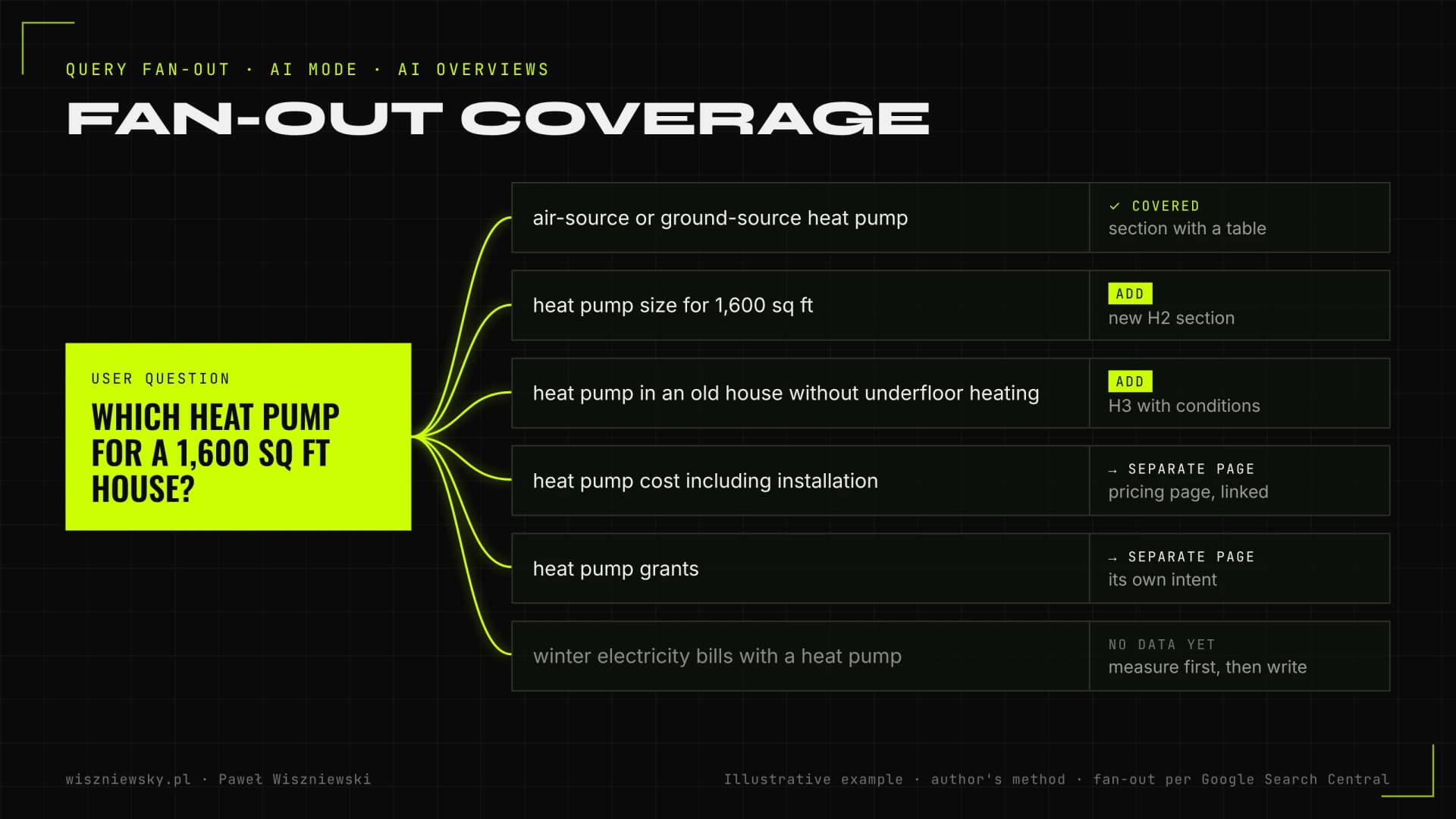
Query fan-out is a set of concurrent, related queries the model generates to gather more sources for an answer. Google's own example: for "how to fix a lawn that's full of weeds", fan-out queries might include the best herbicides for lawns, removing weeds without chemicals and preventing weeds. Your page can be cited for answering a question the user never typed.

Query fan-out coverage map: one heat pump question split into six follow-up queries mapped to page sections, marked as covered, to add, separate page or no data yet.
An example coverage map: each follow-up question gets a section, its own page, or a deliberate skip.

How I collect follow-up questions

  1. I run the main query in AI Mode and note which subtopics appear in the answer and which follow-ups Google suggests.
  2. I collect questions from "People also ask" and search autocomplete.
  3. I generate a list of likely fan-out queries with Gemini through the API, prompting it to break the question into subtopics the way a search engine would. It's a simulation, not Google data, so I always check the output against what AI Mode actually shows.
  4. I group the questions by intent and remove duplicates in meaning.

Section or separate page – how I decide

SituationDecision
The follow-up can be fully answered in 1–3 paragraphs or a tableAn H2 or H3 section on the main topic page
The question has its own intent and its own queries with impressions in Search ConsoleA separate page, linked from a section on the main page
Answering needs data you don't have (e.g. a test you haven't run)Skip it, or plan to get the data instead of writing generalities
The question is outside your offer and expertiseSkip it

That boundary matters. Google's guide to optimizing for generative AI features (updated July 2026) says outright that creating separate content for every query variation, including fan-out queries, mainly to manipulate rankings or AI answers violates its scaled content abuse policy. So I cover follow-ups mostly within existing pages and internal links, and create new pages only where there's a distinct, real intent.

Reworking a page for AI Overviews – what I change and what I leave alone

I only rework passages with a real chance of being cited: a direct answer at the start of the section, a specific detail with a source and a clear structure. I don't chop whole articles into tiny pieces, because the same 2026 Google guide says there's no such requirement and no need to write in a special way for AI.

Those two positions don't conflict. The page should work for people, and a direct answer at the top of a section is simply good editing that AI finds easier to use. Patterns for these paragraphs are in the post on how to write content AI cites; here I focus on what's specific to Google.

The change list I go through for every page

  • Answer in the first sentences of the section – especially for map queries where the page is in the top 10 but not cited.
  • Follow-up questions as headings – based on the fan-out coverage map, without adding sections "just in case".
  • A table where the question is about comparisons or specs – in HTML, not in an image.
  • A first-hand element – your own test, a photo from a real project, data from an implementation. Google's guide encourages non-commodity content based on the author's own knowledge rather than rehashing common information.
  • Images and video – where they support the text, following the image and video SEO practices Google points to in the same guide.
  • Author, update date and structured data that match the visible content – Google stresses that markup has to reflect what's on the page. I cover the implementation in the Schema.org implementation service.
  • Internal links – from the follow-up section to the page that expands on it.

Stores and local businesses

Google's AI answers can include products and information about local businesses. Google says Merchant Center product feeds and Google Business Profiles help with that. For stores and local businesses I therefore check those data sources as well as the site. Details are in the posts on e-commerce SEO and GEO and local SEO in the AI era.

Technical requirements and controlling your presence in AI Overviews – the 2026 picture

Any page that's indexed and eligible to appear in Google with a snippet can show up in AI Overviews and AI Mode. Google requires no extra files or special markup, and since 2026 it gives site owners a dedicated switch in Search Console.

The "Search generative AI" control in Search Console

Search Console settings now include a control covering AI Overviews, AI Mode and generative AI features in Discover. According to Search Console Help, it has been available to all websites worldwide since 31 August 2026. Sites are included by default. Excluding a site means its content isn't shown or linked in those features and isn't used to ground answers, and the site loses the traffic and impressions they would bring. The change usually takes effect within 1–2 days, and Google says the setting isn't a ranking signal for the rest of Search. It works at Search Console property level (child properties can inherit it), not per page.

MechanismWhat it affectsWhen I use it
"Search generative AI" control in Search ConsoleAI Overviews, AI Mode and Discover AI features for the whole propertyAlmost never; only when content loses all value once summarised and citations bring no customers
nosnippet, data-nosnippet, max-snippetSnippets in regular results and in AI featuresSelectively, e.g. data-nosnippet on a passage that shouldn't be summarised
noindexWhether the page is in Google at allOnly for pages that shouldn't be in search
Google-Extended in robots.txtGemini model training and grounding in some other Google systemsA training decision; it doesn't switch off AI Overviews
robots.txt rules for GooglebotCrawling for SearchNever as a way to handle AI Overviews, because it blocks regular results too

What I check on the technical side

  • Whether key pages are indexed and free of an accidental nosnippet or a too-low max-snippet (common in CMS templates).
  • Whether the Search Console control has been switched to exclude, for instance by someone on the team after reading an article about protecting content from AI.
  • Whether the content is in the HTML without JavaScript rendering, or renders correctly in the URL Inspection tool. Google recommends following JavaScript SEO practices; details are in the post on JavaScript SEO.
  • Whether structured data validates and describes what's visible on the page.
  • Whether duplicates are splitting signals across several similar URLs.

How I measure results: Search Console's Generative AI report, citation monitoring and conversions

I measure on three levels: impressions in AI features from the new Search Console report, citations on selected queries from monitoring, and clicks and conversions from organic traffic. None of these sources gives the full picture on its own.

The Generative AI report in Search Console

In June 2026 Google launched performance reports for generative AI features in Search Console, separately for Search and Discover, and since 31 August 2026 they've been available to all websites. The report shows how often URLs from your site appeared in AI features such as AI Overviews and AI Mode, broken down by page, country, device and date. The same data is still included in the overall Performance report too.

Google's announcement lists impressions as the report's metric and says more will be added over time, so I still analyse clicks and queries in the regular Performance report. In practice the Generative AI report answers "which pages does Google show in AI answers, and are there more after the rework", not "how many customers did that bring".

The metrics I report

MetricSourceWhat it tells you
AI feature impressions by pageSearch Console, Generative AI reportWhether reworked pages show up in AI answers more often
Citations on map queries (AIO and AI Mode separately)Repeated monitoring of selected queriesWhich questions you're the source for and where competitors win
Clicks and CTR on queries with AI answersSearch Console, Performance reportWhether citations turn into visits
Organic conversions on reworked pagesGA4 or CRMWhether Google traffic, including AI features, brings customers
Traffic from other assistantsGA4: referrals from chatgpt.com, perplexity.ai and othersWhether the rework helps beyond Google too

Context matters when reading the data. In a 2026 Ahrefs study (300,000 keywords, December 2023 compared with December 2025), the presence of an AI Overview was associated with a 58% lower average CTR for the top result. A drop in clicks with stable rankings doesn't necessarily mean something is wrong with the page, and a citation won't bring back pre-AI traffic levels. That's why I set goals in conversions and citation share, not clicks alone. The GA4 and server-log setup is in the post on measuring traffic from ChatGPT, Perplexity and AI Mode, and the strategy for falling clicks in the piece on zero-click search.

Scope and timeline for AI Overviews and AI Mode optimization

The first phase usually takes 8–12 weeks: analysis and the query map, rework of selected pages, then measurement and fixes. Pricing starts from €1,200 for the analysis and rework of key pages; ongoing monitoring and updates are billed monthly.

PeriodWhat I doWhat you get
Weeks 1–2Query map, cited-page analysis, technical and Search Console settings check, baselineA prioritised query map and a list of 10–30 pages to rework
Weeks 3–7Fan-out coverage maps, passage rework, tables, structured data, author and dates, internal linkingReworked pages live in production
Weeks 8–12Measurement in the Generative AI report, citation monitoring, fixes to pages without resultsA report on changes against the baseline and a plan for the next query groups

If you first want to know how AI describes your brand across all assistants, start with an AI visibility audit. Optimization for ChatGPT, Perplexity and Copilot, which rely on other indexes, is covered by Perplexity, Copilot and ChatGPT Search optimization, and getting Google to recognise the company as an entity by knowledge graph engineering. For the wider context of Google's changes, see the post on AI Overviews and AI Mode.

Frequently Asked Questions

What are Google AI Overviews and AI Mode?

AI Overviews are AI-generated summaries shown above search results, linking to a few sources. AI Mode is a conversational search mode where Google splits a question into many sub-queries and assembles a longer answer. Both draw on Google's index, so solid SEO remains the foundation.

How do I get into AI Overviews?

You need to be indexed by Google, ideally ranking well for the query, and have the passage that best answers the question: short, specific and backed by data. Structured data, a clear author, a current date and follow-up question coverage help. There's no special tag that switches citations on — passage quality and fit decide.

Do AI Overviews take traffic away from my site?

For some queries, yes — 2026 studies show a clear drop in top-result CTR when an AI Overview appears. That's why the goal is to be a cited source: citations build brand visibility, and people clicking through from AI summaries tend to be closer to a decision.

How do I measure traffic from AI Mode and AI Overviews?

Google counts clicks from AI Overviews and AI Mode in the Search Console performance report together with organic results. Since June 2026 Search Console also has a separate generative AI performance report (rolled out to all sites on 31 August 2026) showing impressions of links to your site in AI Overviews and AI Mode by page, country and device. So I combine Search Console data, citation tracking for selected queries and GA4 segments, and identify ChatGPT or Perplexity traffic by referrer.

How much does AI Overviews optimization cost?

AI Overviews and AI Mode optimization starts from €1,200 for the analysis and rebuild of key pages. Ongoing monitoring and content refreshes are billed monthly, depending on the number of queries and pages.

Can I block AI Overviews on my site?

Yes. Since 2026 Search Console has a “Search generative AI” setting (rolled out to all sites on 31 August 2026) that excludes your site from AI Overviews, AI Mode and generative features in Discover — you lose impressions and traffic from those features, but it doesn't affect the rest of Search or model training (that's what Google-Extended is for). You can also limit snippets (e.g. nosnippet), but you'll lose regular result snippets too. It's usually better to be a cited source and get clicks from the summaries.

Will AI Mode replace regular Google results?

For now it runs alongside them, and users can jump from an AI Overview into AI Mode. For businesses that means being visible in both classic results and AI answers.

How long before I see AI Overview citations?

First changes usually show after the rebuilt pages are recrawled, within a few weeks. Competitive keywords need a few months of regular updates.

/// KNOWLEDGE_BASE

From the blog

Got a project?

Terminate
Silence

Initiate protocol. Establish connection. Let's build something loud.

> WAITING_FOR_INPUT...