RETURN_TO_BASE

Web Development

Custom websites, stores and web apps in Next.js and React: landing pages, corporate sites, headless stores, B2B platforms, SaaS interfaces and 3D. 99/100 Lighthouse and SEO built in from day one.

Author: Paweł Wiszniewski · Updated:

Key takeaways

Custom websites, stores and web apps in Next.js and React: landing pages, corporate sites, headless stores, B2B platforms, SaaS interfaces and 3D. 99/100 Lighthouse and SEO built in from day one.

  • ›Next.js & React Architecture
  • ›99/100 Lighthouse & Core Web Vitals
  • ›Headless CMS Integration
  • ›WebGL & 3D Interactions

Web Development – how it works

I build custom websites and web applications with Next.js, React and WebGL — no templates. Every project ships with a 99/100 Lighthouse score, Core Web Vitals in the green and server-side rendering that Google and AI crawlers can read. From high-converting landing pages and multi-page corporate sites to SaaS dashboards, 3D experiences, APIs, databases and CI/CD — one engineer responsible for performance, SEO and code quality end to end.

› CORE_CAPABILITIES:

  • Next.js & React Architecture
  • 99/100 Lighthouse & Core Web Vitals
  • Headless CMS Integration
  • WebGL & 3D Interactions
STRUCT

Who this service is for

  • Companies that need a fast website or store instead of another template.
  • Startups and SaaS products looking for one engineer from frontend to infrastructure.
  • Brands whose slow site hurts conversion and Google rankings.
  • Teams that need help with databases, APIs, cloud and deployments.
/// SYSTEM_MODULES

What's included: Web Development

01

High-Performance Landing Page

Single-page conversion machine built with Next.js, Framer Motion animations, and 99/100 Lighthouse score. Strategy to live in 2 weeks.

from €1,000
02

Corporate Identity Site

Multi-page corporate website with ATS/CRM integrations, investor relations zone, and 99/100 Lighthouse. Builds institutional trust at scale.

from €3,000
03

SaaS Dashboard UI/UX

Figma design system, React + TypeScript component library, D3.js/Recharts dashboards. UI that activates users and reduces churn.

Custom Quote
04

3D Web Experience

Three.js / WebGL product configurators, interactive backgrounds, virtual showrooms. 60fps on mobile, 99/100 Lighthouse, from €4,000.

from €4,000
05

Next.js Migration

Migrate your legacy React / Angular / Vue app to Next.js App Router. SSR, SSG, ISR, React Server Components—zero regression, from €2,500.

from €2,500
06

GraphQL API Design & Implementation

GraphQL schema design, resolvers, real-time subscriptions. Data queries without over-fetching.

from €2,500
07

Third-Party API Integration

Stripe, Shopify, SendGrid, Twilio, OpenAI, Gemini. Webhooks, OAuth, API security.

from €1,500 / integration
08

Database Design & Normalization

Relational schema design. Normalization vs. denormalization trade-offs.

from €1,500
09

Query Optimization & Performance Tuning

EXPLAIN ANALYZE, index optimization, query rewriting. 10-100x speedup.

from €1,200
010

Cloud Architecture & Scaling

Infrastructure design for your application on AWS/GCP/Vercel. Scaling from 100 to 1M users.

from €3,000
011

CI/CD Pipeline & DevOps

Deployment automation. Code → Git Push → Automated tests → Production (zero downtime).

from €2,000
012

Headless Shopify Store

Next.js frontend powered by Shopify's commerce engine. Full design freedom, zero template limits, 100/100 PageSpeed, and SEO dominance for product search terms.

from €4,500
013

Dedicated B2B Platform

B2B wholesale platform with contract-specific pricing, credit limits, and ERP sync. Replaces phone and email ordering with a self-service portal your buyers use 24/7.

Custom Quote
/// GUIDE

Next.js website development – a practical guide for businesses (2026)

This guide answers the questions I hear before every project: do you need a website, a store or a web app, how to build a site that Google and AI search can read, which CMS to choose, when headless Shopify makes sense, what it costs and how to judge a developer. It is short and to the point. Every number has a source, and where I describe my own method, I say so.

Next.js website development – how it differs from a template site

A Next.js website is code written for one specific site, where a developer decides how each page is generated, how fast it loads and what bots see, instead of a theme and a stack of plugins. A template site launches faster, but it inherits someone else's code, most of which you don't need.

Next.js is a React framework that can produce HTML ahead of time, on the server for each request, or in the browser. For a business that means three things: the content is in the HTML before any JavaScript runs, the page loads only what it uses, and new features (a calculator, a client portal, a CRM integration) are added in the same project rather than through yet another plugin.

I don't think every site has to be built in Next.js. If you need a simple brochure site edited by a few people and you don't plan to grow it, a well-maintained WordPress install will do. I choose Next.js when the site has to earn money: generate leads, sell, serve customers or grow new features.

Business website, online store or web app – what you actually need

The type of project follows from what the user has to do: read and get in touch (website), buy (store), or do work after logging in (web app). That answer drives the architecture, the budget and the timeline.

  • Landing page – one page, one goal, usually a paid campaign or a launch. See high-performance landing page.
  • Business website – a dozen to a few dozen pages for customers, candidates and partners, with a CMS and integrations. That is the scope of a corporate website.
  • Online store – catalogue, cart, payments. When a theme stops being enough, I propose a headless Shopify store; for wholesalers with per-customer price lists, a B2B platform.
  • Web app – a dashboard, portal or internal system. Data design, APIs and permissions matter here as much as the interface.

Mixed projects are common: a business site with a client portal, or a store with a product configurator. Plan one shared architecture from the start instead of bolting an app onto a site built on a different system.

SEO-ready architecture – rendering, Core Web Vitals and structured data

An SEO-ready site sends its content, links and structured data in the server's HTML and stays within the Core Web Vitals thresholds. You can't add this properly after launch, because it depends on the rendering approach chosen at the start.

Rendering: what Google and AI crawlers see

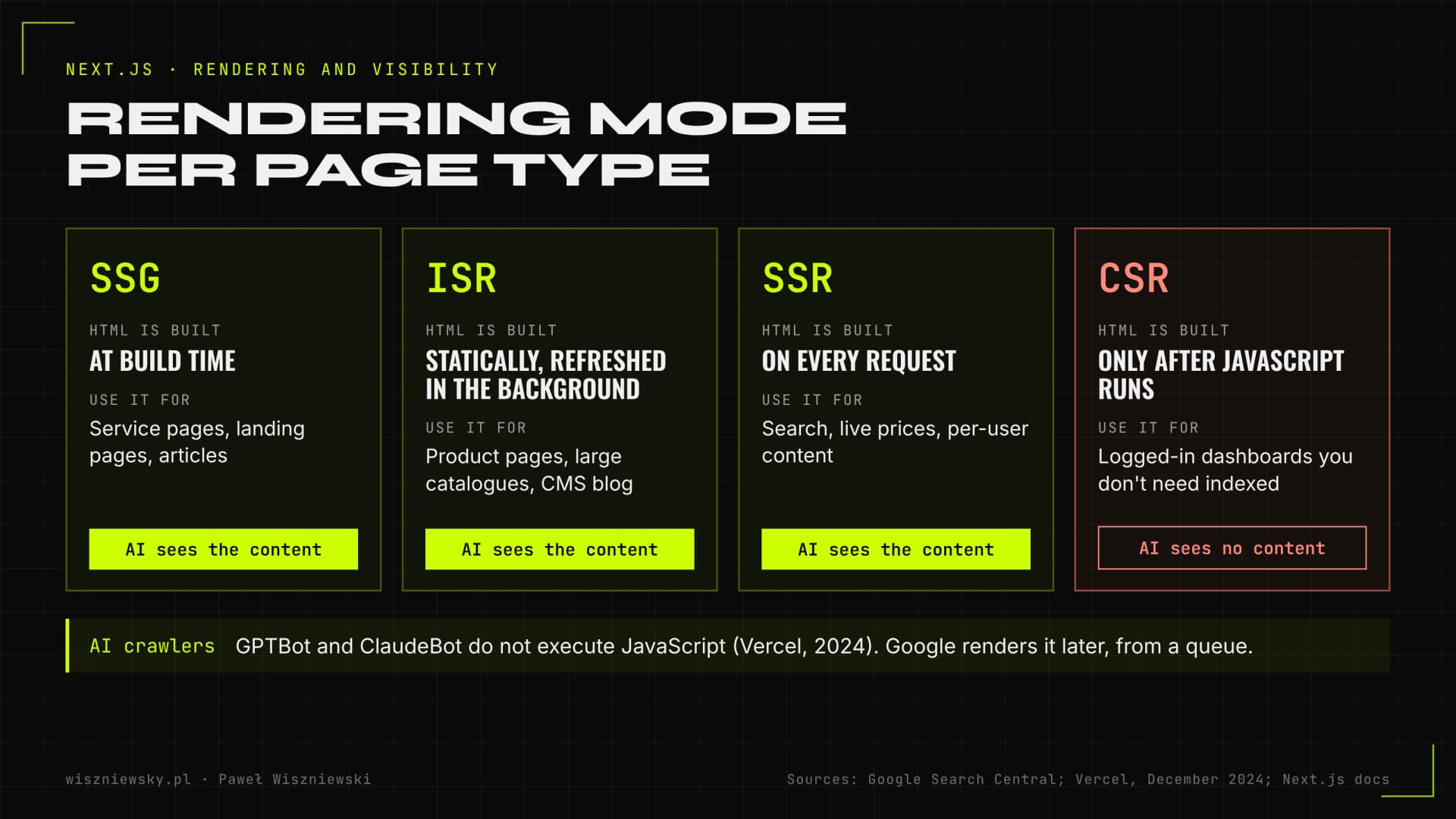
Google processes JavaScript pages in three phases: crawling, rendering and indexing, and rendering waits in a queue. Google's JavaScript SEO documentation still calls server-side rendering or pre-rendering "a great idea" and reminds readers that not all bots can run JavaScript. In "The rise of the AI crawler" (2024), Vercel found that none of the major AI crawlers, including GPTBot and ClaudeBot, rendered JavaScript at the time. Content that only appears after scripts run may simply not exist for ChatGPT or Claude. I go deeper in my post on JavaScript SEO and AI crawlers.

ModeWhen the HTML is builtGood fit
SSG (static)At build timeService pages, landing pages, articles
ISRStatically, refreshed in the background on change or on a timerProduct pages, large catalogues, CMS-driven blog
SSR (server)On every requestPer-user content, site search, live prices
CSR (browser)Only after JavaScript runsLogged-in dashboards that don't need indexing

The Next.js docs describe ISR as updating static pages without rebuilding the whole site, which lets you serve large amounts of content without long builds. In practice I pick the mode per page type, not one mode for the whole site.

Map of Next.js rendering modes: SSG, ISR, SSR and CSR matched to page types, noting that AI crawlers do not execute JavaScript
Choosing a rendering mode per page type. Sources: Google Search Central (JavaScript SEO), Vercel (2024), Next.js docs.

Core Web Vitals and structured data

According to web.dev, a page has good Core Web Vitals when LCP is 2.5 s or less, INP 200 ms or less and CLS 0.1 or less, measured at the 75th percentile of visits. Google recommends hitting these, but its page experience documentation says good scores don't guarantee top rankings, because relevance comes first. I treat speed as a requirement, not an advantage on its own. My Core Web Vitals guide covers how to fix each metric.

Structured data gives Google, in its own words, explicit clues about the meaning of a page and can enable rich results. Google recommends JSON-LD. I generate it from the same data as the visible content (Organization, Product, BreadcrumbList, FAQ), so the schema never drifts from what users see. Details are in my Schema.org guide.

Which CMS to choose – WordPress, headless CMS or Shopify

I choose a CMS based on who edits content, how often, and what the site has to do beyond displaying text. There is no best system, only one that fits your team.

  • WordPress (classic) – sensible for a simple site, many editors and a small development budget. Weak spot: plugins that slow the site down and need constant security updates.
  • Headless CMS (Sanity, Contentful) – you edit content in a dashboard and the Next.js frontend pulls it through an API. A good choice when speed, language versions and custom components matter. Most of the business sites I build use this setup.
  • Shopify – when you sell online and want a proven backend for products, payments and orders. The storefront can stay on a theme or go headless.
  • No CMS – a campaign landing page that rarely changes sometimes doesn't need an editor. I make changes in code, which can be cheaper than maintaining a system.

Whatever the option, one rule holds: the content, the code and the accounts (domain, hosting, CMS) belong to you. Parting ways with a developer must never mean losing your site.

Headless Shopify – when a custom storefront makes sense

Headless Shopify keeps Shopify as the engine for products, payments and orders, while the storefront customers see is built separately, in my case in Next.js. Shopify describes it as all the power of Shopify under the hood with complete control over the frontend.

It makes sense when the theme is holding you back: you need an unusual UX, you combine selling with rich content, you sell in several countries, or product pages are slow because of apps and scripts. It doesn't make sense for a new store with a dozen products where nobody touches the layout. Invest in a good theme and content instead.

Shopify offers its own framework, Hydrogen, hosted on Oxygen. I build the storefront in Next.js because one project then covers the store, the blog, a headless CMS and the company site. Your team keeps working in Shopify Admin; only the layer customers see changes. The scope is described under headless Shopify store.

Migrating to Next.js without losing Google rankings

A Next.js migration is safe when every old URL has a new equivalent and a 301 redirect, and metadata, structured data and internal links move together with the content. The biggest drops I see come from lost URLs, not from the change of technology.

Google's site move documentation recommends server-side redirects from old to new URLs according to your mapping, without chains and without sending everything to the home page. Keep the redirects for as long as possible, generally at least a year. Google also warns that on a medium-sized site it can take a few weeks or more for the new URLs to replace the old ones in results, and ranking fluctuations in that period are normal.

  1. Export every URL: from the sitemap, a crawl, Search Console and backlink data.
  2. Build a 1:1 redirect map and decide which pages to merge or remove.
  3. Migrate route by route, starting with the highest-traffic pages, with tests before and after.
  4. Switch over and monitor 404s, indexing and Core Web Vitals over the following weeks.

That is how I run a Next.js migration. If the domain or the whole site structure changes too, I follow the checklist from SEO migration without losing rankings.

How a website or web app gets built – the process step by step

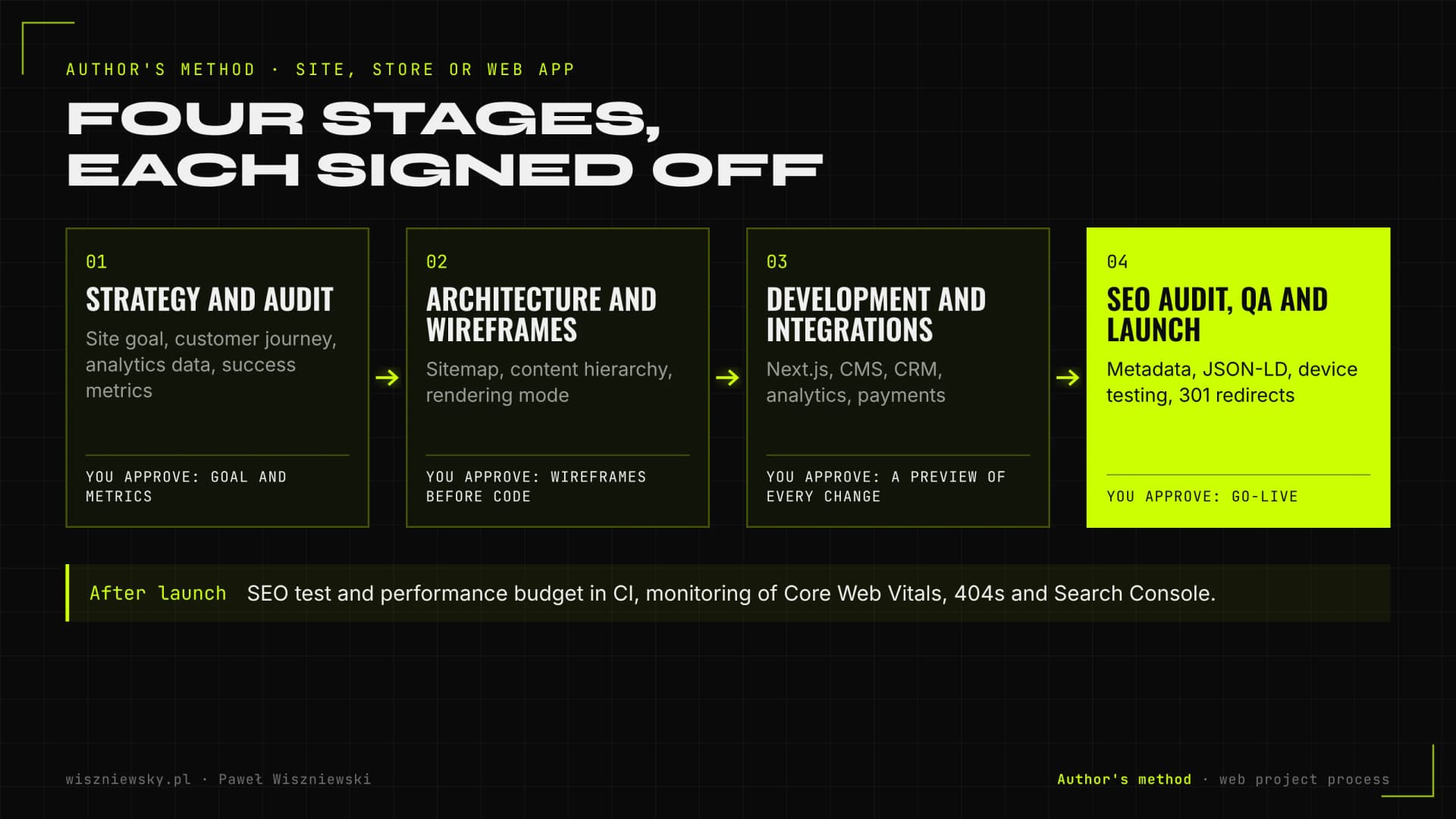
I work in four stages: strategy and audit, information architecture with wireframes, development with integrations, and SEO audit, QA and launch. Each stage ends with something you approve before I move on.

Paweł Wiszniewski's own method: four stages of building a website, from strategy and audit through wireframes and development to SEO audit, QA, 301 redirects and monitoring
Author's method: project stages and what you approve after each one.
  • Strategy and audit – the site's goal, the customer journey, analytics data and success metrics. Without this you design something pretty, not something that works.
  • Architecture and wireframes – sitemap, content hierarchy and wireframes for approval before any code is written.
  • Development and integrations – Next.js code, CMS, forms, CRM, analytics, payments. Every change goes to a preview you can click through.
  • SEO audit, QA and launch – metadata, structured data, device testing, 301 redirects and monitoring after go-live.

On the client side, the biggest time sink is usually supplying copy and photos. That's why I ask for them at the wireframe stage, not a week before launch.

How much a website costs and how long it takes

With me, a landing page starts from €1,000, a corporate website from €3,000, a Next.js migration from €2,500 and a headless Shopify store from €4,500. SaaS interfaces and B2B platforms are quoted individually, because their cost depends mainly on integrations and business logic.

ProjectPrice fromTypical timeline
Landing page€1,000about 2 weeks
Corporate website (15–30 pages)€3,0006–10 weeks
Next.js migration€2,5002–3 weeks (10–20 pages), 6–10 weeks (50+ routes)
Headless Shopify store€4,500after a store audit
3D / WebGL experience€4,000after the concept is agreed
Third-party API integration€1,500 / integrationdepends on the provider
B2B platformcustom quote12–20 weeks

What drives the price up

  • Integrations – CRM, ERP, ATS, payments. Every external system means documentation, testing and error handling.
  • Language versions – separate content, hreflang and often separate CMS workflows.
  • Content migration – moving hundreds of posts and URLs with redirects is real work, not copy and paste.
  • Custom features – configurators, calculators, client portals, 3D.
  • Content readiness – a project without copy and photos takes longer and costs more, because wireframes need rework.

When comparing quotes, look at total cost: hosting, CMS and plugin licences, maintenance and the cost of every future change. A cheap template can get expensive in year two.

How to measure results and maintain the site after launch

I measure a site by leads or sales, organic traffic and Core Web Vitals from real-user data, not by a single Lighthouse run. Maintenance means security updates, monitoring and small improvements, not just paid hosting.

  • Business – conversions in GA4 (form, call, purchase) and cost per lead from campaigns.
  • Visibility – clicks, impressions and indexed pages in Search Console, and increasingly your brand's presence in AI answers.
  • Technical – field Core Web Vitals, 404 and 5xx errors, server response time.

The past year shows why maintenance matters. In December 2025 the React team disclosed a critical vulnerability in React Server Components (CVE-2025-55182, CVSS 10.0) that allowed remote code execution and affected Next.js among others. The fix was an immediate upgrade. A site without someone watching these advisories stays exposed, even though it "still works".

The second topic is accessibility. The European Accessibility Act (Directive 2019/882) applies from 28 June 2025 and covers e-commerce services among others. In Poland it is implemented by an act of 26 April 2024; according to gov.pl, it does not apply to services provided by micro-enterprises, but a larger store has to ensure digital accessibility. Check with a lawyer whether it applies to your business. I build semantic HTML, contrast and keyboard support from day one, because retrofitting them costs more.

Agency or freelancer – how to choose a web developer and which mistakes to avoid

An agency makes sense when you need many roles at once (branding, campaigns, video) and a large team. An independent specialist works well when you want to talk directly to the person who writes the code and owns the result. Either way, the answers to a few questions matter more than the business model.

Questions to ask before signing

  • Who exactly will write the code, and can I talk to them?
  • How will you choose the rendering approach and check what Google and AI crawlers see?
  • Who builds the redirect map when the site changes, and from what data?
  • Who owns the code, the repository, the domain and the accounts?
  • What does maintenance include: updates, backups, response to vulnerabilities?
  • Can I see live projects and their results, not just screenshots?

The most common mistakes when commissioning a website

  • Choosing by the look of a mockup – without a goal, a customer journey and metrics, the site is pretty but doesn't sell.
  • SEO "later" – rendering, URLs and heading structure decided after launch mean a rebuild.
  • Migrating without a 301 map – the fastest way to lose years of work on visibility.
  • Code and accounts in the developer's name – makes switching providers hard and can become leverage.
  • No maintenance budget – an unpatched site keeps its vulnerabilities and slows down with every plugin.
  • A plugin for everything – every extra script costs speed, and hardly anyone counts it.

I combine the roles of Next.js developer and SEO specialist, so I plan architecture and visibility together. If you already have a site and want to know what slows it down first, start with a technical audit and Core Web Vitals review.

/// KNOWLEDGE_BASE

Read more

Articles that dive deeper into this service.

AI & SEO

AI Browsers and Agent Experience (AX) - Can an Agent Actually Use Your Website?

Within twelve months we got Comet from Perplexity (free worldwide since October 2025), Claude for Chrome and ChatGPT Atlas - and in July 2026 OpenAI announced it is retiring Atlas and folding agentic browsing directly into ChatGPT. Browser brands come and go, but the capability stays: an agent that clicks, fills forms and completes tasks on your site on the user's behalf. Crawlers only needed readable HTML - an agent has to be able to ACT. What Agent Experience (AX) is, what most often blocks agents (captchas, modal walls, div-buttons, unlabeled forms) and how to test your own site with an agent in 30 minutes.

14 min
AI & SEO

JavaScript SEO - What Googlebot and AI Crawlers Really See Without Rendering

Googlebot renders JavaScript - late and at its own cost. Most AI crawlers never render it at all: Vercel's study showed GPTBot, ClaudeBot and PerplexityBot fetch JS files but don't execute them. How to check in 5 minutes what bots really see, how CSR differs from SSR/SSG/ISR, and how to fix an SPA without rewriting the whole app.

13 min
AI & SEO

Core Web Vitals 2026 - How to Improve LCP, INP and CLS

Core Web Vitals are the three metrics of real user experience: LCP (how fast content appears), INP (how fast the page responds) and CLS (does the layout jump). I explain the exact thresholds, the common causes and concrete fixes - including Next.js levers - without chasing a perfect Lighthouse 100.

13 min
/// FAQ

Frequently Asked Questions

Why Next.js instead of WordPress?

Next.js renders pages statically or on the server, so they load faster, are more secure and are easier for Google and AI crawlers to index. WordPress makes sense for simple sites edited by many people; for sites built around speed, conversion and custom features I choose Next.js with a headless CMS.

How much does a Next.js website cost?

Landing pages start from €1,000, corporate websites from €3,000 and migrating an existing site to Next.js from €2,500. SaaS interfaces are quoted individually after a short consultation.

Will I be able to edit the content myself?

Yes. I connect a headless CMS (such as Sanity or Contentful) where you edit copy, images and posts without a developer. The code and content are fully yours.

Got a project?

Terminate
Silence

Initiate protocol. Establish connection. Let's build something loud.

> WAITING_FOR_INPUT...