AI assistant that answers questions using only your internal documents—contracts, policies, manuals. Every answer cited, zero hallucinations.
›Answers grounded exclusively in your documents—the AI cannot fabricate information that isn't present in your actual knowledge base.
›Source citation for every answer—users see exactly which document and paragraph the answer came from, enabling fast verification.
›Handles diverse document formats natively: PDF, DOCX, Notion, Confluence, Google Docs, and plain text out of the box.
Price: from €2,000
SERVICE DETAILS
I build Retrieval-Augmented Generation (RAG) systems that give your team an AI assistant grounded exclusively in your own documents. Upload contracts, policies, product manuals or internal wikis — hybrid search (vectors + keywords) with reranking retrieves the most relevant passages and the LLM answers with exact source citations. I deploy and tune vector databases (Pinecone, Weaviate, Qdrant, pgvector), choose the right chunking strategy and measure quality on a test set before launch. With a self-hosted setup, no data ever leaves your infrastructure.
› INVESTMENT:
from €2,000
constmodule = newExecutionProtocol();
// Initializing rag-implementations... › Loading dependencies... OK › Establishing connection... OK › Ready for deployment... AWAITING_COMMAND
Paweł Wiszniewski · my approach
What I do differently
RAG isn't a buzzword for me but a system I can show step by step: the Research Agent demo shows a question split into sub-queries, vector search at work and an answer composed with citations. In production I built, among others, a quoting engine for a general contractor using RAG over 70 historical cost estimates (the Konkret case study). I always start with a test question set and measure quality before launch — without it, RAG “works in the demo” and fails in production.
I think 80% of RAG quality comes down to retrieval, not the model. Companies swap in a pricier model while the problem lies in how documents were chunked and how the system finds passages.
From the market
Anthropic published results for its Contextual Retrieval technique: adding context to document chunks and combining vector search with BM25 cut failed retrievals by 49%, and by 67% with reranking. That improvement came without changing the language model — exactly where I usually look for gains in RAG systems.
Companies where staff waste time searching contracts, procedures and wikis.
Support and sales teams that need fast, verified product answers.
Law firms, offices and compliance teams working with large document sets.
Organizations that can't send data to public AI tools without control.
What you get
An inventory of knowledge sources and a plan for which documents and systems to connect.
An indexing pipeline with chunking, embeddings and incremental updates.
Hybrid search with reranking and answers that cite their source.
Access control: everyone sees only the documents they're allowed to.
A chat interface or integration with Slack, Teams or your intranet.
How results are measured
Retrieval and answer accuracy on a test question set.
Share of answers backed by the right source.
Time to find information before and after launch.
Weekly active users and questions asked.
Key Benefits
Answers grounded exclusively in your documents—the AI cannot fabricate information that isn't present in your actual knowledge base.
Source citation for every answer—users see exactly which document and paragraph the answer came from, enabling fast verification.
Handles diverse document formats natively: PDF, DOCX, Notion, Confluence, Google Docs, and plain text out of the box.
Access control layer—different user roles query only the documents they're authorized to see, enforced at the vector search level.
Self-hostable architecture—your documents and queries never leave your servers; compliant with GDPR, HIPAA, and enterprise data governance requirements.
Hybrid search (dense vectors + BM25) with cross-encoder reranking — captures both intent and exact terminology, keeping retrieval precision above 90% across millions of documents in under 100 ms.
Hallucination guardrails: confidence scoring and an explicit “I don't know” fallback when your documents don't support an answer.
The Process
1
Document Inventory & Chunking Strategy
I inventory your documents and choose the optimal chunking strategy—by section, by paragraph, or by semantic block—for your specific content type and query patterns.
2
Vector Store Setup
I configure the vector database (Pinecone, Weaviate, or pgvector), define metadata schemas for filtering, and index all documents with quality embeddings.
3
Retrieval & Generation Pipeline
I build the query pipeline: embed user question → vector search → rerank results → inject context into LLM prompt → return answer with source citations.
4
UI, Access Control & Launch
I build or integrate the chat interface, implement authentication and document-level access control, test accuracy on 100+ representative questions, and deploy.
RAG on company docs vs fine-tuning vs generic ChatGPT
Criterion
RAG on company docs
Model fine-tuning
Generic ChatGPT
Answer accuracy
High on internal knowledge
High once trained
Low on private data
Source citations
Yes, every answer cited
No native citations
No
Hallucination risk
Low — grounded in your docs
Medium
High on domain facts
Update effort
Re-index changed documents
Retraining required
Not applicable
Setup cost
Moderate one-time build
Higher — training and data prep
Lowest, off the shelf
Data privacy
Self-hostable, GDPR-friendly
Depends on training setup
Sent to a third party
Best for
Q&A over evolving documents
Fixed style or task behaviour
General, non-sensitive use
Common mistakes
✕Dumping all documents into a vector database without cleanup, versioning or removing outdated ones.
✕No access control, so every employee sees every document.
✕Judging quality “by eye” instead of on a test set with expected sources.
✕One chunking strategy for contracts, manuals and emails alike.
When this service is not worth it
—You have a dozen documents that fit in a model's normal context window.
—The information lives in database tables — text-to-SQL is a better fit.
—The documents are outdated and nobody is responsible for maintaining them.
/// GUIDE
RAG implementation for business – how I build an AI knowledge base that holds up in production
This guide covers the decisions in a RAG project that come before anyone picks a model: whether you need custom RAG at all, how to prepare documents, how to handle non-English search, how to enforce permissions and how to measure quality before launch. It also covers running costs and maintenance, because a knowledge system keeps changing with your documents. Every number has a source, and where I describe my own method I say so.
Do you need custom RAG – long context, an off-the-shelf Copilot or a bespoke system
Custom RAG makes sense when your documents don't fit in one context window, when different people should see different documents and when answers must point to their source. If the knowledge fits in a few hundred pages, or you already run a tool with well-managed permissions, something simpler often does the job.
In its write-up of Contextual Retrieval (2024), Anthropic says it plainly: if your knowledge base is under 200,000 tokens (about 500 pages), you can skip RAG and put the whole thing in the prompt, and prompt caching then cuts cost by up to 90% and latency by more than half. Beyond that size the problem isn't just the limit. The “Lost in the Middle” study (Liu et al., TACL 2024) found that models use information at the start and end of a long context best and the middle worst. Chroma's “Context Rot” report (2025) tested 18 models and confirmed that reliability drops as input grows, even on simple tasks. With thousands of documents, giving the model a few relevant passages beats handing it the whole archive.
Situation
What's usually enough
When I move to custom RAG
Up to a few hundred pages of stable knowledge (terms, price list, FAQ)
Full text in a cached prompt
When content grows or answers must cite a specific clause
Documents in Microsoft 365 or Google Workspace, permissions in order
Copilot or the vendor's assistant with connectors
When you need control over retrieval, your own sources or measured quality
Data lives in tables (orders, stock, invoices)
Model-generated SQL or a plain report
When contracts, notes and descriptions join the tables
Thousands of documents across systems, different access levels
—
Straight away: index, permissions, test set
Data can't leave the company
—
Self-hosted RAG with a local model, or a cloud model under a data processing agreement
Off-the-shelf assistants inherit whatever permissions you already have. Microsoft's Copilot readiness documentation (2026) says Copilot and agents retrieve data from Microsoft Graph while respecting existing permissions and sharing settings, and also notes that SharePoint defaults to the most permissive sharing option. So if the payroll folder was shared with “everyone in the company”, the assistant will surface it. Tidy permissions are a precondition for every one of these paths.
Preparing documents for RAG – inventory, parsing and metadata
RAG quality starts before indexing: the system can only answer as well as it reads your documents. The biggest problems I see are scans with no text layer, tables broken into loose words and several versions of the same procedure with nothing saying which one applies.
Inventory checklist
Sources: where documents live (drive, SharePoint, Confluence, Notion, helpdesk, CRM) and whether they can be read via API or only by export.
Owner: who keeps each source current. No owner, no place in the index.
Versions: which version is in force; I remove old versions or tag them in metadata so they don't win in search.
Format: text PDF, scan needing OCR, DOCX, spreadsheet, wiki page, email. Each needs a different parser.
Permissions: who may see each document; I store this alongside every chunk in the index.
Personal data: whether documents contain customer or employee data and whether it belongs in a knowledge base at all.
Document type decides how it's processed
Document type
Typical problem
What I do
Contracts and terms
Cross-references to clauses, definitions at the top
Split by clause; add contract title, parties and clause number to each chunk
Procedures and manuals
Steps split across several chunks
Keep a whole procedure or section together, even if the chunk gets longer
Scanned PDFs
No text, or OCR errors in figures
OCR with spot checks, especially amounts, dates and reference numbers
Tables and spreadsheets
Rows and headers lose meaning as plain text
Turn rows into sentences with column names, or route questions to SQL
Helpdesk and FAQ
Short entries, many near-duplicates
One entry per chunk; deduplicate
Emails and notes
Quoted threads, signatures, personal data
Strip signatures and quotes; often keep them out of the index
Every chunk gets metadata: source, title, section, effective date, language and permission group. That lets you filter retrieval (say, only this year's sales procedures) and show the user where an answer came from. A production example on unusual documents is the quoting engine in the Konkret case study: 70 historical cost estimates totalling 3.2 GB won't fit in any context window, so the model gets only the few most similar estimates picked by retrieval.
Chunking and indexing – where I start and what I change after testing
I start by splitting text into chunks of a few hundred to around a thousand-plus characters with a small overlap, then change the strategy for document types where tests show errors. No single chunk size suits contracts, manuals and FAQs at once.
In my Research Agent demo on this site, the chunker packs whole sentences up to 1,200 characters and carries 180 characters of overlap into the next chunk, so a sentence on the boundary keeps its context. That's a reasonable baseline for running text. In production I add three things the demo deliberately leaves out: hybrid search (vectors plus BM25), reranking and context prepended to each chunk.
Chunk context is a short line such as “From the service agreement with Company X, clause 7, penalties”, generated by a model at indexing time. Anthropic (2024) put the one-off cost at about $1.02 per million document tokens with prompt caching. For a typical company knowledge base that's negligible next to the time people lose on bad answers. Chunking, hybrid search and reranking with code are covered in Advanced RAG – chunking, hybrid search and reranking.
What I check in the index before the first quality test
A random 30–50 chunks: do they make sense without the rest of the document, and do they cut off mid-list or mid-table?
Did numbers, dates and product names survive parsing intact?
Does every chunk carry full metadata, including its permission group?
Does updating a document replace its chunks rather than add new ones next to the old?
Does deleting a document at the source remove it from the index?
The choice of vector database rarely decides quality. It decides cost, hosting and whether hybrid search and metadata filtering come built in. I compare pgvector, Pinecone, Qdrant and Weaviate in Vector databases – how to choose for RAG.
RAG beyond English – embeddings, inflection and hybrid search
Inflected languages such as Polish make retrieval harder, so for non-English documents I almost always combine vector search with keyword search and test the embedding model on the company's own questions rather than on a public leaderboard.
For Polish the best public reference is PIRB (Polish Information Retrieval Benchmark), built at Poland's National Information Processing Institute and published at LREC-COLING 2024. It spans 41 retrieval tasks, including medical, legal and business sets. The authors compared more than 20 models and concluded that dense models perform best and hybrid methods improve results further. That matches what I see in projects: semantic search alone misses contract numbers, product codes and proper names, while BM25 alone doesn't see that “terminating the contract” and “giving notice” are the same question.
How I choose an embedding model
Collect 50–100 real questions from staff or customers, including typos, abbreviations and industry jargon.
Map each question to the document and chunk that should be found.
Compare 2–4 models (commercial and open, multilingual and language-specific) on the same index, measuring how often the right chunk lands in the top few results.
Only then weigh cost, vector size and whether the model can run on-premises.
Switching embedding models after launch means re-indexing the whole base, because vectors from different models aren't comparable. That's why I settle it during testing, not after the first user complaints.
RAG permissions and security – who sees what, and what a document can inject
In RAG, permissions must be enforced at retrieval time, not when the answer is displayed: a chunk the user may not see must never reach the model's context. The second risk is documents carrying hidden instructions for the model.
OWASP's Top 10 for LLM Applications 2025 added a dedicated category, LLM08: Vector and Embedding Weaknesses, aimed squarely at RAG systems. It lists data leaks through misaligned access controls, cross-tenant leakage in a shared vector store, knowledge-base poisoning and recovery of source text from the vectors themselves. Its example is a CV with hidden text instructing the system to recommend the candidate.
Rules I apply in every RAG build
Permission filter in the query: every search carries the user's groups, taken from the login system, never from the question text.
Permission sync: when someone loses access to a folder at the source, they lose it in the assistant at the next sync.
Separate collections for external users: a customer-facing assistant never shares a collection with the internal one.
Content checks on ingest: I strip hidden text, white-on-white fonts and comments, and treat outside documents (CVs, bids, emails) as untrusted.
Chunks are data, not commands: the prompt separates instructions from document content, and the model has no tools a document could trigger.
Retrieval logs: I record who asked what and which chunks they got, so every answer can be explained.
Vectors are data too. Since text can be partly reconstructed from them, a vector store needs the same protection as a document store: encryption, backups and access control. Attacks on RAG and agents are covered in Prompt injection and LLM application security, and personal data in prompts in GDPR and AI.
RAG evaluation – how I measure retrieval and answer quality before launch
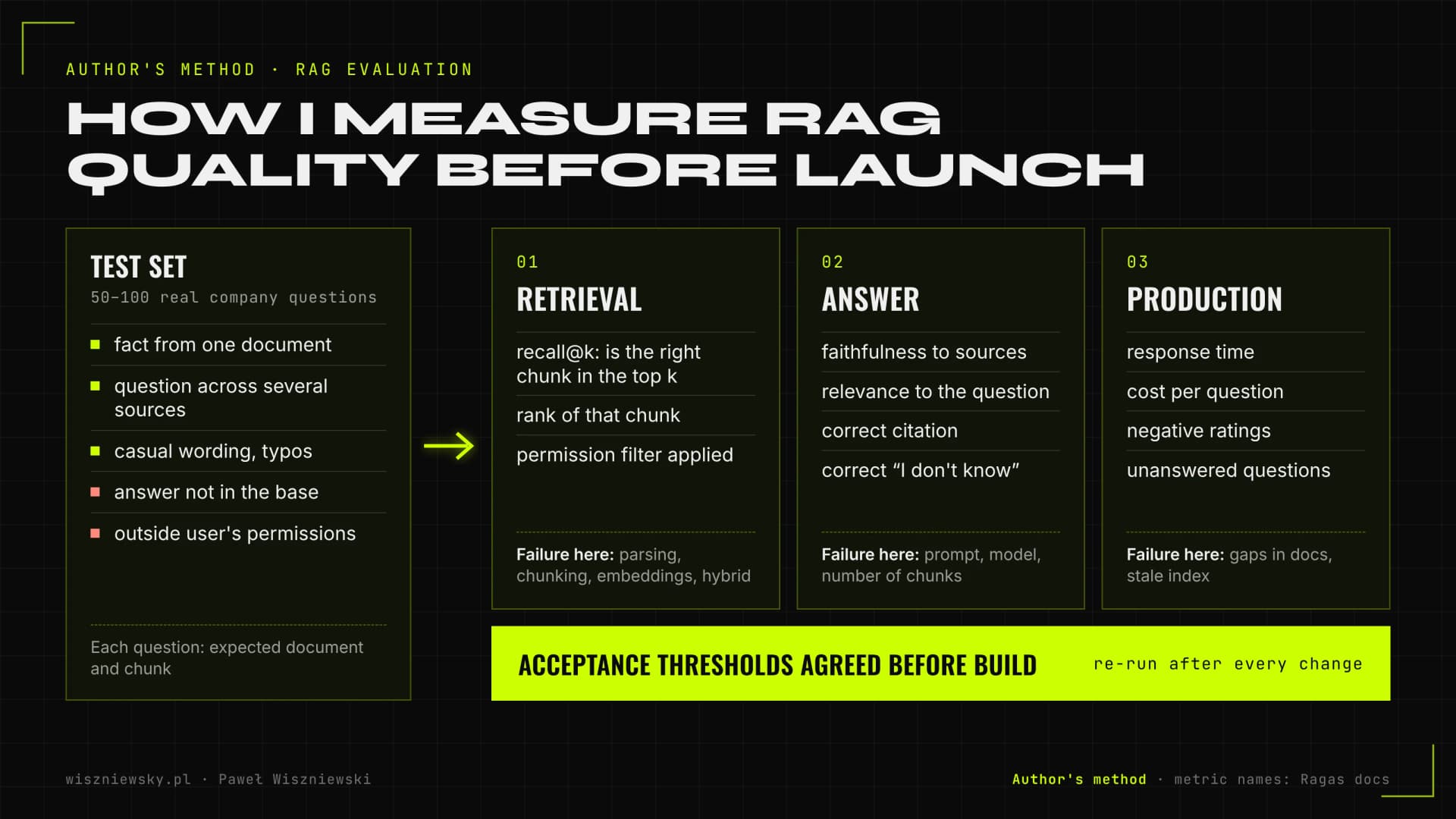
I measure RAG quality separately for retrieval and for answers, because they're two different sources of error. If the right chunk wasn't found, no model will answer well; if it was found and the answer is still wrong, the problem is in the prompt or the model.
RAG doesn't guarantee zero hallucinations. A Stanford team (Stanford HAI, 2024) tested commercial RAG-based legal research tools: Lexis+ AI gave incorrect information in more than 17% of answers and Westlaw AI-Assisted Research in more than 34%. These were tools from major publishers with strong databases. So I treat a “zero hallucinations” promise as a red flag and give clients a measured error rate on their own questions instead.
RAG evaluation in three layers: retrieval, answer and production. Author's method; answer metric names follow the Ragas documentation.
What goes into the test set
Question type
Example
What counts as a pass
Fact from one document
What's the return window for business customers?
Correct answer citing the right clause
Question spanning documents
Does the complaints procedure differ between contract A and B?
Both sources found, difference described correctly
No answer in the base
What's the 2028 price list?
System says it doesn't have that information
Outside the user's permissions
A sales rep asks about salaries
No answer and no chunk in the context
Casual question with typos
how many days to return if i bought in store
Right chunk found despite different wording
Metrics and thresholds
Retrieval: whether the right chunk is in the top k results (recall@k) and how high it ranks. This runs without the generating model, so it's fast and cheap.
Answer: faithfulness to sources (every claim follows from the chunks), relevance to the question and citation accuracy. The Ragas library calls these Faithfulness, Response Relevancy, Context Precision and Context Recall, among others.
Refusals: the share of correct “I don't know” answers on unanswerable questions, and the share of unnecessary refusals where an answer exists.
Production: response time, cost per question, share of answers rated negatively by users.
I agree acceptance thresholds with the client before building, not after the first results. Part of the scoring is done by a model acting as judge, but I calibrate it by hand on a sample, because judges get things wrong too. The method is described in LLM evaluation with LLM-as-a-judge, and wiring tests into the release process in How to write tests for AI applications.
Classic RAG, agentic RAG and GraphRAG – which variant to choose
For most company knowledge bases, classic RAG with hybrid search and reranking is enough. I add agentic RAG when questions are complex and need several searches, and consider GraphRAG only for questions about a whole corpus, such as main themes or relationships.
Variant
How it works
When it makes sense
Cost and risk
Classic RAG
One search, a few chunks, an answer with citations
Factual questions about procedures, contracts, manuals
Cheapest and fastest, easiest to measure
Agentic RAG
The model breaks the question into sub-queries and decides when to search again
Comparative and multi-step questions, research
Several model calls per question, longer response time
GraphRAG
The model builds a graph of entities and relations plus summaries of topic clusters
Whole-corpus questions: main themes, links between parties
Expensive model-driven indexing, harder updates
RAG plus SQL
Some questions go to a database, some to documents
Questions mixing system figures with document content
Needs careful database permissions
GraphRAG was described by Microsoft Research in “From Local to Global” (2024). The authors show that plain RAG struggles with questions like “what are the main themes in this dataset?”, because that's summarising a corpus rather than retrieving one passage. Indexing, however, runs the whole corpus through a model, so it suits stable, high-value collections, not a wiki that changes daily.
I show agentic RAG in the Research Agent demo. One lesson from building it applies to every project: the first step forces a knowledge-base search. Without it, the model sometimes answered straight from the question and, following the “answer only from the base” instruction, refused questions the base actually covered. Later steps are left to the model, and in the final step tools are switched off so an answer always comes out. Designing these loops is covered in Context engineering. When the assistant should also take actions in your systems, that's the scope of AI agents for business.
RAG implementation cost and running costs – what they're made of
My RAG implementations start from €1,400, and running costs come from four items: embeddings, the vector database, the model that writes answers, and maintenance. Embeddings are usually the cheapest part; the answering model and people's time keeping documents current cost the most.
Item
What drives it
How I keep it down
Embeddings
Tokens in your documents and how often they change
Incremental indexing, changed documents only
Vector database
Number of vectors, dimensions, managed or self-hosted
pgvector if you already run PostgreSQL; smaller vectors where tests allow
Answering model
Question volume, chunks in context, model choice
Reranking instead of stuffing 20 chunks, a cheaper model for simple questions, caching
Maintenance
Number of sources, pace of document changes, monitoring
An owner per source, alerts on unanswered questions
A worked example: OpenAI's pricing (2026) lists text-embedding-3-small at $0.02 per million tokens. If I assume a page of a company document is about 500 tokens, indexing 10,000 pages (5M tokens) costs around $0.10, and a few dollars with chunk context at Anthropic's estimate. That's why RAG pricing is about answer cost and document work, not vectors. Implementation price depends mainly on the number of sources to connect, document quality (scans, tables), permission requirements and hosting: cloud or self-hosted. Local models are covered in Ollama, vLLM and self-hosted LLM.
Maintaining a RAG system after launch – updates, data deletion and monitoring
A RAG system needs maintenance because documents, user questions and models all change. Without monitoring, quality slips quietly: the new price list never reaches the index, or the old procedure keeps beating the new one.
What I monitor
Unanswered questions: the list of questions where the system said “I don't know”. It's the best signal of what knowledge is missing from your documents.
User ratings: I review negatively rated answers weekly in the first month, then monthly.
Index freshness: time from a document change at the source to its update in the index, plus sync errors.
Test set scores: after every change to the model, prompt or chunking.
Cost and latency: daily model spend and response time, with an alert on spikes.
RAG beats training a model on one important point: deleting data. When a customer or employee asks for their personal data to be erased, I remove the specific chunks from the index and it's done. You can't pull it out of a trained model's weights without retraining, which I cover on the LLM fine-tuning page. Metrics, tracing and alerts for LLM apps are covered in Monitoring AI in production.
What to prepare before a RAG implementation – a checklist for your team
Projects move fastest when the company names its sources, document owners and a few dozen real questions before kick-off. That shortens the inventory phase and lets me build the test set straight away.
A list of sources with access (a service account or export) and a note on which ones are current.
A person on your side who answers questions about document content and signs off test results.
50–100 questions people actually ask, ideally taken from email, the helpdesk or chat, with where the answer lives.
Access rules: which employee groups see which documents.
A hosting decision: cloud model under a data processing agreement, or everything on your own infrastructure.
Where the assistant will live: browser chat, Slack, Teams, intranet or a customer widget.
When the assistant serves customers rather than staff, RAG gets joined by order data, handover to a human and tone of voice; that's the scope of AI chatbot for business. The bigger picture, including process selection, costs and GDPR in automation, is on the AI & Automation page, and a practical walkthrough of building a knowledge base is in How to build a company internal knowledge base with AI.
How accurate is RAG compared to a standard ChatGPT?
On domain-specific questions, RAG accuracy is dramatically higher because the LLM sees your exact documents instead of relying on general training data. Accuracy typically improves from 40–60% to 85–95% for internal knowledge queries.
Can it handle hundreds of thousands of documents?
Yes. Vector databases like Weaviate and Pinecone scale to hundreds of millions of vectors. Search latency stays under 100ms even at that scale with proper index configuration.
What happens when my documents are updated?
I build an incremental indexing pipeline. Updated or new documents trigger a re-embedding job that updates only the changed vectors, keeping the knowledge base current without a full re-index.
How does RAG eliminate AI hallucinations in business applications?
Eliminating AI hallucinations in business is RAG's primary value. Instead of generating answers from general training knowledge, the vector search (Pinecone, LangChain) first retrieves specific passages from your documents, then the LLM formulates an answer based only on that retrieved context. Every answer is source-cited — the model physically cannot invent facts not present in your knowledge base.
Which vector database should I choose for RAG?
Pinecone is the easiest to start with (fully managed). Weaviate and Qdrant offer built-in hybrid search. pgvector is the most cost-effective at small to medium scale if you already run PostgreSQL. The choice depends on scale, budget and data hosting requirements.
How do you measure RAG quality?
Before launch I build a test set of 100–200 questions with expected sources. I measure recall@k and NDCG for retrieval, and answer correctness and groundedness with LLM-as-a-judge, then tune chunking, embeddings and reranker thresholds until the agreed targets are met.
How much does a RAG implementation cost?
RAG implementations start from €2,000. Price depends on document volume and formats, the number of sources (SharePoint, Confluence, Google Drive), permission requirements and cloud vs self-hosted deployment.
Is my data safe in a RAG system?
Yes, when designed properly: documents and the index can run on your infrastructure, access is controlled per document, and the model provider has a data processing agreement or the model runs locally.
Which sources can RAG use?
Files (PDF, Word, Excel), Google Drive, SharePoint, Confluence, Notion, helpdesk knowledge bases and data from CRM or ERP. Sources sync automatically when documents change.
How long does a RAG implementation take?
A first version on selected sources usually takes a few weeks, including the test set and quality measurement. More sources are added in stages.