Technical SEO that makes your site fast, crawlable and easy to understand — for Google and for AI search engines. Audits, Core Web Vitals, Schema.org, migrations and link building.
Technical SEO that makes your site fast, crawlable and easy to understand — for Google and for AI search engines. Audits, Core Web Vitals, Schema.org, migrations and link building.
›100+ Point Technical SEO Audit
›Core Web Vitals: LCP, INP, CLS
›Schema.org Structured Data
›SEO Migrations Without Traffic Loss
Technical SEO – how it works
Rankings in 2026 start with technical foundations: if Googlebot and AI crawlers can't fetch, render and understand your pages quickly, no amount of content or links will make up for it. I work at code level — 100+ point technical audits, Core Web Vitals fixes (LCP, INP, CLS), Schema.org structured data, crawl budget and indexing, SEO-safe migrations and link building through digital PR and selective link buying on relevant sites with real traffic, never link packages. As a Next.js developer I implement the fixes myself instead of handing you a report to forward. The result is a fast, fully indexable site ready for classic Google results as well as AI Overviews and AI Mode.
› CORE_CAPABILITIES:
100+ Point Technical SEO Audit
Core Web Vitals: LCP, INP, CLS
Schema.org Structured Data
SEO Migrations Without Traffic Loss
Crawl Budget & Indexing
Link Building & Selective Link Buying
RANK_1 DOMINANCE
Paweł Wiszniewski · why me
What I do differently
I combine two roles agencies usually split: SEO specialist and Next.js developer. So I don't stop at a report — I diagnose issues in code, ship the fixes and make sure they don't come back. This site runs an automated SEO test on every code change (H1, canonical, hreflang, structured data, dead links), and I set up the same safeguards for clients. Every SEO action is also planned with AI Overviews and AI assistants in mind.
This guide explains search engine optimization the way I actually practise it: how Google and AI crawlers read a site, what technical SEO and Core Web Vitals really involve, how keyword research works, and what SEO costs, how long it takes and how to tell whether it is working. Every number links to a source at the bottom of the page. Where I am speaking from my own experience, I say so.
What SEO is and how it works in 2026
SEO is the work of making sure a search engine can find your pages, understand them and judge them the best answer to a specific query. In 2026 the same work also decides whether Google AI Overviews, AI Mode, ChatGPT Search or Copilot cite your site.
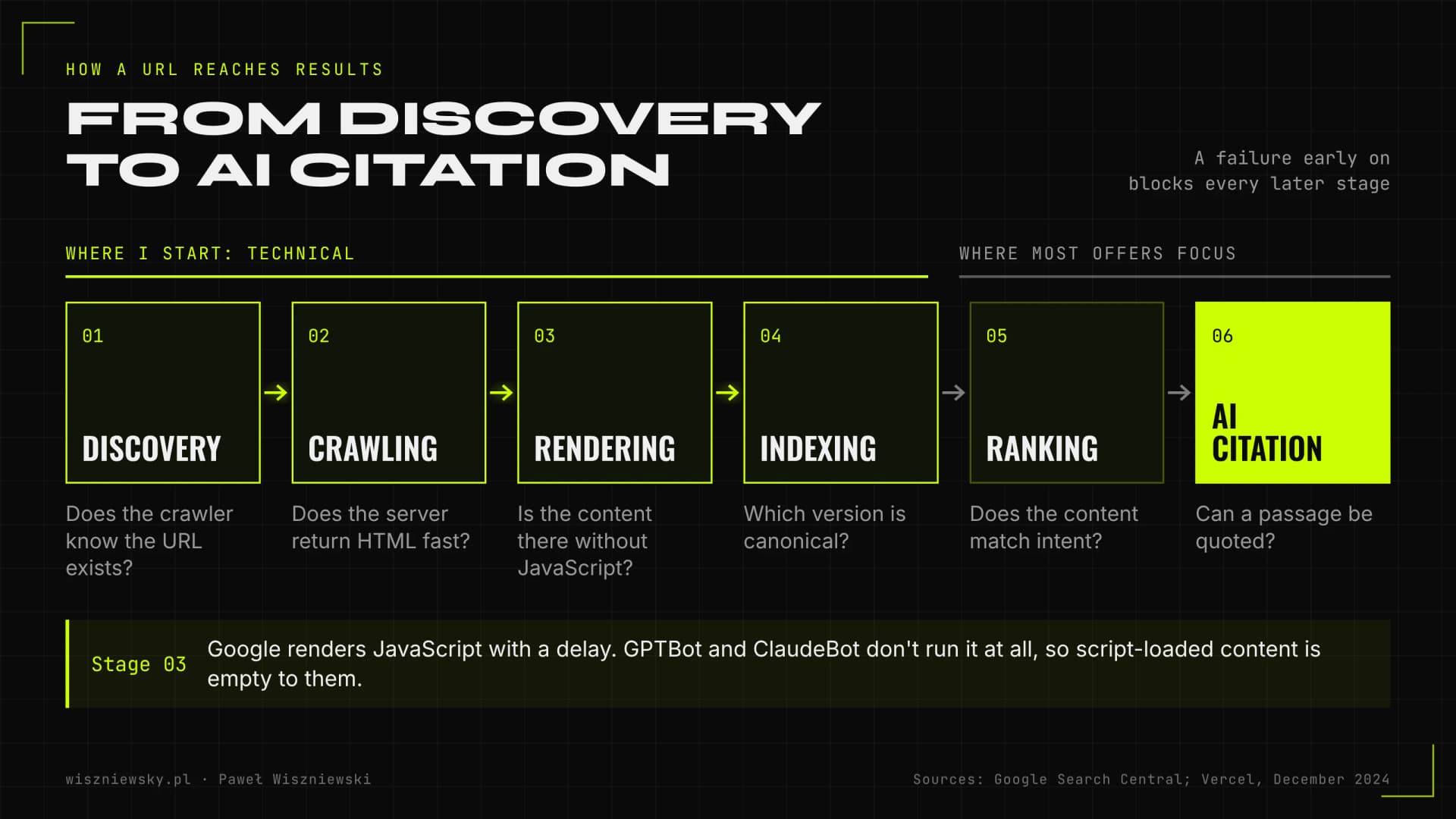
The easiest way to understand SEO is to follow the path every URL takes before it shows up in results. Something can break at each stage, and each stage needs a different kind of work.
Discovery. A crawler has to learn the URL exists: from internal links, links on other sites or an XML sitemap. A page nothing links to effectively does not exist.
Crawling. Googlebot fetches the HTML. If the server is slow, returns errors or robots.txt blocks key folders, fewer pages get crawled than should be.
Rendering. Google runs JavaScript, but later and not always completely. Most AI crawlers do not run JavaScript at all, as I explain below.
Indexing. Google decides whether the page goes into the index, which version is canonical and whether the content duplicates another URL.
Ranking and source selection. Only here do intent match, quality, authority (links and mentions) and user experience come into play. In AI answers there is an extra step: picking passages that can be quoted.
Most SEO offers focus on that last step: content and links. I start with the first four, because if a site falls over at rendering or indexing, every pound or euro spent on articles and placements works with the handbrake on.
A failure at an early stage, such as JavaScript rendering, blocks every later one; sources: Google Search Central and Vercel (December 2024).
Technical, on-page and off-page SEO: the three pillars
SEO has three parts: technical SEO (can a crawler fetch and understand the site), on-page SEO (does the content meet the searcher's need) and off-page SEO (do others treat you as a credible source). None of them works fully without the other two.
Pillar
What it covers
Typical symptom of neglect
Technical SEO
Indexing, JavaScript rendering, status codes, canonicals, hreflang, sitemaps, Core Web Vitals, structured data, crawl budget
Pages stuck in “Discovered – currently not indexed”, slow mobile loads, duplicates in the index
On-page SEO
Keyword and intent mapping, heading structure, titles and meta descriptions, copy, internal linking, information architecture
The site ranks for random queries, or several pages compete for the same one
Off-page SEO
Links from other sites, digital PR, brand mentions, Google Business Profile and reviews
Solid tech and content, but a competitor with a stronger link profile always sits above you
In practice the lines blur. Internal linking is technical (discovery and how authority flows between pages) and editorial (anchor context) at the same time. Structured data is technical, but it has to match what is visible on the page. So I don't sell rigid packages; I work out which pillar is limiting growth right now.
Is technical SEO a separate service?
Some agencies sell technical SEO as a one-off audit and everything else as a retainer. What matters more to you is whether the provider covers all three pillars, or only one, and whether they can tell you which one is your bottleneck. A site with perfect technical health and no content strategy will not grow, and neither will a content machine on a site Google can't render.
Technical SEO in practice: what I check in the code
Technical SEO is a set of concrete, testable conditions in your code and server configuration that decide whether a page can rank at all. Tools show symptoms; the causes almost always live in templates, routing or the rendering setup.
Here is what I check at code level on every project. It is a short version, not the full checklist from my technical SEO audit, but it shows where problems usually hide.
Content in the first server response. Are the H1, main copy, links and JSON-LD in the server HTML (SSR or static generation), or do they only appear after JavaScript runs?
Real HTTP status codes. A missing URL must return 404 or 410 from the server, not a 200 with a “not found” message drawn in the browser. Those soft 404s pollute the index.
Canonicals and duplicates. One canonical URL per piece of content, consistent with internal links, the sitemap and hreflang. Parameter versions, trailing-slash variants and http/https must not compete.
Redirects. No chains or loops, 301 or 308 for permanent moves, and internal links pointing straight at the final URL.
XML sitemap. Only canonical, 200-status URLs, no redirects or noindexed pages, with honest last-modified dates.
robots.txt and meta robots. I never block noindexed pages in robots.txt, because the crawler then can't see the noindex. AI crawlers get their own rules.
Hreflang. Language pairs must reference each other and point at canonical URLs. One template bug can break an entire language version.
Structured data. One coherent JSON-LD graph with stable @id values for the organisation, author and page, matching visible content. More in Schema.org implementation.
Internal linking. Are key pages a few clicks from the homepage, and are there orphan pages nothing links to?
React and Next.js sites
Client-side-only apps (SPAs) are the most common source of invisible problems. Google usually copes, with a delay, but according to Vercel's December 2024 analysis the major AI crawlers do not execute JavaScript: GPTBot and ClaudeBot fetch JS files as text but never run them. Content loaded only by script is blank to them. I cover how to test for this in JavaScript SEO: what crawlers see without rendering.
An automated SEO test on every deploy
The biggest weakness of a classic audit is that it describes one day. A few releases later the same bugs come back: someone edits a template and the canonical disappears, someone adds a second H1, someone deletes a page without a redirect. So on sites I maintain, I run an automated CI test that checks H1, title, canonical, hreflang, JSON-LD validity and broken internal links on every change. This site works exactly that way.
Core Web Vitals: LCP, INP and CLS for SEO
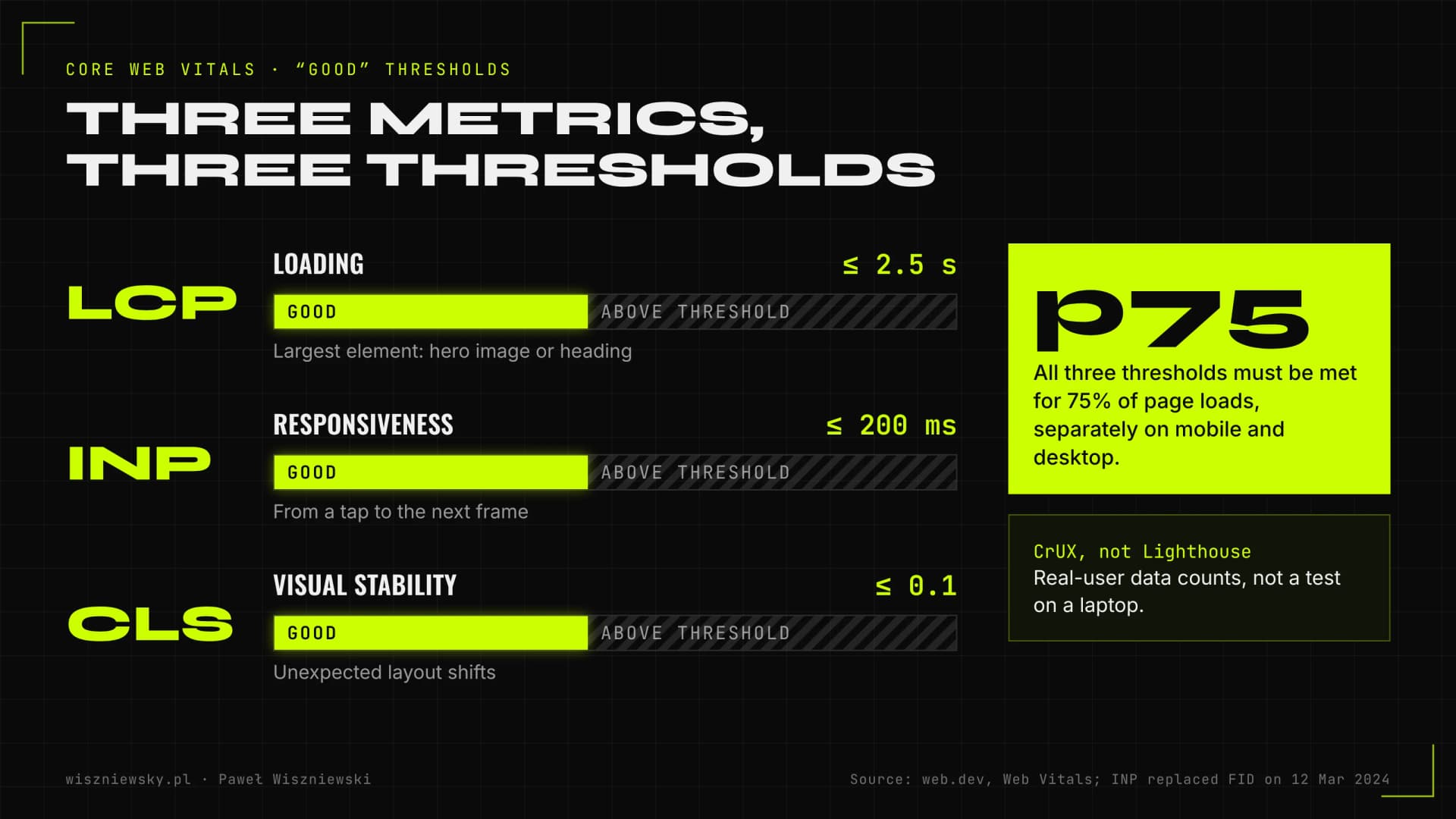
Core Web Vitals are three Google metrics based on real-user data: loading (LCP), responsiveness (INP) and visual stability (CLS). On 12 March 2024 INP officially replaced FID as a Core Web Vital, as Google announced on web.dev.
Metric
What it measures
Good (web.dev)
Most common cause of a poor score
LCP (Largest Contentful Paint)
Time until the largest element, usually the hero image or heading, renders
2.5 s or less
Oversized hero image, slow server, render-blocking CSS and fonts
INP (Interaction to Next Paint)
Time from a tap or click to the next frame on screen
200 ms or less
Heavy main-thread JavaScript, third-party scripts, expensive hydration
CLS (Cumulative Layout Shift)
Unexpected movement of elements while the page loads
0.1 or less
Images and ads without dimensions, cookie banners, late font swaps
According to web.dev, a page passes Core Web Vitals when all three metrics meet their thresholds at the 75th percentile of page loads, measured separately for mobile and desktop. That matters: Google looks at real-user data from the CrUX report, not a Lighthouse run on a developer's laptop.
Core Web Vitals thresholds and the 75th-percentile rule per web.dev; INP replaced FID on 12 March 2024.
How much do Core Web Vitals affect rankings?
Less than “speed up your site for SEO” offers suggest, and more than sceptics admit. Google's page experience documentation says Search always tries to show the most relevant content even if the page experience is sub-par, and that a great experience can help when there are many similarly relevant results. In other words, speed won't replace relevance, but in a competitive niche it breaks ties and, more importantly, it moves conversion rates.
INP: the metric modern sites fail most
LCP and CLS can usually be fixed with a few template changes. INP is harder because it depends on all the JavaScript that runs after a click. The usual suspects are marketing tags, chat widgets, store filters that re-render the whole product grid and React components that re-render for no reason. Fixing it takes profiling in DevTools and code changes, not a caching plugin. Techniques are in my Core Web Vitals 2026 guide.
Keyword research and long-tail queries
Keyword research means finding the words and questions your customers use, the intent behind each one, and which page on your site should answer it. Skip it and even a technically perfect site ends up ranking for random queries.
Long-tail queries are longer and more specific: not “SEO” but “SEO for a PrestaShop store after migration”. Each has little volume, but together they make up a huge share of searches. Ahrefs, in a May 2026 article, reports that keywords with fewer than 10 searches a month account for almost 93% of its US keyword database. Long-tail queries also tend to sit closer to a buying decision and face less competition.
How I run keyword research
Start with data you already own: Search Console queries, customer emails, sales calls and chat logs.
Expand the list with tools (Ahrefs, Semrush, Google Keyword Planner) and search suggestions, including People Also Ask.
Group queries by intent: informational (guide), comparison (roundup), transactional (offer) and local.
Assign each group to one page, so two pages don't compete for the same query (cannibalisation).
Check the live results for key queries: which page types rank, and whether there's an AI Overview, a map pack, products or video.
Prioritise by business value, not volume alone. A query with 50 searches a month that brings enquiries often beats a broad one with 5,000.
Keywords in the age of AI Mode
Google's documentation on AI features describes “query fan-out”: AI Overviews and AI Mode may issue several related searches on subtopics before composing an answer. For keyword research that means mapping whole sets of questions around a topic, not single terms, and answering them directly on the page. My process is in keyword research for AI and query fan-out.
One thing I don't do is repeat a phrase a set number of times. Google has understood synonyms and variants for years, and it ignores the keywords meta tag entirely, as its own SEO Starter Guide states.
SEO audit: what it covers and how the process works
An SEO audit is a diagnosis of what is holding your visibility back, with fixes ranked by traffic impact and implementation cost. A good audit ends in a prioritised task list, not an 80-page PDF of tool warnings.
My technical audit covers 100+ checkpoints and starts from €800. The process:
Data collection. A full crawl (Screaming Frog), Search Console and GA4 data, Lighthouse and PageSpeed Insights for key templates, and server logs on large sites.
Manual analysis. I discard false positives and trace causes in the code. A tool sees 400 pages with a “missing description”; I look for the template that produces them.
Prioritisation. Each fix gets an impact and effort score. Indexing blockers on revenue pages come first, cosmetics last.
Implementation. I ship the fixes in code myself, or write precise instructions for your team.
Verification. I check the results in Search Console and set up monitoring so the issues don't return with the next release.
Free SEO audit or paid?
Free online audit tools are fine for a quick scan: missing titles, slow pages, broken links. They won't tell you why a store category isn't indexed, whether Google sees your content after rendering, or which of hundreds of warnings actually matter. When an agency offers a “free audit” as the opening move for a retainer, it's usually a tool export with a logo on it.
When an audit isn't worth it
If the site has a handful of pages and almost no traffic, start with content and your Google Business Profile. If a full rebuild is weeks away, audit the new version before launch and treat the old one only as a data source for the migration.
SEO vs. AI Overviews, AI Mode and AI crawlers
AI Overviews and AI Mode don't replace SEO; they change what SEO delivers. Alongside clicks, it now matters whether your page is a cited source in the answer. Google's guide to optimising for generative AI features (updated July 2026) says plainly that, from Google Search's perspective, this is still SEO.
What the data shows
A Senuto report on the Polish market, updated in November 2025 and based on nearly 18 million keywords, found AI Overviews on about 29% of keywords but covering only about 15% of search volume, because they appear mostly on long-tail queries. The same report put the median drop in clicks across the analysed domains at roughly 20% for August–October 2025. A Pew Research Center study published in July 2025, based on the browsing of 900 US adults in March 2025, found that users clicked a traditional result in 8% of visits when an AI summary appeared, versus 15% without one.
The conclusion isn't that SEO no longer pays. It's that a ranking without a citation brings less traffic than it used to, so you need to measure both and write content that can be quoted.
What Google does not require
According to Google's guide updated in July 2026, a page must meet the normal Search technical requirements (indexed and eligible to show with a snippet), and the site must also be included in Search generative AI features in Google Search Console. Beyond that, Google says no special optimisations are needed for AI Overviews or AI Mode. Its 2026 guide adds that Google Search doesn't use llms.txt files or special “AI markup”, that you don't need to chop content into artificial chunks, and that structured data isn't a precondition for generative AI visibility. The usual rules apply: the page must be indexed, eligible for a snippet, and offer unique, helpful content.
AI crawlers: which to allow, which to block
Besides Googlebot, your site is visited by bots from AI companies. Each has a different purpose, so your robots.txt decisions should be deliberate, not copied from a forum.
User agent
Purpose (per the vendor's docs)
My default recommendation
Googlebot
Google's index, which AI Overviews and AI Mode also draw on
Allow, obviously
Google-Extended
Token controlling use of content for training and grounding Gemini models; Google says it doesn't affect inclusion or ranking in Search
Business decision; blocking it doesn't hurt Google rankings
OAI-SearchBot
Surfacing websites in ChatGPT search results
Allow if you want to be cited in ChatGPT
ChatGPT-User
Page visits triggered by a user action in ChatGPT
Usually allow
GPTBot
Collecting content that may be used to train OpenAI models
Business decision; blocking it doesn't remove you from ChatGPT search
Bingbot
Bing's index, used by Copilot and some AI search products
Allow, and verify the site in Bing Webmaster Tools
The full picture, including pay-per-crawl and log analysis, is in AI crawlers and robots.txt. And remember the earlier point: AI crawlers don't run JavaScript, so a client-rendered page can be blank to them even when Google sees it fine.
Link building: what works and what wastes budget
Links from other sites remain an important authority signal, but where they come from matters far more than how many you have. I consider “X links a month” packages one of the weakest ways to spend an SEO budget, while a carefully chosen placement on a relevant site with real traffic can beat months of outreach emails.
The honest truth about buying links
Paid placements are common in SEO, even if few people say so openly. I will: I buy placements when the site is worth it. Google's rules are clear, though. Its documentation on qualifying outbound links says paid and advertising links should be marked rel="sponsored", and its spam policies treat buying or selling links that pass ranking credit as a violation. Before any purchase I discuss with the client how the link will be marked and what risk comes with each option, instead of pretending the issue doesn't exist.
A sponsored link still has value: it sends referral traffic, creates brand mentions that people and AI models read, and builds recognition. That's why the site selection criteria matter more than the attribute itself.
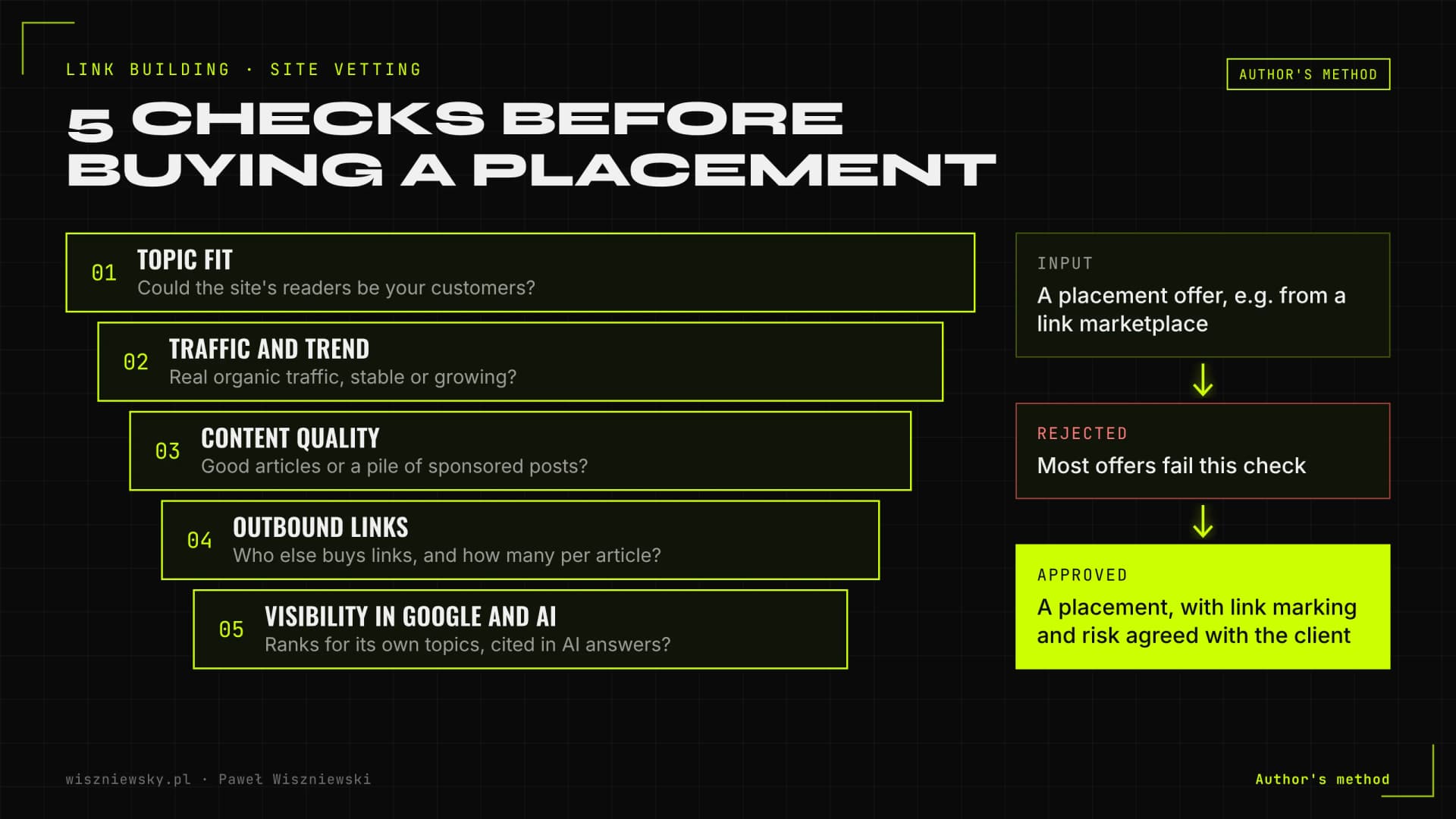
How I vet a site before buying a placement
Does the site's topic fit your industry, and could its readers be your customers?
Does it have real organic traffic that is stable or growing, rather than sliding after each Google update?
Does it publish genuinely good content, or is it a pile of sponsored posts about everything?
Who else does it sell links to, and how many outbound links does a typical article carry?
Is it visible in Google for its own topics, and does it show up as a source in AI answers?
Most offers from link marketplaces fail this check. On top of that come links earned without paying for placement: digital PR, data-driven assets, expert articles and industry partnerships. Scope and pricing are on the link building and selective link buying page.
Author's method: most offers fail one of the five filters, and how the link is marked is agreed with the client.
What I don't do
No links from private blog networks (PBNs), article farms or directories.
No exact-match anchors on most links.
No linking only to the homepage when service and product pages are what sells.
No promises of a fixed number of links per week regardless of quality.
Local SEO basics for single-city businesses
Local SEO is about visibility in map results and in “service + city” or “near me” searches, and its foundation is your Google Business Profile. Google's Business Profile help names three main local ranking factors: relevance, distance and prominence.
Relevance: how well the profile matches the search. Complete details help: categories, services, description, hours, photos.
Distance: how far the business is from the searcher. This is the factor you control least.
Prominence: how well known the business is. Google mentions links to your website and the number of reviews among the signals.
Then there's the website: separate pages for locations where you genuinely operate, consistent NAP data (name, address, phone) across site and profile, LocalBusiness structured data and local mentions. I don't build city pages by swapping the town name in the same copy; those pages add nothing and risk being treated as spam. Each location needs its own context and examples.
If you serve a local market with little competition, a well-run profile, reviews and a solid website are often enough, without expensive link building. How local signals flow into AI answers is covered in local SEO and Google Business Profile.
Site migration without losing rankings
A migration (new domain, CMS or URL structure) is when it's easiest to lose years of SEO work, and also the one moment you can plan for it completely. The key is a 301 redirect map built from traffic and backlink data, not from the page list in the new CMS.
Google's documentation on site moves with URL changes recommends keeping redirects for as long as possible, generally at least a year, and warns that rankings may fluctuate temporarily during the move. For medium-sized sites, Google says it can take a few weeks or more before the new URLs replace the old ones in results. In my migrations, redirects stay permanently, because links from other sites to old URLs keep working for years.
Minimum migration checklist
Inventory every URL with traffic, external links or rankings, including ones missing from the menu.
Map old to new for every valuable page; never redirect everything to the homepage.
Test on staging: redirects, canonicals, hreflang, sitemap, robots.txt, structured data, and no leftover noindex from the test environment.
Launch day: submit the sitemap, use Search Console's Change of Address tool for a domain move, crawl the new version immediately.
Monitor for the following weeks: 404s, redirect chains, indexing pace and rankings for key queries.
Where possible, I don't change domain, content and structure in one step. If everything changes at once and traffic drops, nobody knows why. The full process is in SEO migration without losing rankings and on the SEO migration service page.
How much SEO costs and what drives the price
The cost of SEO depends mainly on the state of your site, how competitive your market is and who implements the fixes. I split the work into one-off technical projects and ongoing authority building, so you pay for a defined scope rather than an “all-inclusive” retainer.
Service
Type
Starting price
Technical audit & Core Web Vitals
One-off, with optional implementation
€800
Schema.org implementation
One-off
€600
Crawl budget optimization
One-off, for large sites
€900
SEO migration
Project with post-launch monitoring
€1,200
Link building & selective link buying
Ongoing
€500 / month
What pushes the cost up or down
Site size and complexity. The number of page templates matters, not the page count. A 20,000-product store on three templates can be simpler than a corporate site with twenty page types.
Code access. If I can ship fixes myself, you save your team's time and don't pay for translating a report into developer tickets.
Competition. In markets with strong players (finance, legal, mass e-commerce) authority takes longer and costs more to build.
Starting point. A site after a botched migration or with a history of spammy links needs a clean-up first.
Content gaps. If pages answering important queries don't exist yet, creating them adds cost.
A retainer makes sense for ongoing content and link work, as long as you know exactly what you get each month. A project fits audits, technical implementation and migrations, which have a clear start and finish. Pay-for-rankings deals deserve caution: they reward picking easy keywords with no business value, and Google's guidance on hiring an SEO warns against anyone who guarantees rankings.
The first step is a free consultation, after which you get a quote based on your scope, not on a price-list package.
How long SEO takes and when to expect results
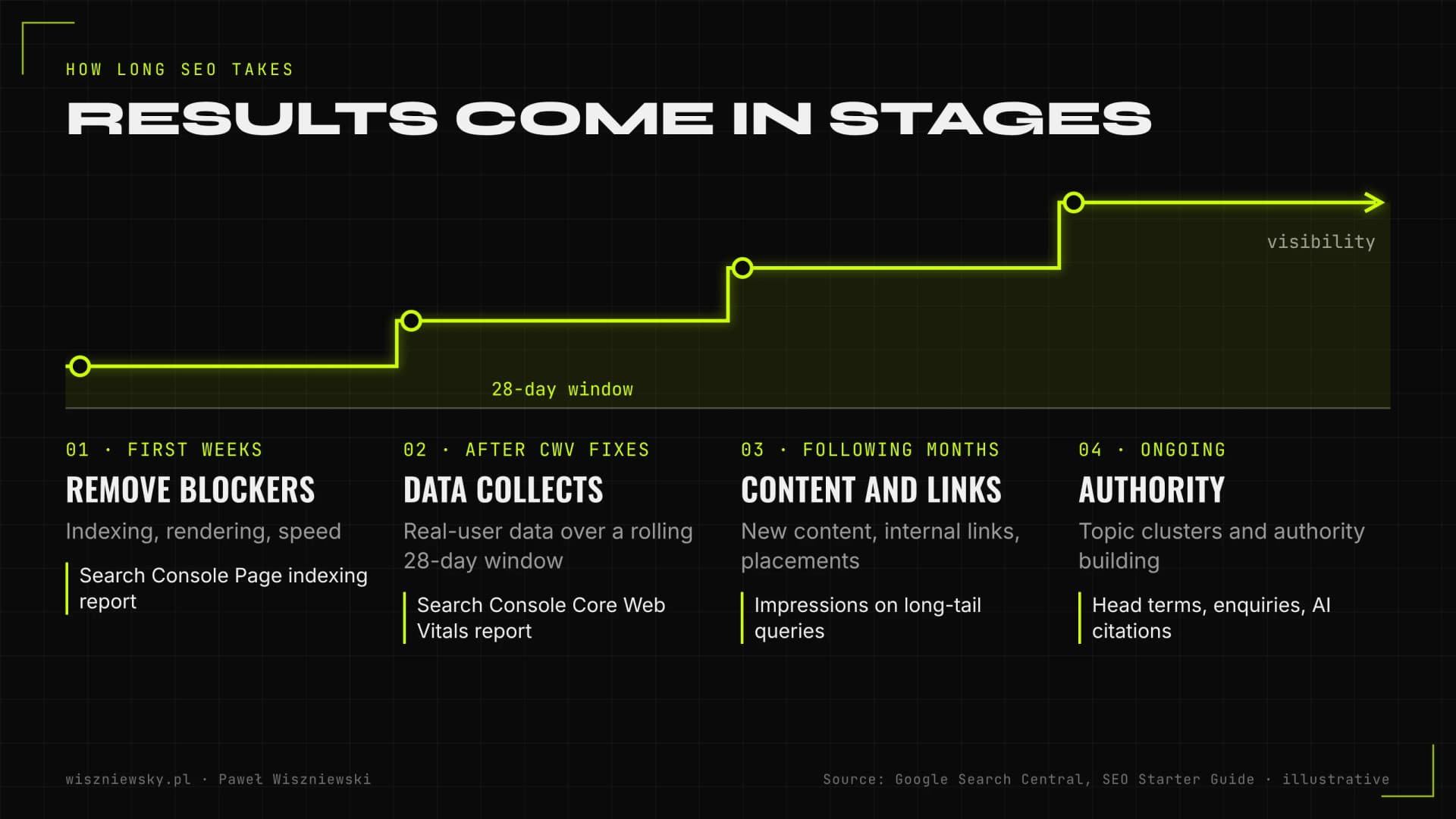
Technical fixes usually show up within a few weeks; lasting growth on competitive queries typically takes several months of consistent work. Google's SEO Starter Guide says some changes take effect within hours while others can take months, and suggests waiting a few weeks before judging an effect.
Stage
What happens
Where you see it
First weeks
Audit and fixes for indexing, rendering and speed blockers
Real-user data accumulates over a rolling 28-day window
Search Console Core Web Vitals report
Following months
New and improved content, internal linking, first placements and links
Impressions and average position on long-tail queries
Ongoing
Authority building and expanding topic clusters
Rankings on head terms, traffic, enquiries, AI citations
Illustrative stages; Google suggests waiting a few weeks before judging the effect of a change (SEO Starter Guide).
Timing depends on the bottleneck. If the site had an indexing blocker, results can come quickly because you're removing an obstacle, not building from scratch. If the problem is authority in a competitive market, you can't buy that in a week. And SEO doesn't end on a set date: competitors keep working and Google keeps updating its systems.
How to tell whether your SEO is working
SEO is working when impressions, clicks and conversions from search grow on the pages that make money, not when a report shows more keywords in the top 10. In 2026 visibility in AI answers joins that list.
The metrics I report
Search Console: impressions, clicks and CTR, split into branded vs. non-branded queries and by page group (offer, blog, categories). Google's documentation says appearances in AI Overviews and AI Mode are counted in the Performance report.
Indexing: the number of business-critical pages indexed and pages stuck as “Discovered – currently not indexed”.
Core Web Vitals from CrUX for key templates.
GA4: organic conversions (forms, calls, sales), not just sessions.
Rankings for an agreed basket of priority keywords, always measured the same way.
AI visibility: citations in Bing Webmaster Tools, traffic from ChatGPT, Perplexity and Gemini in GA4, and regular prompt tests in the models.
In February 2026 Bing launched an AI Performance report in Webmaster Tools as a public preview. It shows how often your content is cited in Copilot answers and Bing's AI summaries, and which URLs are cited. It's the first official data of its kind from a major search engine. How to set up AI assistant traffic tracking in GA4 and server logs is covered in measuring traffic from ChatGPT, Perplexity and AI Mode.
Warning signs in SEO reports
The report shows rankings only, with no traffic or conversions.
Only branded queries are growing, which your customers would type anyway.
The tracked keyword basket changes from month to month.
No record of what was actually done on and off the site.
How to choose an SEO specialist or agency
A good provider can explain what they'll do on your site, why in that order and how you'll both measure the result. Google's “Do you need an SEO?” page lists questions worth asking and warns that no one can guarantee a #1 ranking.
Questions to ask
Can you show examples of previous work and explain exactly what you did?
Do you follow Google Search Essentials?
Who implements technical fixes: you, my team or a subcontractor?
What results should I expect, and over what timeframe?
Will I see every change made to the site and every link acquired?
Where do links come from, do you buy placements, and how are they marked?
How do you account for AI Overviews and AI assistants?
Red flags
Guaranteed rankings, a “special relationship with Google” or “priority submission”, all of which Google calls out directly.
An unsolicited email or call saying “I found errors on your site” from a firm you've never spoken to.
Vague scope: “comprehensive activities” with no task list.
Link packages with no information on where links will land.
A long contract with a steep exit penalty and no measurable goals.
Reports built solely on rankings for keywords that bring no customers.
Freelancer or agency?
An agency offers a bigger team and cover for holidays, but clients often talk to an account manager rather than the person doing the work. An independent specialist gives you direct contact and one person accountable for results, but with limited capacity. I work solo and combine the SEO specialist and Next.js developer roles, so I diagnose and ship fixes without intermediaries. That matters most when the problems live in the code.
The most common SEO mistakes
Most SEO problems I see don't come from not knowing the algorithm; they come from doing things in the wrong order: investing in content and links before the site is technically ready, or in technical work when there's no content answering customers' queries.
Publishing content on a site that doesn't get it indexed. Dozens of blog posts sit in “Discovered – currently not indexed” because of rendering or internal linking issues.
Several pages targeting one query. A service page, a blog post and a city page compete for the same search and none ranks well.
A JavaScript-only site. Google sees it late; AI crawlers don't see it at all.
Lighthouse as the goal. A lab score instead of real-user data on the templates that matter.
Mass low-quality links. Packages, directories and PBNs, exactly what Google's spam policies target.
Migration without a redirect map. Everything sent to the homepage, or old rules deleted a few months later.
Mass-produced content with no value. Google judges quality, not how content was made, but pages churned out purely to target keywords fall under its scaled content abuse policy.
Structured data that doesn't match the page. Ratings, FAQs or prices in JSON-LD that aren't visible.
No monitoring after releases. Fixed issues come back with the next template update.
Measuring rankings only. Without conversions you can't tell whether SEO pays.
Large sites can also waste crawl budget on filters and parameters. But Google says its crawl budget guide is mainly for very large sites, so before any crawl budget optimization I check the logs to see whether the problem exists at all.
SEO tools I actually use
You need only a handful of tools for SEO, provided you know how to read them; the most important data is free and comes straight from the search engines. Paid tools speed things up but don't replace root-cause analysis.
Tool
What I use it for
Cost
Google Search Console
Impressions, clicks, indexing, Core Web Vitals, structured data, Change of Address during migrations
Free
Bing Webmaster Tools
Bing index, IndexNow, AI citation report (AI Performance)
Free
Google Analytics 4
Organic conversions and traffic from AI assistants
Free
PageSpeed Insights and Lighthouse
CrUX data and LCP, INP, CLS diagnosis
Free
Screaming Frog SEO Spider
Site crawls, redirects, canonicals, duplicates, rendering
Free version with limits, paid licence
Ahrefs, Semrush
Keyword, competitor and backlink analysis
Paid
Server logs
What Googlebot and AI crawlers actually request
Depends on hosting
I automate a growing share of the analytical work: keyword clustering, metadata checks, reporting and CI tests. It doesn't replace a specialist's judgement, but it shortens the time from spotting a problem to shipping the fix.
Technical SEO covers everything that helps search engines crawl, render, index and understand your site: speed and Core Web Vitals, JavaScript rendering, site architecture, canonicals, hreflang, structured data and crawl budget. It is the foundation that content and links build on.
How much do technical SEO services cost?
A technical SEO audit starts from €800, Schema.org implementation from €600 and link building from €500 per month. The final price depends on site size and how many fixes need to be implemented.
How long until I see results?
Google usually picks up technical fixes within 2–6 weeks of recrawling. Core Web Vitals data in Search Console updates on a rolling 28-day window. Ranking gains on competitive keywords typically take 3–6 months of consistent work.
Does technical SEO help with AI Overviews and ChatGPT?
Yes. Google's AI Overviews and AI Mode draw on Google's index, and ChatGPT Search and Copilot rely partly on Bing's. Fast pages that render content without JavaScript and carry valid structured data are easier for AI systems to retrieve and cite.
Do you implement fixes or only deliver a report?
Both. I'm a Next.js and React developer, so I can ship fixes directly in your codebase. If you have your own team, they get precise technical instructions for every change plus verification after deployment.
Where should I start with SEO?
With a technical audit and an analysis of the keywords and questions your site should rank for. It shows whether the main problem is technical, content or authority, so the budget goes where it has the biggest effect.
Do you work with companies outside Poland?
Yes. I work remotely with companies across Poland and abroad. Meetings are online, or on-site when needed.