BACK TO Technical SEO

Technical Audit & Core Web Vitals

100+ point technical SEO audit + code-level Core Web Vitals fixes (LCP, CLS, INP). The goal is good real-user field data (CrUX, 28-day window), not just a Lighthouse score.

Author: Paweł Wiszniewski · Updated:

Key takeaways

100+ point technical SEO audit + code-level Core Web Vitals fixes (LCP, CLS, INP). The goal is good real-user field data (CrUX, 28-day window), not just a Lighthouse score.

  • ›Full 100+ checkpoint audit covering Core Web Vitals, crawlability, JS rendering, duplicate content, URL structure, and internal linking.
  • ›Code-level LCP, CLS, and INP fixes
  • ›Google Search Console indexing audit

Price: from €800

SERVICE DETAILS

I conduct a deep technical SEO audit covering Core Web Vitals, crawlability, JavaScript rendering, URL structure, and hreflang. I identify the exact causes of Lighthouse and Search Console issues, then fix them at the code level. The result is a fast, fully crawlable site ready to rank — not just a report with a list of issues.

› INVESTMENT:

from €800
const module = new ExecutionProtocol();

// Initializing technical-audit-core-web-vitals...
› Loading dependencies... OK
› Establishing connection... OK
› Ready for deployment... AWAITING_COMMAND

Paweł Wiszniewski · my approach

What I do differently

Most audits end as a PDF of Screaming Frog warnings that sits in a drawer because nobody knows how to implement it. I'm both an SEO specialist and a Next.js developer, so I diagnose every issue in the code and know straight away what a fix costs. You get findings ranked by impact versus effort, not by the number of tool warnings. This site runs an automated SEO test on every code change, checking H1s, canonicals, hreflang, structured data and dead links. I can set up the same safety net for you so fixed issues don't come back.

Case study: PozyczkoBank Fintech AI

My take and a real-world example

My take

I think a 100/100 Lighthouse score is the most expensive vanity metric in SEO. Google uses real-visit data, and customers buy on slow phones with poor signal, not on a developer's laptop. I'd rather have a score of 85 with fast LCP on product pages than a perfect homepage score.

From the market

Vodafone ran an A/B test on two identical landing pages that differed only in Web Vitals optimization. The version with 31% better LCP delivered 8% more sales. Deloitte's research found that making a mobile site 0.1 seconds faster lifted retail conversions by 8.4%. Speed isn't an SEO metric — it's money.

Sources: web.dev: Vodafone — 31% better LCP, 8% more sales · web.dev / Deloitte: Milliseconds make millions

Who this is for

  • Companies whose Google traffic is falling or flat despite publishing content.
  • Sites with red or amber Core Web Vitals in Search Console.
  • Sites built on React, Next.js or other JavaScript frameworks unsure about indexing.
  • Businesses before a redesign or migration that want a baseline.

What you get

  • A 100+ point audit report: indexing, rendering, architecture, internal linking, duplicates.
  • Code-level diagnosis of LCP, INP and CLS, not just a tool score.
  • A fix list ranked by traffic impact and effort.
  • Fixes implemented in code or precise instructions for your team.
  • Verification in Search Console and post-launch monitoring.

How results are measured

  • Core Web Vitals from CrUX data for key page types.
  • Indexed pages and errors in the Page indexing report.
  • Organic traffic and impressions in Search Console.
  • Rankings for priority keywords.

Key Benefits

Full 100+ checkpoint audit covering Core Web Vitals, crawlability, JS rendering, duplicate content, URL structure, and internal linking.

Code-level LCP, CLS, and INP fixes — not just a report, but actual implementation of improvements with measurable impact on field Core Web Vitals (CrUX), not just the Lighthouse score.

Google Search Console indexing audit — I identify blocked pages, 404 errors, redirect chains, and crawl budget waste.

JavaScript rendering analysis — I verify Google correctly renders your React/Next.js application and that dynamic content is visible to Googlebot.

Written priority report with impact estimates for each fix — you know what to address first and exactly why.

The Process

1

Automated Tool Audit

I run Screaming Frog, Lighthouse CI, PageSpeed Insights, and Google Search Console, collect all technical errors, and pull historical traffic data.

2

Manual Analysis & Prioritization

I analyze tool results in your business context, prioritize issues by potential impact on visibility and traffic, and eliminate false positives.

3

Fix Implementation

I implement fixes directly in code or provide your developer with precise technical instructions for each change — no ambiguity.

4

Verification & Monitoring

I verify fixes in Google Search Console, measure the effect in field data (CrUX in PageSpeed Insights), and configure real-user Core Web Vitals monitoring.

Common mistakes

  • Treating the Lighthouse score as the goal — Google uses real-user data (CrUX), not a lab test.
  • Fixing hundreds of minor warnings instead of the few issues blocking indexing of sales pages.
  • Auditing without checking what Googlebot sees after JavaScript rendering.
  • No monitoring after launch, so the same issues return with the next release.

When this service is not worth it

  • Your site has a few pages and almost no traffic — start with content and your Google Business Profile.
  • You're rebuilding the site in the next few weeks — audit the new version before launch instead.
  • You can't ship code changes and don't want me to do it.
/// GUIDE

Technical SEO audit and Core Web Vitals – how I run it, step by step

This is what actually happens during my technical audit: which data I collect, how I read Search Console reports, how I break Core Web Vitals down into causes in the code and how I prioritise fixes. It is written for people who want to know what they are paying for and how to judge any audit, including someone else's. Figures come from Google's documentation and web.dev, with sources listed at the end.

Technical audit scope – the eight areas I check

A technical audit checks whether a crawler can fetch, render, understand and index your site, and whether real users get it fast. I group more than 100 checkpoints into eight areas, because each one needs different tools and has different typical causes.

AreaExample checkpointsMain data source
Access and crawlingStatus codes, robots.txt, redirects and chains, 5xx responses, server response time, crawl statsCrawl, Crawl stats report, server logs
RenderingWhether content, links, meta tags and JSON-LD are in the server HTML or only appear after JavaScript; differences between raw and rendered versionsTwo crawls (with and without JS), URL Inspection
Indexing and canonicalisationStatuses in the Page indexing report, canonicals, noindex, duplicates, parameters, soft 404sSearch Console, crawl
Architecture and internal linkingClick depth, orphan pages, links as a elements with href, how link equity reaches money pagesCrawl, traffic data
Performance (Core Web Vitals)LCP, INP and CLS from field data, split by template and device, causes in the codeCore Web Vitals report, CrUX, Lighthouse, DevTools
Mobile versionSame content, links and structured data on mobile as on desktop, content that only loads after interactionCrawl with a smartphone user agent
Structured dataValid JSON-LD, consistency with visible content, consistent entities (Organization, Person, Product)Rich Results Test, Schema.org validator, crawl
Languages and AI crawlersHreflang and reciprocity, robots.txt rules for AI bots, content available without JavaScriptCrawl, robots.txt, logs

Then there are limits few people remember, and they can quietly cut off part of a site. Google's Googlebot documentation (updated February 2026) says the crawler fetches the first 2 MB of an HTML file, measured uncompressed, and ignores the rest. robots.txt is read up to 500 KiB, and a single sitemap can hold at most 50,000 URLs or 50 MB. On stores with huge category HTML, or apps that inline a large serialised state into the page, I check that the important content and links do not fall beyond the first 2 MB.

What data I collect before the audit, and why a crawl alone is not enough

A crawler shows what the site looks like to a bot on audit day; Search Console and analytics show what that means for Google and for traffic. Only putting both together separates a problem that costs traffic from a warning that does not matter.

  • Search Console: Page indexing, Crawl stats, Core Web Vitals, Performance split by directory and page type, structured data enhancements, manual actions.
  • GA4: organic landing pages and conversions, so I know which templates make money.
  • Two Screaming Frog crawls: one with JavaScript rendering, one without. The difference between them is the list of things a non-JS bot will never see, which includes most AI crawlers.
  • Field data (CrUX, PageSpeed Insights) for key URLs and the whole origin, separately for mobile and desktop.
  • Server logs on large sites: which URLs Googlebot actually requests, how often and with which status code.
  • Template list and business context: which page types sell, what you plan to change in the coming months and who ships the fixes.

The template list matters more than the page count. A bug in the product page template affects every product at once, so I audit at template level: I pick representative URLs for each page type and only then check whether the problem appears across the whole group.

Indexing diagnosis – how I read the Page indexing report

Statuses in the Page indexing report are symptoms, not errors, and the same status can have several different causes. So for every status I look at which URLs ended up there first, and only then search for the cause in the code or configuration.

Search Console statusMost common cause I findWhat I check
Discovered – currently not indexedWeak internal linking, too many low-value URLs (filters, parameters), slow serverClick depth, number of links to the URL, Crawl stats, response time
Crawled – currently not indexedThe page differs too little from others or is nearly empty when fetched (content only after JS)Version without JavaScript, similarity to other pages
Duplicate without user-selected canonicalSame content under several URLs: parameters, letter case, trailing slash, print versionsCanonical in the template, internal links to variants, sitemap
Duplicate, Google chose different canonical than userConflicting signals: the canonical points to A while links, sitemap and redirects point to BConsistency of canonical, sitemap, links and hreflang
Soft 404A missing product or empty category returns 200 with a „no results” messageStatus codes for deleted and empty resources
Excluded by „noindex” tagNoindex left over from staging or added conditionally in JavaScriptServer HTML, X-Robots-Tag header, conditions in the code
Indexed, though blocked by robots.txtrobots.txt blocks fetching but links point to the URL, so it gets indexed without contentShould the URL be indexed at all; if not, noindex and allow crawling

The last row is a common conceptual mistake: robots.txt controls crawling, not indexing. If a page should disappear from results, Google has to be able to fetch it and see the noindex. For statuses with many URLs I always look at the trend too. A growing „Discovered – currently not indexed” group on a site that keeps publishing usually means Google sees no reason to fetch those pages. That is a signal to work on internal linking, or on crawl budget for very large sites.

JavaScript rendering – the test that settles the most

The key audit question is what the bot receives in the first server response, before any JavaScript runs. Google renders pages, but in a separate queue, and most AI crawlers do not execute JavaScript at all.

Google's JavaScript SEO basics (updated March 2026) describe several rules that I turn into concrete tests:

  • The render queue. Google queues pages with a 200 status for rendering and says a page may wait there for a few seconds or longer. Content that only appears after rendering reaches the index later than content in the HTML.
  • Links only as a elements with href. Google discovers links only from a elements with an href attribute. Buttons with click handlers and navigation driven by JavaScript events give the crawler no URLs.
  • Noindex in JavaScript. When Google finds noindex in the HTML, it may skip rendering entirely, so removing noindex with a script will not work.
  • Soft 404s in SPAs. With client-side routing, a non-existent URL often returns 200. Google recommends redirecting to a URL that returns 404, or adding noindex.
  • Fragments in URLs. Content loaded after a # is not a separate page for Google; you need real URLs handled by the History API.

What I look at in Next.js and React projects

In Next.js most problems are not caused by the framework but by where the content ended up. I check whether the title, description, canonical and hreflang are generated on the server, whether key content sits in client components loaded on interaction, whether missing resources return a real 404, whether menu and pagination links are plain links and whether structured data is in the HTML rather than injected after load. I go deeper in the article on JavaScript SEO and rendering, and when fixes are not enough and the architecture has to change, in the Next.js migration service.

I check the mobile version separately. Google indexes and ranks pages based on the version fetched with a smartphone crawler, and its mobile-first indexing documentation notes that Google does not load content that requires user interaction such as swiping, clicking or typing. „Description / specs” tabs that only load on click, or accordions pulling content from an API, are typical places where content drops out of the index.

Core Web Vitals in an audit – from field data to a specific line of code

I work on Core Web Vitals in the opposite order to most reports: I start from real-user data, and a lab test only serves to reproduce and fix the problem. A Lighthouse score on a developer's laptop is not what Google evaluates.

  1. URL groups in Search Console. The Core Web Vitals report groups URLs with a similar user experience, evaluates them on the last 28 days of data, and a group's status is set by the worst of the three metrics. A group usually maps to a template, so I know where to look straight away.
  2. CrUX data for specific URLs and the whole origin. I keep in mind where it comes from: according to the CrUX methodology, data is collected by Chrome on desktop and Android, while Chrome on iOS and other Chromium-based browsers such as Edge are not included. Low-traffic URLs have no data at all.
  3. Lab reproduction. Lighthouse and the DevTools Performance panel with CPU and network throttling, on the template the field data pointed to.
  4. Breaking the metric into parts and pointing to the cause in the code, not in the tool.

LCP – which part of the load time to fix

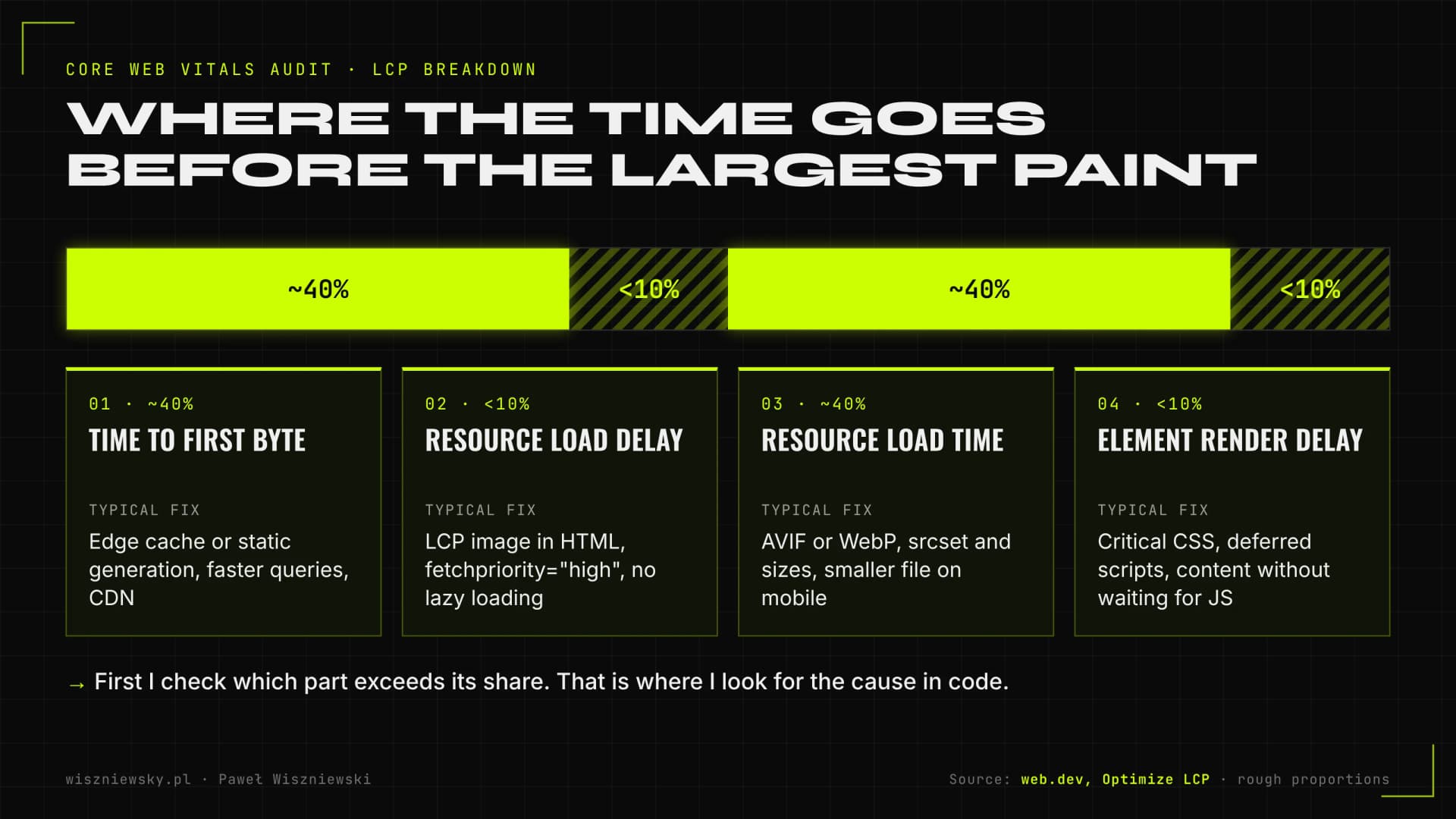
web.dev's LCP optimisation guide splits this time into four parts and gives rough proportions for a well-optimised page: about 40% for time to first byte (TTFB), under 10% for resource load delay, about 40% for resource load duration and under 10% for element render delay. The authors stress these are guidelines, not strict rules. In practice the split immediately shows whether the problem is the server, the loading order, the image weight or render-blocking JavaScript.

The four parts of LCP according to web.dev: time to first byte about 40%, resource load delay under 10%, resource load duration about 40% and element render delay under 10%, with typical fixes for each part.
Splitting LCP into parts shows where to look for the cause. Rough proportions from web.dev.
LCP partTypical causeTypical fix
Time to first byteRendering every request without a cache, slow database queries, no CDNStatic generation or edge caching, query optimisation, CDN
Resource load delayLCP image discovered only via CSS or JavaScript, lazy loading on the first imageImage in the HTML, fetchpriority="high" on one or two images, no lazy loading above the fold
Resource load durationFile too large, wrong format, full-resolution image on mobileAVIF or WebP, srcset and sizes, compression
Element render delayBlocking CSS and scripts, fonts, element hidden until hydrationCritical CSS, deferred scripts, content visible without waiting for JavaScript

INP – three phases of every interaction

web.dev breaks each interaction into input delay (before the event handler starts), processing time (running the handler) and presentation delay (until the next frame is painted). In the audit I record interactions on the most important templates, such as opening a filter, adding to cart or expanding the menu, and check which phase dominates. A long input delay usually means a main thread busy with third-party scripts. Long processing means heavy logic in the click handler that needs to be split up so it yields to the browser, as web.dev recommends. A long presentation delay means too many DOM changes after a single click.

CLS – shifts you can predict

The most common causes listed by web.dev are images without dimensions, ads, embeds and iframes without reserved space, dynamically injected content and fonts. web.dev also points to the back/forward cache: a page restored from the browser cache after going back does not produce layout shifts again, so I check that nothing (an unload listener or cache headers, for example) excludes the page from it. Thresholds for all three metrics and their ranking impact are on the technical SEO page, and the full optimisation techniques are in the Core Web Vitals guide.

How I prioritise fixes and what a single recommendation looks like

I order fixes by how much traffic or revenue depends on the problem, how much the fix costs and how risky it is, not by the number of warnings in a tool. A hundred missing alt attributes on legal pages matter less than one canonical bug in the category template.

PriorityWhen I assign itExample
P0 – nowThe problem blocks indexing or crawling of pages that make moneyNoindex on categories, robots.txt blocking the product directory, 5xx errors
P1 – first sprintThe problem affects a whole template with traffic and has a simple fixCanonical pointing to the homepage, product content only after JavaScript
P2 – plan itClear impact, but needs bigger changes to code or contentINP on a filtered listing, rebuilding internal linking
P3 – when convenientSmall impact or pages without trafficMissing image descriptions in the blog archive, minor redirect chains

Every recommendation in the report follows the same structure, so it can go straight into the team's issue tracker:

  • Problem and evidence: example URLs, a Search Console screenshot or a crawl result.
  • Cause: which template, component or server rule produces the error.
  • Fix: what to change, with a code or config snippet where possible.
  • Acceptance criterion: how to verify the fix works, for example „URL X returns 404” or „the canonical in the server HTML is self-referencing”.
  • Verification in Google: which report to watch and when to expect a change.

The acceptance criterion matters most, because it lets the team close the task on their own and lets me verify it without extra meetings. When I ship the fixes myself, the same format doubles as a change log.

Verification after release and protection against regressions

An audit is finished only when Google confirms the fixes in its reports and the errors do not come back with later releases. That is why my verification has three levels.

  1. Immediately: URL Inspection and live test for sample URLs from each template, a fresh crawl compared with the one taken before the changes.
  2. Within a few weeks: validating fixes in Search Console. For Core Web Vitals, validation is a 28-day monitoring session; the issue counts as fixed if it does not occur on any URL in the group during that time.
  3. Permanently: an automated SEO test in the deployment pipeline and field measurement of Core Web Vitals.

On this site, a test runs before every change goes live. It checks, among other things, a single H1, unique titles and descriptions, self-referencing canonicals, reciprocal hreflang, valid JSON-LD, broken internal links and orphan pages. I set up the same mechanism for clients, adapted to their templates. On top of that I add performance budgets in Lighthouse CI for key templates and collect Core Web Vitals from real visits with attribution, meaning which element or script is responsible for the result. That way you can see which release made INP worse before Search Console shows it 28 days later.

Auditing WordPress, online stores and Next.js – what differs

The checklist is shared, but where I find problems depends on the platform. So at the start of an audit I first check the typical weak spots of the technology in question.

PlatformWhere I usually look for problems
WordPressTag, author and date archives creating thin duplicates, conflicts between SEO and cache plugins, heavy themes and page builders hurting LCP and INP, plugin scripts loaded on every page
WooCommerce, PrestaShop and other storesFilters and sorting generating thousands of URLs, category pagination, product variants, out-of-stock and deleted products (404, 410 or redirects), Product and offer structured data
ShopifyThe same products available under collection URLs, limited control over URL structure and robots.txt, apps injecting scripts and hurting INP
Next.js and ReactContent in client components, metadata and hreflang generated client-side, 404s and redirects in routing, images and fonts, JavaScript size per template
Multilingual sitesHreflang reciprocity, canonicals across language versions, automatic redirects based on browser language that block the crawler

For stores I usually combine the audit with a crawl budget analysis, because filters and parameters are the main reason crawler resources get wasted. For multilingual sites, the details are in the article on hreflang and international SEO. If the audit uncovers structured data problems, I fix and extend them as part of Schema.org implementation.

What I add to an audit in 2026 for AI crawlers and AI Overviews

Auditing for AI answers does not need special tricks, but it does need a few checks that a classic audit easily skips: content without JavaScript, AI bot access, Search Console settings and consistent company data. Google's guide to optimising for generative AI features (updated July 2026) says a page must be indexed and eligible to show in Search with a snippet, and that the site must additionally be included in Search generative AI features in Search Console. The same guide states that Google Search does not use llms.txt files.

  • Content in the server HTML. According to Vercel's 2024 analysis, crawlers such as GPTBot and ClaudeBot do not execute JavaScript. A page rendered only in the browser is empty to them.
  • robots.txt and firewall. I check that robots.txt rules match what you want to expose, and that the CDN or bot protection is not silently blocking AI search bots you do not want to block. The individual bots are described in the article on AI crawlers and robots.txt.
  • Search Console settings. I check that the site is included in generative AI features and that key pages do not carry nosnippet or max-snippet directives that rule out showing them with a snippet.
  • Bing and IndexNow. Some AI assistants rely on the Bing index, so I check verification in Bing Webmaster Tools and change submission; details in the article on Bing, Copilot and IndexNow.
  • Entity consistency. Company name, address, people and offer must match across content, structured data and external profiles.

Measuring whether the brand actually appears in ChatGPT, Perplexity or AI Overviews answers is not part of a technical audit. It is a separate service, the AI visibility audit, which you can order together with this one.

One-off audit, audit with implementation or ongoing care – how to choose

The right scope depends mainly on who will ship the fixes and how often the site changes. Audits start from €800, and the difference between options is how much work I do in the code.

SituationWhat I recommend
You have an in-house dev team with time for fixesAudit with a report and recommendations in ticket format, plus verification after release
You have no developer, or they are busy with another projectAudit with me implementing the fixes, provided I get access to the code or CMS
Several people or teams change the site oftenAudit plus an automated SEO test in the publishing pipeline so errors do not come back
You plan a rebuild or platform change within a few monthsA short audit of the current state as a baseline, and the full work during the SEO migration
The technical side is fine, yet you still lose to competitorsInstead of another technical audit, an analysis of content and authority, including link building

If you are not sure which option fits, start by granting read access to Search Console. After a first look at the data it is usually possible to say whether the problem is technical or lies elsewhere. I write more about how automation and AI agents speed up audits in the article on SEO automation.

Frequently Asked Questions

When will I see ranking improvements after the audit?

Core Web Vitals improvements are reflected in Google Search Console after 28 days (Google's data collection cycle). Ranking effects are typically visible 4–8 weeks after fix implementation.

Do you fix issues yourself, or just deliver a report?

Both — your choice. The base audit is a detailed report with implementation instructions. The extended version includes me personally implementing all fixes directly in your codebase.

Does the audit cover mobile performance?

Yes. Google uses Mobile-First Indexing, so the audit focuses primarily on mobile performance and usability. I analyze Core Web Vitals separately for desktop and mobile.

What do I need to prepare for the audit?

Access to Google Search Console and GA4 (read access is enough), your site URL and which pages matter most to your business. Repository or CMS access is only needed if I'm implementing fixes.

How is your audit different from a Semrush or Screaming Frog report?

Tools show symptoms and don't know your business. I trace causes in the code, discard false positives and rank fixes by impact on traffic and sales. You also get implementation instructions or ready fixes, not just a list of warnings.

How much does a technical SEO audit cost?

Audits start from €800. The price depends on site size, the number of page templates and whether I implement fixes myself or prepare them for your team.

Got a project?

Terminate
Silence

Initiate protocol. Establish connection. Let's build something loud.

> WAITING_FOR_INPUT...