Full-service blog management: strategy, writing, publishing, and promotion. Your blog as a lead generation channel — without your operational involvement.
Full-service blog management: strategy, writing, publishing, and promotion. Your blog as a lead generation channel — without your operational involvement.
›4-8 SEO articles per month published consistently
›Complete operational management: topics, briefs, writing, editing, CMS publishing, internal linking, and meta data
›Monthly report from Google Search Console and GA4: new rankings, organic traffic changes, CTR from search, and top 10 performing articles
Price: from €3,000 / month
SERVICE DETAILS
I take complete ownership of your blog: from monthly topic planning, through SEO article writing, publishing to your CMS (WordPress, Webflow, Sanity), to social media and newsletter promotion. I deliver 4-8 articles per month with measurable growth in organic traffic — tracked in Search Console every month, not just promised.
› INVESTMENT:
from €3,000 / month
constmodule = newExecutionProtocol();
// Initializing blog-management... › Loading dependencies... OK › Establishing connection... OK › Ready for deployment... AWAITING_COMMAND
Paweł Wiszniewski · my approach
What I do differently
I run blogs the way I run my own: over 100 articles in two languages, a quarterly plan, covers and short videos for posts, regular refreshes of older articles and automated source link checks. It's not a “4 posts a month” service but maintaining a channel that grows: new content, refreshes, internal linking and measurement. You can see the result on my blog — that's what the work for you will look like.
I think most companies publish too many new posts and update too few old ones. The cheapest traffic you can get often sits in articles you already have that are slowly slipping.
From the market
HubSpot found that 76% of its monthly blog views came from older posts. After systematically updating selected articles it saw an average of 106% more search views and more than double the leads from those posts. That's why updates are a permanent part of how I run blogs, not an extra.
Companies that want a regularly run blog but don't have a team for it.
Brands with many blog posts but little traffic or enquiries.
B2B companies that want their blog to be a lead channel.
Marketing teams that want to hand over the whole process to one person.
What you get
A strategy and publishing calendar tied to your offer.
Research, writing, editing and publishing in your CMS.
Graphics, internal links and structured data for every post.
Refreshes of decaying content and merging of duplicates.
A monthly report on blog traffic, rankings and leads.
How results are measured
Blog organic traffic and keywords in the top 10.
Leads and conversions from posts.
Share of posts cited in AI answers.
Traffic recovered by refreshing older content.
Key Benefits
4-8 SEO articles per month published consistently — steady publishing builds full coverage of the topics you want to be found for, and compounding organic traffic over time.
Complete operational management: topics, briefs, writing, editing, CMS publishing, internal linking, and meta data — all you provide is approvals and expert input for the articles.
Monthly report from Google Search Console and GA4: new rankings, organic traffic changes, CTR from search, and top 10 performing articles — concrete numbers every month.
Post-publish promotion on your LinkedIn, social media, and newsletter after every article — content reaches your existing audience, not just new search visitors.
Internal linking strategy grows with the blog — every new article strengthens earlier ones, building a dense topical authority network across your entire domain.
The Process
1
Onboarding and strategy
In month one I audit your existing blog, define topical clusters for 6 months, and build the keyword database. We establish tone, style, and the article approval workflow together.
2
Monthly planning
Each month I prepare a plan of 4-8 articles with briefs: target keyword, search intent, outline, internal linking plan, and CTA placement. You approve the plan before writing begins.
3
Content creation and publishing
I write articles, optimize with Surfer SEO, and publish to your CMS with correct heading structure, image alt text, and meta data fully configured. Everything ready — you don't need to click anything.
4
Promotion and reporting
I promote every article on your social channels (LinkedIn, FB/IG) and email newsletter. At month end I deliver a GSC + GA4 report with specific growth metrics and next month's plan.
Common mistakes
✕Publishing regularly but without a plan or link to your offer.
✕Never refreshing older posts, which gradually lose traffic.
✕Posts without links to services, so traffic doesn't turn into enquiries.
✕Measuring the number of posts instead of traffic, leads and citations.
When this service is not worth it
—You don't have time even to approve topics and give short expert input.
—Your site has no offer for the blog to lead to.
—You expect leads in the first month.
/// GUIDE
Blog management – how I take over and run a company blog that earns traffic and leads
Running a company blog is not just writing the next post; it's maintaining the whole channel: the technical template, the calendar, quality control, updates, distribution and measurement. Below I show how I take over an existing blog, how the work splits within a month, which checks every post goes through and how the monthly report turns into decisions for the next month. The general principles (publishing frequency, content ROI, what to do with old posts) are in the content marketing guide; this page covers the operational side of running a blog.
Taking over a blog – the starting audit and a plan for the first three months
The first month is an inventory: before I write anything new, I need to know what's already on the blog, what earns traffic, what competes with what and what's blocking growth. Without that it's easy to publish a post that takes traffic away from one of your own articles.
What I check
Where the data comes from
Typical finding
Every post with its traffic and queries
A site crawl plus Search Console and GA4 exports
A small share of posts brings most of the traffic; the rest get no impressions
Cannibalisation
Queries for which Search Console shows several URLs
Two or three posts on the same thing, none ranking well
Indexing
Search Console's page indexing report
Posts discovered but not indexed, often with no internal links
Orphan posts
Crawl: pages with no links from other pages
Older posts reachable only through archive pagination
Links to the offer
Crawl of outgoing links from posts
Posts with traffic that don't lead to any service
Post template
Page code and a structured data test
No author, no updated date, JSON-LD errors
Category and tag archives
Crawl and indexing report
Hundreds of tag pages with one post each, indexed as separate pages
Outbound source links
Server response check for every link
Dead links to the reports that figures in the posts rely on
The result is an inventory sheet where every post gets a decision: keep, update, merge, or remove with a redirect. The criteria for those decisions are in the post on content decay.
Plan for the first quarter
Period
Main task
What you get
Month 1
Audit, template fixes, cluster map, first merges of duplicates
Inventory sheet, topic plan for the quarter, a fixed post template
Month 2
First new posts in the cluster of your most important service, plus updates to the posts with the most potential
Published articles and a report with a baseline for later comparisons
Month 3
Completing the first cluster, linking older posts to new ones, first look at the data
A report with the first changes and a decision on direction for the next quarter
The blog's technical foundation – template, archives, pagination and dates
The blog template decides how Google and AI crawlers see every post, so a template bug repeats on every page at once. As a developer I fix it myself instead of leaving a list of recommendations for someone else.
Dates. Google's documentation on publication dates recommends a visible, labelled date ("Published", "Updated") plus datePublished and dateModified in structured data that match the visible date. The date should describe when the page was published or updated, not the event the post covers.
Author. Every post has a byline linking to an author page, and in JSON-LD the author is a reference to a single Person entity, in line with Google's Article structured data recommendations.
Archive pagination. According to Google's documentation, every page of a post list should have its own URL, links to the next pages in plain a href tags and its own canonical, not a canonical pointing to page one. Google no longer uses rel="prev" and rel="next".
Categories and tags. I treat categories as topic pages with a short intro and links to the key posts. Tags with one or two posts get merged or noindexed, because they create hundreds of near-empty pages.
Internal links in the template. A related-posts module and a link to the service assigned to the category, rendered in HTML rather than loaded by a script after interaction. Google says plainly that every page you care about should have a link from at least one other page on your site.
Performance and rendering. I check the post template for Core Web Vitals and whether the content is in the HTML without running JavaScript.
The editorial system – calendar, statuses and style rules
An editorial system is the set of tools and rules that stops the blog from depending on one person's memory: a calendar describing every post in full, clear statuses and written style rules. You get access to it, and it stays with you after we stop working together.
Fields in the publishing calendar
Field
Example
Why
Topic and main phrase
Topic, phrase, 5–15 follow-up questions
One intent per post, no cannibalisation
Cluster and pillar
Which cluster it belongs to and which article is the pillar
Consistent internal linking
Target service
The offer page the post leads to
A path from content to an enquiry
First-hand element
Data, a test, an expert interview
An edge over competing articles
Expert and reviewer
Name of the person on your side
Knowledge and subject-matter sign-off
Type of work
New post, update, merge
Planning the month's budget
Dates and status
Planned publish date, current status
Deadline control
Result after 90 days
Impressions, clicks, clicks to the offer
Judging the topic and lessons for the future
Post statuses
Idea – a topic from research, not yet approved.
Approved – signed off by you in the monthly plan.
Brief – structure, questions and sources ready.
Writing – the draft is in progress, with an interview if needed.
Review – with the expert or approver.
Ready – revised, with images, metadata and links.
Published – live, with a publish date.
Due for review – after 90 days, or earlier if the data shows a drop.
Style rules live in one document: how to address the reader, words and promises that are off-limits in your industry, how to present numbers and sources, product naming. With several authors, that document, not endless edits, keeps the blog's voice consistent.
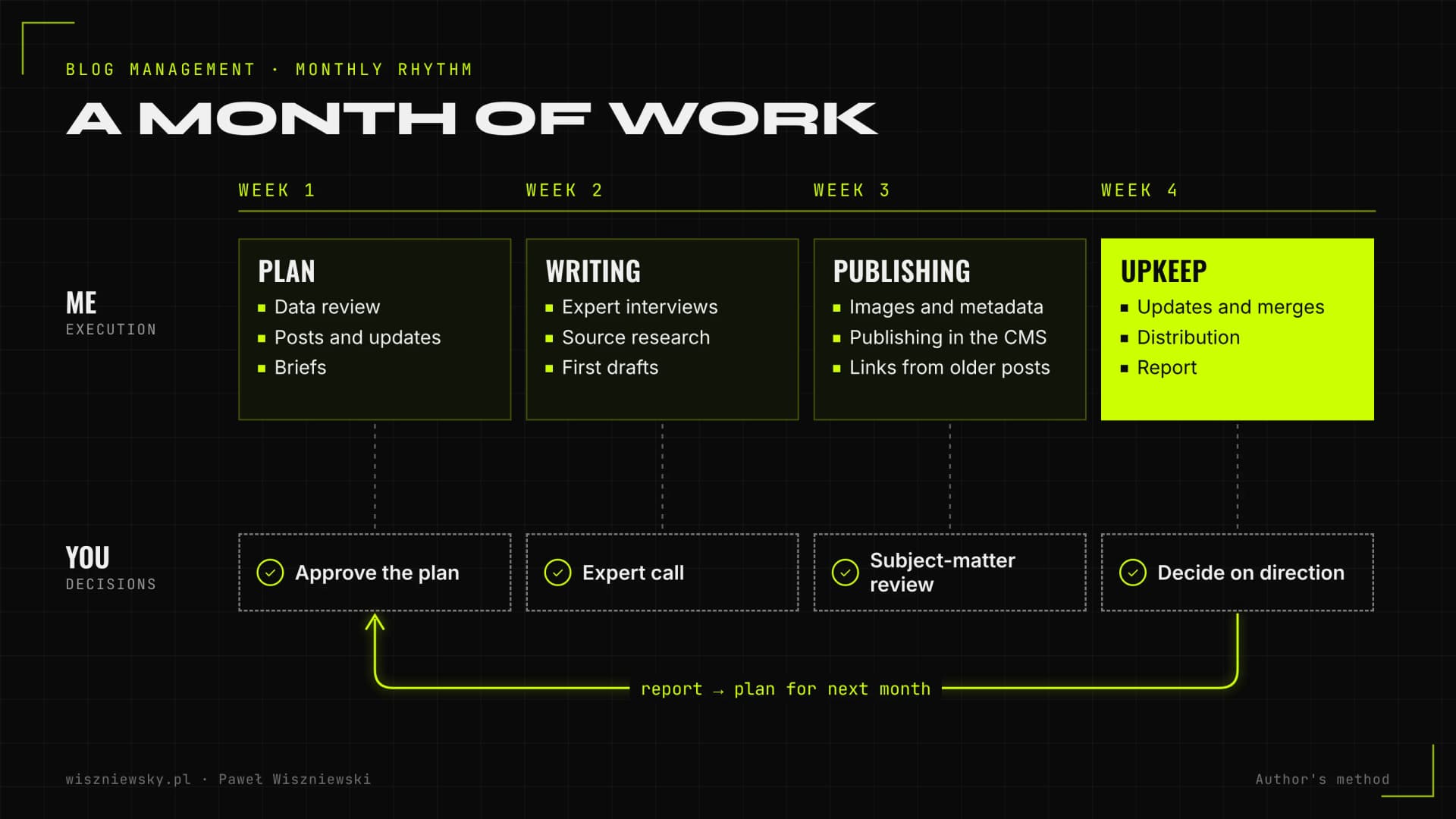
A month of blog management – who does what, and when
Each month has a fixed rhythm: plan and approval at the start, writing and publishing in the middle, updates and the report at the end. Your role comes down to a few decisions at set points, not constant supervision.
How the work splits in a typical month; author's method.
Week
What I do
What I need from you
1
Review last month's data, plan new posts and updates with briefs
Approve the plan, or shift business priorities
2
Expert interviews, research, writing the first drafts
A slot for a short call with the expert
3
Review, revisions, images, publishing in the CMS, linking older posts to new ones
Subject-matter review by the agreed date
4
Updates and merges, distribution, the report and proposals for next month
Read the report and decide on direction
Posts don't all go out in one week. With several articles a month I space them out, and I plan seasonal pieces early so they're indexed before interest peaks.
New posts or updates – how I split the monthly budget
The number of articles in a month is the sum of new posts, updates and merges, and I set the mix each month based on the data. In a month when several important articles are losing traffic, updating them comes before new topics.
The order in which I allocate work
Posts tied to your key services that are losing clicks. They already have history and links, and every loss means fewer enquiries.
Duplicates and cannibalisation. Merging two weak posts into one usually does more than a third post on the same topic.
Missing cluster pieces around the main service. Questions clients look up before buying that the blog doesn't answer yet.
Posts with high impressions and low CTR. A new title and a better first paragraph are often enough.
New topics for earlier stages of the decision. They build reach and first contact with the brand, but their effect on enquiries is slower.
For me an update means a real change: new data, a missing section, corrected sources, a new example. Only then does the updated date change on the page and in the structured data.
Post quality control – what I check before and after publishing
Every post goes through the same checklist before publishing, and some checks keep running automatically afterwards. That way a mistake in one post or in the template doesn't sit there for months until someone notices.
Before publishing
One H1, a title and meta description unique across the site, main phrase at the start of the title.
Every number has a primary source with publisher and year, and the source links work.
The post has a first-hand element and expert sign-off where the topic calls for qualifications.
Links to the pillar, cluster posts and the service with descriptive anchors, plus at least one link to the new post from older articles.
Images with descriptive file names and alt text.
Valid JSON-LD with the author and dates matching the page.
After publishing, automatically
On my own site I run two automated checks in CI, and I suggest the same setup to clients when their infrastructure allows it:
An SEO check on every site change: for each URL in the sitemap it verifies one H1, a unique title and description, a self-referencing canonical, reciprocal hreflang, valid JSON-LD, no broken internal links and no orphan pages.
A weekly check of source links across all blog posts, because sources disappear or move over time. 404, 410 and 5xx errors are flagged for fixing; bot blocks (such as 403 or 429) are warnings, because they don't mean the page is gone.
How the blog leads to enquiries – paths, CTAs and links to the offer
A blog brings enquiries when every post has an assigned service and a natural path to it at the point where the reader has the problem, not just a banner in the footer. I design this together with the topic plan, not after publishing.
Reader's stage
Example post
Call to action
What I measure in GA4
Learning about the problem
What X is and when you need it
Link to a related guide, newsletter sign-up
Clicks to further posts, sign-ups
Comparing options
X or Y, how to choose a provider
Link to the service with who it's for, a downloadable resource
Clicks to the service page
Close to deciding
How much X costs, what implementation looks like
Contact, a quote, a call
Form submissions and contact clicks as key events
A post-to-service map is part of the calendar, so every new article has its target page from day one.
A link to the service in the body, in the section describing the problem that service solves, with a descriptive anchor.
A related-service module in the post template, chosen by category.
GA4 key events for forms, phone and email clicks, and clicks from the blog to offer pages, so the report shows which posts start the paths that end in an enquiry.
Distribution after publishing – LinkedIn, newsletter and short video
A post that only goes to search has no readers for its first few weeks. So I turn each article into several shorter pieces for the channels you already have, adapted to each one, instead of pasting the same link everywhere.
LinkedIn: one argument from the post, developed over a few paragraphs, with the link in a comment or at the end. Ideally from the expert's profile, not only the company page, because it also builds their recognition.
Newsletter: a short summary with one takeaway and a link, collected from the month's posts.
Short vertical video: the post summarised in under a minute. That's what I do on my own blog, where every new post gets a video in Polish and English and its own cover.
Graphics and tables: a diagram or table from the post as a standalone social asset.
The monthly report – what's in it and which decisions follow
The monthly report has one job: show what worked, what didn't and what that means for next month. So every part of it ends with a decision, not just a chart.
Report section
Data
Decision it drives
Blog visibility
Impressions, clicks, number of queries in the top 10, compared with the previous period
Whether pace and direction are right
New posts
Indexing, first queries, rankings after 30 and 90 days
Which topics to expand and which to fix
Posts losing traffic
Drops in clicks and rankings versus previous months
The update list for next month
Paths to the offer
Clicks from posts to service pages and GA4 key events
CTA and link changes in selected posts
AI presence
Assistant answers to a fixed set of questions from the plan, cited URLs
Which posts to strengthen with data and direct answers
Technical health
SEO and link check results, indexing errors
Template or single-post fixes
The report comes with next month's plan for approval. Traffic from AI Overviews and AI Mode is counted in Search Console's regular performance report, so I check presence in AI answers separately, as described in the AI visibility audit guide.
Guest, sponsored and AI-assisted posts on your blog – where the limits are
You can publish partner articles, sponsored posts and AI-assisted content on a company blog, but each has limits set out in Google's policies. I keep to them, because breaching them affects the whole site, not one post.
Format
Risk
How I handle it
Guest and partner posts
Google's site reputation abuse policy covers third-party content published mainly to benefit from the host site's ranking signals
I publish only pieces related to the blog's subject, edited on my side and with a named author; I don't accept ready-made articles distributed to many sites
Sponsored posts and paid links
Google requires paid links to be marked with rel="sponsored" (or nofollow)
The post is labelled as sponsored for readers and the links are marked in the code
AI-assisted content
Google treats mass publishing of pages with no value for readers as scaled content abuse, whatever the tool
AI helps with research and checks, but every post has editing, sources and a first-hand element
In Google's policy, the host's editorial oversight is one of the factors weighed for third-party content, but on its own it doesn't decide compliance. So whether I accept a partner's article depends first of all on whether it's written for your readers. More on the rules for AI content in the post on scaled content abuse, and on paid placements on external sites under link building strategy.
Changing provider or CMS – how not to lose traffic in a handover
When a blog moves from an agency, a freelancer or an in-house team, most traffic is lost through URL changes, bulk deletions and lost access. Before I change anything, I secure what works.
Handover checklist
Access on company-owned accounts: CMS with admin rights, Search Console, GA4 and, if needed, hosting and DNS. The accounts should belong to the company, not the previous provider.
A copy of content and media: an export of posts, the image library and SEO settings from plugins or CMS fields.
A list of URLs with traffic and external links, so none of them disappears without a redirect.
Existing editorial materials: the calendar, style rules, the list of experts and approved sources.
A no-URL-changes rule: in the first weeks I don't change the URL structure or delete posts in bulk. Merges and removals happen only after the audit, always with a 301 redirect, or a 410 where there's no equivalent.
If the handover also means moving the blog to a new CMS or domain, that's a migration, which I run using the procedure from SEO migration. I can also build a blog from scratch if the company doesn't have one yet. If you need a plan first without an ongoing engagement, start with a content marketing strategy; single articles are available as SEO copywriting.
I send the draft via Google Docs or Notion with comments explaining the SEO rationale for key decisions. You give feedback, I revise, and publish. Usually one feedback cycle is enough.
What CMS do you work with?
I work with WordPress, Webflow, Sanity, Contentful, and Ghost. If you have a different CMS — ask, I can likely handle it. If you don't have a blog yet, I can set one up as part of onboarding.
Can I influence the topics?
Yes — we plan topics together. You define the business direction and priorities; I select the specific keyword targets and content structures with the best ranking potential. Final call is always yours.
What does a month of blog management look like?
At the start of the month you approve topics, then I prepare and publish articles, refresh older content and internal links, and at the end you get a report on traffic, rankings and leads with proposals for next month.
Do you also update older posts?
Yes. Every month I check which posts are losing traffic or rankings and refresh them with new data, sections, links and dates. This often pays off faster than publishing new posts.
How much does blog management cost?
Blog management starts from €3,000 per month. The price depends on the number, length and specialization of articles and how much older content is refreshed.