BACK TO AI & Automation

AI Chatbot for Business – Virtual AI Assistant & Customer Support Automation

AI agent resolving 80% of support tickets automatically. 24/7 multi-channel (chat, email, WhatsApp), answering from your knowledge base (RAG).

Author: Paweł Wiszniewski · Updated:

Key takeaways

AI agent resolving 80% of support tickets automatically. 24/7 multi-channel (chat, email, WhatsApp), answering from your knowledge base (RAG).

  • ›80% autonomous ticket resolution rate—your human agents focus only on complex, high-value cases instead of repetitive queries.
  • ›24/7/365 availability with sub-5-second response time—no sick days, no shift gaps, no customer waiting in a queue.
  • ›Answers from your knowledge base and product docs (RAG) in your brand tone—responds as a member of your team, not as a generic chatbot.

Price: from €1,500

SERVICE DETAILS

I deploy custom AI support agents built on LLMs such as GPT or Claude that answer from your product documentation, FAQ, and past ticket history (RAG — the model is not trained on your data, it retrieves it for every answer). The agent handles first-line support autonomously—answering questions, processing refunds, resetting passwords, and escalating complex cases to human agents with full conversation context. Integrates natively with Zendesk, Intercom, Freshdesk, or any webhook-compatible platform.

› INVESTMENT:

from €1,500
const module = new ExecutionProtocol();

// Initializing customer-support-ai-agent...
› Loading dependencies... OK
› Establishing connection... OK
› Ready for deployment... AWAITING_COMMAND

Paweł Wiszniewski · my approach

What I do differently

Before proposing a chatbot, I can show you how my support agent works in practice: the AI Operations Agent demo resolves e-commerce tickets from text, images and voice recordings (Python, FastAPI, LangGraph). I build deployments on the same pattern — the agent knows your returns and complaints rules, checks order status in your system and, when unsure, hands the case to a human with a summary. I start with ticket history analysis, because it shows which topics the agent can take over right away and which it shouldn't touch.

Try the demo: AI Operations Agent

My take and a real-world example

My take

In my view the best AI chatbot is one that knows when to stop talking. Promising 100% support automation is a recipe for a crisis — customers should always have an easy path to a human.

From the market

In 2024 a British Columbia tribunal held Air Canada liable for a wrong discount answer its chatbot gave a customer and ordered it to pay damages. Klarna boasted its AI assistant did the work of hundreds of agents, then in 2025 started hiring humans again after customers complained about generic answers. That's why I design agents with a knowledge base, boundaries and escalation to a human.

Sources: Moffatt v. Air Canada, 2024 BCCRT 149 (AI Business) · Entrepreneur: Klarna hires human agents again (2025)

Who this is for

  • Companies whose support team answers the same questions about orders, returns and delivery every day.
  • Stores and SaaS products with customers writing in the evenings and at weekends.
  • Businesses serving customers across chat, email, WhatsApp and Messenger.
  • Teams that want to grow without hiring more first-line agents.

What you get

  • Ticket history analysis and the topics the agent takes over from day one.
  • An AI-ready knowledge base (RAG) built from your FAQs, policies and documentation.
  • An agent connected to your helpdesk, CRM and order system, with clear escalation rules.
  • On-brand tone of voice and scripts for difficult situations.
  • A dashboard with conversations, quality ratings and questions the agent can't answer yet.

How results are measured

  • Share of tickets resolved without a human.
  • First response time and time to resolution.
  • Customer satisfaction (CSAT) after agent conversations.
  • Answer quality checked against a test question set.

Key Benefits

80% autonomous ticket resolution rate—your human agents focus only on complex, high-value cases instead of repetitive queries.

24/7/365 availability with sub-5-second response time—no sick days, no shift gaps, no customer waiting in a queue.

Answers from your knowledge base and product docs (RAG) in your brand tone—responds as a member of your team, not as a generic chatbot.

Full escalation logic with context handoff—when the AI can't resolve a ticket, a human agent receives a complete conversation summary instantly.

Multi-channel in one agent: web chat, email triage, WhatsApp, Slack, and any webhook-compatible platform unified under a single system.

The Process

1

Knowledge Base Audit

I audit your existing documentation, past ticket history, and FAQs to identify coverage gaps and define what the agent must know before it starts answering customers.

2

Agent Architecture & Knowledge Base

I design the decision tree, tone guidelines, and escalation triggers, then connect your data through Retrieval-Augmented Generation (RAG) — for every question the agent retrieves the relevant document passages and answers from them.

3

Integration & Channel Setup

I wire the agent into your support platform (Zendesk, Intercom, or custom) with fallback logic, confidence thresholds, and human-in-the-loop escalation flows.

4

Testing, Tuning & Launch

I test the agent on historical tickets, measure resolution rate, tune responses for accuracy, and launch with a monitoring dashboard tracking resolution rate and escalation frequency.

AI agent vs rule-based chatbot vs traditional helpdesk

CriterionAI agent 24/7 (virtual assistant)Rule-based chatbotTraditional helpdesk
Availability24/7/365, no downtime24/7, rigid scripts onlyWorking hours only
Response timeInstant (under 5s)Instant, scripted answers onlyMinutes to hours
Language understandingNatural language (LLM + RAG)Keywords and decision treeFull — human
ChannelsChat, email, WhatsApp, voice, SlackUsually one (site widget)Email and phone
CostFrom €1,500 setup, low cost per ticketLow, but limited effectivenessHigh — salaries grow with scale
ScalingUnlimited — 1 and 1000 chats at onceUnlimited, but shallow answersLinear — more tickets, more staff
Best forBusinesses automating 80% of repetitive ticketsSimple, static FAQComplex, non-standard cases needing empathy

Common mistakes

  • Launching a chatbot on the FAQ alone, without access to order and customer data.
  • No clear handover path to a human, so customers get stuck in a loop.
  • Measuring the number of conversations instead of the share of cases actually resolved.
  • Hiding that customers are talking to AI — it hurts trust and can breach the EU AI Act.

When this service is not worth it

  • You get a handful of enquiries a week — answering by hand or adding a good FAQ is simpler.
  • Every case is unique and needs an expert's individual decision.
  • You have no written service rules (returns, complaints, delivery) for the agent to rely on.
/// GUIDE

AI Customer Support Chatbot – How I Build a Support Agent, Step by Step

This guide shows what happens inside an AI support agent and how I make the design calls: which tickets to hand to AI, how to prepare the knowledge base, when to pass a conversation to a human and how to measure all of it. It also covers how channels differ and when a helpdesk's built-in AI agent is enough versus when a custom build is worth it.

How an AI customer support chatbot works – from message to resolved ticket

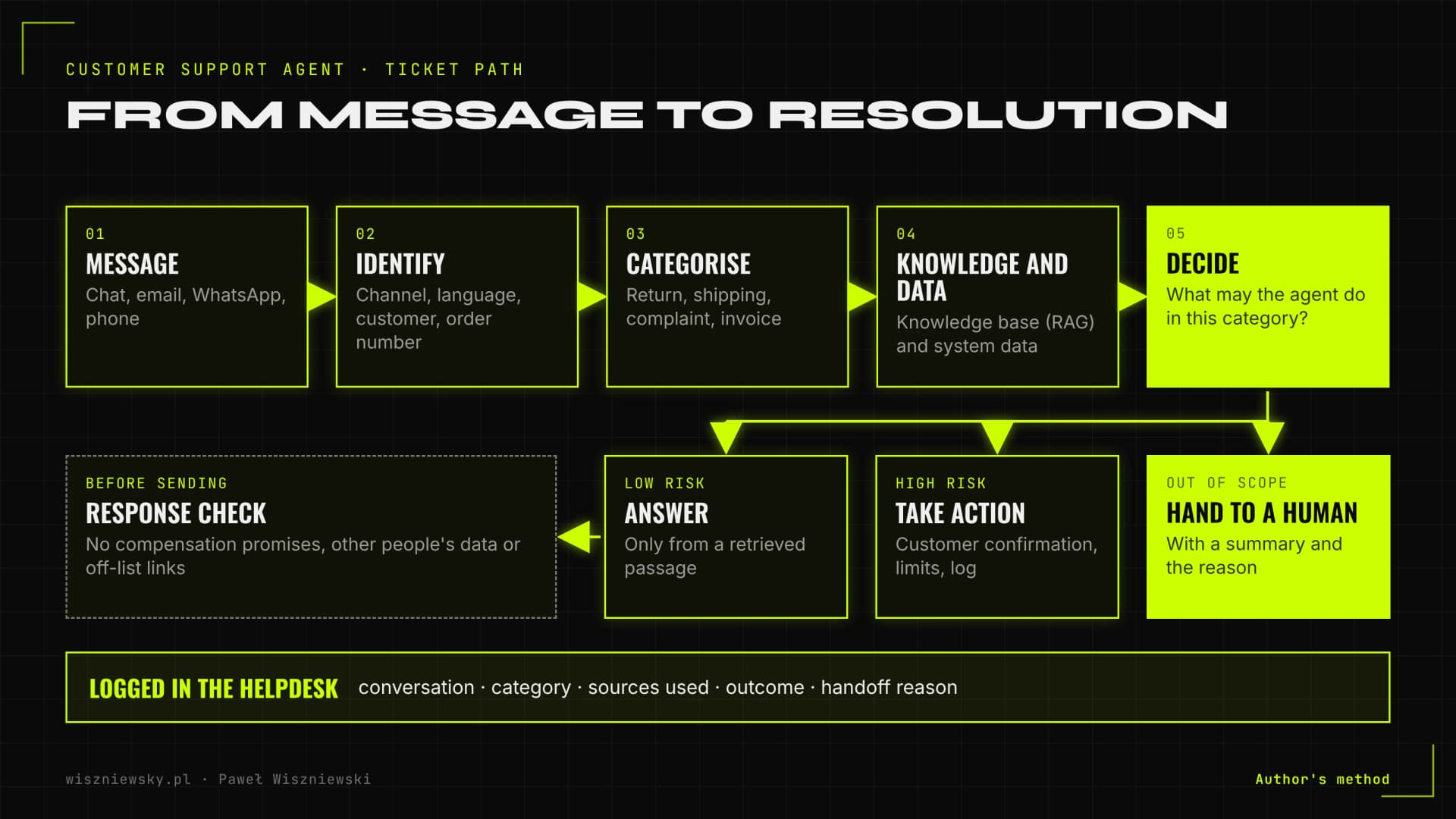
A support agent is not a single prompt but a chain of steps: identify the customer and topic, pull knowledge and system data, decide (answer, take an action or hand off to a human), check the reply and log everything in the helpdesk. The language model is one link in that chain, and quality depends mostly on what surrounds it.

  1. Identification. The agent checks the channel, the language and whether the sender is a known customer (email, phone number, order number). Without this it can't say anything specific about an order.
  2. Topic classification. The message is assigned to one of the categories defined in the ticket analysis, such as shipping status, return, complaint, invoice or product question. The category determines which tools the agent may use and which rules apply.
  3. Knowledge and data. The agent retrieves policy and help-doc passages from the knowledge base (RAG) and reads data through integrations: order status, tracking number, purchase date.
  4. Decision. The agent replies, performs an allowed action (for example, generating a return label) or hands off to a human with a summary.
  5. Checks. Before a reply reaches the customer, rules verify it contains no compensation promises, no other people's personal data and no links outside an allow-list of domains.
  6. Logging. The conversation, category, sources used and outcome are written to the helpdesk, so agents see the history and I have data for improvements.
Diagram of how an AI support agent handles a ticket: message, identification, category, knowledge base and system data, then answer, take action or hand off to a human
The ticket path inside a support agent. Every branch ends with a record in the helpdesk.

Three kinds of action, three levels of risk

Action typeExampleRiskMy rule
Answer from knowledgeHow many days do I have to return this?Low, if the knowledge base is currentAnswer only from a retrieved passage, never from the model's memory
Read dataWhere is my parcel?Medium: exposing someone else's dataVerify the customer before showing order details
Act in a systemCancel an order, issue a return labelHigh: financial impactCustomer confirmation, amount limits and a log entry for every action

Technically, actions run through tool calls with narrow permissions. I explain how to make them reliable in tool calling in production.

Which tickets to hand to a chatbot – analysing your ticket history

From day one the agent takes the categories that are frequent, governed by written rules and free of judgment calls. I pick them from a helpdesk export, not from what the team feels is most common.

I work on an export covering recent months: group tickets into categories, count volume and ask the same questions for each. Does the answer follow from a policy? Does it need data from a system we can reach through an API? Do customers usually write calmly or upset? What happens if the agent gets it wrong?

Category (e-commerce example)Agent's roleWhy
Shipping statusResolves on its ownThe answer comes from carrier and order data
Return within the statutory periodResolves on its ownClear rules, reversible action
Faulty product complaintCollects details, a human decidesThe agent asks for photos and the order number; assessment stays with staff
Invoice correctionPrepares the caseChanging an accounting document needs approval
Complaint, angry customerStraight to a humanEmpathy matters; a handoff with a summary saves time
Pre-purchase questionAnswers from the catalogueGood answers sell; for B2B leads I connect this to a sales qualification bot

Knowledge base for an AI chatbot – what to prepare before launch

A chatbot answers only as well as its knowledge base allows: one current version of every rule, exceptions written out explicitly and a named person responsible for updates. Tidying up that knowledge is usually the biggest piece of work on the company's side.

Knowledge base checklist

  • One source of truth. Terms and conditions, FAQ and helpdesk macros often disagree. We decide which version is valid and fix or delete the rest.
  • Rules with exceptions. Not "returns within 14 days" but "returns within 14 days of delivery; personalised products excluded; business purchases follow different terms". A model won't infer exceptions nobody wrote down.
  • Your agents' best replies. From ticket history I pick replies that closed the case without a follow-up. They become tone and content patterns for the agent.
  • A list of off-limits topics. What the agent never says: compensation promises, legal advice, delivery dates the company doesn't guarantee, anything about other customers.
  • Language versions. If you serve customers in several languages, the rules must match across all of them.
  • An owner and an update rhythm. A price or policy change has to reach the knowledge base the same day. We agree who does it and how.

Under the hood the knowledge base uses the same mechanism I deploy in RAG implementations. Support adds access to order and customer data, without which a chatbot only gives generic answers. Chunking and retrieval techniques are covered in advanced RAG.

Handing off to a human – when a chatbot should step aside

The agent hands the conversation to a person when the customer asks for one, when the topic is out of scope, when the knowledge base has no reliable answer or when the conversation is going badly. The handoff must carry a summary so the customer doesn't have to repeat everything.

This is about trust, not courtesy. In a Gartner survey published in 2024 (5,728 customers, surveyed in December 2023), 64% said they would prefer companies didn't use AI for customer service, and the top concern was that it would become harder to reach a person. An agent that hides the way to a human confirms that fear.

Handoff triggers I configure

  • The customer asks for a human in any wording ("let me talk to someone", "agent", "this isn't helping").
  • A category outside the agent's scope, or one marked "always human" (complaints, legal matters, high amounts).
  • No knowledge base passage that answers the question, instead of an answer from the model's memory.
  • A second failed attempt at the same issue, or clear frustration in the message.
  • An action beyond set limits (refund amount, changing invoice details).

What the human agent receives

The human agent gets a helpdesk ticket with the category, a short summary, customer and order data, a list of what the bot already checked and the reason for the handoff. Outside working hours the bot says plainly when a person will reply and collects everything needed so the case can be closed with one message the next morning.

Website chat, email, WhatsApp and phone – how a chatbot differs by channel

One agent can run across several channels, but each has its own rules: message length, how long customers wait, cost and platform limits. I start with the channel that carries the most repetitive tickets and add others afterwards.

ChannelWhat's specificWhat I watch
Website chatShort messages, the customer waits in real timeResponse speed, a visible "talk to a person" button, context of the page the customer is on
EmailLong messages, several questions at once, attachmentsAnswering every question in the email; draft mode approved by staff at the start
WhatsAppA 24-hour customer service window after the customer writes; outside it only approved templatesTemplate costs, messaging consent, handing off in the same thread
Messenger, InstagramPre-purchase questions, often with a photoRecognising the product from a photo, the line between support and sales
Phone (voice)Real-time conversation where latency mattersShort turns, confirming details, transferring the call to a person

WhatsApp needs its own cost model. According to Meta's documentation, a customer message opens a 24-hour customer service window in which non-template messages are free, and outside that window only approved templates can be sent. Since 1 July 2025 Meta has charged per template message. So a WhatsApp agent should resolve the issue during the conversation rather than reply later.

In every channel the first message says the customer is talking to an AI assistant. According to the European Commission, the transparency obligations in Article 50 of the AI Act apply from 2 August 2026. The voice channel is covered in voice AI agents.

Connecting the chatbot to your helpdesk, store and CRM

Without integrations a chatbot can only answer general questions. To resolve cases, I connect it to the helpdesk (where tickets live and staff work), the order system or store, shipment tracking and the CRM, and every integration starts with read-only access.

  • Helpdesk (Zendesk, Intercom, Freshdesk or any with an API): creating and updating tickets, category tags, internal notes with the summary, queue assignment.
  • Store and order system (e.g. Shopify, WooCommerce, BaseLinker, ERP): order status, line items, dates, payment method, returns.
  • Carriers: shipment status from the tracking number, so the agent doesn't send customers off to the courier's website.
  • CRM: customer history, segment, open cases. For B2B customers, also the account owner who receives the handoff.
  • Team chat (Slack, Teams): alerts about urgent cases and quality drops.

Write permissions (cancellations, refunds, address changes) come only after a period in which the agent prepares actions and a person approves them. Least-privilege rules are covered in AI agent security. With many integrations I use MCP so the support agent and other automations can share the same tools. For online stores I often pair support with e-commerce AI automation.

A helpdesk's built-in AI agent or a custom chatbot – how to choose

A built-in AI agent is enough when most questions can be answered from the knowledge base and all support already happens in that helpdesk. A custom build makes sense when the agent needs several systems, data must stay under your control, or at high volume the per-resolution fee starts to exceed the cost of your own solution.

One pricing example: Intercom's 2026 pricing charges $0.99 per Fin "outcome". An outcome is a conversation where the customer confirms the issue is resolved, doesn't ask for more help after Fin's reply, or Fin completes a defined procedure, including a handoff. Note that "didn't ask again" doesn't always mean the problem was solved.

CriterionBuilt-in helpdesk agentCustom build
StartFast, configured in the admin panelLonger: analysis, integrations, testing
CostFee per resolved conversation or bundleFrom €1,500 to build, plus model and hosting costs
Access to your systemsLimited to available integrationsAny system with an API, including in-house ones
Control over model and dataThe vendor decidesYour choice of model, processing location and logging rules
Switching helpdeskThe agent stays with the old vendorThe agent moves with you

Testing an AI chatbot before launch – test set and attack attempts

Before launch I test the agent on real historical tickets, each with an expected answer, source and action, plus attempts designed to break it. The score on that set decides which categories the agent takes over on its own.

What goes into the test set

  • Tickets from every category in roughly real-traffic proportions, including messy ones with typos and several issues in one message.
  • Edge cases: an order just inside and just outside the return window, a business purchase, a product excluded from returns.
  • Questions the knowledge base can't answer. The expected result is a handoff, not an invented reply.
  • Abuse attempts: asking for a discount "because your agent promised", instructions hidden in the message (prompt injection), trying to extract another customer's data or the system prompt.
  • Messages in other languages and off-topic conversations.

After offline tests comes shadow mode: the agent drafts replies and staff send, edit or reject them. Every edit goes back into the test set. Evaluation methods are covered in LLM evaluation and prompt injection.

How to measure AI chatbot performance – metrics that don't mislead

The key metric is the share of cases the agent actually resolved, not the number of conversations or the share that never reached a human. A conversation after which the customer gave up or wrote again through another channel is not a success, even if many dashboards count it as one.

MetricHow I calculate itTrap
Resolved without a humanCases closed by the agent where the customer didn't come back with the same issue within a few daysCounting every conversation without a handoff as a win
Repeat contactSame customer and topic in another channel or a new ticketIgnoring emails and calls after a chat
CSAT after agent conversationsThe same survey as after human conversations, both groups comparedSurveying only after successful chats
Handoff reasonsShare of each trigger in handoffsNo breakdown, so you don't know what to fix
Unanswered questionsList of questions where knowledge was missingNobody filling the gaps every week
Cost per resolved caseModel, platform and maintenance cost ÷ resolved casesComparing against cost per conversation instead of per resolved case

Every week I also review a random sample of conversations, including ones rated as successful. Automated metrics won't catch a reply that is formally correct but rude or confusing. How to calculate the return on the whole deployment is covered in AI automation ROI, and the chatbot vs agent vs human comparison in AI in customer service.

Frequently Asked Questions

What if the AI gives a wrong answer?

I implement confidence thresholds—below a set level the agent transparently tells the user it doesn't know and escalates to a human. A feedback loop also flags incorrect answers so they improve the next version.

Which platforms does it integrate with?

Out of the box: Zendesk, Intercom, Freshdesk, HubSpot Service Hub. For other platforms I build a webhook or API integration. The agent can also run as a standalone chat widget on your website.

Does the AI learn from new tickets over time?

Yes, through its knowledge base rather than retraining. I set up a semi-automated review process: new resolved tickets are reviewed, approved, and added to the knowledge base on a monthly cadence, keeping the agent continuously improving.

Can it handle multiple languages?

Yes. Current LLMs such as GPT and Claude handle most languages natively. I configure language detection and can set different tone guidelines per language if your customer base is multilingual.

What's the difference between an AI chatbot for business and a virtual AI assistant?

An AI chatbot for business typically handles a specific channel or use case. A virtual AI assistant for business is a full conversational AI agent — LLM-powered conversational bots operating across multiple channels (chat, email, WhatsApp, voice) and answering from your company's knowledge base. I deploy complete AI assistant systems, not just simple rule-based chatbots.

What data do you need to deploy an AI chatbot?

Ticket or chat history (a helpdesk export is enough), FAQs, policies, product information and access to the systems the agent should use, such as your store or CRM. Together we also agree when the agent hands a case to a human.

Is an AI chatbot GDPR and AI Act compliant?

It can be, when designed properly: customers know they're talking to AI, personal data is limited to what's necessary and the model provider has a data processing agreement. I design deployments with these rules from the start.

What happens after launch?

For the first weeks I review conversations, improve answers and add questions the agent didn't know to the knowledge base. After that you can use monthly support or run the agent yourself with the documentation.

Got a project?

Terminate
Silence

Initiate protocol. Establish connection. Let's build something loud.

> WAITING_FOR_INPUT...