BACK TO Technical SEO

Schema.org Implementation

JSON-LD Schema.org implementation generating Rich Snippets: review stars, prices, FAQ accordions, breadcrumbs. SERP visibility increases by 20–40% CTR without changing position.

Author: Paweł Wiszniewski · Updated:

Key takeaways

JSON-LD Schema.org implementation generating Rich Snippets: review stars, prices, FAQ accordions, breadcrumbs. SERP visibility increases by 20–40% CTR without changing position.

  • ›Rich Snippets in Google: review stars, product prices, inventory status, FAQ accordions directly in search results
  • ›20–40% CTR uplift from visual SERP differentiation
  • ›Correctly validating schemas per Google Rich Results Test and Schema Markup Validator

Price: from €600

SERVICE DETAILS

I implement advanced Schema.org structured data in JSON-LD for every page type: Product (stars, price, availability), FAQPage (accordions in search results), Article (author, date, thumbnail), LocalBusiness, and Organization. The outcome: your Google results take up more screen space, stand out visually, and generate 20–40% higher CTR at the same ranking position.

› INVESTMENT:

from €600
const module = new ExecutionProtocol();

// Initializing schema-org-implementation...
› Loading dependencies... OK
› Establishing connection... OK
› Ready for deployment... AWAITING_COMMAND

Paweł Wiszniewski · my approach

What I do differently

Most schema implementations are a plugin adding several independent JSON-LD blocks that often contradict each other. I build structured data as one graph with stable @id identifiers: the company, author, page, service and article all reference each other, so Google and AI models see one consistent entity. This site is built the same way — one author entity referenced by every article and service. I also enforce a rule plugins don't: structured data must match what's visible on the page.

Case study: Fashion Brand SEO/GEO

My take and a real-world example

My take

I think structured data has stopped being a way to win stars and decorations in results and become a dictionary for machines. Today I implement it mainly so Google and AI models understand unambiguously who you are and what you sell.

From the market

In August 2023 Google limited FAQ rich results to authoritative government and health sites, and HowTo to desktop. Thousands of sites lost their expandable questions overnight. Those who implemented schema just for looks lost everything; those who built a consistent entity lost nothing.

Sources: Google Search Central: Changes to HowTo and FAQ rich results (2023)

Who this is for

  • Stores that want prices, availability and ratings shown in Google.
  • Service and local businesses building brand credibility in search results.
  • Publishers and blogs that want Google and AI to understand author and date correctly.
  • Sites whose structured data throws errors in Search Console.

What you get

  • An audit of current structured data and Search Console errors.
  • A schema plan per template: Organization, Product, Article, FAQ, Breadcrumb and more.
  • JSON-LD implemented as a consistent graph with stable @id identifiers.
  • Validation in the Rich Results Test and Schema Markup Validator.
  • Documentation on keeping data valid as new pages are added.

How results are measured

  • Pages with valid items in Search Console reports.
  • Impressions and CTR of rich results.
  • Structured data errors and warnings.
  • Accuracy of brand information in knowledge panels and AI answers.

Key Benefits

Rich Snippets in Google: review stars, product prices, inventory status, FAQ accordions directly in search results — visual differentiation from competitors at no extra ranking effort.

20–40% CTR uplift from visual SERP differentiation — more clicks from the same ranking position, more traffic without additional ad spend.

Correctly validating schemas per Google Rich Results Test and Schema Markup Validator — I implement schemas Google actually displays, not ones that silently fail validation.

Schemas for all page types: Product, FAQPage, Article, BreadcrumbList, Organization, LocalBusiness, Event, Course — tailored to your business model.

GEO (Generative Engine Optimization) signal — JSON-LD structured data is a primary signal for language models (e.g. in ChatGPT and Gemini), which parse structured data more reliably than plain text.

The Process

1

Existing Structured Data Audit

I check what's already implemented, verify correctness in Google Rich Results Test and Bing Webmaster Tools, and identify page types with the highest Rich Snippet potential.

2

Schema Architecture Design

I define JSON-LD schemas for each page type, plan the Organization/WebSite/WebPage hierarchy, and implement sameAs attributes to link with Knowledge Graph entities.

3

JSON-LD Implementation

I implement schemas in the site's codebase (or CMS configuration), test each schema type in Google Rich Results Test, and validate against the Schema.org validator.

4

Search Console Monitoring

I configure Rich Results monitoring in Google Search Console, verify Rich Snippet appearance in search results, and fix any errors reported by Google.

Common mistakes

  • Adding review or FAQ schema for content that isn't visible — a manual action risk.
  • Several Organization or Person objects with different names and addresses on one page.
  • Plugin-based markup never validated after template updates.
  • Expecting stars in results for types Google no longer shows them for.

When this service is not worth it

  • Your site has a few static pages with no products, articles or services — basic Organization markup is enough.
  • Your platform doesn't allow code or head edits.
  • You expect structured data alone to lift rankings — it's a supporting signal, not a ranking factor.
/// GUIDE

Schema.org implementation – how I plan and ship structured data, step by step

This guide shows what a structured data project looks like from the inside: which types go on which templates, where the JSON-LD values come from, how I test them and how I measure the result. For a general introduction to Schema.org and the list of retired rich results, see my structured data guide. Here I focus on the work itself.

What structured data actually gets you in 2026

Structured data makes a page eligible for rich results and gives machines an unambiguous description of your entities. It does not guarantee that anything is shown, and it does not raise rankings. Google decides whether stars or prices appear, even when the test passes cleanly.

Google's introduction to structured data lists a few case studies: Rotten Tomatoes marked up 100,000 pages and measured a 25% higher click-through rate on enhanced pages, and Nestlé reported an 82% higher CTR for pages shown as rich results compared with non-rich results. These come from Google's own materials, from large sites and from types that add something visible to the result. I read them as evidence that the effect is real, not as a forecast for any particular site.

The second benefit is less visible but lasts longer: a consistent description of the company, author, products and services that a search engine can connect with what it already knows. That part doesn't disappear when Google retires another rich result type, which has happened regularly in recent years.

What not to expect

  • Ranking gains from markup alone. Google's general guidelines say a structured data manual action removes rich result eligibility but does not affect how the page ranks. The reverse holds too: markup doesn't lift rankings by itself.
  • Expandable FAQ answers under a regular business site. Since 2023 Google shows them only for well-known, authoritative government and health sites.
  • Review stars for reviews of your own business on the home page or a service page. Stars work for products and a handful of other types, not for self-serving reviews.

Template map: which Schema.org type goes on which page

I plan structured data per template, not per URL. A store with 20,000 products usually has somewhere between a few and a dozen templates, and those decide the quality of the implementation. The first document in every project is a table that assigns types, properties and a data source to each template.

TemplateTypesKey propertiesWhere the values come from
Home pageWebSite, Organization (or a subtype such as OnlineStore, ProfessionalService)name, url, logo, sameAs, contactPointGlobal site settings
About, author pageAboutPage or ProfilePage, Personname, jobTitle, worksFor, sameAs, imageAuthor profile in the CMS
Article, blog postBlogPosting or Article, BreadcrumbListheadline, author (@id), datePublished, dateModified, imagePost fields, date of the last real edit
Store categoryCollectionPage, BreadcrumbListname, breadcrumb, hasPart or a product listCategory tree
Product pageProduct or ProductGroup, Offer, AggregateRatingsku, gtin, brand, price, priceCurrency, availabilityProduct database, the same one that feeds Merchant Center
Service pageService, WebPageprovider (company @id), areaServed, offersService data and price list
Location, branchLocalBusiness (or a subtype)address, geo, openingHoursSpecification, telephoneBranch data, matching the Google Business Profile
Returns and shippingOrganization with hasMerchantReturnPolicy and a shipping policyreturnPolicyCategory, merchantReturnDays, shipping costs and timesStore terms
Event, job posting, videoEvent, JobPosting, VideoObjectEvery property Google requires for that typeEvents module, ATS, video library

This table exposes gaps right away. The column most often missing is the last one: someone hard-coded a price or a date into the template, and ever since, the structured data has been saying something different from the page.

The JSON-LD graph and stable @id identifiers

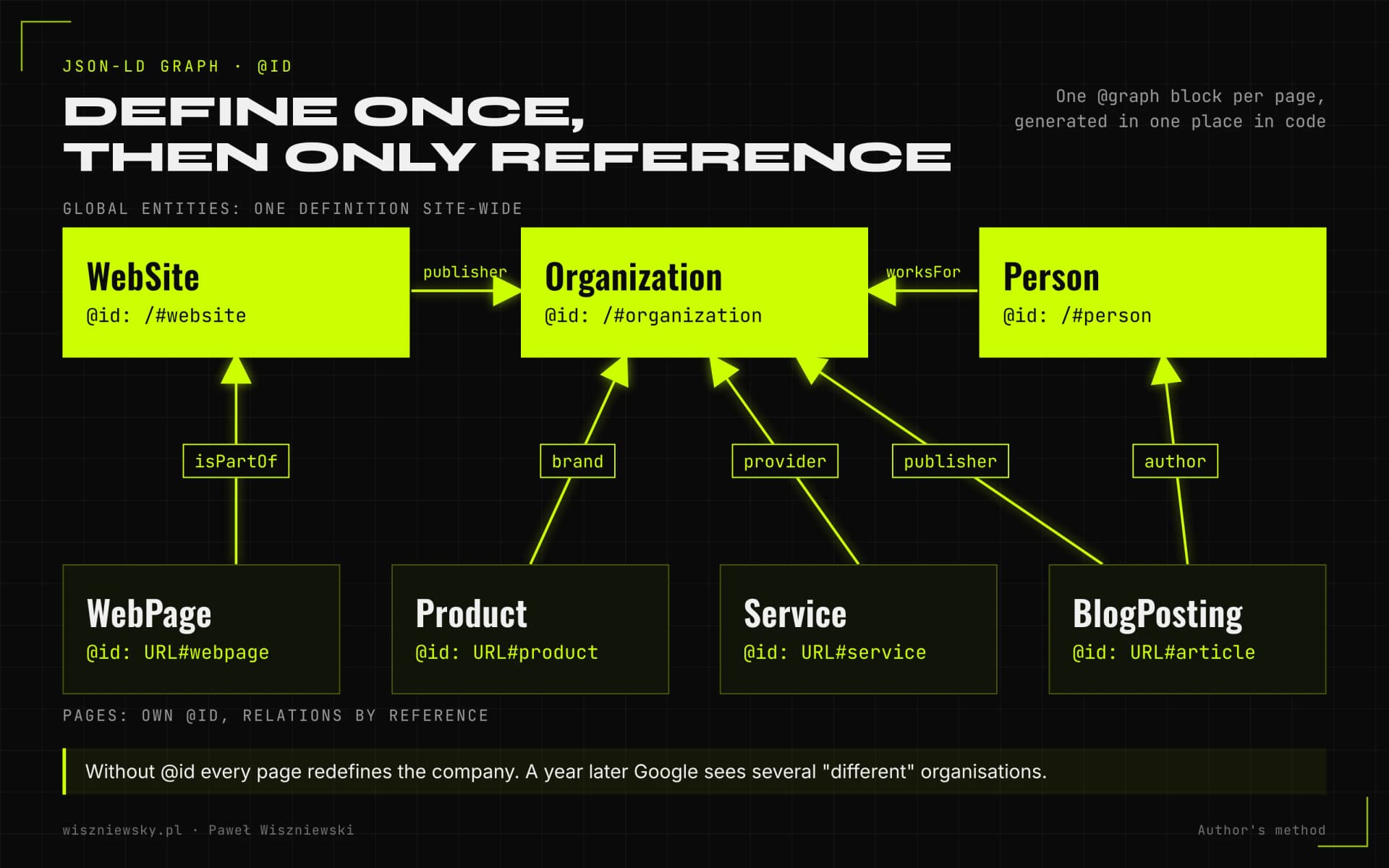
I treat all JSON-LD on a page as one graph in which every entity has a stable @id and is defined exactly once. Pages reference the company, the author and the website by @id instead of describing them again each time, usually with slightly different data.

Diagram of a JSON-LD graph: WebSite, Organization and Person defined once with @id identifiers, while WebPage, BlogPosting, Product and Service reference them through publisher, author, provider and brand.
Global entities are defined once and every page only references them, so the whole site describes one company and one author.

The conventions I follow

  • The @id is the canonical URL plus a fragment, for example https://yourdomain.com/#organization for the company and the article URL plus #article for a post. It doesn't have to resolve to a real anchor, but it must never change.
  • Global entities (WebSite, Organization, Person) have one definition across the site. This site works the same way: there is a single author entity, https://wiszniewsky.pl/#person, and every article, service and course points to it.
  • Relations instead of repetition: author, publisher, provider, brand, worksFor and founder point to an @id rather than a pasted copy of the object.
  • Language versions: global entities keep the same @id in every language, because it's still the same company and the same person. Pages and articles get their own @id and an inLanguage value.
  • sameAs only for profiles that genuinely belong to the entity: LinkedIn, Wikidata, the company register, industry profiles. Not directories where someone else created the listing.
  • One @graph block per page, generated in one place in the code. Two sources of markup, such as the theme and a plugin, almost always end with two conflicting organizations.

The graph is also the foundation for work on the brand entity. If the goal is a knowledge panel or correct company facts in AI answers, I start here and extend it as part of knowledge graph engineering. More on entities in Entity SEO and the Knowledge Graph.

Where JSON-LD values come from: one source shared with the page

Structured data values have to come from the same source as the content users see. Google's guidelines forbid marking up content that isn't visible, and the most common cause of a mismatch isn't bad intent. It's two copies of the same data drifting apart over time.

Google says this explicitly even for Google Tag Manager implementations: pull values from the page with variables instead of retyping them into the container, because duplication raises the risk of a mismatch. I apply the same rule in code: the component that renders the price and the function that builds the Offer read from the same product object.

Fields that drift most often

  • Price and availability after a promotion, a stock change or a sold-out variant.
  • dateModified bumped automatically on every save, including typo fixes. I change it only when the content changes meaningfully.
  • Ratings and review counts pulled from a third-party widget that shows a different number on the page than in the JSON-LD.
  • Author when another editor has taken over the piece but the markup still names the previous person.
  • Branch opening hours updated in the Google Business Profile but not on the site.

Stores have a third place that must agree: the product feed in Merchant Center. The product page, the JSON-LD and the feed should all come from one database. The same rule applies to selling through AI agents, which I cover in Agentic Commerce and product feeds.

Implementation in Next.js, WordPress and Shopify

The safest option is JSON-LD in the HTML the server returns. Google can read structured data added with JavaScript, but its documentation warns that dynamically generated markup can make Shopping crawls less frequent and less reliable. So for products with frequently changing prices I avoid injecting the data with scripts.

Next.js and custom code

I write functions that build graph nodes from the page's data and render them on the server in a single script type="application/ld+json" block. Global entities come from one configuration module. On the sites I maintain, a CI check verifies on every change that each JSON-LD block parses. This site runs that way. When a site moves off an old CMS, I build the graph like this from day one as part of a Next.js migration.

WordPress

Yoast SEO and Rank Math generate a graph with @id values, so there's usually no reason to build one from scratch. Trouble starts when the theme, the store plugin, a reviews plugin and the SEO plugin each add their own block. I pick one graph source, switch off the others and add missing types through the plugin's filters so they land in the same graph rather than a separate block.

Shopify

Shopify themes often ship with built-in product markup, and review or SEO apps add a second copy. I start from the rendered HTML of a product page and count how many times Product appears. Variants such as size and colour go into ProductGroup, which Google has supported since February 2024, using hasVariant, variesBy and productGroupID.

Google Tag Manager

I treat it as a stopgap when there's no access to the code. It works if values are read from the page, but it adds a dependency on rendering and breaks easily when the layout its variables read from changes.

Structured data for stores: merchant listings, variants, returns and shipping

In a store, product markup feeds two different experiences: product snippets and merchant listings. Google keeps separate Search Console reports for them because the requirements differ. Merchant listings cover pages where a customer can buy the product; product snippets also cover editorial reviews and aggregator sites.

ElementWhat I implementNotes from Google's documentation
Product pageProduct with Offer: price, currency, availability, condition, GTIN or SKU, brandThe Merchant listings report covers pages where shoppers can buy products
VariantsProductGroup with hasVariant, variesBy and productGroupIDSupported since February 2024 for single-page and multi-page variants
Returns policyMerchantReturnPolicy under Organization, exceptions under OfferOrganization level since June 2024; offer-level policies support only a subset of properties
ShippingShipping policy under Organization, exceptions on the productSince November 2025; Search Console settings take precedence over markup
ReviewsAggregateRating and Review for productsOnly reviews visible on the product page

Since November 2025 the Shipping and returns settings in Search Console are open to any site Google identifies as an online merchant, not only to Merchant Center accounts. For smaller stores that's often the quickest route. I add policy markup when the rules are complex or when the client wants them in code alongside the rest of the data. Either way I make sure Search Console settings and markup don't say two different things.

For the wider picture of store visibility in Google and AI shopping, see E-commerce SEO & GEO.

Validating structured data: four levels of testing

A clean Rich Results Test is only one of four checks I run. Google's tools check syntax and required fields, but they won't tell you whether the price in the JSON-LD matches the price on the page, or whether the markup will survive the next deployment.

  1. Syntax. Every block must parse as JSON. I run this automatically on every code change, because one stray comma can switch off the whole graph on every page of a template.
  2. Schema.org vocabulary. The Schema Markup Validator checks types and properties regardless of whether Google uses them.
  3. Google eligibility. The Rich Results Test on the live URL (not pasted code, which runs with JavaScript limitations) and URL Inspection in Search Console, which shows the rendered HTML.
  4. Content parity. On a sample of pages from each template I compare JSON-LD values with what's visible: price, availability, author, dates, review count. For large stores I do this with a script that fetches the page and compares both sources.

After launch I watch the enhancement reports in Search Console. A growing number of invalid items after a theme or plugin update is the most common sign that someone changed a template without checking the markup.

How I measure the impact of a Schema.org rollout

I measure impact in the Search Console Performance report using the Search appearance filter, which shows clicks and CTR for results with a given rich result type. I compare the same queries and pages at a similar average position before and after, because a CTR change that comes with a position change proves nothing.

What I measureWhereWhat to watch out for
Valid items per typeEnhancement reports in Search ConsoleDrops after code deployments or plugin updates
Impressions and CTR of rich resultsPerformance, Search appearance filterSeasonality and position changes in the same period
Template CTR before and afterPerformance, page filter (e.g. all product URLs)Compare periods of equal length
Accuracy of brand factsBrand search results, knowledge panel, AI assistant answersChanges lag and can't always be attributed to markup

I judge the first data after a full recrawl cycle of the key templates. On large stores Google needs time to revisit thousands of product pages, so valid items in the reports grow gradually.

Structured data and AI visibility: realistic expectations

Structured data is not a requirement for appearing in AI Overviews, AI Mode or ChatGPT. Google's documentation on AI features says there are no additional technical requirements beyond normal indexing rules, and the makers of other assistants don't confirm that their systems read JSON-LD.

I still implement schema with AI in mind, for two reasons. First, a consistent graph helps Google connect the page to the company entity, and Google's AI features draw on Google's index. Second, working on markup forces order in the content: a clearly stated author, date, price and service scope helps every system that reads the page, including the ones that ignore JSON-LD. How I build on this layer for GEO is described under AI Overviews and AI Mode optimization.

I also check separately what AI assistants say about the company. If they give the wrong address, an outdated offer or confuse the brand with another one, correct markup is one part of the fix but not the whole fix. More in Brand Reputation in AI.

Types retired in 2025 and 2026: what to do with existing markup

I usually keep markup for types Google no longer displays, as long as it's valid and matches the content, but I don't add it from scratch just for rich results. In June 2025 Google announced it was phasing out seven types from search results: Book Actions, Course Info, Claim Review, Estimated Salary, Learning Video, Special Announcement and Vehicle Listing. It said the change doesn't affect ranking and that use of these types outside Google Search is unaffected.

In November 2025 Google added that from January 2026 it would remove support for these types from Search Console and its API. Their reports disappear, so you won't see errors there any more. That's one more reason to run syntax validation in your own pipeline rather than relying only on Google's tools.

SituationMy call
Markup is valid and describes visible contentKeep it; it does no harm and describes the page to other systems
Markup has errors or doesn't match the contentFix it or remove it; I don't leave incorrect data in place
Type added only for the visual effect, with no content behind itRemove it
A plugin still outputs a retired type on every pageSwitch it off if it can't be matched to the content

Maintenance after launch: documentation for your team

Structured data usually breaks during changes that have nothing to do with SEO: a new template, a plugin update, a store migration. That's why every implementation includes short documentation for the team that ships code, not just a report for marketing.

  • The template map with types, properties and data sources (the table at the start of this guide, filled in for your site).
  • The list of @id values for global entities and the rule that they never change.
  • Instructions for new templates: which module builds the graph, how to add a type, how to test it.
  • The events that require re-validation: theme or plugin changes, migrations, a new language version, changes to pricing or the returns policy.
  • An owner on your side who receives Search Console alerts.

During a site migration I check structured data on the same checklist as redirects and canonicals, because a new theme often launches without it. I cover this under SEO migration. If you're not sure what state your technical setup is in, start with a technical SEO audit; the full range of SEO services is on the technical SEO page.

Frequently Asked Questions

How long until stars appear in Google results?

Google typically displays Rich Snippets 1–4 weeks after the schema is implemented and indexed. Review stars require a minimum of 5 reviews visible in the schema.

Does Schema.org directly affect rankings?

Structured data is not a direct ranking factor, but the higher CTR from Rich Snippets is a behavioral signal for Google that indirectly influences rankings. Additionally, correct Organization hierarchy and sameAs attributes strengthen LLMs' knowledge of your brand.

Can you implement schema in WordPress or Shopify?

Yes. In WordPress I configure schemas via Yoast SEO or RankMath with extended JSON-LD settings. In Shopify I add them via theme editing or dedicated apps. In Next.js I implement them directly in page components.

Which structured data types make sense in 2026?

For most businesses: Organization, WebSite, Person (author), Article or BlogPosting, Product and Offer for stores, BreadcrumbList, LocalBusiness for local businesses and Service for services. FAQ and HowTo no longer produce rich results for most sites but still help with understanding.

Does structured data help visibility in AI?

Yes, indirectly. It helps AI systems recognize the company, author, prices and dates unambiguously, and a consistent brand entity reduces the risk of wrong information in answers. The key is that the data matches the page content.

How much does Schema.org implementation cost?

Implementation starts from €600. The price depends on the number of page templates and data types and on the platform — in Next.js I implement it in code, in WordPress and Shopify through the theme or an app.

Got a project?

Terminate
Silence

Initiate protocol. Establish connection. Let's build something loud.

> WAITING_FOR_INPUT...