BACK TO Technical SEO

E-commerce SEO

E-commerce SEO done at code level and judged by sales: categories and product pages, faceted navigation and duplicates, Product structured data, Google Merchant Center and product visibility in AI shopping. Shopify, WooCommerce, PrestaShop and Next.js.

Author: Paweł Wiszniewski · Updated:

Key takeaways

E-commerce SEO done at code level and judged by sales: categories and product pages, faceted navigation and duplicates, Product structured data, Google Merchant Center and product visibility in AI shopping. Shopify, WooCommerce, PrestaShop and Next.js.

  • ›Category architecture built on keywords: every keyword group gets one target page
  • ›Faceted navigation, sorting, pagination and variants under control: Google crawls and indexes sales pages, not thousands of parameter combinations.
  • ›Category and product pages rebuilt for SXO: copy that answers buyers' questions, clear specs, images, reviews and delivery details that help both rankings and conversion.

Price: from €850

SERVICE DETAILS

SEO for an online store differs from SEO for a company site in scale and in the kind of problems you hit: thousands of URLs from filters and variants, product pages carrying the manufacturer's copy, products that come and go, and category pages that have to rank and sell at the same time. I start with a technical audit and a keyword map assigned to categories, then clean up faceted navigation, duplicates and pagination, rebuild category and product templates, implement Product structured data with offers, variants, shipping and returns, and connect the store to Google Merchant Center so products show up in free product listings. I also make sure the store is readable for shopping in AI Mode and ChatGPT, and I earn links from topically relevant sites with real traffic, never packages. As a developer I ship template fixes myself, so changes don't sit in a developer's backlog for months.

› INVESTMENT:

from €850
const module = new ExecutionProtocol();

// Initializing ecommerce-seo...
› Loading dependencies... OK
› Establishing connection... OK
› Ready for deployment... AWAITING_COMMAND

Paweł Wiszniewski · my approach

What I do differently

I do store SEO as a developer, not just a consultant. E-commerce problems usually live in templates: how the product list generates filter links, where canonicals come from, and whether the price in JSON-LD matches the page and the feed. I fix those in code myself, in Shopify, WooCommerce, PrestaShop or Next.js. For a beauty and fashion store I ran a WooCommerce to PrestaShop migration with no visibility loss, removed duplicates caused by faceted filters and cut category page load time from about 4.2 s to about 1.1 s.

Case study: Beauty E-Commerce SEO/GEO

My take and a real-world example

My take

In my view the biggest SEO problem in most stores isn't a lack of links or short descriptions — it's URL chaos. Filters, sort orders, variants and parameters create thousands of pages that compete with categories for Google's attention. Before a store spends on content and links, I fix what the crawler actually sees.

From the market

On Google's Search Off the Record podcast (February 2026), Gary Illyes walked through the crawling problems Google dealt with in 2025. According to Search Engine Land's coverage, half of them came from faceted navigation and another 25% from action parameters — URLs that trigger an action rather than change the page content. Those are exactly the mechanisms that generate the most unnecessary URLs in online stores.

Sources: Search Engine Land: Google's biggest crawling challenges are faceted navigation, action parameters and more (2026) · Google Search Off the Record: Crawling Challenges – What the 2025 Year-End Report Tells Us (2026)

Who this is for

  • Shopify, WooCommerce, PrestaShop or headless stores whose Google traffic is flat despite a large catalogue.
  • Stores where a handful of products drive organic sales and category pages barely rank.
  • Catalogues with thousands of products, variants and filters where Google indexes noise instead of sales pages.
  • Stores planning a replatform or redesign that don't want to lose the visibility they've built.

What you get

  • A technical store audit: indexing, filters, duplicates, pagination, rendering and speed of category and product templates.
  • A keyword map assigned to categories, subcategories, filters and product pages, with no cannibalisation.
  • Template fixes shipped: headings, meta data, category copy, internal linking, canonicals and filter rules.
  • Product structured data with offers, variants, shipping and returns, plus Google Merchant Center feed setup or audit.
  • A monthly report: organic revenue in GA4, category and product clicks in Search Console, indexing status and next steps.

How results are measured

  • Organic revenue and transactions in GA4.
  • Clicks and impressions for category and product pages in Search Console.
  • Valid products in the merchant listings report and in Merchant Center.
  • Share of indexed sales pages versus filter and parameter URLs.

Key Benefits

Category architecture built on keywords: every keyword group gets one target page — a category, subcategory, filter or product page — with no cannibalisation.

Faceted navigation, sorting, pagination and variants under control: Google crawls and indexes sales pages, not thousands of parameter combinations.

Category and product pages rebuilt for SXO: copy that answers buyers' questions, clear specs, images, reviews and delivery details that help both rankings and conversion.

Product and merchant listing structured data with price, availability, variants, shipping and returns, consistent with the page and the Google Merchant Center feed.

Free product listings on Google: Merchant Center setup or audit so products appear in the Shopping tab, Google Images and Lens without paying per click.

Visibility in AI shopping: access for AI search crawlers and complete product data that AI Mode and ChatGPT shopping draw on.

Links from topically relevant sites with real traffic instead of packages — every placement is agreed with you, and paid links are marked as Google's policies require (rel="sponsored").

The Process

1

Audit and keyword map

I crawl the store, analyse Search Console, GA4 and server logs where available, check how filters and variants are indexed, then assign keyword groups to categories, filters and products.

2

Technical clean-up in templates

I implement rules for filters, sorting and pagination, canonicals, out-of-stock handling, speed fixes and Product structured data. I work in the theme or app code, testing on a copy of the store.

3

Categories, products and Merchant Center

I rebuild templates and copy for key categories and product pages, internal linking and the Merchant Center feed, starting with the pages with the highest revenue potential.

4

Links, monitoring and reporting

I earn selected links to categories and guides, report organic revenue and traffic, indexing and Merchant Center status every month, and plan the next steps.

E-commerce SEO vs SEO for a company website

CriterionCompany websiteOnline store
Number of URLsDozens or hundreds of pagesThousands of categories, products, filters and variants
Main target pagesServices and guidesCategories, filters with real demand and product pages
Most common technical issueSpeed and renderingDuplicates and crawling of filters, parameters and pagination
Structured dataOrganization, Service, ArticleProduct with offers, variants, shipping and returns
Extra placements in GoogleBusiness Profile and AI OverviewsFree product listings, Images, Lens and AI Mode
Success metricEnquiries and leadsOrganic revenue and transactions

Common mistakes

  • Indexing every combination of filters and sort orders instead of the few filters people actually search for.
  • Product descriptions copied from the manufacturer, identical across dozens of other stores.
  • Returning 404 for out-of-stock products without checking whether they have links, traffic or a successor.
  • Category pages with no copy and no planned headings, even though they usually answer the most profitable queries.
  • Price or availability in structured data that differs from the page and the Merchant Center feed.

When this service is not worth it

  • Your store has a dozen products and is just launching — good product pages, Merchant Center and ads will do more early on than long-term SEO.
  • You expect guaranteed rankings by a set date — no honest provider can promise that.
  • You can't change store templates or give access to the code or admin panel.
/// GUIDE

E-commerce SEO – how I optimise an online store, step by step

This guide shows what e-commerce SEO looks like from the inside: the order I work in, how I map keywords to categories and products, what I change in templates on Shopify, WooCommerce, PrestaShop and Next.js, and how I tie SEO to product data for Google and AI assistants. The SEO basics are covered in the guide on the service page, and AI shopping gets its own article, E-commerce SEO & GEO. Here I focus on what I actually do on a store project.

Where e-commerce SEO starts – the order that saves budget

I start with what Google sees and indexes, then map keywords to pages, and only then add content and links. In a store the reverse order is the most expensive one: category copy and links won't help while Google wastes its time on thousands of filter URLs or indexes three versions of the same product page.

StageWhat I doWhy in this order
1. Indexing and duplicatesStore crawl, Search Console page indexing report, filters, sort orders, variants, paginationEvery later fix only works on pages Google indexes correctly
2. Keyword map and architectureAssigning keyword groups to categories, filters, products and guidesWithout a map, content and links land on random pages and cannibalise each other
3. Category and product templatesHeadings, meta data, copy, internal links, speed, out-of-stock handlingOne template change improves hundreds or thousands of pages at once
4. Product dataProduct structured data and the Google Merchant Center feedUnlocks free product listings and feeds AI shopping
5. Supporting content and linksGuides, comparisons and selected placements on relevant sitesStrengthens categories that are already technically ready to rank

In practice I run stages 1 and 2 in parallel during the first weeks and start stage 3 with the few categories that have the highest revenue potential. That way the first changes reach production quickly instead of after months of analysis.

Keyword research for online stores – mapping queries to categories, filters and products

Every group of keywords with the same intent gets exactly one target page. Broad product queries go to a category, queries with an attribute (brand, material, use) to a subcategory or a selected filter, model names to a product page, and questions or comparisons to a guide.

Example queryIntentTarget page
running shoesBrowse the rangeCategory
women's trail running shoesNarrowed choiceSubcategory or filter with its own URL
specific model name and sizeBuy a specific productProduct page
how to choose running shoesPre-purchase researchGuide linking to the category
best running shoes, reviewsComparisonComparison or roundup linking to products

Where the keywords come from

  • Search Console: queries the store already gets impressions for but ranks poorly on. This is the fastest source of growth.
  • On-site search: search events in GA4 show the words customers use for products, often different from category names.
  • Keyword tools (Ahrefs, Semrush, Senuto for Poland): volumes, difficulty and the terms competitors rank for.
  • The results page itself: if Google shows store categories for a query, I build a category; if it shows guides, I write a guide instead of forcing the query onto a product list.

Finally I check for cannibalisation: whether Search Console shows several store URLs alternating for one query. The usual pairs are a category and a filter, or a category and a blog post on the same topic. I resolve it by changing content, internal links or merging pages, not with a canonical alone.

Category pages – the anatomy of a page that ranks and sells

The category page is the most important SEO page in a store, because it answers the broadest, most profitable queries. It has to give Google a clear topic and copy, and give shoppers fast access to products. So the copy must not push the product grid below the fold, but it can't be missing either.

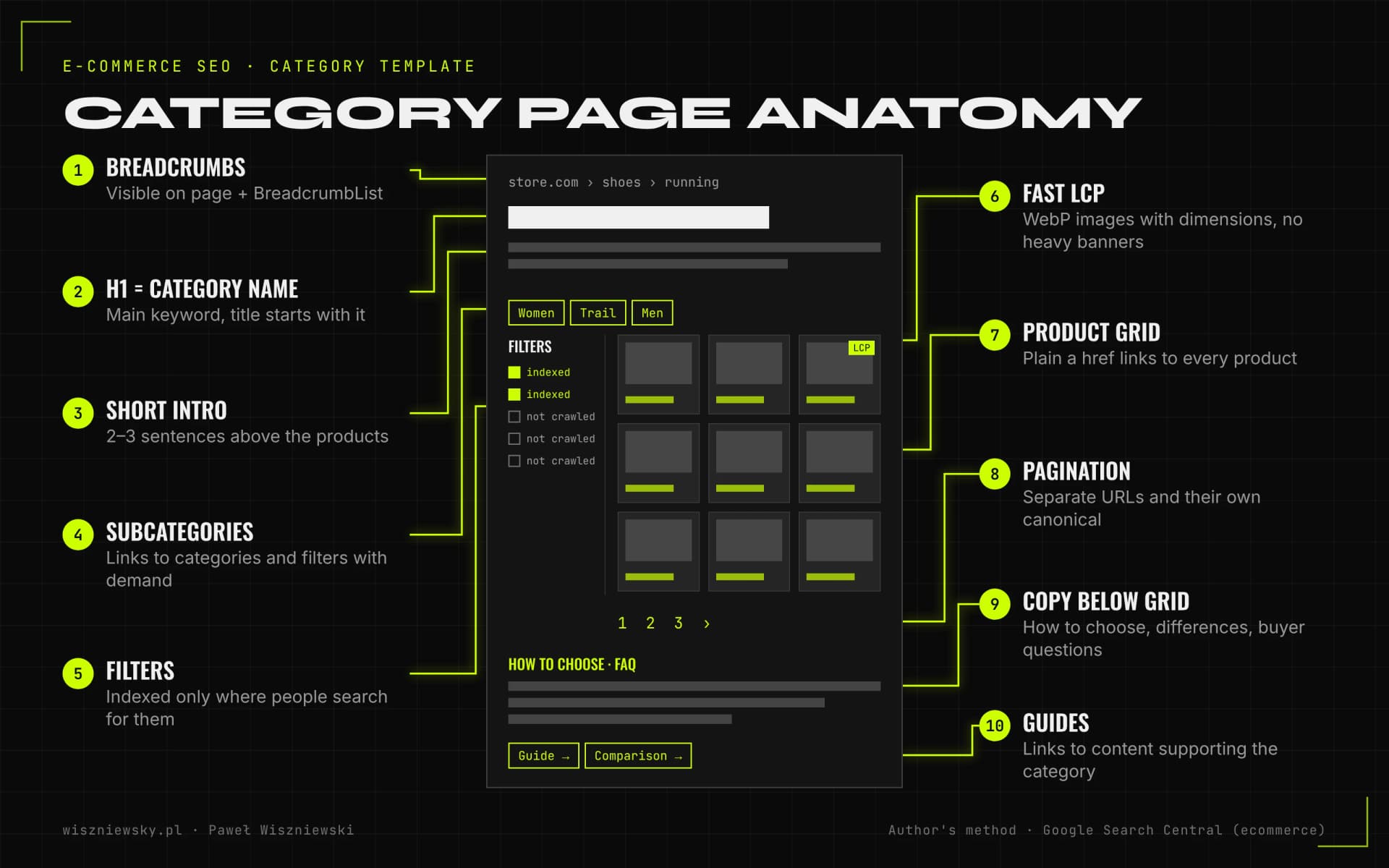
Diagram of an online store category page with labelled SEO elements: breadcrumbs with BreadcrumbList data, an H1 with the category name, a short intro above the products, links to subcategories, filters split into indexable and non-indexable, a product grid with plain links, pagination with separate URLs, extended copy and FAQ below the grid, and links to guides.
Category page elements I check and fix in the template. Author's method based on Google's ecommerce documentation.

What a category page needs

  • An H1 with the exact category name, matching the main keyword, and a title tag that starts with it. H2s and H3s in the copy add context: types, uses, how to choose.
  • A short intro above the products (2–3 sentences) and a longer part below the grid: how to choose, how the product types differ, common questions. I write it for the buyer, not to hit a character count.
  • Links to subcategories and to selected filters that have their own search demand, plus guides on the topic.
  • Plain a href links to products. Google strongly recommends that category pages link to every product you want indexed and warns against navigation built on JavaScript events instead of links.
  • Breadcrumbs visible on the page and described with BreadcrumbList data, so the hierarchy is clear to people and crawlers.
  • A fast first screen: product images in a modern format with explicit dimensions, and no large banners delaying LCP.

For a beauty and fashion store I rebuilt headings on category and product pages on the same principle: the H1 is the precise entity name, and H2s and H3s are layers of context that support long-tail queries. The project is described in the Beauty E-Commerce SEO/GEO case study.

Product pages – what I check and fix

A product page wins with information competitors don't have: concrete specs, answers to buyers' questions, original photos and reviews. A manufacturer description that appears on dozens of stores gives Google no reason to show your page in particular.

ElementWhat I checkTypical fix
Title and H1Whether they include brand, model and the key attributeA title template with the product name first instead of the store name
DescriptionUniqueness and whether it answers customer questionsSpecs in a table, use cases, comparison with a similar model
ImagesFormat, weight, alt attribute, whether they sit in an img elementDescriptive alt text without keyword stuffing, file names, WebP or AVIF
Reviews and Q&AWhether they're in the page HTML or only in a widgetServer-rendered reviews and a questions and answers section
Shipping and returnsWhether delivery cost and time are visible before the cartInformation next to the price and consistent data in Merchant Center
LinksBreadcrumbs, related products, link to the categoryLinks to the parent category and alternatives, not just “recently viewed”

Images matter twice in a store, because Google Images and Lens are a separate traffic source. Google's documentation notes that alt text is the most important image metadata, that CSS background images aren't indexed, and that the text near an image provides context. I cover this in more depth in the article on image SEO and visual search.

Nobody can hand-write thousands of descriptions for a large catalogue, so I combine SEO with AI product descriptions: the model works from product attributes in the database, and quality rules keep the output from turning into template text. I always refine the pattern by hand on the best-selling products first.

Filters, variants and duplicates – how a store creates its own competition

Most duplicates in a store don't come from copied content but from the way the platform generates URLs. The same product list is available with a sort parameter, a filter, a tracking parameter and a page number, and the same product under several category paths.

Duplicate sourceExampleWhat I usually do
Faceted navigation?colour=black&size=42&price=100-200Own URLs only for filters with demand, the rest kept out of the crawl
Sort order and view?orderby=price, ?view=gridNo indexable links, blocked in robots.txt
Action parameters?add-to-cart=123, add to wishlistActions via a form or button, not a link, and the parameter blocked
Product variants/t-shirt?colour=greenSeparate URL for variants that should be found, canonical to the parameterless URL when the variant is optional
Category paths/category-a/product and /category-b/productOne product URL in internal links and canonicals
Tracking parameters?utm_source=, session IDsNo internal links carrying such parameters

Google sets out these rules in its documentation on ecommerce URL structure: every variant that should be found needs its own URL, fragment identifiers after # aren't used for indexing, and the number of alternative URLs returning the same content should be kept to a minimum. For filters, Google's advice is that URLs you don't need in search results shouldn't be crawled at all.

I cover this in full, with server log analysis and robots.txt rules, in crawl budget optimization. In e-commerce SEO I always address it, but to the extent the store really needs: a small catalogue often needs only canonical and link fixes, a large one also needs changes to how filters are generated.

Pagination and out-of-stock products – two decisions stores often get wrong

Each page of a product list should have its own URL and its own canonical, and an unavailable product shouldn't automatically disappear with a 404. Both mistakes either cut Google off from products or drop pages that have links and traffic.

Pagination

  • Google treats paginated URLs as separate pages and advises against using the first page as the canonical for the whole series.
  • Google no longer uses rel=next and rel=prev, although other search engines may still read them.
  • With “load more” buttons and infinite scroll I make sure the subsequent pages are also reachable through plain links, because Google mainly follows URLs in href attributes.

Out-of-stock and discontinued products

Google's John Mueller said in 2022 (as reported by Search Engine Journal) that Google may treat an out-of-stock product page much like a soft 404 and drop it from search results. So I don't leave empty pages that just say “out of stock”. The decision depends on whether the product will return and whether it has SEO value:

SituationWhat I do
Temporarily out of stock, will returnPage stays (status 200), OutOfStock availability in the data, visible alternatives and a restock date if known
Discontinued, has a successor301 redirect to the new model
Discontinued, has links or traffic, no successorKeep it as an archive page with information and links to alternatives, or redirect to the closest category
Discontinued, no traffic or links404 or 410 status, removed from the sitemap and internal links
Seasonal categoryThe same URL all year round, with copy and a preview outside the season

Product structured data and Google Merchant Center – two sources that must agree

Google recommends using both structured data on product pages and a Merchant Center feed, because crawling isn't guaranteed to find every product. Merchant Center participation is required for listings in the Shopping tab, while structured data powers product rich results in regular search.

Google launched free product listings in the Shopping tab in April 2020, first in the US, with plans to expand worldwide by the end of that year. According to Merchant Center Help, products can now appear at no cost across Google Search, the Shopping tab, Images, Lens, YouTube, Maps and Gemini. Google also notes that products aren't guaranteed to show, because it relies on the data you provide.

What I implement and check

  • Product with Offer on every product page: price, currency, availability, condition, GTIN or manufacturer code, brand, images. Values come from the same source as the visible content, so JSON-LD never shows a different price from the page.
  • Variants as ProductGroup with hasVariant when the store sells colours and sizes, plus shipping and returns policies.
  • A Merchant Center feed with the required attributes (including ID, title, link, image, price, description, availability, GTIN or MPN) and proper product titles rather than abbreviations from the stock system.
  • Free listings switched on under marketing methods in Merchant Center, and automatic item updates based on website data, which Google suggests to cover feed sync delays.
  • The merchant listings and product snippets reports in Search Console, plus Merchant Center diagnostics after every template change.

The markup itself, with an @id graph and validation, is described in detail in Schema.org implementation. In e-commerce SEO it's one part of the work, not a separate project.

SEO for Shopify, WooCommerce, PrestaShop and Next.js stores

The SEO rules are the same everywhere, but each platform breaks them in a different place. So I start an audit from the known issues of the platform and theme, and only then crawl the whole store.

PlatformTypical issuesWhat I usually change
ShopifyProduct links via /collections/collection-name/products/product-name, URLs from collection filters and tags, apps injecting their own scripts and markupTheme links to the canonical /products/ URL, rules in robots.txt.liquid, cleaner structured data from apps
WooCommerceFilter plugins creating thousands of URLs, ?orderby= and ?add-to-cart= parameters, attribute and tag archives, heavy themesParameter control, noindex or removal of unnecessary archives, theme and cache optimisation
PrestaShopThe faceted search module with its q parameter, IDs in URLs, product combinations in URL fragmentsFilter rules, canonicals, separate URLs only for variants with demand
Next.js (headless)Content and links visible only after JavaScript, missing metadata on dynamic pages, stale prices in the cacheServer rendering, metadata and JSON-LD from the same data as the UI, revalidation when price or stock changes

On Shopify, be careful with robots.txt edits. The platform only allows changes through the robots.txt.liquid template, and Shopify Help warns plainly that incorrect use of the feature can result in loss of all traffic. So I test every rule against a list of crawled URLs before publishing.

I build and fix headless Next.js stores as a developer, so I know client-side rendering problems from the inside. I describe them in the article on JavaScript SEO, and the store build itself in the headless Shopify store service.

SXO for online stores – where SEO meets conversion

SXO combines SEO with user experience: a page should not only attract traffic but also let people find and buy a product quickly. In a store the same changes often serve both goals: a faster category, usable filters and visible delivery costs improve both Google's signals and sales.

A good example is the Japanese store Rakuten 24, documented on web.dev: in an A/B test, the version optimised for Core Web Vitals had 53.37% higher revenue per visitor and a 33.13% higher conversion rate than the unchanged version. So I treat the speed of category and product templates as part of SEO and sales at the same time.

What I check from the buyer's point of view

  • Whether a visitor from Google lands on a page that matches their query, not the homepage or a generic category.
  • Whether filters work quickly on a phone and it's easy to get back to the list after filtering.
  • Whether price, availability, delivery cost and delivery time are visible without scrolling and before the cart.
  • Whether the product page answers the questions customers ask support, and whether reviews are visible.
  • Whether conversion changes (pop-ups, widgets, A/B tests) slow the page down or create duplicates.

When a store has traffic but sales are the problem, I move on to conversion rate optimization (CRO) with funnel analysis and A/B tests. If you don't know whether traffic, conversion or tech is the bottleneck, an e-commerce audit is a good place to start.

Supporting content and link building for online stores

In a store, guides and comparisons exist to catch the customer before the decision and pass authority to categories. I plan every piece together with the category page it should lead to, not as a standalone blog chasing traffic.

  • A buying guide (such as “how to choose running shoes”) links to the categories and filters that match the criteria it describes.
  • Comparisons and roundups link to specific product pages.
  • Categories link back to the guides, so both shoppers and crawlers see the full topic.

I built this kind of cluster architecture for a Polish slow fashion brand: 14 topic clusters, 5 pillar pages and 62 articles connected by internal links, backed by 8 digital PR placements. Organic search became the brand's number one acquisition channel, ahead of paid ads. Details are in the Fashion Brand SEO/GEO case study, and the method in the article on topical authority.

Links to the store

I don't buy “X links per month” packages. For a store I look for placements on topically relevant sites with real traffic and readers: industry media, creators who test products, partners' guides. Links go to categories and guides, not only to the homepage. If a placement is paid, Google's policies require the link to carry rel="sponsored", which we agree on before buying. How I vet sites is described in link building.

Online stores in AI Mode and ChatGPT – what you can realistically do in 2026

In AI shopping, stores with complete, up-to-date product data and access for AI search crawlers win. There's no separate “ChatGPT SEO” for products: the same data a store should have for Google is what counts.

  • Google AI Mode combines Gemini with the Shopping Graph, which according to Google (May 2025) holds more than 50 billion product listings, with more than 2 billion refreshed every hour. A complete Merchant Center feed and correct on-page data are your way into that database.
  • ChatGPT, according to OpenAI's help centre, builds a product's merchant list from metadata supplied by third-party providers or by merchants directly, and ranks merchants on factors such as availability, price, quality and whether they are the maker or primary seller. OpenAI also stresses that product results are not ads.
  • Crawler access: OpenAI recommends allowing OAI-SearchBot in robots.txt for sites that want to appear in ChatGPT search. Blocking GPTBot only signals that content shouldn't be used for model training.
  • Feeds for agents: OpenAI publishes a product feed specification as part of the Agentic Commerce Protocol. It matters for stores that want to sell directly inside ChatGPT, not as a requirement for appearing in results.

I go deeper, including the ACP and UCP protocols, in E-commerce SEO & GEO and Agentic Commerce. Store content for citations in Google's AI summaries is handled in AI Overviews and AI Mode optimization.

Replatforming a store without losing traffic

A store migration is the easiest moment to lose years of SEO work, because URLs, templates and product data all change at once. So in e-commerce the redirect map is only part of the job: moving attributes, reviews, images and filter rules matters just as much.

  • I match product URLs between platforms by SKU or EAN, not by name, because names often differ.
  • I map product attributes to fields on the new platform, so the specs needed for filters, structured data and the feed don't disappear.
  • Filters with demand get equivalents in the new structure, and the rest get rules that keep them out of the crawl from day one.
  • I switch the Merchant Center feed together with the site, so free listings don't link to old URLs.

That's how I ran a WooCommerce to PrestaShop migration: every category, product and blog URL got its counterpart, product attributes were mapped to PrestaShop features, and the new structure was fully re-indexed within 3 months with no loss of visibility. The full migration process is described in SEO migration.

How I measure e-commerce SEO results

The main metric is organic revenue, not the number of keywords in the top 10. Rankings show direction, but a store can climb on keywords that don't sell and slip on the ones that do.

MetricSourceWhy I track it
Organic revenue and transactions by landing page typeGA4Shows whether categories, products or guides are growing
Clicks and impressions for categories and productsSearch Console with a URL pattern filterSeparates the effect of category work from product page work
Product result impressionsSearch Console, search appearance filterMeasures the effect of structured data
Approved and disapproved productsMerchant CenterCatches feed errors before products drop out of free listings
Indexed sales pages versus parameter URLsPage indexing report, crawl stats, logsChecks whether the filter clean-up works

I always compare year over year, because seasonality in stores can hide both growth and decline. For larger template changes I annotate the release date in reports, so the effect of a specific fix is visible.

How much e-commerce SEO costs and what drives the quote

My e-commerce SEO starts from €850, and the final quote depends on store size, the number of products and categories, and the platform. Smaller stores with a simple structure sit closer to the starting price; the more templates, variants and technical issues, the larger the scope. I prepare the quote after a free consultation and a short review of the store.

FactorHow it affects scope
Number of products, categories and variantsMore templates to fix, more duplicates and a larger feed
Platform and code accessA custom theme or Next.js allows more fixes than a locked SaaS plan with a limited template
Technical stateA store after years of plugins and migrations needs more clean-up before content work
ContentThe number of categories and product pages to rebuild and guides to write
LinksThe placement budget depends on how competitive the niche is
Merchant CenterSetup from scratch or an audit of an existing feed

If you only need one element, you can order it separately: a technical SEO audit from €800, Schema.org implementation from €600, crawl budget optimization from €900, an SEO migration from €1,200 or link building from €500 per month. E-commerce SEO combines these into one plan, ordered by impact on revenue.

Frequently Asked Questions

How much does e-commerce SEO cost?

E-commerce SEO starts from €850. The final quote depends on store size, the number of products and categories, the platform and how many template fixes I implement myself. After a free consultation and a short review of the store, you get a quote matched to the scope.

How long does e-commerce SEO take to show results?

Google usually picks up technical fixes within a few weeks of recrawling the pages. Traffic growth on competitive category keywords typically takes 3–6 months of consistent work, longer in very competitive niches. Products in free listings from Merchant Center can appear sooner, once the feed is approved.

Which platforms do you work with?

Shopify, WooCommerce, PrestaShop and headless stores on Next.js. Each has typical issues: in Shopify, duplicate product paths inside collections and a robots.txt edited through the robots.txt.liquid template; in WooCommerce, filter plugins that create thousands of URLs; in PrestaShop, the faceted search module and URL parameters. For other platforms I first check what can be changed in the templates.

Can a store with manufacturer descriptions still rank?

It can, but product pages with the same copy as competitors rarely win. I start with categories and the products with the most potential and add original information: specs, use cases, answers to customer questions and comparisons. For large catalogues I combine this with quality-controlled AI product descriptions.

Do I need Google Merchant Center for e-commerce SEO?

For free listings in the Google Shopping tab, yes — Merchant Center participation is required there. Product rich results in regular search can work from structured data alone, but Google recommends using both, because crawling isn't guaranteed to find every product.

Does e-commerce SEO help visibility in ChatGPT and AI Mode?

Yes, because AI shopping relies on similar data. AI Mode is built on the Shopping Graph, Google's product database fed partly by merchant data, and according to OpenAI, ChatGPT builds its merchant lists from product metadata supplied by third-party providers or by merchants directly. Complete product data, access for AI search crawlers and mentions of the store in credible sources help in both channels.

How do you report results?

Every month you get a report with organic revenue and transactions in GA4, category and product clicks in Search Console, indexing and Merchant Center status, and a list of what I shipped and what's next. I treat keyword rankings as a supporting metric, because a store earns money from sales, not positions.

/// RELATED_SERVICES

Related services

Technical SEO

Crawl Budget Optimization

Crawl budget optimization for large e-commerce and portal sites. Google indexes your most important pages faster — less crawl waste, higher rankings for money pages.

Technical SEO

Schema.org Implementation

JSON-LD Schema.org implementation generating Rich Snippets: review stars, prices, FAQ accordions, breadcrumbs. SERP visibility increases by 20–40% CTR without changing position.

Technical SEO

SEO Migration

Safe domain, CMS, or URL restructure migration without losing organic traffic. Full 301 mapping, Search Console validation, and 90-day ranking monitoring included.

E-commerce & AI for Online Stores

E-Commerce Audit & Strategy

In-depth store analysis, identification of conversion bottlenecks, and a growth plan.

E-commerce & AI for Online Stores

AI Product Descriptions – Automated Content Generation for E-commerce

AI product description generation in your brand voice: 100+ SKUs per day, SEO-optimised, multilingual. From raw supplier data to ready content in your store.

E-commerce & AI for Online Stores

Conversion Rate Optimization (CRO) & A/B Testing

Data-driven checkout flow optimization using heatmaps, session recordings, and GA4 funnel analysis. More revenue from your existing traffic — no ad budget increase needed.

GEO – AI Search Optimization

Google AI Overviews & AI Mode Optimization

I optimize your site so Google cites it in AI Overviews and AI Mode: answer-first content, follow-up question coverage, structured data and E-E-A-T signals. I track citations and AI traffic.

Got a project?

Terminate
Silence

Initiate protocol. Establish connection. Let's build something loud.

> WAITING_FOR_INPUT...