BACK TO AI & Automation

n8n Automation for Business – AI Workflow & Document Process Optimization

n8n / Make automation for report generation, employee onboarding, invoice processing, and document analysis. Cut manual work by 70%.

Author: Paweł Wiszniewski · Updated:

Key takeaways

n8n / Make automation for report generation, employee onboarding, invoice processing, and document analysis. Cut manual work by 70%.

  • ›70% reduction in manual, repetitive work—your team focuses on strategic decisions instead of copy-paste tasks and manual data entry.
  • ›n8n self-hosted workflows keep your data on your own servers—no third-party automation cloud storing your business data, which makes GDPR compliance easier (self-hosting alone doesn't make a process compliant).
  • ›Cross-tool orchestration connecting your CRM, ERP, HR system, and communication tools in a single automated flow without custom code.

Price: from €1,200

SERVICE DETAILS

I build no-code and light-code automation workflows using n8n, Make, and custom Python scripts that connect your existing tools—CRM, ERP, HR system, Slack, email—into one orchestrated ecosystem. Typical use cases: automated weekly report generation, new employee onboarding flows, invoice processing with OCR, contract analysis with AI summaries, and KPI dashboards delivered to Slack every Monday morning.

› INVESTMENT:

from €1,200
const module = new ExecutionProtocol();

// Initializing internal-operations-workflow...
› Loading dependencies... OK
› Establishing connection... OK
› Ready for deployment... AWAITING_COMMAND

Paweł Wiszniewski · my approach

What I do differently

I build document automations the way the demo shows: reading an invoice into structured data, validating business rules, matching it against the purchase order and routing it to a human for approval when something doesn't add up. The principle is “AI where data is messy, strict rules where they belong”. Before building, we work out which processes will actually pay off — automating three processes well beats half-automating ten. I cover when to choose n8n over Make or Zapier in detail on the blog.

Try the demo: Document Automation

My take and a real-world example

My take

I think automating whole jobs is a myth, while automating tasks is everyday reality. I look for activities people do reluctantly and repeat daily — that's where the return is fastest.

From the market

McKinsey Global Institute estimated that in about 60% of occupations at least 30% of activities could be automated, though fewer than 5% of occupations could be fully automated. The second market lesson is security: in January 2026 a critical n8n vulnerability (CVSS 10) was disclosed, with tens of thousands of internet-facing instances exposed. That's why every self-hosted deployment I do includes updates and restricted internet access.

Sources: McKinsey Global Institute: A future that works · Rapid7: critical n8n vulnerabilities (Ni8mare, 2026)

Who this is for

  • Companies where staff copy data between email, spreadsheets, CRM and accounting.
  • Offices and admin teams processing invoices, contracts and documents by hand.
  • Teams producing the same reports every week or month.
  • Businesses with sensitive data that prefer self-hosted automation to a vendor cloud.

What you get

  • A process-mapping workshop and an automation list ranked by return on investment.
  • n8n or Make workflows integrating your tools.
  • AI steps where data is messy: reading invoices, classifying email, writing summaries.
  • Error handling, alerts and a log of every action taken.
  • Documentation and training so your team can extend the automations.

How results are measured

  • Hours of manual work saved per week.
  • End-to-end process time.
  • Data entry errors.
  • Share of workflow runs completed without intervention.

Key Benefits

70% reduction in manual, repetitive work—your team focuses on strategic decisions instead of copy-paste tasks and manual data entry.

n8n self-hosted workflows keep your data on your own servers—no third-party automation cloud storing your business data, which makes GDPR compliance easier (self-hosting alone doesn't make a process compliant).

Cross-tool orchestration connecting your CRM, ERP, HR system, and communication tools in a single automated flow without custom code.

Error handling and retry logic built into every workflow—failures are caught, logged, and reported to Slack, never silently dropped.

Full audit trail of every automated action with timestamps—every step is logged for compliance, debugging, and process improvement.

The Process

1

Process Mapping

I document your current manual process step by step, identify bottlenecks, decision points, and data sources that the automation needs to interact with.

2

Workflow Design

I design the automation flow in n8n or Make—triggers, conditions, transformation steps, and actions—and share the design for your approval before building.

3

Build & Integration

I build the workflow, connect all API integrations with proper authentication and error handling, and test it against real data in a staging environment.

4

Testing, Documentation & Handover

I run end-to-end tests with edge case scenarios, document the workflow logic clearly, and train your team to maintain and extend the automations.

Dedicated n8n automation vs SaaS tools vs manual work

CriterionDedicated n8n automationZapier / Make (SaaS)Manual work
Cost at scaleFlat self-hosted cost, scales wellPer-task pricing grows with volumeSalary costs rise with workload
Data privacy / GDPRSelf-hosted on your serversData flows through third-party cloudStays internal, but error-prone
Custom logicComplex branching and code stepsCode steps and branching (e.g. Code by Zapier, Paths), within plan limitsFully flexible but slow
Time to deployDays to weeks per workflowFast for simple flowsNo setup, but ongoing effort
Ownership / controlFull control over the workflowsLocked to the vendor platformFull, but undocumented
Error handlingBuilt-in retries and Slack alertsBasic, plan-dependentCaught only when noticed
Best forComplex, data-sensitive automationsQuick connections between SaaS appsOne-off or rare tasks

Common mistakes

  • Automating a chaotic process — automation only speeds up the mess.
  • Workflows without error handling that silently stop after an API change.
  • No process owner on your side who knows what the automation does.
  • Using AI for steps a simple rule could handle — more expensive and less predictable.

When this service is not worth it

  • The process runs once a month and takes a few minutes.
  • The process changes every week and has no fixed rules.
  • Your systems have no API or data export and can't be replaced.
/// GUIDE

n8n process automation – how I design and ship business workflows

This guide shows what n8n process automation looks like from the inside: the parts of a workflow that runs for months without babysitting, what I collect in a process-mapping workshop, how typical processes break down into steps and how to set up a self-hosted n8n instance safely. At the end I explain when n8n stops being enough and how I measure the results.

What a production n8n workflow looks like – the anatomy of an automation

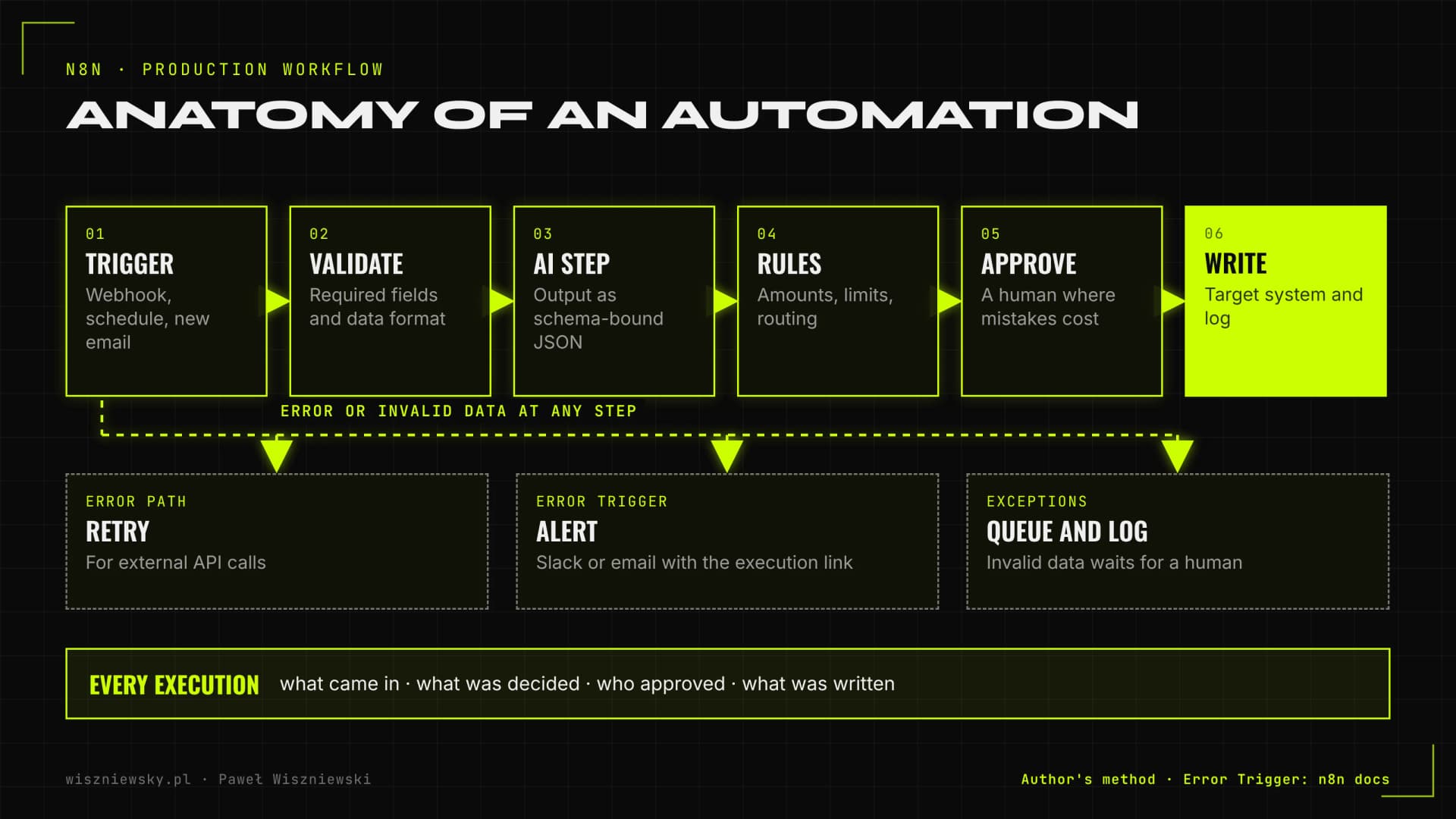
A production n8n workflow is more than a chain of nodes from trigger to write. It validates its input, keeps rule-based steps clearly apart from AI steps, stops for human approval wherever a mistake is expensive, and has a separate error path with an alert and a log.

Anatomy of an n8n workflow: trigger, validation, AI step with structured output, business rules, human approval, write to the target system, plus an error path with retry, alert and log
The parts every production workflow I build has. The error path runs as a separate workflow started by the Error Trigger node.
  • Trigger. A webhook from another system, a schedule (say, a report every Monday at 7:00), a new email in a mailbox or an event in an app. I pick an event-based trigger whenever the system offers one, because polling every few minutes delays the process and puts needless load on the API.
  • Input validation. I check that the data has the required fields in the right format before a model or a target system touches it. Invalid records go to an exceptions queue instead of moving on.
  • AI step. Reading a document, classifying an email, writing a summary. The output always follows a fixed structure (JSON with defined fields) that rules can check.
  • Business rules. Does the amount match the purchase order, is it under the approval limit, which department owns it. Plain IF and Switch nodes do this, not the model.
  • Human approval. The workflow pauses, sends a decision request to Slack, Teams or email, and resumes after the click.
  • Write and log. The result lands in the target system and every execution leaves a trail: what came in, what was decided, who approved it.
  • Error handling. According to the n8n docs, an error workflow starts with the Error Trigger node and receives, among other things, the execution ID, the error message and the last node that ran. I send an alert with a link to the execution from there, and I switch on retries for calls to external APIs.

Process-mapping workshop – what I collect before building anything

Before I build the first node, I walk through the process with the person who does it every day and collect real data samples. Most automation problems come from exceptions nobody mentioned because "that rarely happens".

The list I bring to the workshop

  1. Who and when. Who runs the process, what kicks it off and how often it happens.
  2. Inputs. Where the data comes from and in what form. I ask for a few dozen real examples, including the odd ones.
  3. Systems and access. Which apps are involved, whether they have an API, who can grant access and with what permissions.
  4. Decision rules. How the person decides what to do with a case, including exceptions and every "it depends".
  5. Time. How long one case takes, timed on a few examples rather than estimated from memory.
  6. Correct output. What a well-handled case looks like and how you spot a mistake.
  7. Boundaries. What the automation must never do without a human.

The workshop produces a process map, a list of exceptions with a decision for each, and the approval points. If there are several candidates, we rank them with the scoring described on the AI & Automation page. When a company wants its team to build simple automations on its own, I pair the project with n8n training.

n8n automation examples, step by step

Below are four processes I automate most often, broken into workflow steps. Each starts in suggestion mode, and I raise its autonomy once the data shows that the automation doesn't make mistakes in a given category.

Purchase invoices and Poland's KSeF in 2026

If your company operates in Poland, the national e-invoicing system changes the picture. According to Poland's Ministry of Finance, issuing invoices in KSeF became mandatory on 1 February 2026 for businesses whose 2024 sales exceeded PLN 200 million (VAT included), and on 1 April 2026 for all other taxpayers. Until 31 December 2026, invoices outside KSeF can still be issued by taxpayers whose monthly sales on such invoices stay under PLN 10,000 including VAT. For automation this is a fundamental shift: domestic purchase invoices arrive as structured XML, so there is no PDF to read.

  1. Fetch new purchase invoices from KSeF through its API or from the accounting system that syncs them.
  2. For documents outside KSeF (foreign invoices, receipts, small suppliers during the transition): AI extraction into the same data structure.
  3. Match against the purchase order or contract and check amounts, VAT rates and the bank account.
  4. Assign the cost category and cost centre (rules, plus a model suggestion for new suppliers).
  5. Manager approval for discrepancies or amounts above the limit.
  6. Write to the accounting system or ERP and alert on invoices due in the next few days.

I cover invoice extraction in detail in how AI reads invoices and posts them to the ERP, and what this means for accounting firms in AI automation for accounting firms.

A department's shared inbox

  1. A new message in a shared inbox (office@, orders@, claims@).
  2. AI classification: case type, urgency, customer, language.
  3. Extraction of fields (order number, amount, deadline).
  4. Assignment to a person or queue and a task in the right system.
  5. A draft reply for approval on routine cases.

More examples are in AI email automation. When the emails come from shop customers, a customer support AI agent is often the better fit.

A recurring management report

  1. A schedule, for example Monday morning.
  2. Pull data from the CRM, sales system, accounting and analytics.
  3. Calculate KPIs and deviations from plan with rules (not the model).
  4. A short AI comment on the deviations, with numbers passed straight from the data.
  5. Send to Slack or email, with an alert when a KPI crosses its threshold.

My approach to alerts is in the end of manual reporting.

Employee onboarding and offboarding

  1. Trigger: a new person in the HR system with a start date.
  2. Accounts created by role (Google Workspace or Microsoft 365, Slack, department tools).
  3. Task lists for the manager and IT, with reminders before day one.
  4. When someone leaves, the same workflow in reverse: revoke access, hand over files, confirm completion.

AI steps in n8n – where to use a language model and where a plain rule

I add a language model to a workflow only where the data is unstructured: the text of an email, a scanned document, a free-form note. Anything that can be written as a condition is handled by ordinary nodes, because they are cheaper, faster and give the same result every time.

TaskRule or AIWhy
KSeF invoice (XML)RuleThe data is already structured
Scanned foreign invoiceAIThe layout is different every time
Checking that the amount matches the orderRuleComparing numbers, the result must be certain
Working out what an email is aboutAICustomers use their own words
Routing an email to a department by categoryRuleThe category-to-department mapping is fixed
Summarising a contract for approvalAIThe text needs understanding, a human makes the decision

How I work with AI steps

  • Structured output. The model returns JSON that matches a schema, and the workflow validates it before use. I explain how to do this reliably in structured outputs in production.
  • Data minimisation. I send the model only the fields the task needs and strip personal data it doesn't need beforehand.
  • An uncertainty path. If the model can't find a required field or the output fails validation, the case goes to a person, not further down the line.
  • Cost per case. I calculate model cost per invoice or per email and use a smaller model for simple steps.
  • An agent only for a reason. I use n8n's AI Agent node when the order of steps really depends on the content of the case. Otherwise a chain with a single model call is enough. More complex cases fall under AI agents for business.

Self-hosted n8n for business – a setup that won't let you down

Running n8n on your own server gives you control over your data, but it also makes you responsible for security, backups and updates. The critical vulnerabilities Rapid7 described in January 2026 showed that an unpatched n8n instance exposed to the internet is a real risk.

The checklist I apply to every installation

  • Postgres instead of the default SQLite in production, with a daily backup and a restore that has actually been tested.
  • The credentials encryption key stored off the server. Without it, a database backup can't restore saved passwords and tokens.
  • Queue mode at higher volume. According to the n8n docs, in queue mode the main instance receives triggers, Redis holds the execution queue and separate worker processes run the executions. Every worker needs the same encryption key.
  • No public editor. The UI is reachable only through a VPN or an IP allowlist, and only the webhook URLs are exposed, behind a reverse proxy with HTTPS.
  • Accounts and access. SSO or two-factor login, individual accounts for people, and separate credentials with minimal permissions for each integration.
  • Updates on a fixed rhythm, and immediately for security patches, after a test on a staging instance.
  • Pruning execution data. Execution history contains invoice and email content, so I set a retention period that matches the company's GDPR rules.

When to self-host and when to use the cloud is covered on the AI & Automation page, and data protection in automations in AI data security.

Testing, versioning and documenting n8n workflows

I treat workflows like code: I build them on a test instance, test them against saved examples and promote to production a version that can be reproduced. According to the n8n docs, built-in Git source control and environments are available on the Business and Enterprise plans. Otherwise I export workflows to a repository automatically.

  • Test examples. I pin saved input data in the nodes, odd cases included, and check the output after every change.
  • A test instance connected to test accounts in the target systems, so a test run never creates a real invoice in accounting.
  • Naming. The workflow name says what it does and for whom, and node names describe the step rather than the node type.
  • A one-page doc for every workflow: process owner, trigger, systems, approval points, what to do when an alert fires.
  • Sub-workflows for repeated pieces (writing to the CRM, for example), so a change in one place applies everywhere.

When n8n isn't enough – signs that code is the better choice

n8n stops being a good fit when most of the logic lives in Code nodes, when the process needs unit tests and code review like an application, or when volume and latency requirements grow to the point where a visual tool becomes the bottleneck.

  • Code nodes hold more logic than the rest of the workflow.
  • Several people edit the same workflows and it's hard to tell who changed what.
  • The process needs a sub-second response, for example in a shop's checkout path.
  • The automation is meant to become a product for your customers, which means checking n8n's licence terms.

At that point I move the logic into a Python or TypeScript service and keep n8n where it's good at wiring systems together. How to recognise that moment and migrate is in when Zapier and Make aren't enough, and a tool comparison in n8n vs Make vs Zapier. Larger systems I build as part of AI systems programming.

How to measure the impact of process automation

I measure the impact of an automation against a baseline collected before launch: how long one case took, how much time passed from arrival to closure and how many errors there were. Without that baseline, all you have after launch is a feeling that "it's faster".

MetricData sourceWhat it shows
Work time per casePre-launch timing and approval time after launchHow much team time was actually freed
Process cycle timeTimestamps in the execution logWhether cases close faster from arrival to finish
Executions without interventionn8n log and the exceptions queueHow mature the automation is
Errors and correctionsCorrections in the target systemWhether the automation passes errors downstream
Cost per executionModel, hosting and maintenance costWhether the numbers still work as volume grows

A full ROI calculation with examples is in AI automation ROI.

Frequently Asked Questions

Can you automate any software we currently use?

If it has an API or webhook, yes. The n8n.io catalogue lists over 2,000 integrations including community nodes (Salesforce, HubSpot, Notion, Airtable, Google Workspace, Slack), plus a generic HTTP node for anything custom.

Is n8n better than Zapier or Make?

It depends on your needs. Zapier also supports custom code (Code by Zapier in Python and JavaScript) and branching (Paths). n8n's advantages are self-hosting, which gives you control over your data, and pricing per workflow execution rather than per step—usually cheaper for multi-step workflows. I use Make or Zapier when clients prefer a managed cloud solution with a simpler maintenance overhead.

What happens if a workflow breaks?

Every workflow has error-catching nodes that retry automatically, log the failure with full context, and send an alert to your Slack or email. Nothing fails silently or loses data.

What is n8n automation for businesses and what processes can it automate?

n8n automation for business is the deployment of a self-hosted, open-source workflow platform that connects all your business applications (CRM, ERP, email, Slack) into automated processes. n8n process optimization eliminates repetitive tasks: AI document workflow automation, report generation, employee onboarding, and n8n + Supabase system integration. Unlike Zapier, your data stays on your own servers — GDPR compliant by design.

Which processes do you automate most often?

Invoice routing and extraction, recurring reports, moving data between CRM, spreadsheets and accounting, employee and customer onboarding, incoming email handling and exception alerts for the team.

Can the automations run on my own server?

Yes. n8n can run on your server or private cloud, so data never goes to an external automation vendor. It's a good fit for sensitive data and GDPR requirements.

How much does an n8n automation cost?

Implementations start from €1,200. The price depends on the number of steps and systems involved and whether the process needs AI elements such as document extraction.

Got a project?

Terminate
Silence

Initiate protocol. Establish connection. Let's build something loud.

> WAITING_FOR_INPUT...