BACK TO Technical SEO

Crawl Budget Optimization

Crawl budget optimization for large e-commerce and portal sites. Google indexes your most important pages faster — less crawl waste, higher rankings for money pages.

Author: Paweł Wiszniewski · Updated:

Key takeaways

Crawl budget optimization for large e-commerce and portal sites. Google indexes your most important pages faster — less crawl waste, higher rankings for money pages.

  • ›Elimination of crawl waste pages (filters, faceted navigation, URL parameters, pagination)
  • ›robots.txt configuration blocking session URLs, search parameter URLs, and duplicates
  • ›Canonical strategy: which pages are canonical, how to handle CMS-generated duplicates, pagination, and parameter variants

Price: from €900

SERVICE DETAILS

For sites with thousands of pages (e-commerce, portals, aggregators), I manage crawl budget so Google's bots spend their allocated crawl time on valuable pages, not on filter pages, pagination, or duplicate content. I optimize robots.txt, canonical tags, noindex for low-value pages, and internal link architecture — shortening the time for Googlebot to fully re-index your most important content.

› INVESTMENT:

from €900
const module = new ExecutionProtocol();

// Initializing crawl-budget-optimization...
› Loading dependencies... OK
› Establishing connection... OK
› Ready for deployment... AWAITING_COMMAND

Paweł Wiszniewski · my approach

What I do differently

Crawl budget is something I've practised on my own projects: GiftFinder generates over 11,000 landing pages, so any mistake in filters, pagination or linking shows up immediately in logs and the indexing report. That's why I start with server logs, not theory — I check where Googlebot actually spends its time and only then decide what to block and what to strengthen with links. I also check AI crawlers, which increasingly load servers without always sending traffic.

Case study: GiftFinder AI Platform

My take and a real-world example

My take

Honestly: most companies asking me about crawl budget don't have a crawl budget problem. They have a content quality or internal linking problem, and crawl budget is a convenient technical explanation.

From the market

Google itself says in its documentation that the crawl budget guide is mainly for sites with over a million pages changing weekly or over 10,000 pages changing daily. If new pages are indexed the day they're published, an up-to-date sitemap and the indexing report are enough. That's why I always start by checking whether the problem exists at all.

Sources: Google: Large site owner's guide to managing your crawl budget

Who this is for

  • Large stores with thousands of products, filters and variants.
  • Classifieds portals and sites with many generated pages.
  • Sites where new content waits a long time to be indexed.
  • Sites with many “Discovered – currently not indexed” pages in Search Console.

What you get

  • Server log analysis: what Googlebot actually crawls and how often.
  • Clean-up of filters, URL parameters and low-value pages.
  • Fixes to robots.txt, canonicals, sitemaps and internal linking.
  • Prioritizing sales pages in the site structure.
  • Indexing monitoring after changes.

How results are measured

  • Share of crawl spent on valuable pages.
  • Time from publication to indexing for new pages.
  • Pages discovered but not indexed.
  • Organic traffic to categories and products.

Key Benefits

Elimination of crawl waste pages (filters, faceted navigation, URL parameters, pagination) — Googlebot focuses on pages that generate traffic and conversions.

robots.txt configuration blocking session URLs, search parameter URLs, and duplicates — immediate 30–70% reduction in unnecessary crawl requests for large e-commerce.

Canonical strategy: which pages are canonical, how to handle CMS-generated duplicates, pagination, and parameter variants — a clear framework, not ad-hoc noindex tags.

Internal link architecture optimization — I prioritize your most important pages through shallow click depth and more internal links pointing to them, accelerating re-indexing after content updates.

Log file analysis — I analyze HTTP server logs to see exactly what Googlebot crawls and how often, surfacing hidden crawl waste invisible to other tools.

The Process

1

Log Analysis & Google Search Console Crawl Stats

I analyze server logs (or Search Console Crawl Stats) to understand how Googlebot currently crawls the site — how much time it spends on valuable pages vs. noise.

2

Low-Value Page Identification

I identify URLs generating crawl waste: parametric URLs, faceted navigation filters, noindex pages still being crawled, and thin-content pages not yet blocked.

3

Optimization Implementation

I implement changes to robots.txt, canonical configuration, noindex/nofollow tags, and sitemap architecture — reducing crawl waste and directing Googlebot to valuable pages.

4

Results Verification

I monitor Crawl Stats in Search Console for 4–8 weeks post-implementation, verify increased % crawling of valuable pages, and measure accelerated indexing of new content.

Common mistakes

  • Blocking pages with noindex in robots.txt — Google then never sees the noindex directive.
  • Letting every filter combination in a store get indexed.
  • Sitemaps full of redirects, 404s and pages canonicalized elsewhere.
  • Decisions made from crawler tools alone, without server log analysis.

When this service is not worth it

  • Your site has a few hundred pages and all are indexed — crawl budget isn't your problem.
  • You have no access to server logs and can't get it.
  • The main problem is weak content or a lack of links, not indexing.
/// GUIDE

Crawl budget optimization – how I diagnose and fix crawling on a large site

This guide shows how I work on crawl budget in a real project: how I check whether there is a problem at all, how I read the Crawl Stats report and server logs, which tool I use to close off which kind of URL, and how I measure the result. For the definition of crawl budget and the usual sources of waste, see my article Crawl Budget – How Google Indexes a Large Site. Here I focus on what I actually do.

Do you actually have a crawl budget problem? Diagnosis before optimization

You have a crawl budget problem when Google knows about important URLs but doesn't fetch them, or fetches them late, while spending requests on URLs with no value. If new pages reach the index within a day or two, crawl budget work won't move anything, and your time is better spent on content or internal linking.

Google's guide for large sites (updated in July 2026) gives rough thresholds: more than a million unique pages changing about once a week, more than 10,000 pages changing daily, or a large number of URLs in the "Discovered – currently not indexed" status. That last condition matters most, because it also hits smaller sites, such as stores with extensive filters.

Two statuses that are easy to confuse

The Page Indexing report in Search Console separates two situations that need completely different fixes. Search Console Help describes "Discovered – currently not indexed" as a page Google found but hasn't crawled yet, typically because crawling it was expected to overload the site, so the crawl was rescheduled. "Crawled – currently not indexed" means the page was fetched but not added to the index.

SymptomMost likely causeCrawl budget?
Many "Discovered – currently not indexed" URLs, growing week over weekNot enough server capacity, or too many URLs to fetch (filters, parameters)Yes, the classic signal
Many "Crawled – currently not indexed" URLsThin or duplicated content, pages without clear valueNo, it's a quality problem
New products show up in Google after weeksWeak internal linking, stale sitemap, too much noise in the crawlPartly; I start with the logs
Googlebot in the logs mostly hits parameters, sort orders and old URLsFaceted navigation, session IDs, redirect chainsYes
URL Inspection reports "Hostload exceeded"The server responds slowly or returns errorsYes, on the capacity side
A few hundred pages, all indexed, but traffic doesn't growContent, intent, authorityNo

The Crawl Stats report in Search Console: what I read from it

The Crawl Stats report shows how many requests Google sent to your site, with what result and for what purpose. It's the fastest data source when there are no logs, but it only exists for root-level properties. A property added for a subfolder such as /blog/ doesn't have it.

According to Search Console Help, the report breaks requests down by response, by file type (HTML, image, JavaScript, CSS, JSON and others), by purpose (discovery of new URLs or refresh of known ones) and by Googlebot type (smartphone, desktop, image, video, page resource load, AdsBot, StoreBot and others). A separate Host status section shows problems fetching robots.txt, resolving DNS and connecting to the server over the past 90 days.

Patterns I look for

  • A low share of Discovery while you add lots of new pages. If you publish hundreds of products a day and almost every request is a refresh of old URLs, Google isn't keeping up with discovery.
  • A high share of redirects and 404s. Every one of those is a fetch with no value. They usually come from stale internal links or from the sitemap.
  • A large share of JSON or "Other file type". This often means Googlebot is fetching the API endpoints your JavaScript app calls during rendering.
  • Page resource load as a big slice of requests. Pages need many JS and CSS files, or the file URLs change with every deploy.
  • Average response time rising along with request volume. The server is becoming the bottleneck; once it's over its limit, Google will slow down on its own.
  • robots.txt problems in Host status. Search Console Help explains that a failed robots.txt fetch can make Google slow or stop crawling, so this file has to respond reliably.

The report shows example URLs, not a full list, and it can't split requests by page template. So I treat it as a starting point and base decisions on the logs.

Server log analysis, step by step

Server logs are the only source that shows every Googlebot request to every URL. They tell you how much crawling goes to the pages that sell and how much to filters, parameters and errors. Crawler tools simulate a bot; logs show what the bot really does.

  1. Getting the logs. I pull access logs from the server (Nginx, Apache), the CDN (e.g. Cloudflare, Fastly) or the hosting platform. With a CDN I take edge logs, because some requests never reach the origin. At minimum I need URL, status, response time, user agent, IP and timestamp.
  2. Verifying Googlebot. User agents are easy to fake. Google documents two verification methods: a reverse DNS lookup (googlebot.com, google.com or googleusercontent.com) confirmed by a forward lookup, or matching the IP against the published range files such as common-crawlers.json. I automate this, because I regularly find bots in logs that only pretend to be Googlebot.
  3. Classifying URLs by template. Every URL goes into a group: product page, category, filter, pagination, internal search, article, static asset, API, other. I use rules on URL patterns, and for unusual structures a script that matches URLs against the product and category database.
  4. Joining with the list of canonical URLs. I combine the logs with a site crawl and the sitemap. That shows canonical URLs Googlebot didn't visit in the period, and visited URLs that aren't part of any structure (old links, campaign parameters, URLs generated by scripts).
  5. Conclusions per template. For each group I calculate its share of requests, status mix, visit frequency and response time. Only then do I decide what to close off, what to speed up and what to strengthen with links.
Log metricHow I calculate itWhat it tells me
Share of crawl on valuable URLsRequests to canonical, indexable URLs ÷ all Googlebot HTML requestsThe main measure of waste
Canonical coverageCanonical URLs visited in the period ÷ all canonical URLsHow many important pages Google never visits
Time to first crawlDate of first Googlebot request − publication dateHow quickly Google discovers new pages
Status mix per templateShare of 200, 301/302, 304, 404/410, 5xx in each groupWhere the redirects, errors and missing caching are
Response time per templateMedian and 95th percentile of response time for Googlebot requestsWhich templates drag down crawl capacity
Orphans in the crawlURLs Googlebot requests that are neither in the site crawl nor in the sitemapNoise sources outside the site structure

I match the analysis window to how fast the site changes, usually a few weeks, to smooth out daily swings and cover a full refresh cycle of the key templates. For smaller datasets I use Screaming Frog Log File Analyser; with millions of rows, my own scripts and a database (BigQuery or DuckDB). The same logs are useful for measuring traffic from AI assistants, which I cover in How to Measure Traffic from ChatGPT, Perplexity and AI Mode.

robots.txt, noindex, canonical or 404: which tool for which URL

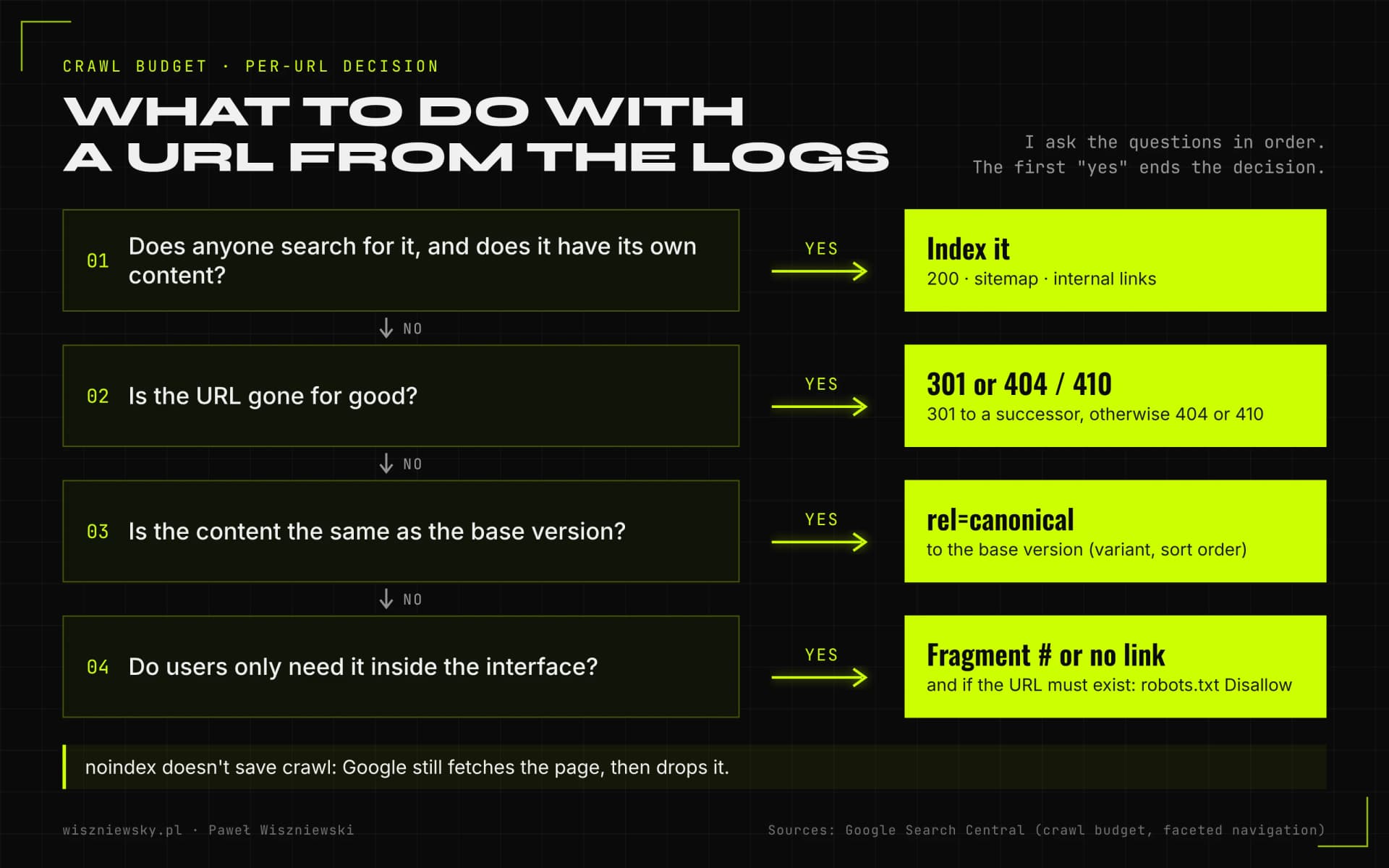
Each tool does something different: robots.txt stops fetching, noindex removes a page from the index but requires fetching it, canonical consolidates signals, and 404 or 410 ends a URL's life. The most crawl damage I see comes from using noindex to save crawl, or from blocking pages in robots.txt that should actually drop out of the index.

Decision tree for a URL from the logs in four questions: a URL with search demand and its own content gets indexed; a URL gone for good gets a 301 to its successor or a 404 or 410; a duplicate of the base version gets a canonical; a URL only needed in the interface becomes a # fragment or loses its link, and if it must exist it's blocked in robots.txt.
The order of questions I ask for every URL type in the logs. The answer depends on the URL's value for search, not on which tool is easiest to deploy.
ToolEffect on crawlingWhen I use itTrap
robots.txt DisallowGoogle doesn't fetch the URLFilters and parameters with no demand, internal search, cart, actionsGoogle says a blocked URL can still appear in results without a description if other pages link to it; a noindex on that page won't be seen
meta robots noindexGoogle still fetches the page, then drops itPages the site needs but that shouldn't rank, at small scaleGoogle's large-site guide advises against noindex as a way to save crawl
rel=canonicalCrawling drops gradually, not at onceVariants and sort orders with the same content as the base versionA hint, not a directive; at scale it works less well than robots.txt
404 or 410Google stops visiting the URL over timeProducts permanently discontinued with no successor, empty filter combinationsA soft 404, an empty page returning 200, still uses crawl
301 to a successorOne extra request per URLA product replaced by a new model, merged categoriesRedirect chains, and redirecting everything to the homepage
No link (or a # fragment)Google doesn't discover the URLSort orders, list views, filters that shouldn't be URLs at allThe URL still exists if it was linked before or is in the sitemap

Google's guide also says not to use robots.txt to temporarily shift crawling to other pages. A block makes sense for URLs that should stay closed for good. I explain how robots.txt behaves, including with AI crawlers, in AI Crawlers – Who Scans Your Site and How to Manage It.

Faceted navigation: which filters to index and which to cut off

A filter deserves an indexable URL only when people search for that exact combination and the result has enough products to be useful. Every other filter works for users but shouldn't create URLs a bot can reach.

How I choose filters for indexing

  1. I collect queries that combine a category with an attribute (brand, material, use case) from keyword tools and Search Console.
  2. For each combination I check how many products the store has. A page with one or two products rarely beats the parent category.
  3. I check the results page: if Google ranks filtered category pages for that query, the intent is confirmed.
  4. Chosen combinations get a static, readable URL, their own title, heading, short description and a link from the category. The rest stay as filters without indexable URLs.

Technical rules from Google's documentation

In December 2024 Google published a dedicated document on faceted navigation (updated in December 2025). The recommendations I implement:

  • If filtered URLs aren't needed in search, I disallow the filter parameters in robots.txt and leave only product pages and unfiltered listings crawlable.
  • Filters stored in the URL fragment (after #) have no effect on crawling, because Google generally doesn't support fragments in crawling and indexing. That's a good fit for purely functional filters.
  • rel=canonical and rel=nofollow can reduce crawling, but Google calls them less effective long term than robots.txt. Nofollow only works if every link to that URL carries it.
  • If filters should be crawled: the standard & parameter separator, a consistent filter order in the URL and no duplicate filters.
  • An empty filter combination, a nonsensical combination and a nonexistent pagination page return 404, not a redirect to a generic error page.

Stores have other noise sources too: out-of-stock products, variants on separate URLs and deep pagination. I cover the e-commerce strategy in E-commerce SEO & GEO.

Crawl capacity: server, HTTP caching and page resources

Crawl capacity goes up when the server responds quickly and reliably, and goes down with 5xx errors, 429 responses and growing response times. This is the part of crawl budget I can influence directly in code and infrastructure.

HTTP caching and 304 responses

Google's large-site guide recommends supporting the 304 (Not Modified) status. In its "Crawling December" series from December 2024, Google added that its crawlers support conditional requests with ETag and If-None-Match as well as Last-Modified and If-Modified-Since, and recommended ETag because it's less error-prone. On product pages and articles that rarely change, I implement an ETag computed from the page content, not from the render time, because otherwise every request looks like a change.

Page resources use crawl too

In the same series Google explained that fetching the resources needed to render a page (JavaScript, CSS, API responses) counts against the crawl budget of the host serving them, and that the rendering service caches the JS and CSS it fetches for up to 30 days regardless of cache headers. What that means in practice: fewer files per page, care with cache-busting parameters that change a file's URL without changing its content, and content available in the HTML without extra API calls. I cover rendering in detail in JavaScript SEO.

File size limit

Googlebot's documentation now says that when crawling for Search it fetches the first 2 MB of a supported file type and the first 64 MB of a PDF. Google described the February 2026 change as a documentation clarification rather than a change in behaviour. Most pages are far below the limit, but I check it on category pages with hundreds of products and on pages with a large application-state JSON inlined into the HTML. Content and links beyond 2 MB won't be read.

Slowing crawling during an incident

If Googlebot is overloading the server, Google recommends temporarily returning 500, 503 or 429 (with a Retry-After header) instead of 200, but only for a few hours, a day or two at most. Longer than that and URLs may drop out of the index. Google retired the crawl rate limiter tool in Search Console on 8 January 2024, so the lasting fix is a faster server and caching, not putting the brakes on the bot.

Crawl demand: sitemaps, lastmod and internal linking

Crawl demand depends on how important and how fresh Google thinks your URLs are. A sitemap with a trustworthy lastmod and internal links to key pages are two signals you fully control.

Sitemaps split by template

Google limits a single sitemap to 50,000 URLs or 50 MB uncompressed; larger sets are split into several sitemaps tied together by an index. I split them not just by the limit but by template: products, categories, articles, location pages. Search Console then shows the indexed share for each group, and you can see straight away which template has the problem.

  • The sitemap holds only canonical, indexable URLs returning 200. No redirects, 404s, noindex pages or URLs blocked in robots.txt.
  • lastmod changes only on a significant change to content, structured data or links. Google uses the value when it's consistently and verifiably accurate, and ignores it when every page carries today's date.
  • I leave out priority and changefreq, because Google ignores them.
  • The sitemap is generated from the same database as the site, so a discontinued product leaves it at the same moment it starts returning 404 or a redirect.

Click depth and links to new pages

In the site crawl I check how many clicks separate key categories and products from the homepage, and which canonical URLs have no internal link at all. New products get linked from their category (on the first page of the listing, not page 40) and from "new in" blocks; articles from related posts and service pages. Internal linking works on crawl demand and on rankings at the same time, which is why it gives the most for the least risk.

Beyond Google, don't forget Bing, whose index feeds Copilot and ChatGPT Search among others. Bing supports IndexNow, which notifies the search engine about a changed URL the moment you publish. I write about it in Bing, Microsoft Copilot and IndexNow.

AI crawlers and server performance

AI crawlers don't take Googlebot's budget, but they share the same server. If GPTBot, ClaudeBot and other bots generate heavy traffic, the server slows down, and a slower server means lower crawl capacity for Google.

In every log analysis I separate out AI bot traffic and check three things: how many requests they send, to which templates, and how they affect response times at peak hours. I decide with the client which bots to allow, separately for training bots and for AI search bots, since the latter can bring citations and traffic. This is where technical SEO meets GEO, optimization for AI search.

AI bots usually don't execute JavaScript, so content loaded by scripts is empty to them. That's one more argument for server-side rendering, which helps both Google's crawl budget and visibility in AI answers.

How I measure the results of crawl budget optimization

I measure the result by the change in the share of crawling spent on valuable URLs, the time from publication to indexing, and the drop in "Discovered – currently not indexed" URLs. Organic traffic is the goal, but it reacts later and depends on other factors too.

MetricSourceDirection I expect
Share of Googlebot requests to canonical HTML URLsServer logsUp
Number of "Discovered – currently not indexed" URLsSearch Console, Page Indexing reportDown
Time from publication to first crawl and to indexingLogs, URL Inspection, per-template sitemapsShorter
Share of 3xx, 404 and 5xx responsesCrawl Stats, logsDown
Share of 304 responses for unchanged pagesLogsUp after caching is in place
Indexed share of sitemap URLs per templateSearch Console, sitemapsUp for products and categories
Clicks for categories and productsSearch Console, page filterUp over the longer term

The first changes in Crawl Stats usually show after a few weeks, which is why my process includes 4–8 weeks of monitoring after deployment. I compare against a baseline period of the same length, and for stores I note seasonal peaks, which change Googlebot's behaviour on their own.

Special cases: migrations, programmatic SEO, language versions

Crawl budget usually becomes a problem not because of a site's steady size but because of a sudden change: a migration, thousands of newly generated pages or another language. In those situations I plan for crawling before the release, not after the drop.

  • Migrations and URL changes. After a move, Google has to fetch old URLs to see the redirects and new ones to index them. Single-hop redirects, updated internal links and new sitemaps from day one shorten that period. I describe this under SEO migration.
  • Programmatic SEO. Thousands of pages generated from a database quickly outrun crawl capacity when most of them look alike. I publish them in batches, starting with combinations that have real demand, and watch the indexed share in each batch's sitemap. More in Programmatic SEO with AI.
  • Language versions. Every language multiplies the URL count, and broken hreflang or canonicals can make Google crawl versions it treats as duplicates. I cover the rules in Hreflang and International SEO.
  • JavaScript apps. A site rendered only in the browser spends crawl on resources and API calls. When it's rebuilt with server-side rendering, for example as part of a Next.js migration, the problem often disappears along with the old architecture.
  • Content cleanup. Thousands of thin, outdated articles also dilute crawl demand. How I decide what to update, merge or remove is in Content Decay.

Crawl budget optimization is one part of broader technical work on a site. You'll find the full context on the technical SEO page, and the structured data I often implement on the same templates under Schema.org implementation.

Frequently Asked Questions

How large does a site need to be before this matters?

According to Google's guide, it mainly matters for large sites (roughly 1M+ unique pages changing about weekly), medium or larger sites (10,000+ pages) with content changing daily, and sites with a large share of “Discovered – currently not indexed” URLs. Google calls these rough estimates. Smaller sites usually just need an up-to-date sitemap and a check of the indexing report — there, content quality and internal linking matter more.

Does noindex remove pages from Google?

Noindex removes a page from search results but doesn't save crawl budget — Googlebot still visits it. Blocking in robots.txt saves crawl budget but prevents Google from following links from those pages. The right strategy depends on each specific case.

How do you measure crawl budget optimization results?

I measure via Google Search Console → Crawl Stats: the ratio of crawled pages with errors vs. content pages, average daily crawl requests, and whether the percentage of 'discovered but not indexed' pages decreases.

How do I know I have a crawl budget problem?

Typical signs are many “Discovered – currently not indexed” pages in Search Console, a long delay between publishing and indexing, and logs showing Googlebot mostly visiting filters, parameters and old URLs instead of sales pages.

Should I block AI crawlers?

It's a business decision. Blocking training crawlers protects content but can reduce your brand's presence in AI answers. AI search crawlers (e.g. OAI-SearchBot, PerplexityBot) are usually worth allowing because they can bring traffic and citations. I help you set this up deliberately.

How much does crawl budget optimization cost?

It starts from €900. The price depends on site size, log availability and how many structural and template changes are needed.

Got a project?

Terminate
Silence

Initiate protocol. Establish connection. Let's build something loud.

> WAITING_FOR_INPUT...