RETURN_TO_BASE

AI & Automation

AI agents, process automation with n8n and Make, chatbots, RAG on your own documents and custom LLMs. I build AI systems that cut manual work and run 24/7.

Author: Paweł Wiszniewski · Updated:

Key takeaways

AI agents, process automation with n8n and Make, chatbots, RAG on your own documents and custom LLMs. I build AI systems that cut manual work and run 24/7.

  • ›AI Agents for Business
  • ›n8n & Make Automation
  • ›AI Chatbots & Voice AI
  • ›RAG on Your Documents

AI & Automation – how it works

I build AI systems that work around the clock: AI agents that take actions inside your CRM, ERP and inbox; customer support chatbots that resolve most tickets on their own; n8n and Make workflows that connect your tools into one process; RAG assistants that answer only from your company documents and cite the source; and fine-tuned LLMs trained on your data. Every project starts with a process map and a measurable goal — hours saved, tickets resolved, leads qualified — and ends with monitoring, documentation and a handover your team can maintain.

› CORE_CAPABILITIES:

  • AI Agents for Business
  • n8n & Make Automation
  • AI Chatbots & Voice AI
  • RAG on Your Documents
  • Custom LLM Fine-tuning
  • CRM & Lead Automation
STRUCT

Paweł Wiszniewski · why me

What I do differently

I don't show automation on slides — you can try it. The site has my demos: a support agent handling tickets from text, images and voice, document automation with validation and human approval, and agentic RAG with cited sources. In production I've built, among others, the GiftFinder agentic system and a RAG quoting engine for a general contractor. Every deployment includes an action log, permission control and human oversight where a mistake would be costly.

Try the demo: AI Operations Agent

Who this service is for

  • Companies where staff lose hours on repetitive tasks and retyping data.
  • Support and sales teams that want to respond faster without hiring.
  • Organizations with lots of documents and knowledge spread across many systems.
  • Companies that want AI to do work inside their systems, not just answer questions.
/// AI_SERVICES

My AI Automation Services

/// GUIDE

AI Automation for Business – A Practical 2026 Guide

This guide covers what I walk every company through before a project starts: how AI automation differs from ordinary automation, which processes to automate first, when a workflow is enough and when you actually need an agent, what it costs and how to work out the return. It also covers the parts that rarely make it into sales decks: security, GDPR, the EU AI Act, maintenance after launch, and why most AI pilots never reach production. Every statistic is sourced, and where I describe my own method I say so.

AI automation vs traditional process automation – what's the difference

AI automation combines classic rules and integrations with steps where a large language model (LLM) understands messy input: emails, PDFs, notes, photos or voice recordings. Traditional business process automation handles data that already sits in form fields; AI adds the ability to read, classify and summarise what a rule can't cover.

In practice I rarely build an "AI system" from scratch. Far more often it's a flow where most steps are ordinary logic (fetch data, check a condition, write to the CRM) and the model appears only where the data is messy. That distinction matters for cost and reliability. A rule-based step costs almost nothing and behaves the same way every time. A model step is slower, more expensive and probabilistic, so it has to be measured and guarded.

Three levels of automation worth telling apart

LevelHow it worksExampleMain risk
Rule-based automation (RPA, Zapier, n8n without AI)Fixed scenario: if X, do YA new order goes to a spreadsheet and SlackBreaks when the data format changes
Workflow with an AI stepFixed flow; the model handles one or a few stepsThe model reads an emailed invoice, rules validate itA reading error nobody checked
AI agentThe model decides which tools to use and in what orderAn agent drafts a quote from an email, the CRM and the price listPermissions that are too broad, hard-to-predict behaviour

Most companies I talk to start by thinking about agents, yet the biggest wins usually come from the middle level: a well-designed workflow with one or two AI steps. That's the kind of flow I typically build as part of n8n process automation.

Workflow or AI agent – choosing the right architecture

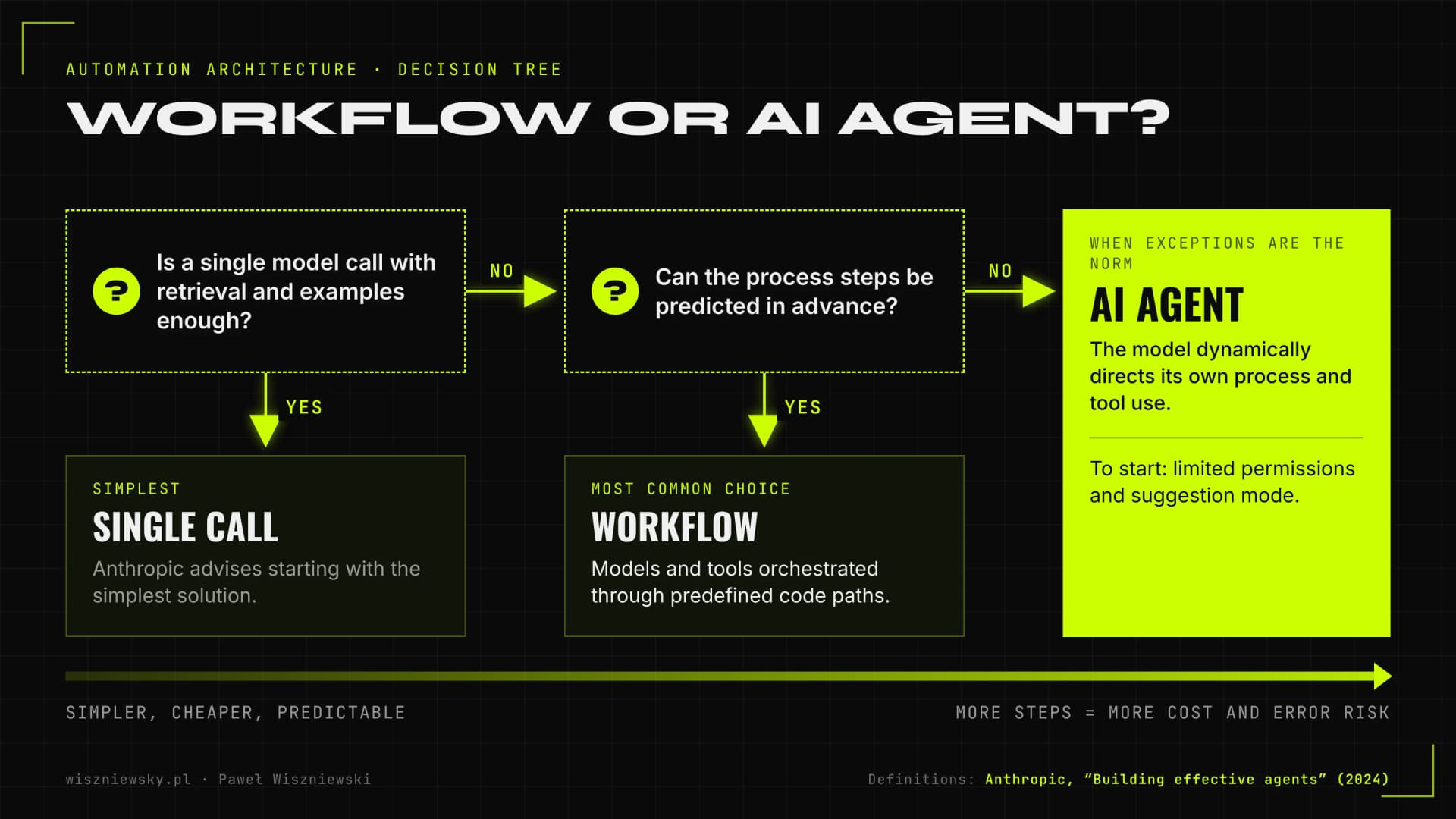
I choose a workflow when the steps of a process can be predicted in advance, and an agent only when the order of actions depends on the content of each case and can't sensibly be mapped out. Anthropic drew this line in "Building effective agents" (2024), and it's the most useful definition I know for conversations with leadership.

Anthropic describes workflows as systems where LLMs and tools are orchestrated through predefined code paths, and agents as systems where the LLM dynamically directs its own process and tool use. The same piece recommends looking for the simplest solution first and adding complexity only when it's needed: for many applications, a single well-prepared model call with retrieval and in-context examples is enough.

Decision tree: a single model call, a workflow with predefined code paths, or an AI agent that dynamically directs its own process and tool use
Choosing the architecture using the definitions from Anthropic's “Building effective agents” (2024).

Workflow patterns that cover most needs

  • Prompt chaining – the task is split into fixed stages, e.g. read the document, validate it, draft a reply.
  • Routing – the model classifies the input (complaint, invoice question, quote request) and sends it down the right path.
  • Parallelisation – several independent checks run at once, e.g. against the price list and against contract terms.
  • Orchestrator-workers – one model breaks the task into parts and hands them to specialised steps.
  • Evaluator-optimiser – a second pass checks the first output against criteria and sends it back for revision.

An agent makes sense when cases vary widely, require pulling from several systems and you can't anticipate every path. Typical examples: handling quote requests, multi-step research, or working through a team inbox. In those cases I propose AI agent development with limited permissions and a suggestion mode to start. Under the hood an agent is a loop: the model gets a goal and a list of tools, picks a tool, looks at the result and decides on the next step, until it considers the task done or hits a boundary where it has to ask a human. Every turn of that loop costs money and is a chance to make a mistake, so keep the number of steps and tools as small as possible.

Quick test: workflow or agent

QuestionAnswer points to a workflowAnswer points to an agent
Are the steps always the same?Yes, only the data changesNo, they depend on the case
How many systems need checking?One or two, always the sameSeveral, depending on the case
How costly is a mistake?High, so predictability mattersModerate and reversible
Can the output be defined precisely?Yes, as fields and rulesOnly descriptively, with quality scoring
How often do exceptions occur?RarelyExceptions are the norm

Which processes to automate first – selection criteria and examples

I automate processes first that are frequent, repetitive, built on data from systems with an API, and that have a clear owner inside the company. A process that happens once a month or changes every week is almost never a good first candidate.

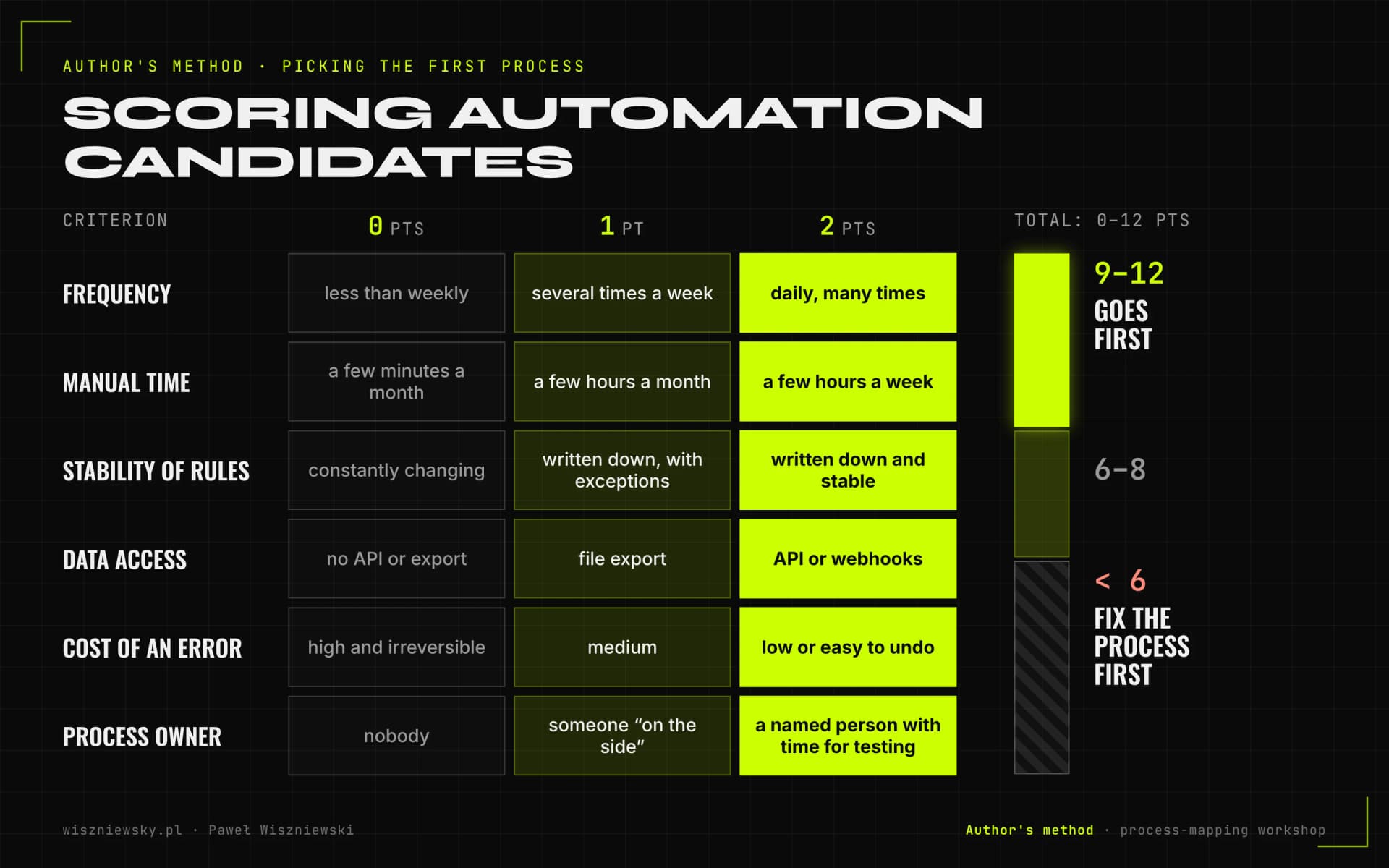
"Start with one process" is easy advice. The hard part is picking which one. I use a simple scoring sheet that we fill in together during a process-mapping workshop.

My scoring sheet for automation candidates

Criterion0 points1 point2 points
FrequencyLess than weeklySeveral times a weekDaily, many times
Manual timeA few minutes a monthA few hours a monthA few hours a week or more
Stability of rulesConstantly changingWritten down, with exceptionsWritten down and stable
Data accessNo API or exportFile exportAPI or webhooks
Cost of an errorHigh and irreversibleMediumLow or easy to undo
Process ownerNobodySomeone "on the side"A named person with time for testing

Processes scoring 9–12 go first. Below 6, we usually fix the process itself before automating it, because automating chaos just makes chaos faster. This isn't a textbook methodology; it's a tool that helps me cut short debates about what would be "nice" to automate.

Author's process scoring model: 6 criteria at 0–2 points (frequency, time, rules, data, error cost, owner); 9–12 points go first, below 6 fix the process
My scoring sheet for automation candidates, filled in together with the client during a process-mapping workshop.

Processes that most often come out on top

  • Invoices and expense documents – read from email, validate, enter into accounting or ERP, with approval when something doesn't match. The model extracts the data; rules compare amounts, tax IDs and line items against the purchase order.
  • A team inbox – classify, assign to a person, draft a reply for approval.
  • Quote requests – pull details from the email, check the CRM and price list, draft a quote for the salesperson.
  • First-line customer support – order status, returns, policy questions; this is where an AI chatbot for business with access to order data does well.
  • Lead qualification – instant response and a CRM record; that's the scope of AI sales automation.
  • Recurring reports – collect data from several sources, comment on variances, send to management.

In "A future that works" (2017), the McKinsey Global Institute estimated that in about 60% of occupations at least 30% of activities could be automated, while fewer than 5% of occupations could be automated entirely. That's why I look for tasks, not jobs.

n8n vs Make vs Zapier – choosing an AI process automation tool

I use Zapier for simple cloud integrations, Make for moderately complex scenarios built visually, and n8n where I need complex logic, custom code or hosting on your own server. When a process needs full control, tests and version control, I move to Python or TypeScript.

The difference companies most often miss is the billing model. According to the vendors' pricing pages (as of 2026): Zapier counts tasks, meaning each successful action step in a Zap; Make counts credits, with most module actions using one credit; n8n Cloud counts whole workflow executions regardless of how many steps they contain, and the self-hosted Community Edition is free. With multi-step flows, the cost gap grows with volume.

CriterionZapierMaken8n
Billing modelTasks (each successful action step)Credits (most actions = 1 credit)Whole workflow executions; self-hosted Community with no licence fee
HostingVendor cloud onlyVendor cloud onlyn8n Cloud or your own server
Complex logic and codeLimitedGood, visualVery good, JavaScript and Python steps
AI steps and agentsAvailable, billed in tasksAvailable, billed in creditsAI and agent nodes, any model
LicenceCommercial SaaSCommercial SaaSSustainable Use License: your own internal business purposes
Best forSimple, occasional integrationsTeams without a developer, medium complexityCompanies with sensitive data and complex processes

One note on n8n's licence: it isn't open source in the OSI sense. It's the Sustainable Use License, which lets you use and modify n8n for your own internal business purposes. If you want to build a product on n8n and sell it to customers, check the terms with a lawyer or look at the Enterprise licence.

I've written a full comparison with pricing examples in n8n vs Make vs Zapier – which tool to choose.

RAG and AI chatbots for business – knowledge base or assistant

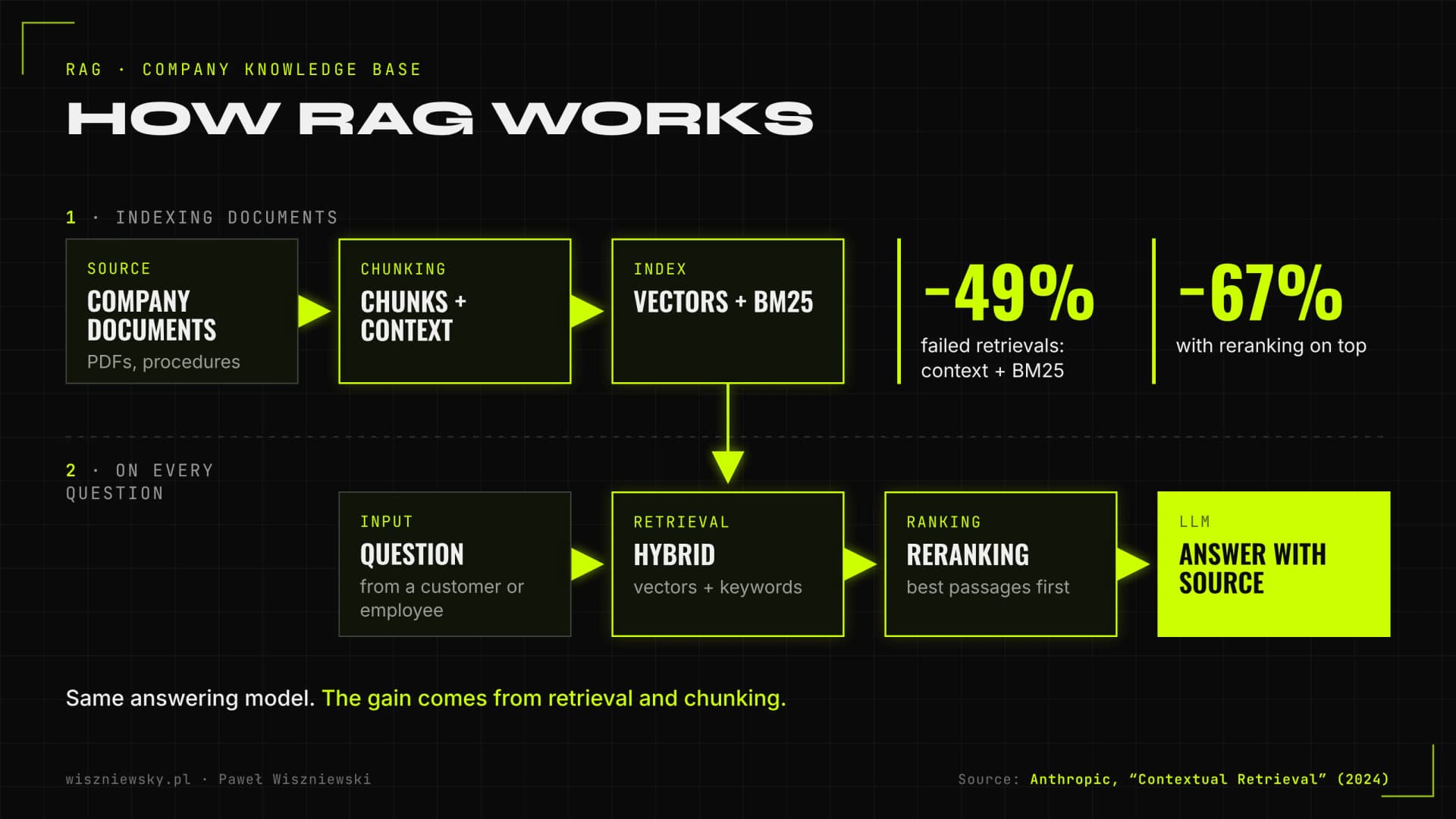
RAG (Retrieval-Augmented Generation) is how a model answers from your documents: the system first retrieves matching passages, then the model writes an answer that cites the source. A customer-facing chatbot usually relies on RAG too, but it also needs access to order data and clear rules for handing a conversation to a human.

The most common RAG mistake is trying to fix quality with a more expensive model. In its Contextual Retrieval write-up (2024), Anthropic showed that adding context to document chunks and combining vector search with BM25 cut failed retrievals by 49%, and by 67% with reranking on top, without changing the model that writes the answer. RAG quality depends heavily on retrieval and on how documents were chunked.

RAG diagram: indexing contextual chunks with vectors and BM25, hybrid retrieval, reranking and an answer with its source; 49% and 67% fewer failed retrievals
Per Anthropic (Contextual Retrieval, 2024), contextual chunks with BM25 and reranking cut failed retrievals without changing the model.

What I check before proposing RAG

  • Whether there are enough documents that they won't fit in a model's normal context window.
  • Whether the documents are current and someone owns keeping them that way.
  • Whether different employees should see different documents (then access control is part of the project, not an add-on).
  • Whether the data actually lives in database tables, where model-generated SQL works better.
  • Whether we have a set of test questions with expected sources to measure quality before launch.

A company knowledge base falls under RAG implementation. A production example is a quoting engine for a general contractor built on RAG over 70 historical cost estimates, described in the Konkret case study. When a client asks about fine-tuning, I usually check first whether RAG and a good prompt are enough; fine-tuning mainly makes sense for a consistent style and format at high volume.

Your chatbot is responsible for what it says

In Moffatt v. Air Canada (2024), British Columbia's Civil Resolution Tribunal held the airline liable for wrong discount information its website chatbot gave a customer, rejecting the argument that the chatbot was a separate entity. The takeaway for any company deploying an AI assistant is simple: it must answer only from approved sources, be able to say "I don't know" and make it easy to reach a human.

AI implementation step by step – what an automation project looks like

I run AI automation projects in six stages: choosing the process and success metrics, mapping, a design with human checkpoints, building in a test environment, launching in suggestion mode, and gradually increasing autonomy. A single n8n workflow typically takes 2–4 weeks; a first agent for one process takes 4–6 weeks.

  1. Choose the process and define success. We pick one process and 2–3 metrics, e.g. handling time per case, share of cases needing no correction, data-entry errors. Without a baseline from before the project, you can't honestly measure the result later.
  2. Map the process. I walk through it step by step with the person who does it every day and collect real examples: dozens of emails, invoices or tickets, including the awkward ones.
  3. Design. I decide which steps are rules and which need a model, where a human approves, what permissions the automation gets and what happens on failure.
  4. Build and test. I build in a test environment and run it against the collected examples. For AI steps I prepare a test set with expected outputs so every prompt or model change is measured.
  5. Launch in suggestion mode. The automation prepares the output; a person approves or corrects it. Those corrections are the most valuable data for further tuning.
  6. Gradual autonomy and handover. When the data shows the automation doesn't make mistakes in a given category of cases, we remove approval for that category. I hand over documentation and train someone on your side.

If a company is still working out where AI makes sense and has a dozen candidate processes, it's worth running a separate strategy stage first: review the processes, score them and plan the order. Building starts once it's clear which process will deliver the fastest and most reliable result.

How much AI automation costs – implementation prices and running costs

The cost of AI automation has two parts: a one-off implementation and ongoing costs, meaning model fees, hosting, tool subscriptions and optional support. My projects start from €1,000 for a lead qualification bot, while agent and fine-tuning projects start from €3,000.

Type of projectImplementation (from)Biggest price drivers
Lead qualification botfrom €1,000Number of channels, qualification complexity, CRM and calendar integration
Process automation in n8n or Makefrom €1,200Number of steps and systems, AI steps (e.g. document reading)
AI customer support chatbotfrom €1,500Channels, helpdesk and CRM integration, knowledge base scope
RAG implementation (knowledge base)from €2,000Number and format of documents, sources, permissions, cloud or self-hosted
AI agent for one processfrom €3,000Number of tools and systems, approval points, security testing
Model fine-tuningfrom €3,000Data preparation, model size, training iterations, deployment

Running costs to ask about before you sign

  • Model fees. These depend on the number of calls and the length of the text. For an agent handling one process they're typically tens to a few hundred euros a month, but at high volume they deserve their own calculation.
  • Automation platform. Zapier or Make subscriptions grow with tasks or credits; self-hosted n8n means server costs and maintenance time.
  • Hosting and vector database. RAG adds a vector store and document processing on every update.
  • Maintenance. API changes in connected systems, model updates and quality reviews. This is not a one-off project.

There are a few proven levers on model costs: prompt caching, smaller models for simple steps, batch mode and shorter context. I take apart the "million-dollar invoice" myths in how much AI implementation really costs.

AI automation ROI – how to calculate the return before you build

I calculate automation ROI as the value of time saved and errors avoided minus the full cost of implementation and running, over a 12-month horizon. The most important input is an honest assumption about what share of cases the automation will actually take over, because it's usually not 100%.

The formula I use

  1. Annual savings = cases per year × time per case × hourly labour cost × share of cases taken over by the automation.
  2. Additional value = errors avoided (e.g. invoice corrections, lost leads), valued conservatively or left out if it can't be measured.
  3. Total cost = implementation + 12 months of running costs (model, tools, hosting, support) + your team's time on testing and approvals.
  4. ROI = (savings + additional value − total cost) ÷ total cost.
  5. Payback period = implementation cost ÷ net monthly savings.

I'm conservative about the takeover share: in the first months I count only the categories the automation handles without corrections in suggestion mode. Time people still spend approving gets subtracted from the savings. I've put a detailed worksheet and examples in AI automation ROI – how to calculate returns.

What to leave out of an ROI calculation

  • Headcount reduction, if nobody is actually planning team changes. Time saved is only worth something if it has somewhere to go.
  • Sales growth "thanks to AI" without a measurable mechanism, such as lead response time.
  • An automation rate taken from a vendor's deck rather than a test on your own data.

In lead generation the mechanism can be measured. Harvard Business Review (2011) analysed 1.25 million leads across 42 companies: firms that contacted a lead within an hour were seven times as likely to qualify it as those that responded an hour later. That's the kind of value you can check in your own CRM before and after.

Human-in-the-loop – where people must approve AI decisions

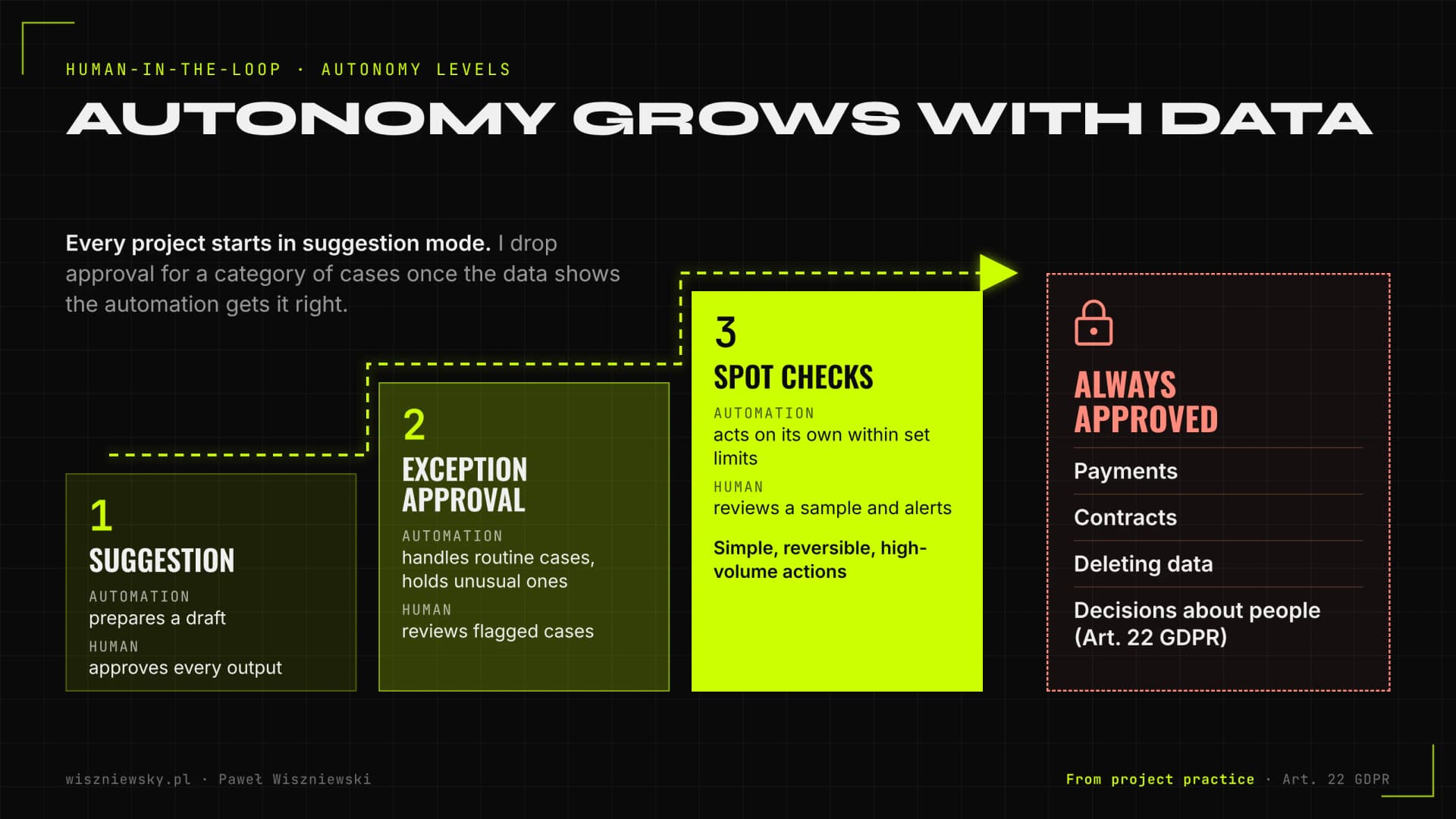
Human-in-the-loop means that at defined points in a process a person approves, corrects or rejects what the automation wants to do. I put these checkpoints where a mistake is irreversible, expensive or affects an individual's rights, not "just in case" on every step.

The autonomy levels I use

LevelWhat the automation doesHuman roleWhen I use it
1. SuggestionPrepares a draft or recommendationApproves every outputStart of every project, high-stakes decisions
2. Exception approvalHandles routine cases, holds unusual onesReviews cases flagged by the systemWhen suggestion-mode data shows stable quality
3. Spot checksActs on its own within set limitsReviews a sample and alertsSimple, reversible, high-volume actions
Always approvedNever acts aloneDecidesPayments, contracts, deleting data, decisions about people
Three autonomy levels: suggestion, exception approval and spot checks, plus actions that are always approved: payments, contracts, data, decisions about people
I raise autonomy step by step based on suggestion-mode data; decisions about people stay with a human (Art. 22 GDPR).

There's a legal angle too. Article 22 GDPR gives people the right not to be subject to a decision based solely on automated processing that produces legal effects concerning them or similarly significantly affects them. If an automation rejects a loan application, a job candidate or a complaint, you need genuine human involvement, not a rubber stamp.

Approval has to be convenient: one click in Slack, Teams or email with full context, not a login to a separate dashboard. Otherwise people start approving everything on autopilot. I go deeper into designing these checkpoints in human-in-the-loop in practice.

AI automation security – prompt injection and the OWASP LLM Top 10

The biggest risk in AI automation is a model that reads untrusted content (an email, a document, a web page) while also having permission to act. A malicious instruction hidden in that content can push it into doing something it shouldn't. That's prompt injection, number one on the OWASP Top 10 for LLM Applications 2025.

The 2025 OWASP list includes, among others: prompt injection (LLM01), sensitive information disclosure (LLM02), data and model poisoning (LLM04), improper output handling (LLM05), excessive agency (LLM06), system prompt leakage (LLM07), vector and embedding weaknesses (LLM08) and unbounded consumption (LLM10). For business automation, I consider LLM01, LLM05 and LLM06 the most important.

Rules I apply on every project

  • Least privilege. The automation gets its own account with access only to what it needs. An agent that drafts quotes doesn't need permission to send emails.
  • Separate content from instructions. The text of an email or document is data, not commands. Actions triggered by untrusted content go through validation or approval.
  • Validate outputs. Model output is checked by rules before it reaches a system: format, amount ranges, allowed values.
  • Action log. Every action is recorded: what the system saw, what it decided and what it did.
  • Limits. Hourly and daily caps on calls and spend, so an error loop can't run up a bill.
  • Attack testing. Before launch I test the automation against prompt injection attempts through its usual input channels.

I cover specific defensive techniques in prompt injection and LLM application security. Agents also need environment isolation: test the agent on a copy of the data, with no production access, until it passes.

GDPR and the EU AI Act in automation – what companies need to know in 2026

AI automation that processes customer or employee data falls under GDPR like any other system: you need a lawful basis, data minimisation, a data processing agreement with the model provider and often a DPIA. The AI Act adds obligations that depend on the use case; for typical business automation the key one is transparency towards people who interact with AI.

GDPR – a practical checklist

  • Work out which personal data actually reaches the model and remove whatever the task doesn't need.
  • Check that the model provider acts as a processor and sign a data processing agreement (Article 28 GDPR). Look at where processing happens and whether data is used for training.
  • Assess whether a DPIA is required (Article 35 GDPR), especially for evaluating people, monitoring or large-scale processing.
  • Make sure humans are involved in decisions that significantly affect individuals (Article 22 GDPR).
  • Update your privacy notice and record of processing activities.

I go into the details, including personal data in prompts and vendor agreements, in GDPR and AI in practice.

The AI Act – what applies now and what has moved

According to the European Commission, the transparency obligations in Article 50 of the AI Act apply from 2 August 2026. AI systems that interact directly with people must make clear from the first interaction that the person is dealing with AI, unless that's obvious. A limited grace period until 2 December 2026 covers only the marking of content generated by systems placed on the market earlier.

The AI Omnibus package entered into force on 27 July 2026. According to the Commission, it moved the deadline for Annex III high-risk systems (e.g. recruitment, creditworthiness assessment) to 2 December 2027, and for AI in Annex I regulated products to 2 August 2028. The Omnibus also shifted the weight of the AI literacy obligation towards the Commission and Member States, though I still consider training the people who work with AI a sensible minimum.

Use caseWhat the AI Act requiresFrom
Customer-facing chatbot or voice botTelling people they're talking to AI2 August 2026
Content generation (text, image, video)Marking content; labelling deepfakes as artificially generated2 August 2026; machine-readable marking for older systems by 2 December 2026
CV screening, candidate assessment, credit scoringHigh-risk system requirements2 December 2027 (after the AI Omnibus)
Invoice, email and internal reporting automationUsually no specific obligations beyond the general onesNot applicable

This is a practitioner's overview, not legal advice. For systems in HR, finance or decisions about people, I plan the project together with a lawyer or data protection officer. More on obligations in the EU AI Act in practice. It's also worth checking the current legal text and Commission updates, because the AI Act timeline has already changed since it was adopted.

Self-hosted or cloud – where to run your automation and AI model

I choose the cloud when a fast start, the strongest models and no in-house infrastructure matter most, and self-hosting when data can't leave the company, volume is large and steady, or the client has a team that can run a server. A hybrid is often best: n8n on your own server, the model in the cloud under a data processing agreement with a limited scope of data.

CriterionCloud (model APIs, SaaS)Self-hosted (own server, open models)
Getting startedFast, no infrastructureSlower: server, configuration, security
Model qualityAccess to the strongest commercial modelsOpen weights; good for many tasks, weaker on the hardest ones
Data controlDepends on the contract and provider settingsFull; data stays in-house
Cost at low volumeLow; pay for usageHigh relative to usage (server, GPU)
Cost at high, steady volumeGrows linearly with usageCan be lower if infrastructure is well utilised
MaintenanceOn the providerOn you: updates, monitoring, backups

Self-hosted models aren't only about the cost of a GPU server. You also need time for updates, load monitoring and quality testing after every model version change. For many companies a sensible compromise is the cloud with a processing agreement and EU data processing, plus a local model only for steps that touch the most sensitive data.

Maintaining and monitoring AI automation after launch

AI automation needs maintenance because three things change that you don't control: the APIs of connected systems, the providers' models and the input data itself. Without monitoring, a workflow can quietly fail, or quietly get worse, for weeks.

What I monitor on every project

  • Reliability: share of runs completed without errors, retries, failure alerts in Slack or email.
  • Quality: test-set results after every prompt or model change, correction rate in approval mode, escalations and their reasons.
  • Cost: model cost per case and a daily spend cap.
  • Time: end-to-end process time compared with the baseline.
  • Data drift: new document types, format changes, questions the system hasn't seen.

For AI steps I add tracing: input, prompt, model response, cost and latency recorded for every call. Without it, when a customer complains, there's no way to reconstruct why the system made the decision it did.

The review rhythm I suggest

  1. First 2–4 weeks after launch: review errors and corrections every few days, extend the test set.
  2. The following months: a monthly review with the process owner and decisions on increasing or reducing autonomy.
  3. On every model or provider change: a full run of the test set before switching.

Why AI pilots fail – the most common implementation mistakes

AI pilots fail mostly for organisational reasons: no measurable goal, unprepared data, rising costs and no process owner. A weak model is rarely the cause. Both analyst forecasts and research on real deployments point the same way.

  • Gartner (2024) predicted that at least 30% of generative AI projects would be abandoned after proof of concept by the end of 2025, due to poor data quality, inadequate risk controls, escalating costs or unclear business value.
  • Gartner (2025) predicts that over 40% of agentic AI projects will be cancelled by the end of 2027. It also flags "agent washing": by its estimate, only about 130 of the thousands of vendors calling themselves agentic AI offer genuine agentic capabilities.
  • Gartner (2025) predicts that through 2026 organisations will abandon 60% of AI projects that aren't supported by AI-ready data.
  • MIT NANDA's report "The GenAI Divide: State of AI in Business 2025", as reported by Fortune, found that about 95% of corporate generative AI pilots deliver no measurable impact. According to the report, deployments built on tools bought from specialised vendors succeeded about 67% of the time, while internal builds succeeded about a third as often. More than half of generative AI budgets go to sales and marketing tools, while the authors saw the biggest returns in back-office automation.

The mistakes I see most often

  • A pilot with no baseline: nobody measured how long the process took before.
  • A demo on hand-picked easy examples instead of a test on real data, exceptions included.
  • Automating a process with no written rules and no owner.
  • An agent where a workflow would do, which raises cost and lowers predictability.
  • No maintenance plan: the project ends on launch day.
  • A tool the team doesn't use because nobody planned the people side of the rollout.

Data is its own topic. Before a project, check that documents have a single current version, that CRM data is complete and that someone is responsible for its quality. Automation won't fix your data; it will just expose the gaps faster.

How to choose an AI automation provider – questions to ask before signing

You'll recognise a good AI automation provider because they ask about the process, the data and success metrics before proposing technology, and can show a working deployment rather than a slide deck. The second sign is honesty about limits: when AI gets things wrong, what maintenance costs and what happens if the model provider changes its pricing.

Questions worth asking

  1. Can I see a working demo or deployment of a similar process, not just slides?
  2. How will we measure quality before launch, and on what test set?
  3. Where in the process does a human approve decisions, and what permissions will the automation get?
  4. What are the monthly running costs: model, tools, hosting, support?
  5. Where will data be processed, and which providers will we sign processing agreements with?
  6. Can the model or provider be changed without rewriting everything?
  7. Who owns the code, workflows and prompts when the project ends?
  8. What happens when the automation stops working: who gets the alert and how fast do they respond?

Warning signs

  • Promises of 100% automation or "AI with no hallucinations".
  • No questions about data or exceptions, straight to a quote for an "agent".
  • No action log and no test plan in the proposal.
  • A closed solution you can't get your data or workflows out of.

I've put an extended list of questions and contract clauses in how to choose an AI implementation partner.

/// FAQ

Frequently Asked Questions

What is AI process automation?

AI process automation means deploying systems that do repetitive work without human input — reading documents, answering customers, qualifying leads and moving data between tools. Unlike rule-based automation, AI handles unstructured input such as emails, PDFs and free-text requests.

What is the difference between an AI chatbot and an AI agent?

A chatbot answers questions in a conversation. An AI agent can also act: it calls tools and APIs, updates records in your CRM, sends emails and completes multi-step tasks, with guardrails and human approval for sensitive actions.

How does RAG work with my documents?

A RAG system indexes your contracts, manuals and FAQs in a vector database. When someone asks a question, it retrieves the most relevant passages and the LLM answers only from them, citing the source document.

How long does an AI automation project take?

A single n8n workflow or chatbot typically takes 2–4 weeks from process mapping to launch. Multi-system AI agents and RAG platforms take 4–8 weeks, including testing on real data.

How much does AI automation cost?

Projects start from €1,000 for a lead qualification bot, €1,200 for an n8n workflow and €1,500 for a customer support AI agent. RAG systems start from €2,000. You get a fixed quote after a free consultation.

Where should a company start with automation?

By choosing one process that's repetitive, time-consuming and rule-based. We map it, estimate the savings and build the first automation. More processes follow once the first one works and delivers.

Are AI automations safe for company data?

They can be: automations can run on your server, personal data is limited to what's necessary and model providers have data processing agreements. I design deployments with least-privilege access and full action logging.

Got a project?

Terminate
Silence

Initiate protocol. Establish connection. Let's build something loud.

> WAITING_FOR_INPUT...