RETURN_TO_BASE

E-commerce & AI for Online Stores

I grow online stores with AI and data: automated product descriptions, recommendations, order automation, conversion rate optimization (CRO) and store audits. Shopify, WooCommerce and BaseLinker.

Author: Paweł Wiszniewski · Updated:

Key takeaways

I grow online stores with AI and data: automated product descriptions, recommendations, order automation, conversion rate optimization (CRO) and store audits. Shopify, WooCommerce and BaseLinker.

  • ›AI Product Descriptions
  • ›AI Product Recommendations
  • ›Order & Service Automation
  • ›CRO & A/B Testing

E-commerce & AI for Online Stores – how it works

E-commerce is ideal territory for AI — repetitive processes, large volumes of product data, and a direct impact on conversion. I implement automated AI product description generation (100+ items per day maintaining brand voice), intelligent recommendations that personalise shopping based on customer history, and complete operational automations — inventory management, returns handling, dynamic pricing, and analytical report generation.

› CORE_CAPABILITIES:

  • AI Product Descriptions
  • AI Product Recommendations
  • Order & Service Automation
  • CRO & A/B Testing
  • Online Store Audit
  • Shopify, WooCommerce, BaseLinker Integrations
$999k
CONVERSION_RATE_OPTIMIZED

Paweł Wiszniewski · why me

What I do differently

I combine e-commerce, SEO and AI in one person, so I see the store as a whole: from product descriptions and recommendations, through order automation, to conversion and visibility in Google and AI assistants. On my own GiftFinder project I built a recommendation system and over 11,000 pages generated by AI agents, and for a beauty and fashion store I ran a migration with SEO and GEO. Every implementation is measured with a test or a before-and-after comparison.

Case study: GiftFinder AI Platform

Who this service is for

  • Stores with large catalogues and missing or duplicated product descriptions.
  • Stores with traffic that doesn't turn into sales.
  • Multichannel sellers whose operations eat up the team's time.
  • Store owners looking for growth priorities for the coming months.
/// SYSTEM_MODULES

What's included: E-commerce & AI for Online Stores

/// GUIDE

AI in E-commerce – A Practical Guide for Online Stores (2026)

This guide answers the questions store owners ask me before every project: where AI in e-commerce actually makes money, where to start, what it costs, how long until you see results and how to measure them. It is short on purpose, and every number has a source. Where I describe my own method, I say so, so you can tell my practice from industry rules.

AI in e-commerce – what it actually does in an online store

AI in e-commerce is a set of tools that take over work on your store's data: writing product content, choosing recommendations, handling orders and tickets, and finding the places where the store loses customers. It is not one system but several separate projects, each with its own inputs and its own measure of success.

Before you pick a first project, look at what each one needs as input. Most failed projects I have seen did not fail on the model. They failed on missing data.

Use caseWhat it needs as inputMain metric
AI product descriptionsAttributes, materials, use cases, reference copy in your brand voiceShare of pages with unique copy, traffic and conversion of product pages
Product recommendationsOrder and behaviour history, margin and stock dataAverage order value in an A/B test
Online store automationA defined process and access to the platform APIHours saved and error count
Store conversion optimizationWorking analytics, heatmaps, session recordingsConversion rate and revenue per session
Product visibility in AIA complete feed and structured dataTraffic and mentions from AI Overviews and assistants

The service page explains how I work in each of these areas. Here I focus on the decisions you make as the owner: what to do first, how much to pay and how to tell whether it works.

AI for an online store – when it makes sense and when it doesn't yet

AI for an online store makes sense when you have repetitive work or data at a scale your team can't handle by hand. If the real problem is a lack of traffic or an unclear offer, a language model won't fix it.

Signs your store is ready

  • The catalogue grows faster than the team can write copy, or descriptions come from the wholesaler and match every competitor.
  • You have order history that shows what customers buy together.
  • Someone on the team retypes stock levels, order statuses or answers to the same order questions every day.
  • Your platform (Shopify, WooCommerce, PrestaShop, BaseLinker) has an API you can connect to.
  • Analytics works correctly, so you can measure before and after a change.

Signs it is better to wait

  • Processes aren't settled and everyone does them differently. Automation will lock in the chaos.
  • Product data has gaps that suppliers can't fill.
  • The store has too little traffic for A/B tests, and the main problem is acquiring customers.

E-commerce audit – where to start with AI in your store

The safest start is an online store audit and a baseline measurement, followed by one project with the largest estimated impact. Without a baseline, any result after launch is just an opinion.

In an audit I price two areas first because they usually hide the most money: checkout including shipping costs, and page speed. Then I check product data, because descriptions, recommendations and AI visibility all depend on it. The full scope is on the e-commerce audit and strategy page.

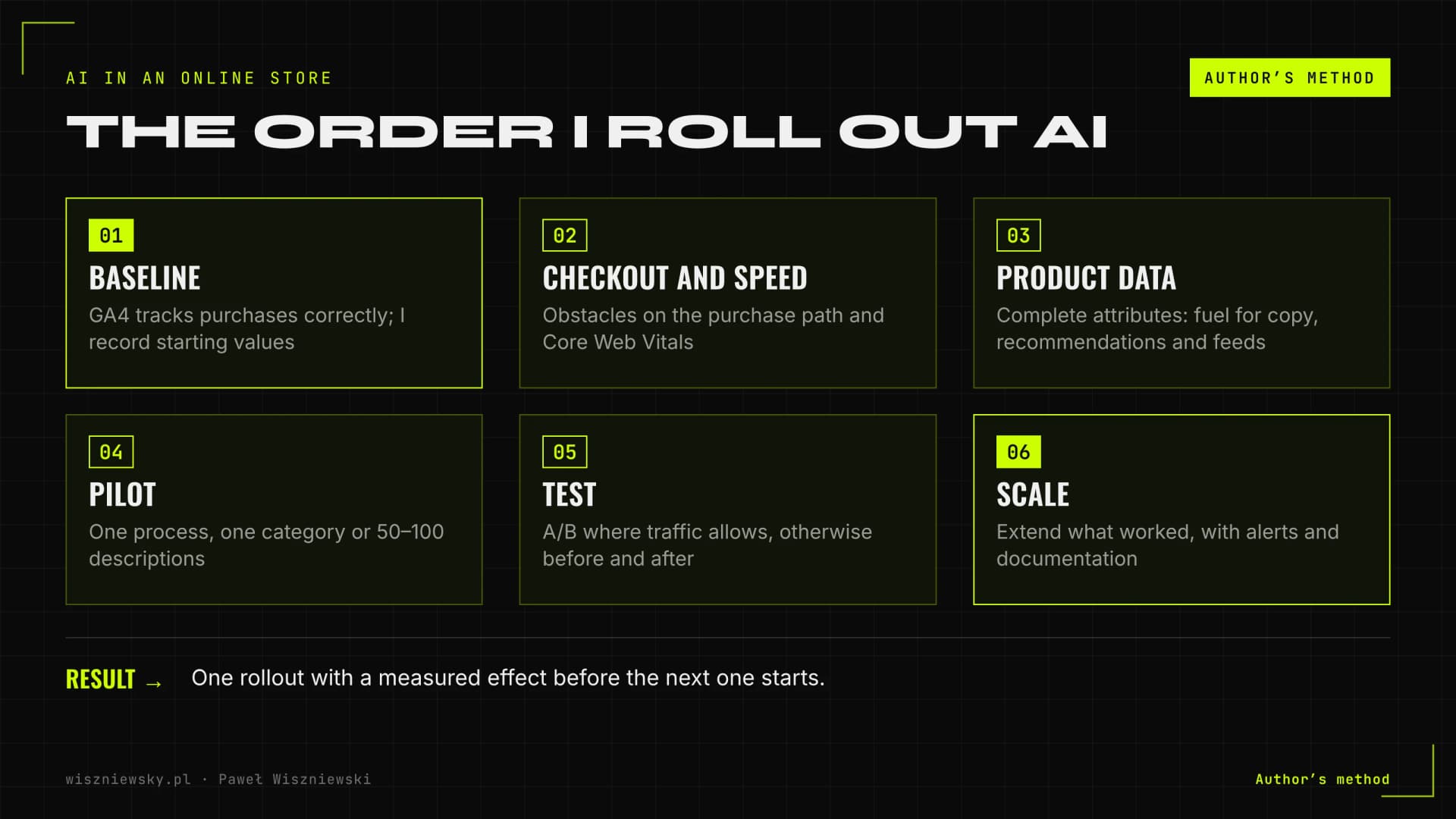
Author's six-step method for AI in an online store: baseline, checkout and speed audit, product data clean-up, pilot, A/B test or before-and-after comparison, scaling with monitoring
The order in which I roll out AI in online stores. Author's method.
  1. Baseline. I check that GA4 records purchase events correctly and record the starting values of the chosen metrics.
  2. Checkout and speed. I look for obstacles on the purchase path and Core Web Vitals problems.
  3. Product data. I assess attribute completeness, because it feeds descriptions, recommendations and product feeds.
  4. Pilot. One process, one category or 50–100 descriptions for approval before the whole catalogue.
  5. Test. An A/B test where traffic allows it, otherwise a before-and-after comparison.
  6. Scale. I extend what worked, with alerts and documentation for your team.

AI product descriptions – how to generate them without SEO risk

AI product descriptions are safe for SEO when they are built from real product data and add something for the buyer. Google's 2023 guidance judges content quality regardless of how it was produced, but its spam policies explicitly list using generative AI tools to produce many pages without adding value for users as scaled content abuse.

In practice the line runs between copy built from data and copy built from a product name. A model that only gets the name invents features the product doesn't have. A model that gets attributes, materials, dimensions, use cases and customer questions writes copy that answers real pre-purchase doubts.

What I check before generating the whole catalogue

  • Every category has its own template, not one prompt for the whole store.
  • Rules block forbidden claims, such as health claims, and features not present in the data.
  • Variants (colour, size) get short, distinct paragraphs instead of copies of the same text.
  • Marketplace copy differs from the copy on your own store.

On my own GiftFinder project an agent system generated more than 11,000 pages, so I know where AI produces repetitive text. I described a description and parameter pipeline connected to Base (formerly BaseLinker) in the post on BaseLinker AI automation, and the project scope on the AI product descriptions page.

AI product recommendations – personalization you can measure

AI product recommendations show each customer similar, complementary or history-based products. You only know their value from an A/B test against your current setup, because a "similar products" block on its own proves nothing.

Customer expectations are high. McKinsey's 2021 report found that 71% of consumers expect companies to deliver personalized interactions and 76% get frustrated when that doesn't happen. That doesn't mean every store needs its own engine. With a small range and little order history, an off-the-shelf plugin is often the sensible choice.

Three decisions that decide the outcome

  • A method that fits the data. With short history I start with attribute similarity (content-based) and add collaborative filtering as orders accumulate.
  • Business rules. The model must not recommend out-of-stock products or items the store loses margin on.
  • Placement and number of blocks. Product page, cart and post-purchase email behave differently, and too many blocks slow the page down.

Data requirements and the rollout are covered on the AI product recommendations page.

Online store automation – which processes to hand over to AI

I start online store automation with the most frequent, repetitive tasks, not the exceptions. Most steps are plain logic (stock sync, statuses, reports), and a language model only appears where something has to be read and understood, such as a return request.

Typical candidates for automation

  • Syncing stock, prices and orders between the store, marketplaces and the warehouse.
  • Recognising ticket type (return, complaint, status question) and collecting missing details.
  • Draft replies to order questions based on system data, not guesswork.
  • Alerts: stock below a threshold, a stalled sync, a delayed shipment.

I walk through the full cycle from cart to complaint in the post on AI order management automation, and the service scope is on the e-commerce AI automation page.

Store conversion optimization – cart, checkout and page speed

Store conversion optimization means removing the obstacles that make customers give up and proving each change with a test. The biggest gains usually sit in checkout and page speed, not in button colours.

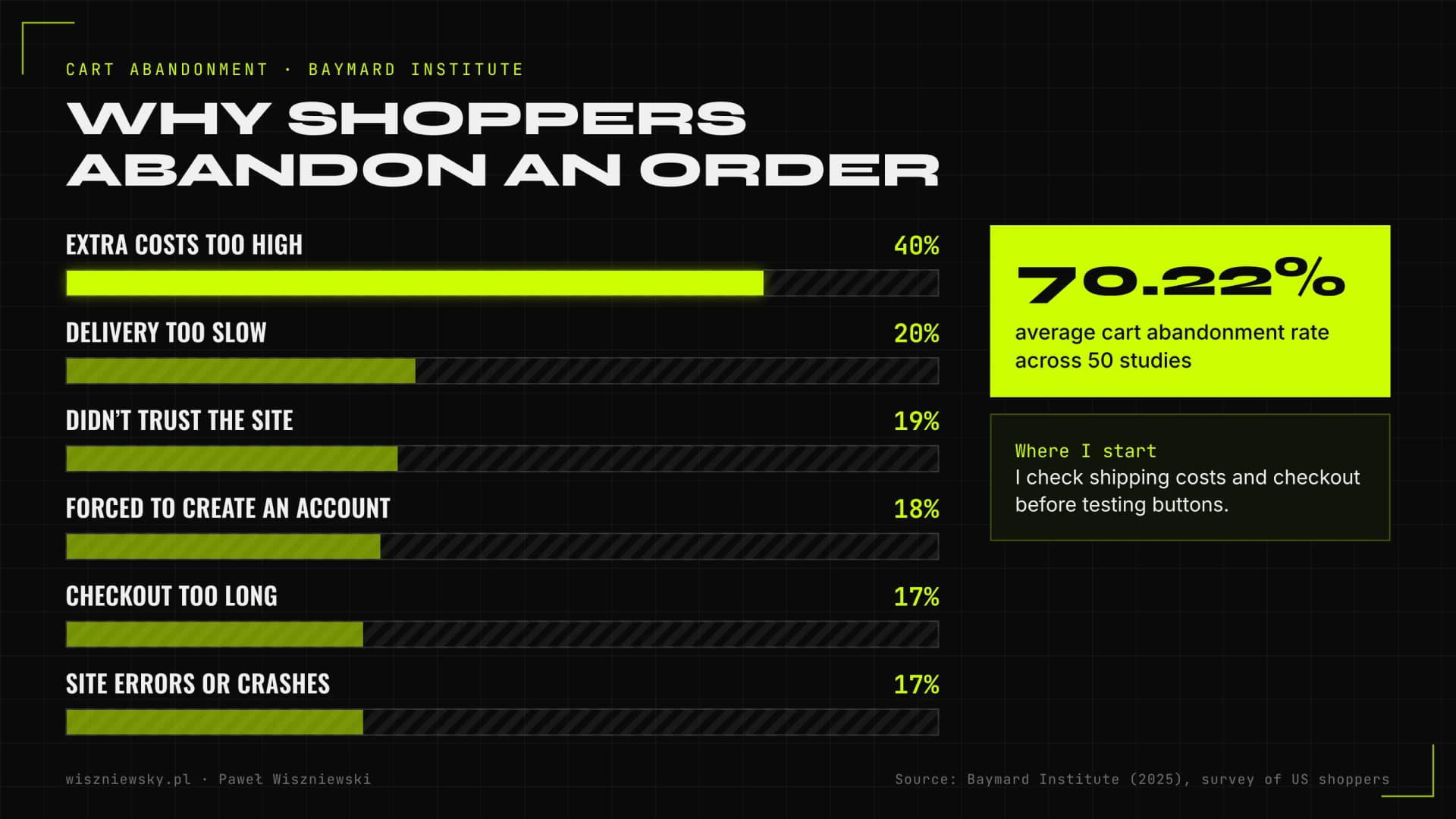
Baymard Institute puts the average documented cart abandonment rate at 70.22%, based on 50 studies (updated 2025). In its survey of US shoppers, the most common reason for abandoning an order was extra costs being too high (40%), followed by slow delivery, not trusting the site and being forced to create an account.

Chart of checkout abandonment reasons according to Baymard Institute: extra costs 40%, slow delivery 20%, distrust 19%, account required 18%, checkout too long 17%, site errors 17%
Reasons US shoppers abandon an order. Source: Baymard Institute (2025).

Speed is money too. In Deloitte's "Milliseconds Make Millions" study (2020), a 0.1-second improvement in mobile site speed was linked to an 8.4% increase in retail conversions. As a technical target I use the Core Web Vitals thresholds: LCP up to 2.5 s, INP up to 200 ms and CLS up to 0.1 for 75% of visits.

I run A/B tests following Google's guidance: no cloaking, rel="canonical" on variant URLs, 302 rather than 301 redirects, and removing test code as soon as there is a result. The testing programme is described on the conversion rate optimization (CRO) page.

Product content for AI shopping answers – Google, ChatGPT and feeds

For products to appear in AI answers, you need complete, consistent data in three places: the product page, structured data and the product feed. Assistants compare products on price, availability and features, so a missing attribute means you're missing from the comparison.

  • Google. Google's documentation says there are no special optimizations needed for AI Overviews and AI Mode, but it recommends keeping Merchant Center up to date and making structured data match visible content. Merchant listings require a name, an image and an offer with price and currency.
  • ChatGPT. According to OpenAI's help center, the merchant list is built from product metadata supplied by third-party providers or directly by merchants, and ranking considers factors such as availability, price and quality. Shopify stores are connected through Shopify Catalog; others can apply for a direct feed.
  • Feed. OpenAI's product feed spec requires, among other fields, an ID, title, description, page URL, brand, image, availability and price. That is the same data a good product description needs.

I cover store visibility in Google and AI shopping in more depth in the post on e-commerce SEO and GEO. Product structured data is part of my Schema.org implementation service.

How much AI in e-commerce costs and when you see results

My projects start at €1,200 for a store audit, and the cost depends mainly on the number of integrations, catalogue size and number of sales channels. The first measurable results usually come after a few weeks, because that's how long it takes to collect test data.

ServicePrice fromMain cost driverFirst result
E-commerce audit€1,200Store size, number of channelsA few weeks, including data collection
AI product descriptions€500 setup + €0.50 / SKUNumber of SKUs, languages, marketplacesA pilot of 50–100 descriptions before full production
E-commerce AI automation€1,500Sales channels, warehouse and courier systemsOnce the first process is live
Conversion rate optimization (CRO)€1,500Traffic, number of tests, scope of changesA/B test result after 3–6 weeks
AI product recommendations€2,500Catalogue, placements, integrationsA/B test after 4–6 weeks

Add running costs to the build cost: AI model calls, hosting for automations and your team's time for quality checks. For product descriptions the maths is linear (setup plus a per-SKU rate), so you can work it out before deciding.

How to measure AI results in a store and choose a provider

You measure the effect against a baseline: an A/B test where traffic allows it, and a before-and-after comparison elsewhere. Set the metric before the project starts, or after launch someone will find one that happens to look good.

What to measure

  • Descriptions: share of pages with unique copy, organic traffic and conversion of pages with new copy.
  • Recommendations: average order value and revenue from recommendations in the test and control groups.
  • Automations: hours saved, stock errors and response time on tickets.
  • Conversion: conversion at each funnel step and revenue per session.
  • AI visibility: traffic from AI Overviews (included in the "Web" search type in Search Console) and product presence in assistant answers.

How to choose a provider

  • Ask how they will measure the result and what they'll do if a test shows no difference.
  • Check whether they ship changes in code and integrations themselves or only hand over recommendations.
  • Ask for a pilot on a small part of the catalogue or one process before the full engagement.
  • Make sure you get documentation and access to the automations, not a black box.

Common mistakes

  • Generating copy from the product name alone and publishing without quality control.
  • Recommendations and checkout changes without a test, so nobody knows if they helped.
  • Automations without alerts that break silently.
  • Testing details while shipping costs or a slow site drive customers away.
  • Skipping the feed and structured data, so products never make it into AI comparisons.
/// KNOWLEDGE_BASE

Read more

Articles that dive deeper into this service.

/// FAQ

Frequently Asked Questions

Is AI in e-commerce cost-effective for small stores?

For stores with fewer than 200 SKUs and under 1,000 sessions per month — cost-effectiveness is limited. The best ROI is for stores with 500+ SKUs or 200+ orders per month. For smaller stores I start with a single high-impact automation, not a full deployment.

Which e-commerce platforms do you support?

Primarily Shopify (all plans, not only Plus), WooCommerce on WordPress, and integrations via BaseLinker. Other platforms (PrestaShop, Magento, IdoSell) — possible, quoted individually after API analysis.

Will the AI deployment disrupt my store's operation?

No — I design all integrations to operate outside the critical checkout path. Inventory syncs and description updates run asynchronously, without blocking checkout. Deployments happen in stages with a fast rollback option.

How do you measure the success of an AI e-commerce deployment?

I define KPIs before the project: AOV growth (%), operational hours saved, CS ticket reduction, returning customer rate growth. I deliver a pre-deployment baseline report and a measurement plan afterwards — concrete numbers, not promises.

Which store platforms do you work with?

Most often Shopify, WooCommerce, PrestaShop and headless Next.js stores, plus BaseLinker and marketplaces. For other platforms I check the API before quoting.

Where should I start growing my store with AI?

With a store audit or one process with the biggest potential — usually product descriptions, order enquiries or product page conversion.

Got a project?

Terminate
Silence

Initiate protocol. Establish connection. Let's build something loud.

> WAITING_FOR_INPUT...