BACK TO Technical SEO

WooCommerce SEO

WooCommerce SEO done at code level: filter and sort URLs, attribute archives and tags, variants, Product data from WooCommerce core, server speed and Google Merchant Center. An audit plus fixes shipped in the theme.

Author: Paweł Wiszniewski · Updated:

Key takeaways

WooCommerce SEO done at code level: filter and sort URLs, attribute archives and tags, variants, Product data from WooCommerce core, server speed and Google Merchant Center. An audit plus fixes shipped in the theme.

  • ›Control over the URLs WooCommerce creates itself: the filter_, query_type_, min_price, max_price, rating_filter, orderby and add-to-cart parameters, so Google crawls sales pages.
  • ›Filters with demand turned into stable pages: subcategories or attribute archives with copy instead of parameter URLs.
  • ›Category pages that rank and sell: a short intro above the products, full copy below the list and links to subcategories, built into the theme.

Price: from €850

SERVICE DETAILS

WooCommerce SEO means adapting a WordPress store to how Google and AI assistants crawl, understand and rank product pages. WooCommerce creates its own URLs for every filter, sort order and add-to-cart action, outputs structured data without shipping details or variant grouping, and the typical store on this platform runs on a slow server: according to HTTP Archive and CrUX data for August 2026, only 12.7% of WooCommerce stores have a good server response time. I start with a map of every URL type and a decision on what belongs in the index, then clean up filters, attribute archives and tags, fix category and product templates, complete the Product data and connect the store to Merchant Center. As a developer I ship the changes in the theme, robots.txt rules and server configuration myself instead of leaving a list of recommendations.

› INVESTMENT:

from €850
const module = new ExecutionProtocol();

// Initializing woocommerce-seo...
› Loading dependencies... OK
› Establishing connection... OK
› Ready for deployment... AWAITING_COMMAND

Paweł Wiszniewski · my approach

What I do differently

I fix WooCommerce stores as a developer, in a child theme, in hooks and in the server configuration, not just in the SEO plugin settings. Before every audit I read what the specific WooCommerce version does with URLs and structured data, because it changes between releases. I also know the platform's limits: for a beauty and fashion store, WooCommerce stopped keeping up with a large number of products and variants, so I ran a migration to PrestaShop with no loss of visibility, and category page load time dropped from about 4.2 s to about 1.1 s. That's why I can say plainly when a store is worth fixing and when it's time to change platforms.

Case study: Beauty E-Commerce SEO/GEO

My take and a real-world example

My take

In my view WooCommerce is neither good nor bad for SEO. It's a set of building blocks that every store assembles a little differently. Problems almost always come from the configuration: filter plugins, a page-builder theme and a cheap server, not from the platform itself. That's why I start an audit with what this particular installation does to URLs and speed, not with a generic checklist.

From the market

The CartHacker dataset published in October 2026, based on HTTP Archive and the Chrome UX Report, shows the scale of the problem. In August 2026, 39.5% of WooCommerce stores passed all three Core Web Vitals on mobile, compared with 76.5% of Shopify stores and 53% of all websites. Only 12.7% of WooCommerce stores had a good server response time. The authors note that this describes the stores rather than the platform, so the result depends mainly on hosting and configuration.

Sources: CartHacker: Ecommerce site speed by platform – Core Web Vitals from real visitors, 2020–2026 (Zenodo, 2026)

Who this is for

  • WooCommerce stores whose Google traffic is flat even though the catalogue keeps growing.
  • Stores where Search Console shows thousands of URLs with filter_, orderby or add-to-cart parameters.
  • Stores on slow hosting with dozens of plugins and a page-builder theme.
  • Owners wondering whether to fix WooCommerce or move to another platform.

What you get

  • A map of the store's URL types (products, categories, tags, attribute archives, filters, sorting, action parameters) with a decision for each type.
  • Filter rules: dedicated URLs for filters with demand and robots.txt for the rest, rolled out in stages and checked in Search Console.
  • Theme fixes: category copy below the product list, product links without parameters, headings and title templates.
  • Complete Product data: ProductGroup for variants with demand, GTIN codes, shipping and returns, with no duplicate blocks from plugins.
  • A speed audit: server and TTFB, caching, plugins that load scripts on every page, LCP and INP of the templates.
  • Google for WooCommerce and Merchant Center feed setup or audit.

How results are measured

  • Organic revenue and transactions in GA4.
  • Indexed sales pages versus parameter URLs in the Search Console indexing report.
  • Share of URLs with good Core Web Vitals in Search Console.
  • Valid products in the merchant listings report and in Merchant Center.

Key Benefits

Control over the URLs WooCommerce creates itself: the filter_, query_type_, min_price, max_price, rating_filter, orderby and add-to-cart parameters, so Google crawls sales pages.

Filters with demand turned into stable pages: subcategories or attribute archives with copy instead of parameter URLs.

Category pages that rank and sell: a short intro above the products, full copy below the list and links to subcategories, built into the theme.

Product data without gaps or duplicates: GTIN, variants as ProductGroup, shipping and returns, one data source instead of several plugins.

A faster store: server, caching, plugins and templates tuned for LCP, INP and server response time.

Products in Google's free listings and in AI Mode through a properly configured Google for WooCommerce and Merchant Center.

The Process

1

URL map and audit

I crawl the store, analyse Search Console and the server logs when available, identify the filter plugins, theme and WooCommerce version, then give every URL type a decision: index, noindex or keep out of the crawl.

2

Technical clean-up

I roll out filter and sorting rules in stages, clean up tags and attribute archives, and fix product links, canonicals and out-of-stock handling. I test changes on a copy of the store.

3

Templates, data and speed

I rebuild category and product templates in a child theme, complete the Product data, remove duplicate blocks from plugins and fix the server, caching and scripts.

4

Merchant Center, content and reporting

I set up or fix Google for WooCommerce and the feed, expand key categories and products, and report organic revenue, indexing and Core Web Vitals every month.

An SEO plugin (Yoast, Rank Math) vs WooCommerce SEO

AreaSEO plugin aloneWooCommerce SEO
Titles, descriptions, sitemapSets them from templatesTemplates built around category and product keywords
Filter and sort URLsDoesn't decide which filters have demandDedicated URLs for filters with demand, robots.txt for the rest
Tags and attribute archivesLets you set noindexA decision based on demand data, and copy for the pages that stay
Product dataMay add its own block next to the WooCommerce dataOne data source with GTIN, variants, shipping and returns
Speed and serverOutside the plugin's scopeServer, caching, plugins and templates tuned for Core Web Vitals
Merchant CenterOutside the plugin's scopeGoogle for WooCommerce and a feed consistent with the page
Success metricA score in the plugin panelOrganic revenue and transactions in GA4

Common mistakes

  • Blocking thousands of indexed filter URLs in robots.txt at once, so Google can no longer see the noindex or the canonical.
  • Enabling archives for every attribute or tagging products without a plan, which creates hundreds of thin pages.
  • Two SEO plugins, or an SEO plugin plus the theme, outputting separate Product blocks with different prices.
  • Changing product permalinks in a live store without a 301 redirect map.
  • Looking for speed in yet another optimisation plugin when the problem is the server and the missing object cache.

When this service is not worth it

  • Your store has a dozen products and is just launching. Early on, a good setup, Merchant Center and ads will do more.
  • You can't change the theme or give access to the admin panel, server or code.
  • You expect guaranteed rankings by a set date. No honest provider can promise that.
/// GUIDE

WooCommerce SEO – what I fix and why

WooCommerce is the most widely used store system in the world: according to W3Techs (October 2026) it accounts for 47.4% of all e-commerce systems detected in their survey. This guide is only about WooCommerce: which URLs the platform creates on its own, which of them end up in Google, what structured data the plugin core outputs and where WordPress stores lose speed. I checked every statement about how WooCommerce works against its documentation or source code (as of October 2026), and the sources are listed at the bottom of the page. Principles shared by all stores, such as keyword mapping or category page structure, are covered on the e-commerce SEO page. Here I focus on what is specific to WooCommerce.

Which URLs WooCommerce creates and which belong in Google

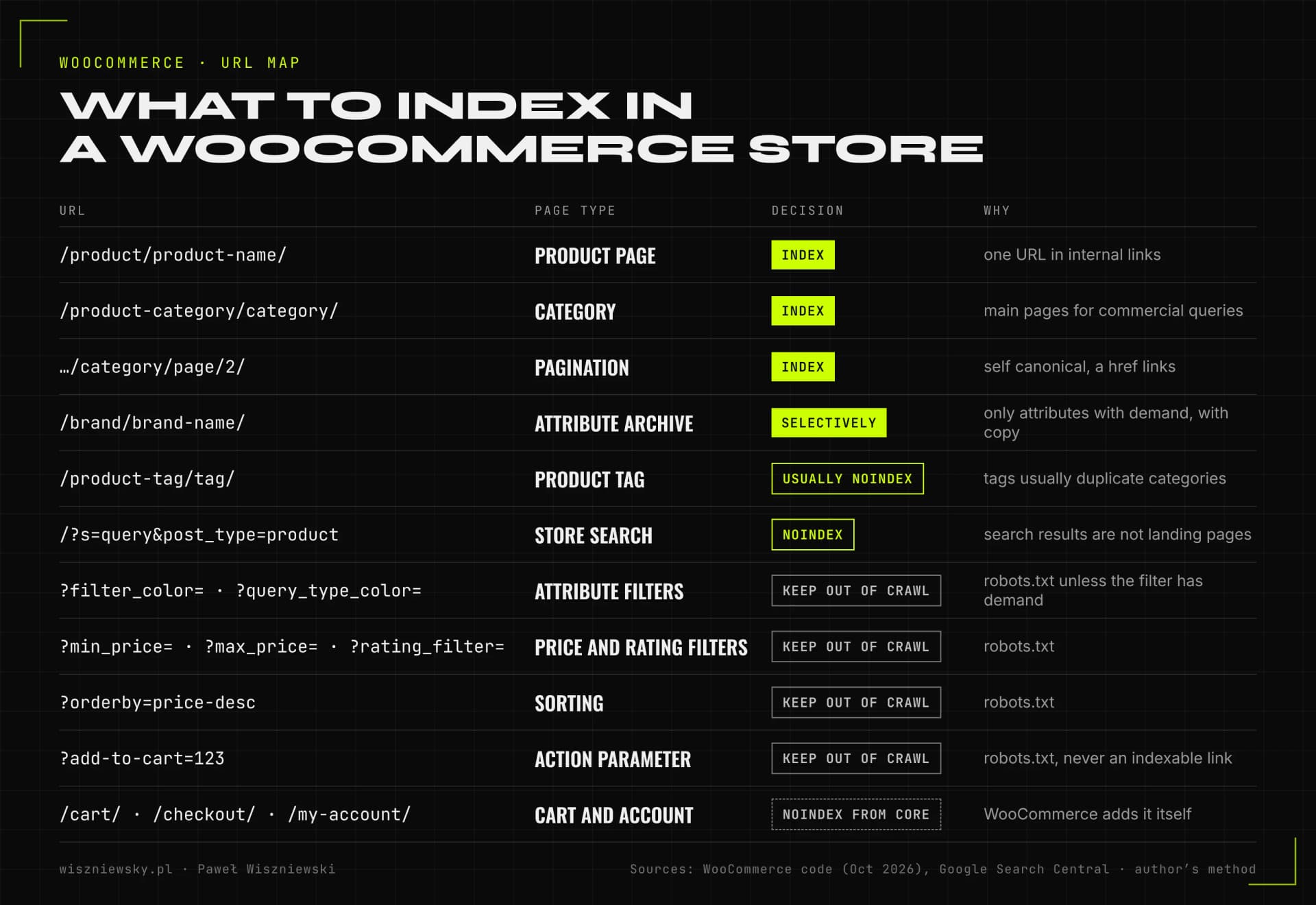
WooCommerce creates separate URLs for products, categories, tags, attribute archives and paginated pages, plus one for every filter, sort order and add-to-cart action. Only some of them should be indexed. So the first step of an audit is to give every URL type one decision: index it, keep it out of the index, or keep it out of the crawl altogether.

Table of WooCommerce store URLs with SEO decisions: product pages under /product/, categories under /product-category/ and pagination are indexed, attribute archives selectively, product tags and store search get noindex, the filter_, query_type_, min_price, max_price, rating_filter, orderby and add-to-cart parameters are kept out of the crawl, and cart, checkout and account pages get noindex from WooCommerce itself.
The URL map I start a WooCommerce audit with. Parameter names come from the WooCommerce code (classic filter widgets); the decisions come from Google's documentation and my own practice.

According to the WooCommerce documentation, the default structure is: products under /product/name/, categories under /product-category/name/, tags under /product-tag/name/, and attribute archives with no base at all, e.g. /size/medium/. The product path can be changed under Settings → Permalinks to one of four options:

SettingExample product URLMy comment
Default (with pretty permalinks)/product/hoodie-with-logo/Short and stable, right for most stores
Shop base/shop/hoodie-with-logo/Also fine if the shop page has a sensible name
Shop base with category/shop/hoodies/hoodie-with-logo/The URL depends on the category, so recategorising a product changes its URL
Custom baseany prefix before the product nameOnly with a clear reason and a redirect plan

I don't change the URL structure of a live store just to make URLs prettier. The WooCommerce documentation warns that changing permalinks updates the URLs of existing products, and that shared links and search engine indexes pointing to the old URLs will return 404 errors unless you set up redirects. When a change does make sense, I run it like a migration: with a 301 map for every URL and monitoring after launch.

The good news: WooCommerce keeps the cart, checkout and account pages out of the index by itself. In the plugin code, a function hooked into the wp_robots filter adds noindex to these three pages, and endpoints such as the order confirmation get an X-Robots-Tag: noindex header. There is nothing to fix here, but I check that the theme or SEO plugin doesn't override it.

WooCommerce filters – the parameters that eat crawl budget

Classic WooCommerce filters add filter_ (attribute), query_type_ (how values combine), min_price and max_price (price) and rating_filter (rating) parameters to the URL, and sorting adds orderby. Every combination is a new URL with the same or nearly the same product list. With a few attributes of a dozen values each, that means tens of thousands of URLs, and filter plugins (for example AJAX filters with their own parameters or paths) can multiply that number further.

In its faceted navigation documentation Google recommends that filter URLs which don't need to appear in search results should not be crawled at all, and it points to robots.txt for that. It adds that rel=canonical may reduce crawling of such URLs over time, and that nofollow is generally less effective. So in WooCommerce I split filters into two groups:

  • Filters with search demand (e.g. “women's running shoes”, “grey corner sofa”) get their own stable URL: a subcategory or an attribute archive, with an H1, a short description and a place in the navigation. I don't leave them as ?filter_color=grey.
  • All other filter and sort combinations are kept out of the crawl in robots.txt, and I make sure the template doesn't link to them with plain links where it doesn't need to.
  • Empty combinations shouldn't return a page with a 200 status. Google recommends a 404 when a filter combination returns no results.
User-agent: *
# sorting and action parameters
Disallow: /*?*orderby=
Disallow: /*?*add-to-cart=
# classic WooCommerce filters
Disallow: /*?*filter_
Disallow: /*?*query_type_
Disallow: /*?*min_price=
Disallow: /*?*max_price=
Disallow: /*?*rating_filter=
Example rules for classic WooCommerce filters. Filter plugins use their own parameters, so I always match the rules to the URLs found in the crawl and the server logs.

Attribute archives and product tags – hidden potential and hidden duplicates

In WooCommerce, attribute archives are the simplest way to give a popular filter its own indexable URL without parameters. When you tick “Enable archives” on a global attribute, WooCommerce creates a page listing all products with a given value, e.g. /color/black/ or /brand/brand-name/. The WooCommerce documentation describes this option in its guide to managing attributes.

Such a page only makes sense if people search for that value and the page has its own content: a heading, a description, links to categories. So I enable archives selectively, e.g. for brand, material or use case, and not for size or colour in a store where nobody searches for “all red products”.

TaxonomyTypical problemWhat I usually do
Product categoriesThe category description is shown above the product list, so longer copy pushes products below the foldA short intro above the list and the longer copy below it, via a template or hook change
Product tagsTags added without a plan create hundreds of thin pages that duplicate categoriesnoindex and removal from the sitemap, or turning valuable tags into subcategories
Attribute archivesDisabled even though the filter has demand, or enabled for every attributeEnabled only for values with demand, with copy and navigation links
BrandsA brand set up as a tag, an attribute and a category at once, i.e. three pages about the same thingOne source for the brand and one target URL

I decide whether a value deserves its own page based on demand data, not gut feeling. I describe how to assign keywords to categories, filters and products in detail in the article on ecommerce keyword research, and the rules for filters in ecommerce faceted navigation and SEO.

Product pages and variants in WooCommerce

A variable product in WooCommerce has one URL, and a specific variation is selected with attribute_ parameters in the URL or the form. For most stores that is a good setup: one strong page instead of a dozen near-identical ones. The problem starts when a variation has its own search demand, such as a specific colour or capacity that people search for by name.

In its variants documentation Google recommends that each variant can be identified by a separate URL (a path or a parameter) and that the group is described with ProductGroup and the hasVariant, variesBy and productGroupID properties. With optional variant parameters, Google recommends the URL without the parameter as the canonical. WooCommerce core doesn't do this: for a variable product it outputs a Product with an AggregateOffer (lowest and highest price and the number of offers), and a single variation offer only when all of its attributes are in the URL.

What I check on a product page

  • One product URL in internal links, whichever category the visitor came from, and consistent with the canonical.
  • Variants with demand get a URL that selects the variant and ProductGroup data; the rest stay within one product.
  • Original copy instead of the manufacturer's description on the products with the most potential, with specifications, use cases and answers to buyers' questions.
  • The GTIN, UPC, EAN or ISBN field filled in for products that have a code. WooCommerce passes it into structured data, but only when the code has 8, 12, 13 or 14 digits.
  • Images in a modern format, with dimensions and descriptive alt text, without gallery plugins that load everything at once.

WooCommerce structured data – what core provides and what's missing

WooCommerce outputs Product structured data on its own, but it isn't complete for Google's product results. I read the class that generates JSON-LD in the WooCommerce code and compared it with Google's merchant listing requirements:

ElementWooCommerce coreWhat I usually add or fix
Product: name, description, image, SKU, URLYesI check that the theme doesn't strip the description or image
Offer: price, currency, availability, sellerYes, including the regular price during a salePrice consistency with the page and the feed after every pricing-plugin change
GTINYes, from the GTIN, UPC, EAN or ISBN fieldFilling in codes across the catalogue
VariantsAggregateOffer with a price rangeProductGroup with hasVariant for variants with demand
Price validity (priceValidUntil)End of next year by defaultUsually left as is; for sales with an end date WooCommerce sets it itself
Ratings and reviewsYes, when the product has reviewsChecking that the reviews are visible on the page
Shipping (shippingDetails)NoShipping cost and time in code or in Merchant Center
Returns (hasMerchantReturnPolicy)Only as store data on the refund policy page (since 11.3)Return policy in Merchant Center or in the organisation data
Breadcrumbs (BreadcrumbList)Yes, when the theme uses WooCommerce breadcrumbsConsistency with the visible navigation

The most common problem, though, isn't what's missing but what's duplicated. An SEO plugin, a reviews plugin and the theme can each add a separate Product block to the same page, with different prices or ratings. So I settle on one source of product data and switch the rest off. I describe how I build the data itself, with an ID graph, on the Schema.org implementation page.

Google Merchant Center in WooCommerce

Google's free product listings require a Merchant Center account with a product feed. The simplest route is the official Google for WooCommerce plugin (over 800,000 active installs according to its listing), which syncs products to Merchant Center and keeps prices and stock up to date. Syncing alone isn't enough: I check product titles, Google product categories, GTIN codes, images and whether the feed says the same thing as the page.

WooCommerce store speed – server, plugins and theme

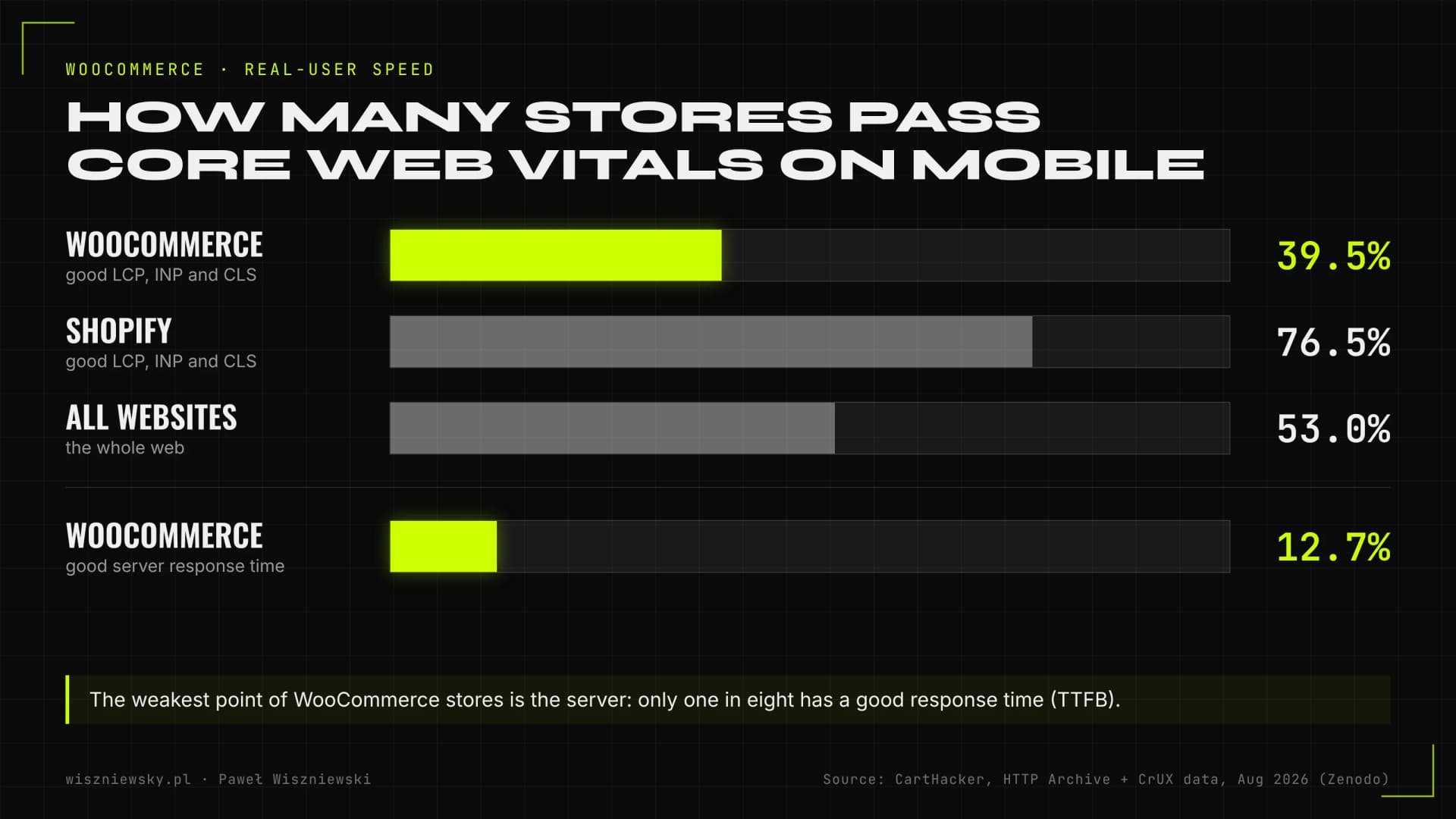
WooCommerce stores score clearly worse on Core Web Vitals than Shopify stores, and the main reason is server response time. According to the CartHacker dataset based on HTTP Archive and the Chrome UX Report (August 2026), 39.5% of WooCommerce stores pass all three metrics on mobile, compared with 76.5% of Shopify stores and 53% of all websites. Only 12.7% of WooCommerce stores have a good server response time.

Bar chart: 39.5% of WooCommerce stores, 76.5% of Shopify stores and 53% of all websites pass Core Web Vitals on mobile, and 12.7% of WooCommerce stores have a good server response time. Data from August 2026.
Source: CartHacker, Ecommerce site speed by platform (Zenodo, HTTP Archive and CrUX data for August 2026). This describes stores, not the platform itself: a well-built WooCommerce store can be very fast.

That isn't a verdict on the platform but on the typical setup: cheap shared hosting, dozens of plugins and a page-builder theme. In a WooCommerce speed audit I check, in order:

  1. Server and TTFB: the PHP version, memory limit, database and object cache (e.g. Redis), because without them every category page is rebuilt from dozens of queries.
  2. Page cache: full caching of categories and products, with cart, checkout and account excluded.
  3. Plugins: the plugin list and which plugins load scripts and styles on every page when they're only needed on one.
  4. Cart fragments: since version 7.8 WooCommerce no longer loads the cart fragments script on every page, only where the cart widget is shown. Older themes can still force it and trigger an extra AJAX request on every page.
  5. Template and INP: heavy sliders, filters that reload the list with JavaScript and page builders that slow down the response to clicks.
  6. Images and LCP: the largest image on the product page and in the category list, its format, dimensions and loading priority.

I cover this in detail in the technical SEO audit and Core Web Vitals service and in the article on improving LCP, INP and CLS.

An SEO plugin in WooCommerce – what to set and what not to expect

Yoast SEO, Rank Math or SEOPress help you set titles, descriptions, the sitemap and noindex, but they won't design the store's architecture. They won't decide which filters have demand, fix a template that links to products through parameters, or speed up the server. Which plugin you choose matters less than how it's configured.

  • One SEO plugin, not two. Two plugins usually mean duplicate titles, canonicals and structured data blocks.
  • Title templates for products and categories that start with the name, not with the store name.
  • noindex for tags and search results if they aren't landing pages, and their removal from the sitemap.
  • A sitemap without noindexed, redirected or parameter URLs.
  • A product data check after installing the plugin: whether a second Product block appeared next to the WooCommerce one.

Out-of-stock and discontinued products in WooCommerce

The inventory option to hide out-of-stock products removes them from store listings, but it doesn't remove their pages. In the WooCommerce code this option excludes out-of-stock products from product list queries, i.e. from categories, the shop page and search. The product page still works, has external links and can be indexed, so it needs its own decision.

SituationWhat I do with the product page
Temporarily out of stock, coming backKeep the page with a 200 status and OutOfStock or BackOrder availability, add the expected date and similar products
Discontinued, with a successor301 redirect to the successor
Discontinued, no successor, with links or traffic301 redirect to the closest category or a page with information and alternatives
Discontinued, no links or traffic404 or 410
A category temporarily without productsnoindex or 404, as Google recommends for empty categories

For stores with high stock turnover I implement this logic in code, so it doesn't depend on someone remembering to add a redirect when deleting a product.

WooCommerce and product visibility in AI Mode and ChatGPT

Shopping assistants use the same data as search engines: product feeds, structured data and the content of pages their crawlers can fetch. So I prepare a WooCommerce store for AI as carefully as for Google, with a few extra steps:

  • Merchant Center and the Shopping Graph: products synced to Merchant Center go into the database Google also uses in AI Mode.
  • Access for AI search crawlers: I check that robots.txt, the firewall or a security plugin don't block, for example, OAI-SearchBot, the crawler used by ChatGPT search.
  • Content visible without JavaScript: name, price, availability and description must be in the HTML, not only after a script loads.
  • Complete product attributes: brand, GTIN, material, dimensions and use case. Assistants compare products on these attributes.
  • MCP in WooCommerce: WooCommerce exposes its functions to AI agents through MCP (Model Context Protocol) with the help of the MCP Adapter plugin. According to the documentation it is still a developer preview, so I treat it as an experiment, not a foundation for visibility.

I write more about AI shopping in the articles on SEO and GEO for e-commerce and agentic commerce.

When to fix WooCommerce and when to change platforms

In most stores, WooCommerce SEO problems can be fixed without changing platforms. Replatforming only makes sense when the limits come from the architecture itself, not from the configuration. Before an audit I say plainly which situation applies to your store.

SignalRather fix WooCommerceRather consider migrating
SpeedSlow hosting, no cache, heavy themeEven on a good server with caching, the database can't keep up with tens of thousands of SKUs and variants
FiltersFilters create duplicates, but rules can contain themFilter and variant logic needs a rebuild that costs more than a new platform
TeamYou have access to the theme code or a developerThe store runs on dozens of plugins nobody maintains
IntegrationsWholesalers, ERP and marketplaces work through stable pluginsKey integrations exist only on another platform

If a platform change is settled, I run it as part of the SEO migration service.

How much WooCommerce SEO costs

WooCommerce SEO starts from €850, the same as for any store. The scope depends not on the platform itself but on the state of the specific installation. I prepare a quote after a free consultation and a short review of the store.

FactorHow it affects the scope in WooCommerce
Number of products, variants and attributesMore filter URLs, more data to clean up
ThemeA custom child theme is easy to fix; a page builder or a purchased theme without support takes more work
PluginsEvery filter, review or pricing plugin can create its own URLs and structured data
HostingWithout server access I can't improve TTFB, only tell you what to change with your provider
Merchant CenterSetting up Google for WooCommerce from scratch or auditing an existing feed

The overall scope of store SEO, with the order of work and reporting, is described on the e-commerce SEO page. If you want to check the technical state first, you can order a technical SEO audit on its own.

Frequently Asked Questions

How much does WooCommerce SEO cost?

WooCommerce SEO starts from €850. The quote depends on the number of products and variants, the theme, the filter plugins and server access. After a free consultation and a short review of the store you get a quote matched to the scope.

Is WooCommerce good for SEO?

Yes, when it's configured well. WooCommerce gives full control over code, URLs and structured data, but it creates its own URLs for filters and sorting, and the typical store on this platform runs on a slow server. According to HTTP Archive and CrUX data for August 2026, 39.5% of WooCommerce stores pass Core Web Vitals on mobile versus 76.5% on Shopify, but that reflects configuration, not the platform itself.

WooCommerce or Shopify – which is better for SEO?

Shopify gives a faster start and better speed results without server work, but limits control: URLs have fixed /products/ and /collections/ prefixes, and robots.txt can only be changed through the robots.txt.liquid template. WooCommerce lets you change almost anything but requires looking after hosting, plugins and filters. For a store that's already running, improving the current platform usually pays off more than switching.

Yoast SEO or Rank Math – which SEO plugin is better for WooCommerce?

Both are enough to set titles, descriptions, the sitemap and noindex, and the feature differences matter less than the configuration. What matters is running only one SEO plugin and making sure it doesn't duplicate the Product data WooCommerce outputs. No plugin replaces decisions about filters, templates and the server.

Should you index tags, filters and attribute archives in WooCommerce?

Only the ones people search for and that have their own content. I turn filters with demand into subcategories or attribute archives with stable URLs, keep unplanned tags out of the index, and keep the remaining filter and sort combinations out of the crawl with robots.txt, as Google recommends.

How do you speed up a WooCommerce store?

Start with the server, not another plugin. According to August 2026 data, only 12.7% of WooCommerce stores have a good server response time. The biggest gains usually come from better hosting, a current PHP version, object and page caching, removing plugins that load scripts on every page, and lighter category and product templates.

How long does WooCommerce SEO take?

Google usually picks up technical fixes within a few weeks of recrawling the pages, while filter clean-ups on large stores take longer because I roll them out in stages. Growth on competitive category keywords most often takes 3–6 months of steady work.

/// RELATED_SERVICES

Related services

Technical SEO

E-commerce SEO

E-commerce SEO done at code level and judged by sales: categories and product pages, faceted navigation and duplicates, Product structured data, Google Merchant Center and product visibility in AI shopping. Shopify, WooCommerce, PrestaShop and Next.js.

Technical SEO

Crawl Budget Optimization

Crawl budget optimization for large e-commerce and portal sites. Google indexes your most important pages faster — less crawl waste, higher rankings for money pages.

Technical SEO

Schema.org Implementation

JSON-LD Schema.org implementation generating Rich Snippets: review stars, prices, FAQ accordions, breadcrumbs. SERP visibility increases by 20–40% CTR without changing position.

Technical SEO

Technical Audit & Core Web Vitals

100+ point technical SEO audit + code-level Core Web Vitals fixes (LCP, CLS, INP). The goal is good real-user field data (CrUX, 28-day window), not just a Lighthouse score.

Technical SEO

SEO Migration

Safe domain, CMS, or URL restructure migration without losing organic traffic. Full 301 mapping, Search Console validation, and 90-day ranking monitoring included.

E-commerce & AI for Online Stores

AI Product Descriptions – Automated Content Generation for E-commerce

AI product description generation in your brand voice: 100+ SKUs per day, SEO-optimised, multilingual. From raw supplier data to ready content in your store.

GEO – AI Search Optimization

Google AI Overviews & AI Mode Optimization

I optimize your site so Google cites it in AI Overviews and AI Mode: answer-first content, follow-up question coverage, structured data and E-E-A-T signals. I track citations and AI traffic.

Got a project?

Terminate
Silence

Initiate protocol. Establish connection. Let's build something loud.

> WAITING_FOR_INPUT...