Ecommerce Pagination SEO - Canonical, noindex, Load More or Infinite Scroll (an Audit of Polish Stores)

Ecommerce pagination splits a long category product list into consecutive pages. For SEO, one thing matters: can Google reach every product through those pages. The rule to start with: if a category has more products than the first page holds (in practice usually over 24-48), every next page needs its own URL (e.g. ?page=2), its own canonical and an `<a href>` link in the raw HTML. Do not point the canonical of pages 2+ to page 1, do not put noindex or nofollow on them, and do not rely only on a "Load more" button or infinite scroll without page URLs.
How to set up category pagination so Google finds every product: pagination, load more or infinite scroll, canonical and noindex on pages 2+, rel=next, titles, page URLs, filters, an audit of Polish stores, a script and the most common mistakes.
In this post I show what Google says about pagination today (with screenshots of the documentation), how pagination, "Load more" and infinite scroll compare, what to set on pages 2+, how page URLs and titles should look, how pagination works with filters, the results of my check of 19 Polish online stores, a script for checking it yourself and the pitfall that happens most often in stores.
Does pagination hurt SEO at all - the first decision
No. Pagination itself is neutral and Google understands it. The problem is two situations: Google cannot move on to the next pages (no links in the HTML, a button instead of a link, the page number after a # sign), or it gets a signal that the next pages do not matter (a canonical to page 1, noindex, nofollow). Then products linked only from later category pages are found by Google more slowly or not at all.
| Situation in the store | Is it a problem | What to do |
|---|---|---|
| The category fits on one page | No | Nothing - no pagination needed |
| Pages 2+ have their own URL, canonical and an HTML link | No | Nothing, apart from linking products from other places too |
| The canonical of pages 2+ points to page 1 | Yes | Give every page its own canonical |
| "Load more" or infinite scroll without page URLs | Yes, when the category has many products | Add ?page=n URLs and links to them in the HTML |
| Pages 2+ with noindex or nofollow | Yes | Remove noindex and nofollow from pagination pages |
| Filter and sort URLs in the index | Usually yes | Paginate only the base list, handle filters separately |
What Google says about pagination in 2026
Google describes pagination in a dedicated guide for online stores: "Pagination, incremental page loading, and their impact on Google Search". The key rules in short, each with a quote from the documentation.
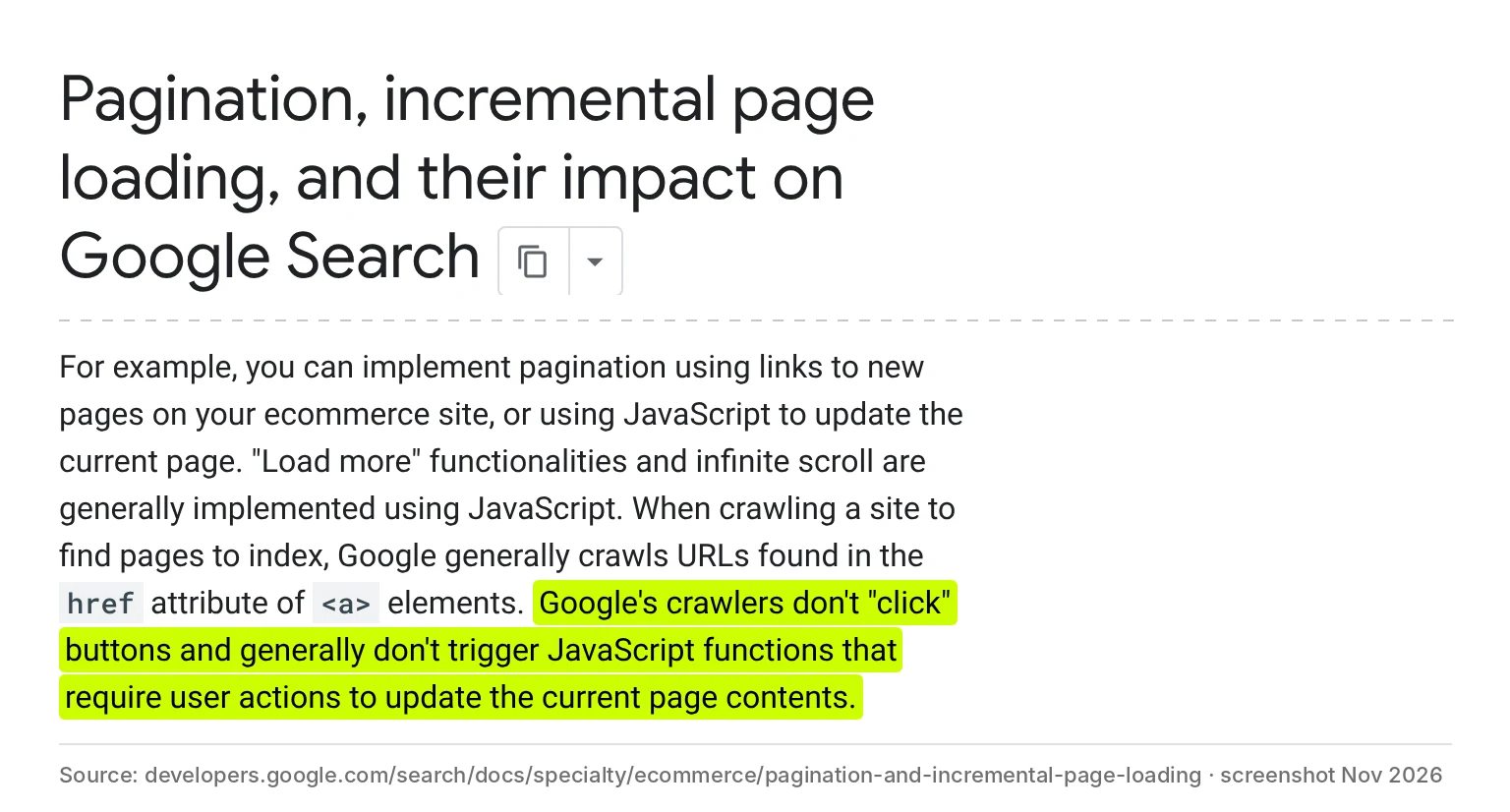
1. Googlebot does not click buttons. Google takes URLs from the href attribute of <a> elements. A "Load more" button or infinite scroll that pulls in products with JavaScript after a user action does not lead Googlebot any further.
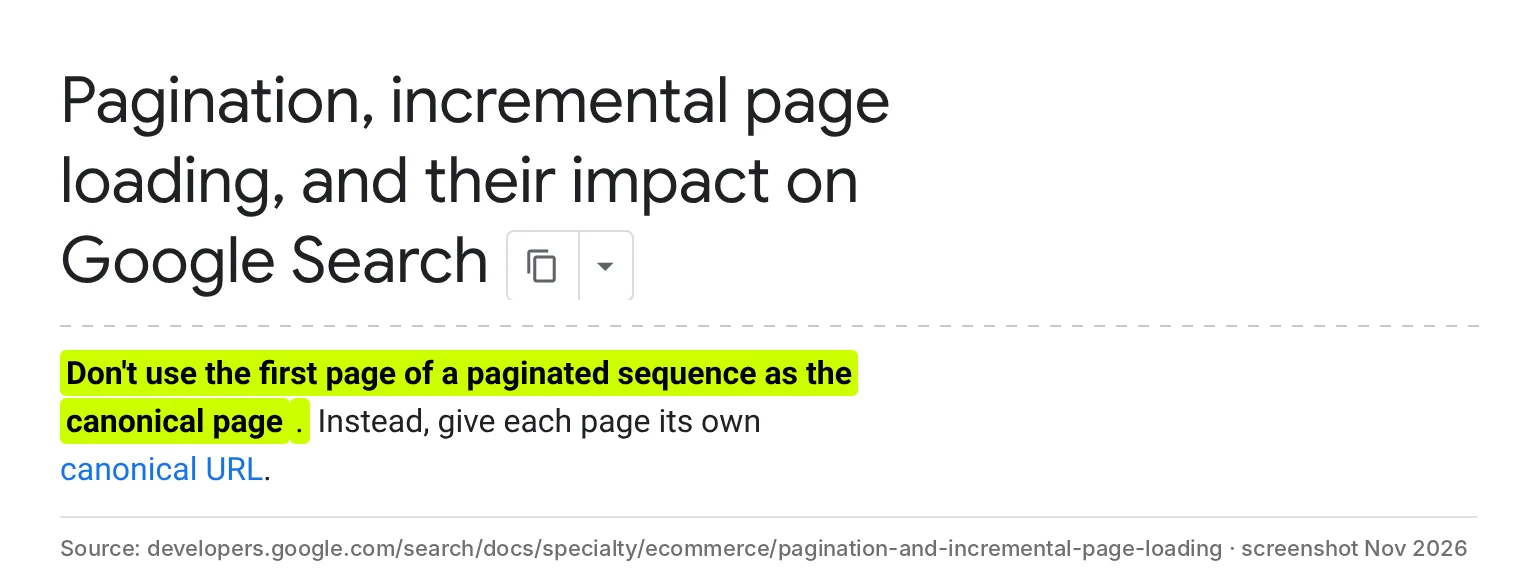
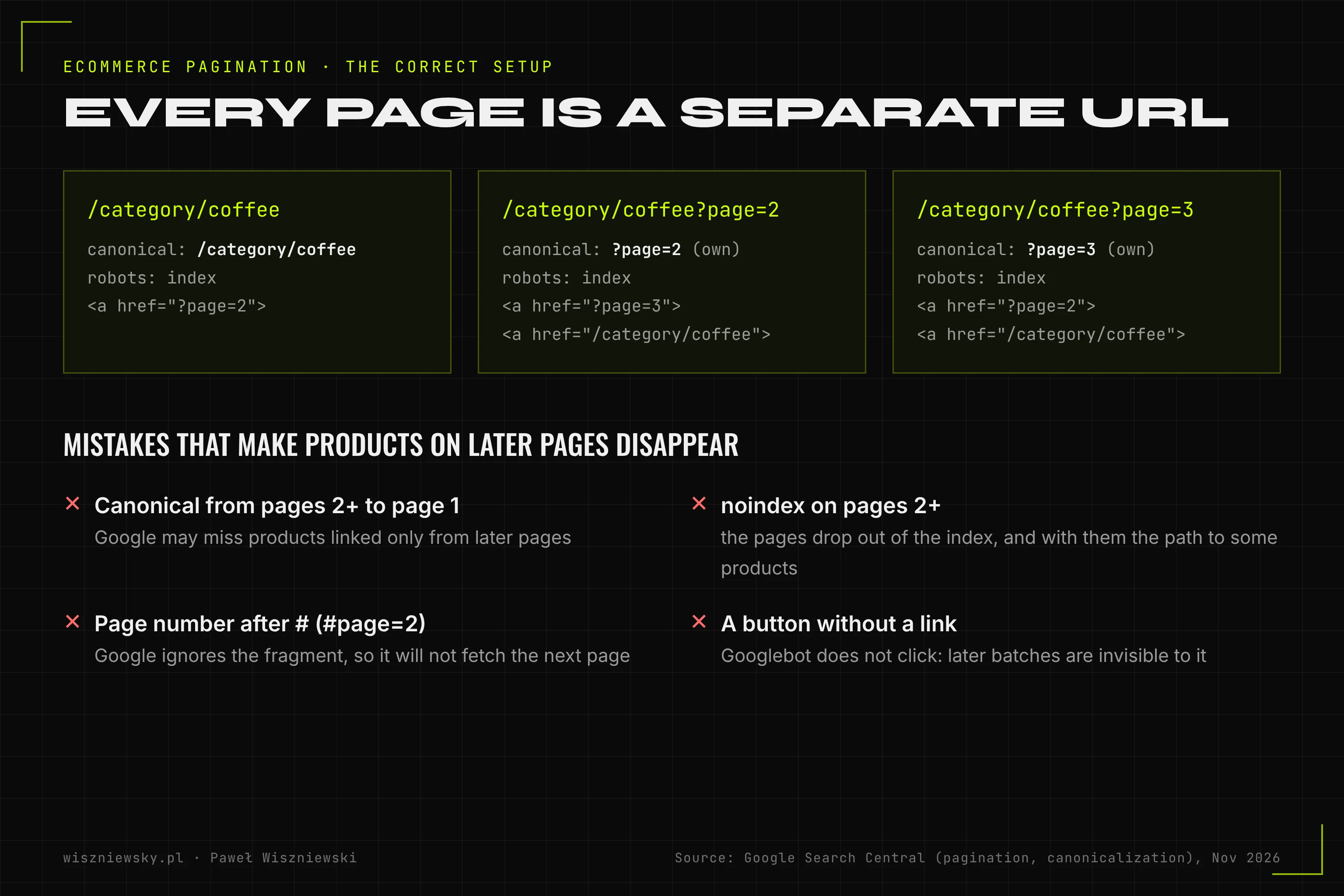
2. Every page has its own canonical. Google says plainly not to use the first page as the canonical page for the whole sequence.
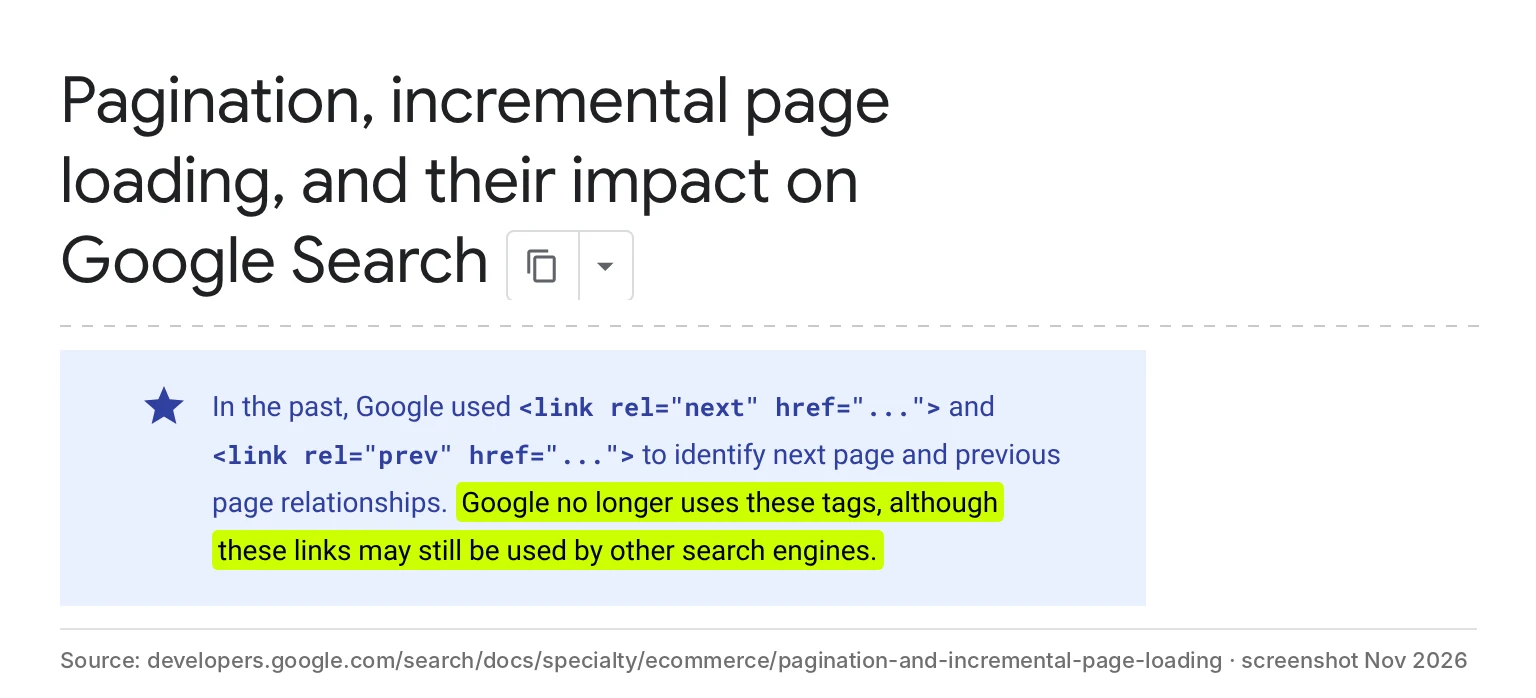
3. Google no longer uses rel=next and rel=prev. You can keep them (other search engines may use them), but they do not replace links in the HTML.
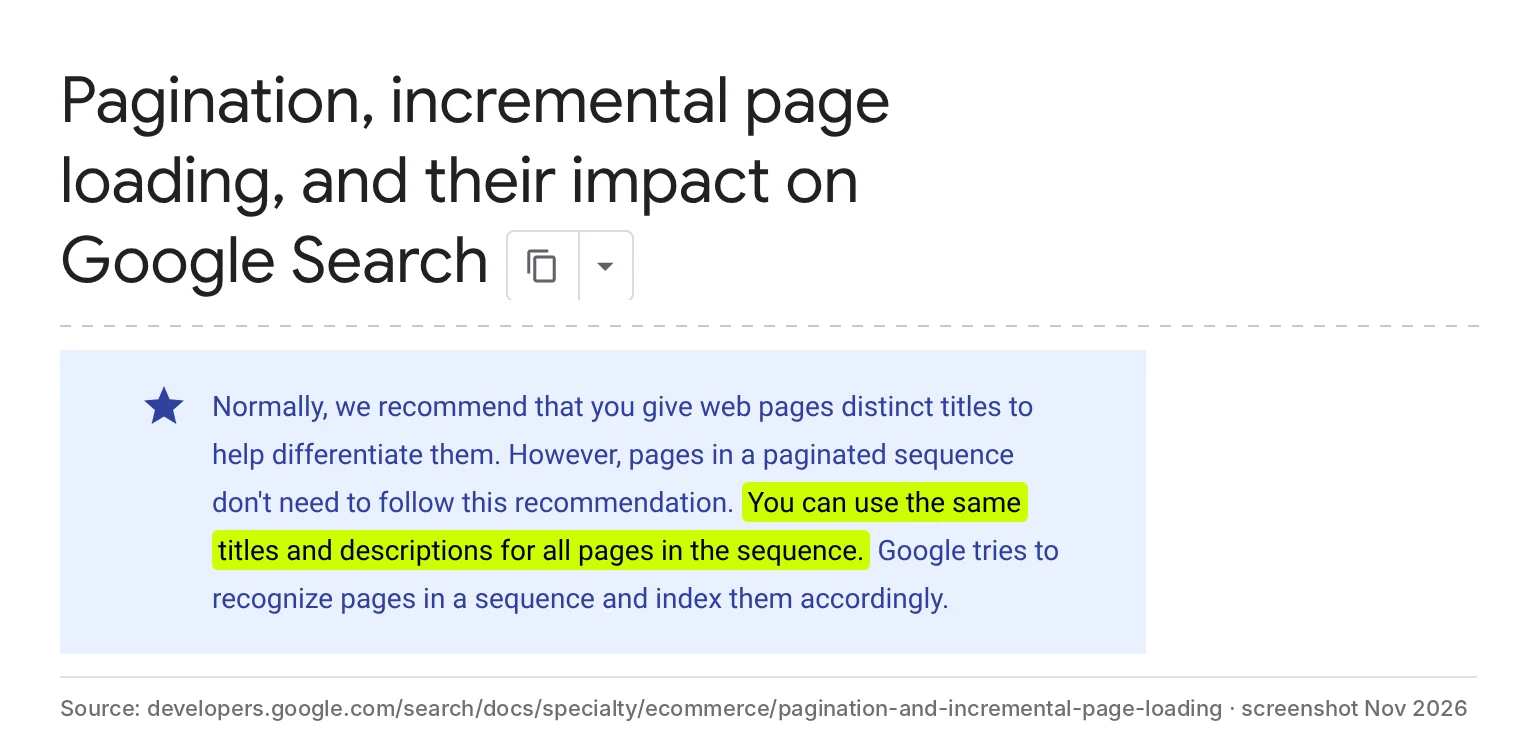
4. Titles can be the same. This is an exception to the unique-title rule: pages in one sequence can share the same title and description. Adding "page 2" is not required, but it does no harm either.
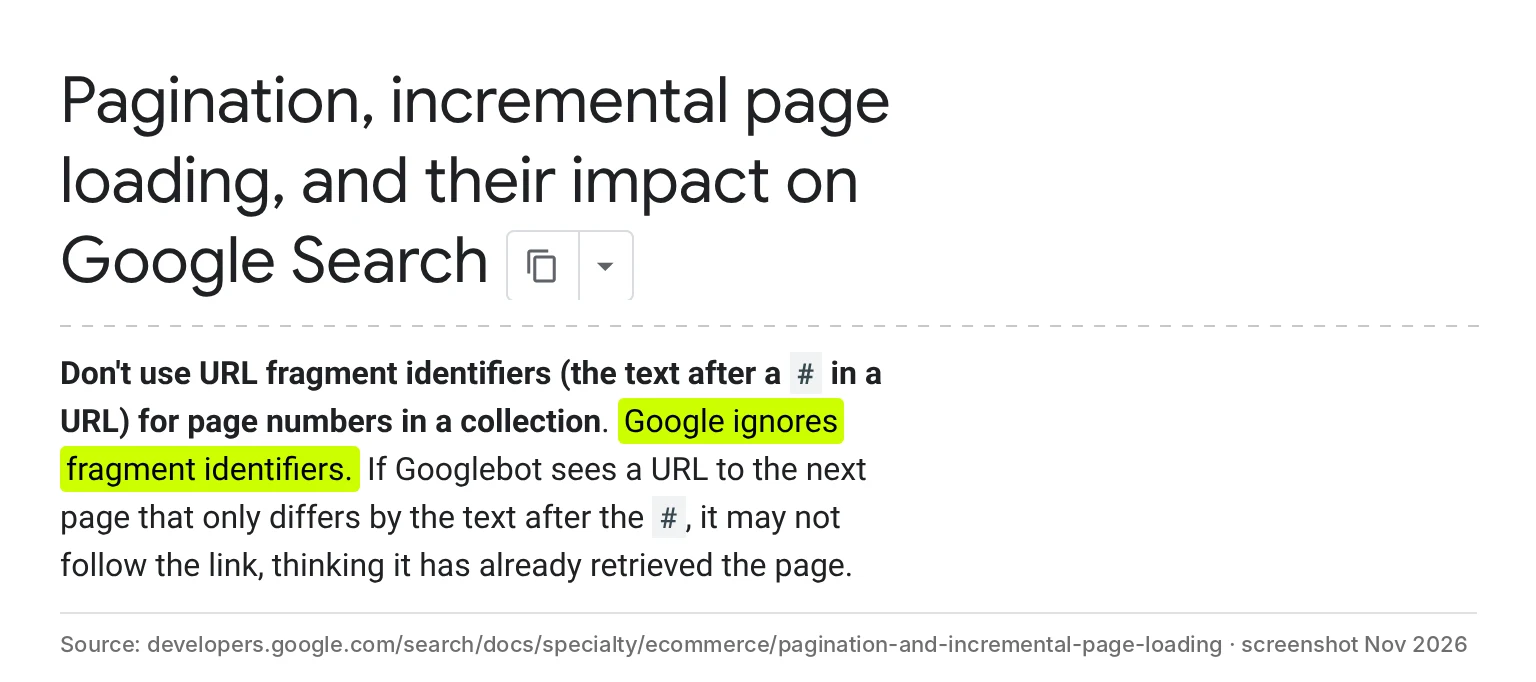
5. The page number cannot sit after a #. Google ignores the URL fragment, so category#page=2 is the same page as category for Google.
Plus two tips from the same guide: link from every page of the sequence back to the first page, and keep filtered and re-sorted URLs out of the index (noindex or a robots.txt rule).
Pagination, "Load more" or infinite scroll - a comparison
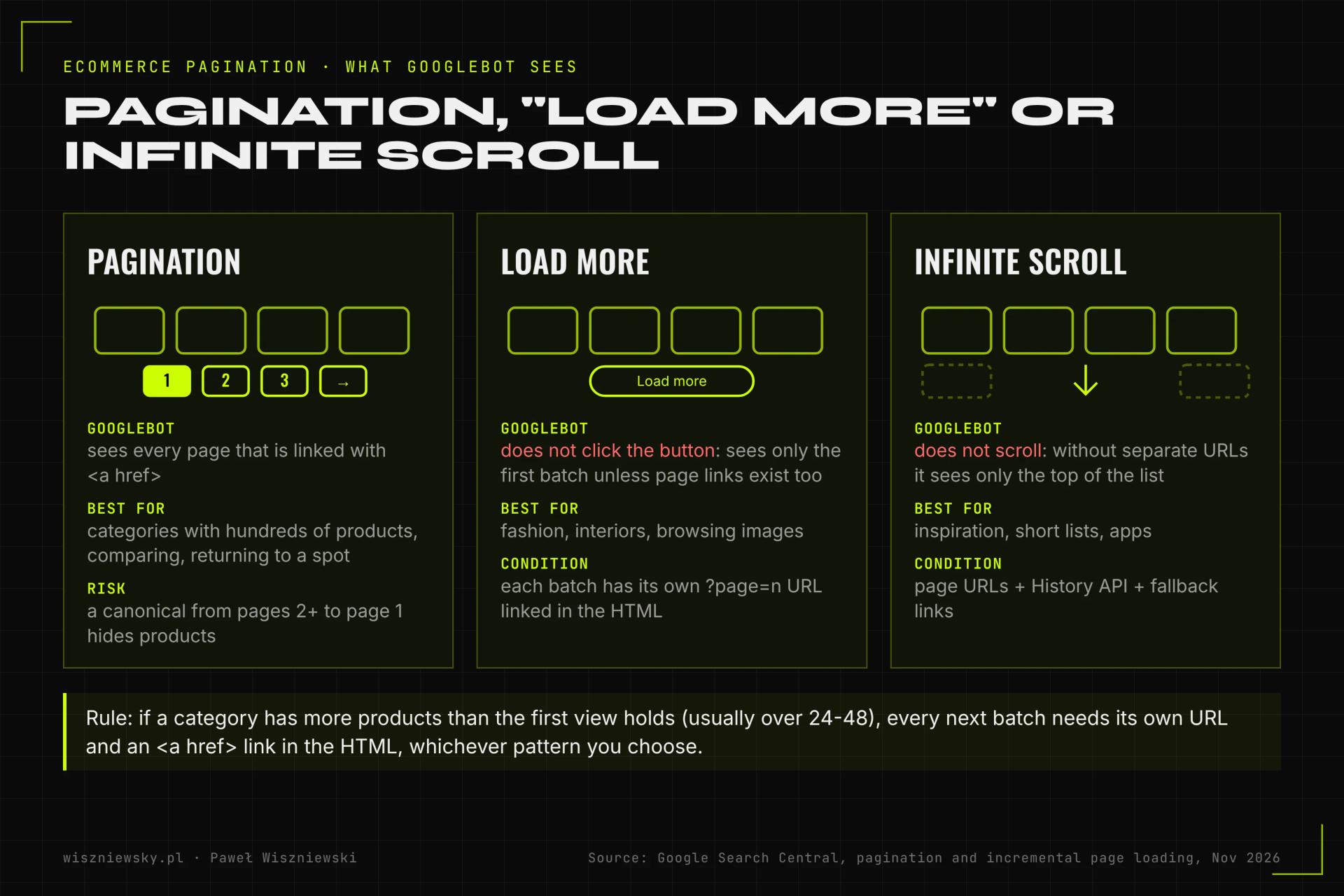
Choosing the pattern is a decision about the customer's convenience. For SEO, each of them can work under one condition: the next batches of products have their own URLs with links in the HTML.
| Criterion | Infinite scroll | "Load more" | Pagination |
|---|---|---|---|
| What Googlebot sees without extras | Only the top of the list | Only the first batch | Every page linked with <a href> |
| What to add for SEO | Page URLs, History API, fallback links | ?page=n URLs and links to them | Nothing |
| Customer orientation | Does not know how many products there are | Sees how many are left (on the button) | Sees the number of pages and where they are |
| Back from a product page | Often loses the position | Often loses the position | Returns to the same page |
| Store footer | Hard to reach | Reachable | Always reachable |
| Which stores | Inspiration, short lists | Fashion, interiors, decor | Electronics, pharmacies, bookstores, catalogs with hundreds of products |
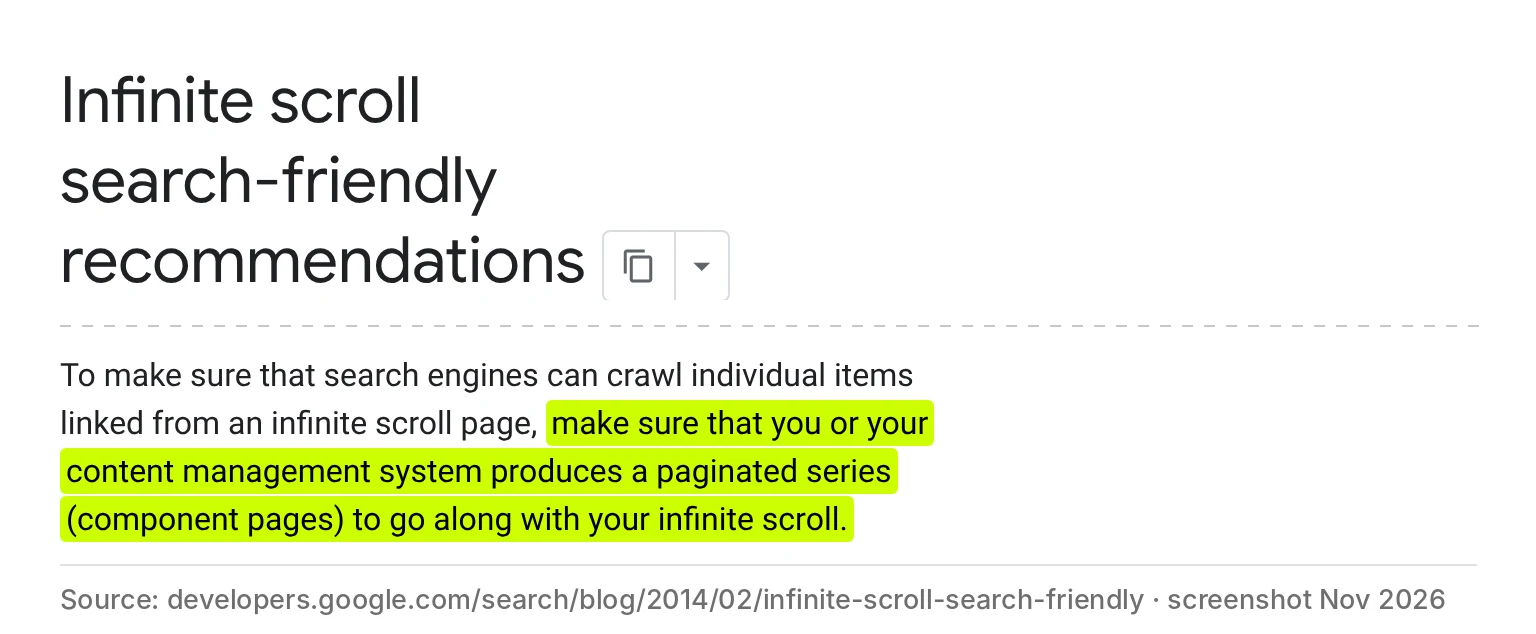
Google has recommended for years that infinite scroll should come with a series of regular pages linked from it:
Canonical, noindex, rel=next - what to set on pages 2+
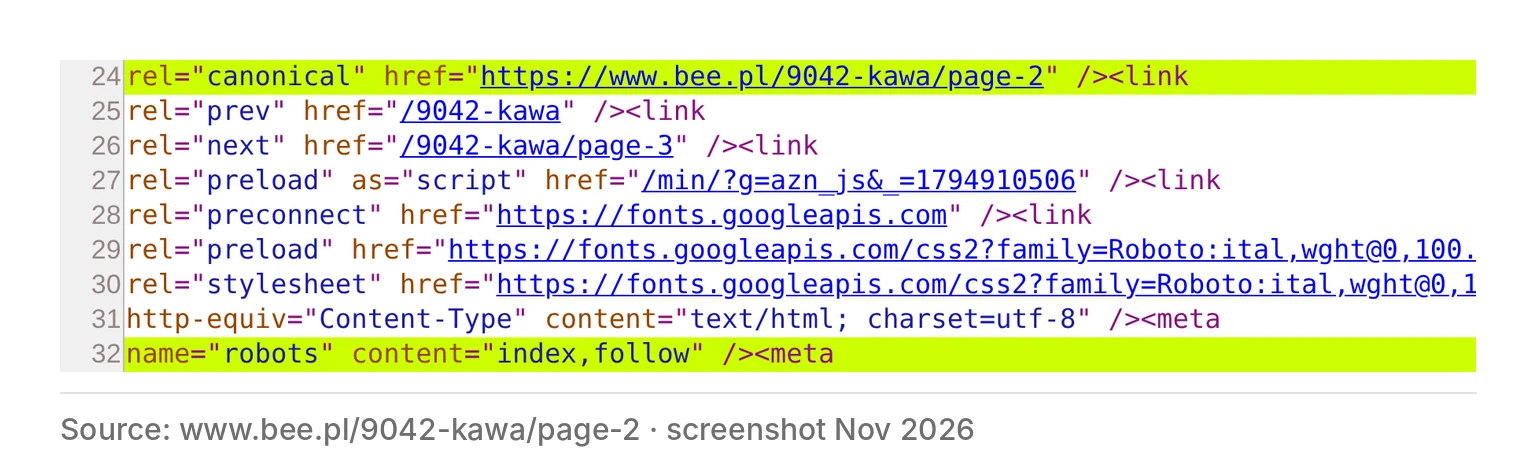
On pages 2+ use a simple set: own canonical, no noindex, a link to the next page and to the first one. This is how it looks on page 2 of the coffee category in the bee.pl store:
| Setting on page 2+ | What happens | Verdict |
|---|---|---|
| Own canonical (?page=2 points to ?page=2) | Google treats the page as separate and follows its links further | Yes |
| Canonical to page 1 | A signal that page 2 duplicates page 1 - Google may skip it together with its product links | No |
| No canonical | Google picks the canonical itself, with URL parameters this can be random | Better add your own |
| noindex | The page drops out of the index, and with it the path to some products | No |
| nofollow (meta robots) | Google does not follow the links on this page, product links included | No |
| rel=next and rel=prev | Google does not use them, other search engines may | Optional |
| A "View all" page as canonical | Works only when the whole list loads fast | Rarely in stores |
Page URLs and titles
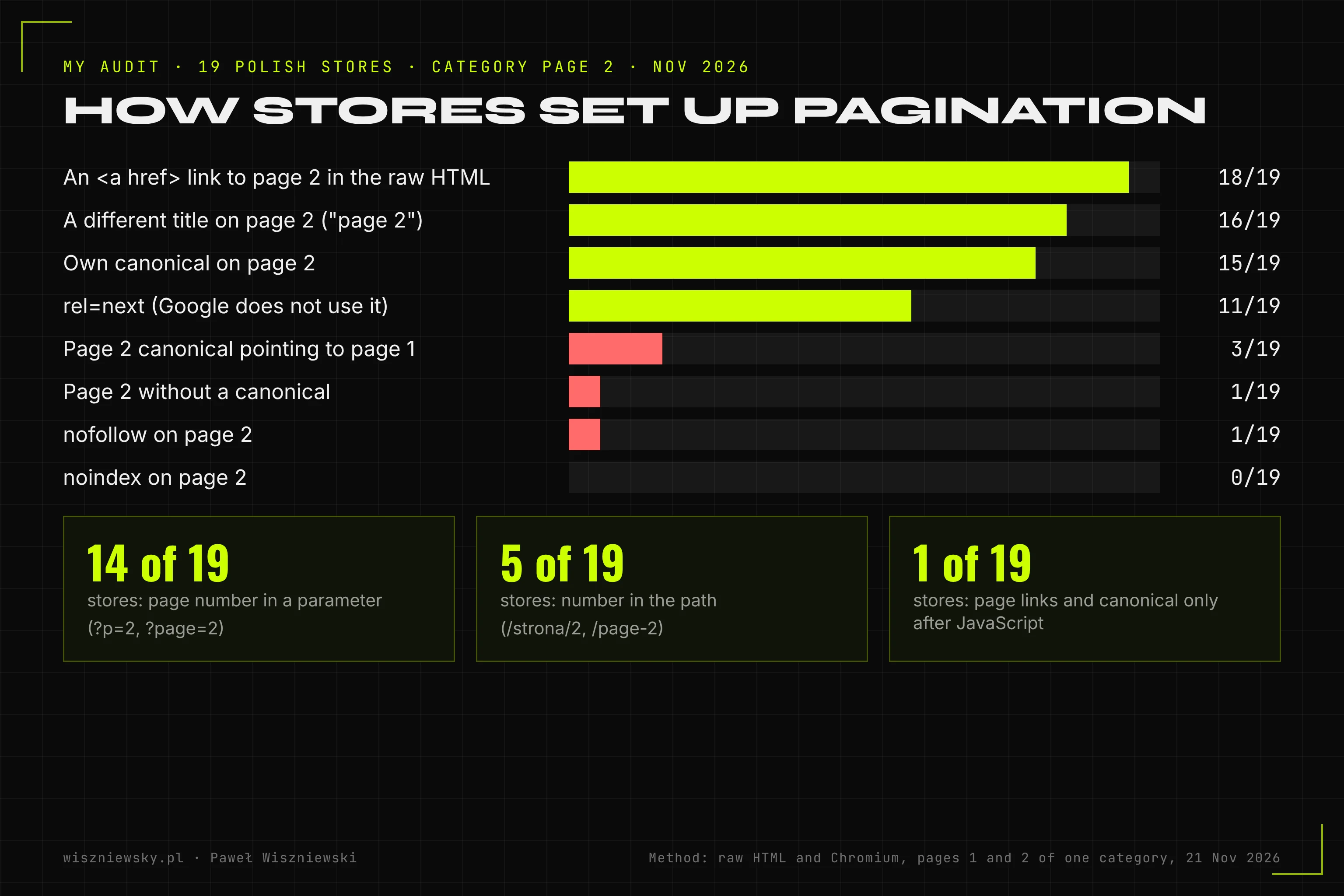
The URL can carry the number in a parameter (?page=2, ?p=2) or in the path (/page/2, /page-2). Both work for Google, what matters is that it is stable and has no #. In my audit, 14 of 19 stores use a parameter and 5 use the path.
Three rules that are easy to forget:
- Page 1 without a number. The "1" link in pagination should lead to the category URL, not to ?page=1. If ?page=1 exists, give it a canonical to the category URL or a 301 redirect.
- A non-existent page is a 404. ?page=999 should not return an empty list with a 200 code or redirect to page 1.
- A suffix in the title is optional. 16 of 19 checked stores add "page 2" to the title. It helps customers in browser tabs, but Google does not require it.
Pagination with filters and sorting
Paginate only the base category list. Once a customer picks a filter or a sort order, URLs like ?color=black&page=2 or ?sort=price&page=3 multiply very fast and eat crawl budget. For Google, the fix is the same as for filters alone: only filters with demand are indexed as separate pages, and the rest of the combinations get noindex or a robots.txt rule. I describe how to decide which filters to index in the post on faceted navigation in online stores.
Watch the order: if you block every URL with the page parameter in robots.txt and pagination uses that parameter, you also block regular category pages 2+. The rule should cover filter and sort combinations, not the page number alone.
How many products per category page
Google gives no single number. A practical rule: as many as keep the page fast on a phone (check LCP in Core Web Vitals) while the key products of the category stay at most two clicks from the home page. More products per page means fewer pages for Googlebot to walk through, but a heavier page for the customer.
| Category size | Products per page | What else to do |
|---|---|---|
| Up to 50 products | 24-48, often a single page | Plain pagination or none |
| 50-500 products | 24-60 | Pagination with HTML links, subcategories for groups with demand |
| Over 500 products | 36-60 | Subcategories and filters with demand as separate pages, a product sitemap |
In large categories pagination alone is not enough for Google to find new products at the end of the list quickly. Links from subcategories, "new in" sections and the sitemap help - I cover them in the post on ecommerce indexing.
What my audit of 19 Polish stores showed
On 21 November 2026 I checked pages 1 and 2 of one category in Polish online stores (electronics, drugstores, pharmacies, bookstores, fashion, furniture, pet supplies). I fetched the raw HTML, the version without JavaScript, and compared it with the version rendered in Chromium. Pagination could be checked in 19 stores. In a few others, bot protection blocked access or I did not find a category with a second page, so they are not in the results.
| Element on category page 2 | Stores | Comment |
|---|---|---|
| <a href> link to page 2 in the raw HTML of page 1 | 18 of 19 | One store shows links only after JavaScript |
| Own canonical | 15 of 19 | The model setup |
| Canonical to page 1 | 3 of 19 | In one case the canonical is added only by JavaScript |
| No canonical | 1 of 19 | Google picks the canonical itself |
| noindex | 0 of 19 | No store removes pages 2+ from the index |
| nofollow in meta robots | 1 of 19 | Google does not follow product links from this page |
| rel=next or rel=prev | 11 of 19 | Google does not use them, but they do no harm |
| A different title than page 1 | 16 of 19 | A "strona 2" ("page 2") suffix |
| Page number in a parameter | 14 of 19 | ?p=2, ?page=2, ?strona=2, ?counter=1, ?start=61 |
| Page number in the path | 5 of 19 | /strona/2, /page-2, /2/ |
| Page number after # | 0 of 19 | - |
Selected stores from the sample:
| Store | Page 2 URL | Page 2 canonical | Link in raw HTML | Notes |
|---|---|---|---|---|
| bee.pl | /page-2 | own | yes | rel=next and prev |
| doz.pl | /strona/2 | own | yes | rel=next |
| zooplus.pl | ?p=2 | own | yes | rel=next |
| morele.net | /2/ | own | yes | title with "strona 2" |
| taniaksiazka.pl | /page-2 | own | yes | rel=next |
| eZebra.pl | ?counter=1 | own | yes | zero-based numbering in the parameter |
| drogerienatura.pl | ?p=2 | own | yes | robots INDEX,NOFOLLOW on page 2 |
| rossmann.pl | ?Page=2 | page 1 | yes | same title as page 1 |
| empik.com | ?start=61 | page 1 | yes | rel=next and prev |
| swiatksiazki.pl | ?p=2 | page 1 (after JavaScript) | no | raw HTML without the product list |
| smyk.com | ?p=2 | none | yes | rel=next |
Key takeaways from the audit:
- The basics are fine. 18 of 19 stores have a link to page 2 in the raw HTML, and none uses noindex or a page number after #.
- A canonical to page 1 is still a common pattern. 3 of 19 stores have it. Large stores usually have their products in sitemaps and other categories too, so the effect can be smaller, but in a smaller store where a product is linked only from its category it can mean products Google never reaches.
- rel=next survives in more than half of the stores. It does no harm, but it does not replace links and should not be relied on.
- The riskiest case is a list that exists only after JavaScript. In one store the raw HTML of the category page has neither products nor links to further pages, and the canonical appears only after rendering. Google can render it, but later, and AI crawlers do not run JavaScript - more in my post on JavaScript SEO.
I check pagination, filters and canonicals across all listing templates as part of my ecommerce SEO service.
How much work - two scales
| Scope | Small store (up to 1k products, a hosted platform) | Large store (over 20k products, a custom template) |
|---|---|---|
| Pagination audit | 1-2 hours (the script below on a few categories) | 1-2 days (crawler, server logs, all listing templates) |
| Canonical and robots fix | A theme or SEO plugin setting, 1-2 hours | Template change and tests, 2-5 developer days |
| Replacing "Load more" with a version with page URLs | 1-2 days (often built into the theme) | 1-2 weeks (URLs, History API, device tests) |
| Checking the effect | Search Console after 2-4 weeks | Server logs and Search Console after 2-6 weeks |
Script: check pagination on your category
The script fetches pages 1 and 2 of a category without JavaScript, the way a crawler sees them before rendering, and shows the canonical, meta robots, rel=next, the title and whether page 1 has an <a href> link to page 2. It needs only Python 3.
# Usage: python3 check_pagination.py https://store.com/category https://store.com/category?page=2import re, sys, urllib.requestfrom urllib.parse import urljoinUA = "Mozilla/5.0 (compatible; pagination-check/1.0)"def fetch(url): req = urllib.request.Request(url, headers={"User-Agent": UA}) with urllib.request.urlopen(req, timeout=20) as r: return r.status, r.geturl(), r.read().decode("utf-8", "ignore")def meta(html, base): head = html.split("</head>")[0] can = re.search(r'<link[^>]+rel=["\']canonical["\'][^>]*href=["\']([^"\']+)', head, re.I) rob = re.search(r'<meta[^>]+name=["\']robots["\'][^>]*content=["\']([^"\']+)', head, re.I) title = re.search(r"<title[^>]*>(.*?)</title>", head, re.I | re.S) return {"canonical": urljoin(base, can.group(1)) if can else None, "robots": rob.group(1) if rob else "(none)", "rel_next": bool(re.search(r'<link[^>]+rel=["\']next', head, re.I)), "title": title.group(1).strip() if title else None}def links(html, base): return {urljoin(base, h).split("#")[0] for h in re.findall(r'<a[^>]+href=["\']([^"\']+)', html, re.I)}page1, page2 = sys.argv[1], sys.argv[2]s1, u1, h1 = fetch(page1)s2, u2, h2 = fetch(page2)m1, m2 = meta(h1, u1), meta(h2, u2)print("Page 1:", s1, m1)print("Page 2:", s2, m2)print("<a href> link to page 2 in the HTML of page 1:", page2 in links(h1, u1))if m2["canonical"] and m2["canonical"].rstrip("/") == u1.rstrip("/"): print("WARNING: the page 2 canonical points to page 1")if "noindex" in m2["robots"].lower() or "nofollow" in m2["robots"].lower(): print("WARNING: page 2 has noindex or nofollow")if "#" in page2: print("WARNING: page number after # - Google ignores the URL fragment")
Note: some large stores block requests that do not come from a browser (a 403 code or a "Just a moment" page). Then check the same by hand: open page 2, choose "View page source" and search for canonical and robots, and in Search Console use URL Inspection, which shows the version Googlebot sees.
Production pitfall: a canonical to page 1 after a theme or plugin change
The most common scenario I see in audits: the store had correct pagination, then changed its theme or SEO plugin, or deployed a new listing template, and pages 2+ started pointing their canonical to page 1. Nobody notices, because the page looks the same, and the effects arrive after a few weeks: Search Console shows more URLs as "Alternate page with proper canonical tag", and new products at the end of the list get indexed more and more slowly.
How to protect yourself:
- 1.After every theme, SEO plugin or category template change, run the script from this post on 3-5 categories.
- 2.Add this test to your deployment checklist (or to automated tests, if the store has them).
- 3.Once a month, check in Search Console whether the number of pagination pages with "Alternate page with proper canonical tag" has suddenly grown.
The second variant of the same pitfall: a plugin adds noindex to pages 2+ "for tidiness". Nothing happens in the short term, but over time Google visits these pages less often, and products linked only from them lose their path to the index.
What not to do
- Do not point the canonical of pages 2+ to page 1.
- Do not add noindex or nofollow to pagination pages.
- Do not put the page number after a # (category#page=2).
- Do not rely only on a button or infinite scroll without page URLs and HTML links for further products.
- Do not block the page parameter in robots.txt if pagination uses it.
- Do not count on rel=next as the only way to connect pages - Google does not use it.
- Do not return an empty list with a 200 code for non-existent pages (?page=999).
FAQ
Summary
Ecommerce pagination is one of those things that keep working for years once set up, as long as nobody breaks them with a theme change. A check takes a few minutes: an <a href> link to page 2 in the raw HTML, an own canonical, no noindex or nofollow, a page number without a #. I describe the order of all store work in the ecommerce SEO strategy. If you want me to check pagination, filters and indexing in your store and prepare template fixes, see my ecommerce SEO service.
Services related to this topic
Need these concepts implemented? Explore the services related to this topic.
Sources
- 01Google Search Central - Pagination, incremental page loading, and their impact on Google Search
- 02Google Search Central - Make your links crawlable
- 03Google Search Central - How to specify a canonical URL
- 04Google Search Central - Managing crawling of faceted navigation URLs
- 05Google Search Central Blog - Infinite scroll search-friendly recommendations (2014)
- 06Google Search Central - JavaScript SEO basics
Related articles
Ecommerce Structured Data - Product, Offer, Variants (ProductGroup) and BreadcrumbList in Practice
What structured data an online store needs: merchant listing vs product snippet, required Product and Offer properties, returns and shipping in Organization, variants with ProductGroup, breadcrumbs, ratings, JSON-LD vs JavaScript, an audit of 36 pages in 19 Polish stores, a script and the sale-price pitfall.
Ecommerce Indexing - Why Google Is Not Indexing Your Products and Categories and How to Fix It
Why Google is not indexing products and categories: Search Console statuses translated into store causes, Discovered vs Crawled - currently not indexed, unavailable and discontinued products, variants, the sitemaps of 30 Polish stores, a URL Inspection API script and the lastmod pitfall.
Ecommerce Faceted Navigation and SEO - Which Filters to Index and Which to Block (noindex, canonical, robots.txt)
Which ecommerce filters to index and which to block: a rule with thresholds, noindex vs canonical vs robots.txt vs nofollow in one table, a check of filters in 11 Polish stores, Shopify, WooCommerce, PrestaShop and IdoSell defaults, URL counts at two scales, robots.txt rules, a script and two pitfalls.

Signal received?
Book a free consultation
Initiate protocol. Establish connection. Let's build something loud.